1. Nhanganyaya
This manual provides instructions for the Generic RM-1720 Viera Tool Remote Control, designed for use with Panasonic LED LCD TVs. Please read this manual carefully before using the remote control to ensure proper operation and longevity of the device.
Important: Before use, ensure your existing remote control matches the appearance of the RM-1720 to confirm compatibility. This remote is a generic replacement and may not be compatible with all Panasonic TV models.

This image illustrates the importance of comparing your current remote control with the RM-1720 to ensure compatibility. The text 'OLD REMOTE MUST BE SAME' highlights this crucial step.
2. Zvigadzirwa zveChigadzirwa
- Ergonomic & Lightweight Design: Comfortable grip for effortless control.
- Responsive & Durable Buttons: Fast response time for a smooth user experience.
- Pre-Programmed & Easy to Set Up: Simple pairing process for hassle-free use.
- Hupenyu Hwebhatiri Hurefu: Energy-efficient design for extended usage.
- Strong Signal Range: Works from a distance with excellent connectivity.
3. Setup
3.1 Kuiswa kwebhatiri
- Tsvaga chivharo chebhatiri kuseri kweremote control.
- Svetera chivharo pasi kana kudzvanya latch kuti uvhure.
- Isa mabhatiri maviri matsva eAAA (haasanganisirwe), uchiita shuwa kuti ma terminals akanaka (+) neasina (-) anoenderana nemazvo nezviratidzo zviri mukati me compartment.
- Chinja chifukidziro chebhatiri, uchichidzosera panzvimbo yacho kusvika chadzvanya zvakanaka.
3.2 Compatibility and Initial Use
This remote control is pre-programmed and generally requires no additional setup for compatible Panasonic LED LCD TVs. Simply insert the batteries and point the remote towards your TV.
Ensure the remote control is pointed directly at the TV's infrared receiver. If the remote does not respond, verify battery installation and check for any obstructions between the remote and the TV.
4. Operating Instructions
4.1 Bhatani Mabasa
The RM-1720 remote control features a standard layout for easy navigation of your Panasonic LED LCD TV. Refer to the image below for button identification.
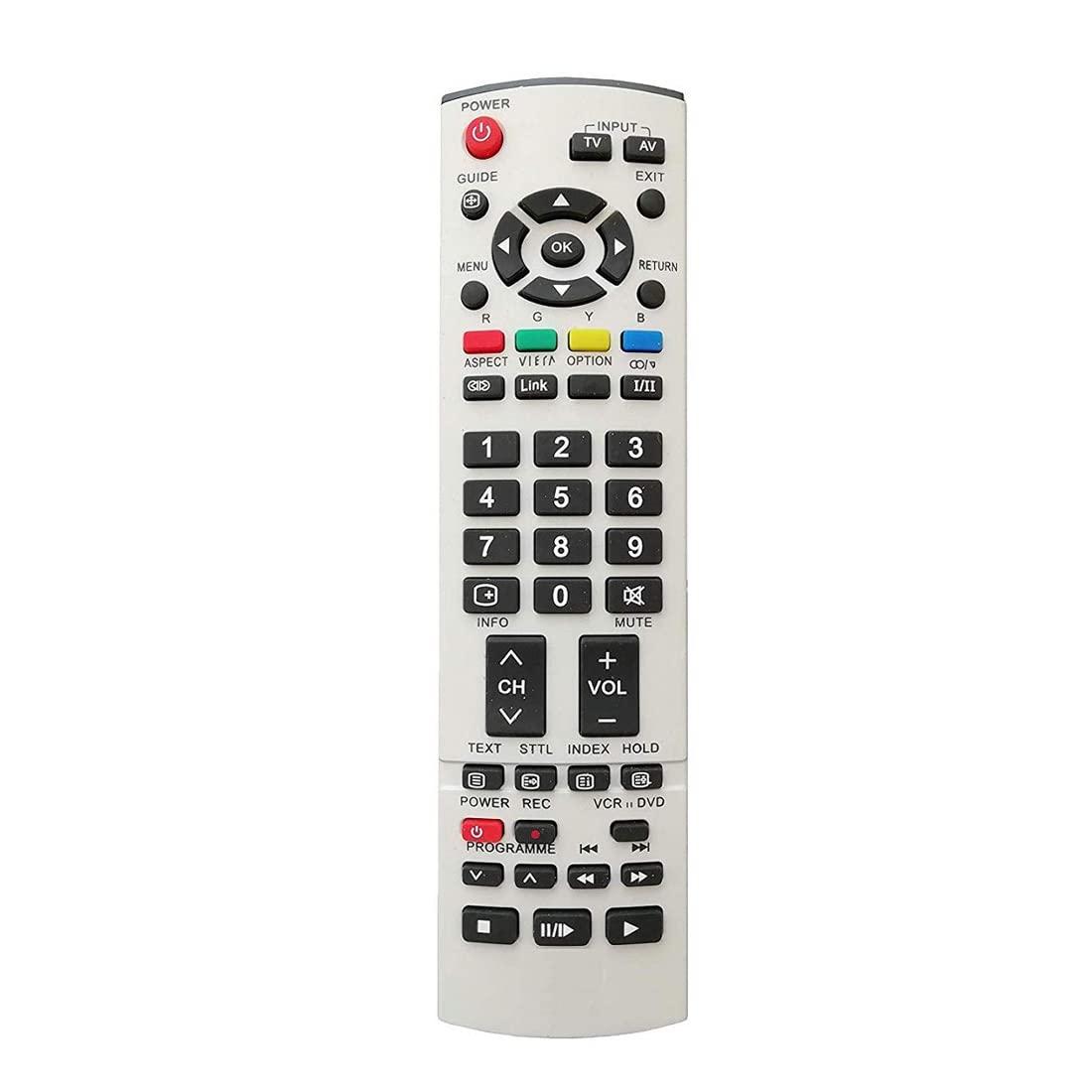
This image displays the full layout of the RM-1720 remote control, including power, input, channel, volume, number keys, menu, guide, and media control buttons.
- SIMBA: Batidza kana kudzima TV.
- INPUT / TV / AV: Selects the input source (e.g., HDMI, AV, TV tuner).
- GUIDE: Inoratidza gwaro rechirongwa chemagetsi.
- MENU: Inopinda mumenyu huru yeTV.
- OK: Confirms selections within menus.
- RETURN / EXIT: Navigates back or exits current menu/screen.
- CH +/-: Inochinja machaneli kumusoro kana pasi.
- VOL +/-: Inogadzirisa chiyero chevhoriyamu.
- MUTE: Inodzima kana kudzima ruzha rweTV.
- Mabhatani eNhamba (0-9): Directly selects channels.
- INFO: Displays information about the current program.
- TEXT / STTL / INDEX / HOLD: Functions related to teletext or specific TV features.
- Media Control Buttons (Play, Pause, Stop, Rewind, Fast Forward, Record): Controls media playback on compatible devices or TV functions.
5. Kuchengeta
5.1 Kuchenesa
Wipe the remote control with a soft, dry cloth. Do not use liquid cleaners, abrasive materials, or chemical solvents, as these may damage the surface or internal components.
5.2 Kutsiviwa kwebhatiri
Replace batteries when the remote control's response becomes sluggish or stops working. Always replace both batteries with new ones of the same type (AAA) to ensure consistent performance.
5.3 Kuchengeta
Chengeta remote control munzvimbo inotonhorera, yakaoma kure nezuva rakananga uye tembiricha yakanyanya. Kana remote isingazoshandiswi kwenguva yakareba, bvisa mabhatiri kudzivirira kubuda kwemvura.
6. Kugadzirisa matambudziko
6.1 Kudzora Kure Kusingapindure
- Tarisa Mabhatiri: Ensure batteries are inserted correctly with correct polarity (+/-) and are not depleted. Replace with new batteries if necessary.
- Mutsara wekuona: Make sure there are no obstructions between the remote control and the TV's infrared sensor.
- Distance: Ensure you are within the effective operating range of the remote control (typically up to 7 meters).
- TV Simba: Confirm the TV is powered on and not in standby mode.
6.2 Intermittent Response
- Battery Level: Batteries may be low. Replace them with fresh ones.
- Kupindira: Other electronic devices (e.g., fluorescent lights, certain wireless devices) might be causing infrared interference. Move them away if possible.
7. Zvinotsanangurwa
| Feature | Detail |
|---|---|
| Brand | Generic |
| Model | BZ_PANASONIC-1720 |
| Inowirirana Devices | Television (Panasonic LED LCD TVs) |
| Special Feature | Hapana Chirongwa Chinodiwa |
| Connector Type | Infrared |
| Material | Plastiki |
| Nhamba Yezvinhu | 1 |
| Nyika Yekwakabva | India |
| Max Nhamba Yemidziyo Inotsigirwa | 1 |
8. Warranty uye Tsigiro
This product is a generic replacement remote control. For specific warranty information, please refer to the retailer or manufacturer's terms of sale at the time of purchase.
For technical support or inquiries regarding this remote control, please contact your point of purchase or the seller directly.


