
Oilsky M303
Oilsky M303 Android 9.0 MP3 Player User Manual
Muenzaniso: M303
1. Nhanganyaya
The Oilsky M303 is a versatile digital audio and video player running on Android 9.0. It features a 4-inch full-touch screen, 8-core processor, 2GB RAM, 16GB internal storage (expandable with a 64GB microSD card included), Wi-Fi, and Bluetooth connectivity. This manual provides essential information for operating your device.
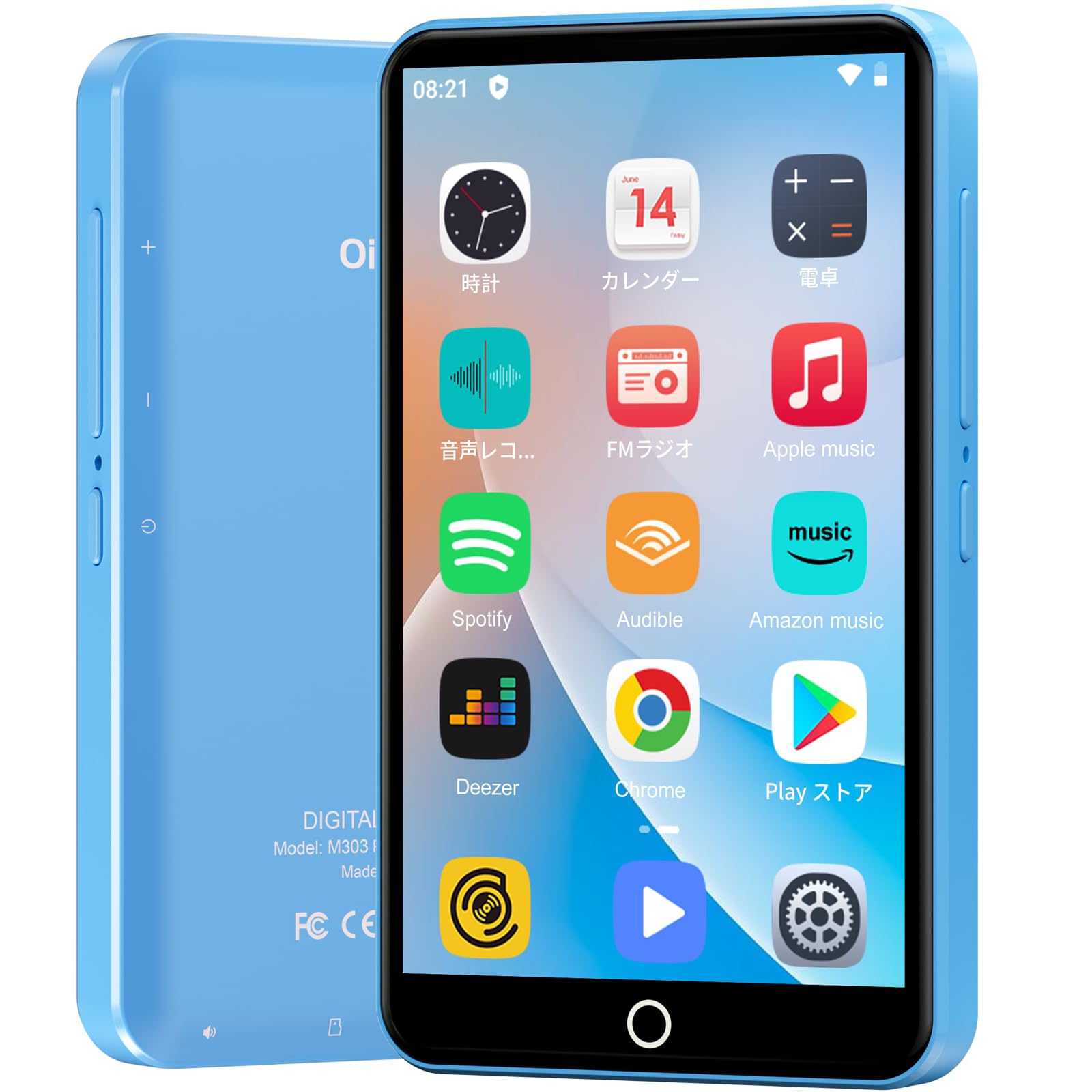
Mufananidzo: Mberi view yeOilsky M303 MP3 Player, showcasing its compact design and touchscreen interface.
2. Chii chiri muBhokisi
Ndokumbira utarise kuti zvese zvinotevera zvinosanganisirwa mupasuru yako:
- Oilsky M303 Main Unit
- Maearphone
- Type-C Data Cable
- Protective Film (one pre-installed, one spare)
- Multi-language User Manual (including Japanese)
- Nyaya yekudzivirira yeSilicone
- 64GB Memory Kadhi

Image: All included accessories for the Oilsky M303 MP3 Player, neatly arranged.
3. Chigadzirwa Pamusoroview
Familiarize yourself with the device's physical features and controls.
3.1. Device Layout

Mufananidzo: Side view of the Oilsky M303, highlighting the volume buttons, power button, and USB-C port.
- Bhatani reSimba: Press and hold to power on/off or restart. Short press to turn the screen on/off.
- Mabhatani eVolume: Rongedza vhoriyamu yekuteerera.
- USB-C Chiteshi: Yekuchaja uye kutumira data.
- 3.5mm Headphone Jack: Connect wired earphones.
- MicroSD Kadhi Slot: Insert a microSD card for expanded storage.
- Mutauri Akavakirwa-mukati: Kuteerera manzwi pasina mahedhifoni.
4. Setup
4.1. Kutanga Kuchaja
Before first use, fully charge the device. Connect the provided Type-C data cable to the player and a USB power adapter (not included). A full charge takes approximately 3 hours. The device has a 2000mAh battery for extended use.
4.2. Simba On / Off
- Kubatidza: Dhinda uye ubatisise bhatani reMasimba kusvikira iyo skrini yasimuka.
- Kudzima: Dzvanya wobata bhatani rePower, wobva wasarudza "Kudzima" kubva pane zvasarudzwa.
- Sikirini Yakavhurwa/Kudzima: Short press the Power button to turn the screen on or off.
4.3. Zvirongwa zveMutauro
Upon first boot, you may need to set the language. Navigate to Settings > System > Languages & input > Languages to select your preferred language, such as English or Japanese.
4.4. Kubatana kweWi-Fi
To access online features and download apps, connect to a Wi-Fi network:
- Enda ku Settings > Network & internet > Wi-Fi.
- Toggle Wi-Fi On.
- Sarudza yako yaunoda network kubva pane iyo rondedzero uye isa password kana ikakurudzirwa.
4.5. Google Play Store
The Oilsky M303 supports Google Play Store, allowing you to download various applications.
- Iva nechokwadi chekuti wakabatana neWi-Fi.
- Vhura iyo Play Store app kubva pachidzitiro chekutanga.
- Pinda neakaundi yako yeGoogle.
- Tsvaga and install desired applications like YouTube, Spotify, or other streaming services.

Image: The Oilsky M303 screen showing the Google Play Store interface with various app icons.
5. Operating Instructions
5.1. Mumhanzi Playback
The device supports various audio formats including MP3, WMA, WAV, FLAC, OGG, AAC, APE, and M4A.
- Transfer Music: Connect the player to your computer using the Type-C cable and transfer audio files to the device's internal storage or the microSD card.
- Ridza Mumhanzi: Open the Music app. You can browse by artist, album, song, or create custom playlists.
- Chiyero: Adjust sound settings using the built-in equalizer for a personalized audio experience.
- Online Lyrics: The player supports displaying online lyrics for songs.

Image: The Oilsky M303 displaying its music playback interface, showing options for song classification, search, playlist creation, and equalizer settings.
5.2. Vhidhiyo Playback
Enjoy videos on the 4-inch IPS full-touch screen with 480x800px resolution, supporting up to 1080P Full HD video playback. Supported formats include RM, AVI, RMVB, FLV, MP4, DAT, MKV, MPG, MOV, TS.
- Transfer Videos: Chinja vhidhiyo files kubva pakombuta yako kuenda kune mudziyo.
- Tamba Mavhidhiyo: Open the Video app and select your desired video.
- Playback Options Features include loop or random playback, variable speed playback, sleep timer, and gesture controls for zoom.

Image: The Oilsky M303 displaying a video on its 4-inch screen, illustrating its video playback capabilities.
5.3. Kubatana kweBluetooth
Connect your player to Bluetooth headphones, speakers, or car audio systems.
- Enda ku Settings > Yakabatana midziyo > Bluetooth.
- Batidza Bluetooth On.
- Make sure your Bluetooth accessory is in pairing mode.
- Sarudza chishongedzo kubva pane runyorwa rwezvishandiso zviripo zvekuzvibatanidza.

Image: The Oilsky M303 demonstrating its Bluetooth connectivity with various audio devices like speakers and headphones.
5.4. FM Radio
The device includes an FM radio function. Connect wired earphones to act as an antenna for optimal reception.
5.5. Voice Recorder
Use the built-in voice recorder for capturing audio notes or lectures. Open the Sound Recorder app to start recording.
5.6. File Management
The player comes with 16GB of internal storage and a 64GB microSD card, providing a total of 80GB usable storage. This can be expanded further up to 512GB using a larger microSD card. Use the File Manager app to organize your media and documents.
6. Kuchengeta
- Kuchenesa: Shandisa jira rakapfava, rakaoma kuchenesa mudziyo. Dzivisa mishonga yekuchenesa mvura kana zvinhu zvinokurisa.
- Kuchengeta: Chengetedza mudziyo munzvimbo inotonhorera, yakaoma kure nechiedza chezuva uye tembiricha yakanyanyisa.
- Battery Care: Kurebesa bhatiri, dzivisa kuburitsa bhatiri zvakazara nguva zhinji. Chaja nguva dzose.
- Zvigadziriso zveSoftware: Check for system updates periodically in Settings > System > Advanced > System update kuona kuti inoshanda zvakanaka uye yakachengeteka.
7. Kugadzirisa matambudziko
| Dambudziko | Possible Solution |
|---|---|
| Mudziyo haubatike. | Iva nechokwadi chekuti bhatiri rachajwa. Batanidza pachaja kwemaminitsi gumi nemashanu usati waedza kuibatidza zvakare. |
| Haikwanisi kubatana neWi-Fi. | Check if Wi-Fi is enabled in settings. Ensure the password is correct. Restart the device and your Wi-Fi router. |
| Bluetooth connection is unstable or disconnects. | Ensure the player and Bluetooth accessory are within close range. Avoid areas with strong electromagnetic interference. Try re-pairing the devices. |
| Zvishandiso zvinononoka kana kusadaira. | Close unnecessary background applications. Clear app cache (Settings > Apps & notifications > See all apps > [App Name] > Storage & cache > Clear cache). Restart the device. |
| Device gets warm during use. | It is normal for the device to warm up during intensive use (e.g., video playback, gaming). If it becomes excessively hot, close applications and let it cool down. |
| Cannot charge with USB-C PD charger. | The device may not support USB-C Power Delivery (PD) protocols. Use a standard USB-A to USB-C cable with a compatible USB-A power adapter (5V, up to 900mA). |
8. Zvinotsanangurwa
| Brand | Oilsky |
| Model | M303 |
| Operating System | Android 9.0 |
| Sikirini | 4-inch Full-touch IPS LCD (480x800px) |
| processor | 8-core (MTK 8-Core) |
| RAM | 2GB |
| Kuchengeta Kwemukati | 16GB |
| Expandable Storage | MicroSD card up to 512GB (64GB card included) |
| Bhatiri | 2000mAh |
| Kubatana | Wi-Fi, Bluetooth |
| Inotsigirwa Audio Formats | MP3, WMA, WAV, FLAC, OGG, AAC, APE, M4A |
| Inotsigirwa Vhidhiyo Mafomati | RM, AVI, RMVB, FLV, MP4, DAT, MKV, MPG, MOV, TS (up to 1080P) |
| Zviyero (D x W x H) | 1 x 6.1 x 10.3 cm |
| Features | Touchscreen, Voice Recorder, Built-in Speaker, Video Playback, FM Radio, Calculator, Calendar, Alarm |
| Origin | China |
9. Warranty uye Tsigiro
The Oilsky M303 MP3 Player comes with a 1-makore waranti kubva pazuva rekutenga. Ndapota chengetedza humbowo hwako hwekutenga kwezvichemo zvewaranti.
For technical support or warranty inquiries, please contact the retailer or manufacturer directly. Refer to the contact information provided in the packaging or on the official Oilsky website.