1. Nhanganyaya
Thank you for choosing the InMotion ANC True Wireless Earbuds. This manual provides essential information for setting up, operating, and maintaining your earbuds to ensure optimal performance and longevity. Please read this manual thoroughly before use.
These earbuds feature Active Noise Cancelling (ANC) for an immersive audio experience, true wireless connectivity for freedom of movement, and intuitive touch controls. They are designed for comfort with suction tips and offer up to 6 hours of use on a single charge.
Safety Information
- Usaisa maearbuds kana kechi yekuchaja kune tembiricha yakanyanyisa, mwando, kana zvinwiwa.
- Dzivisa kudonhedza kana kuisa mudziyo kune zvinokanganisa zvakasimba.
- Do not attempt to disassemble or modify the earbuds or charging case.
- Chengetedza pasingasvikirwi nevana.
- Shandisa chete tambo yekuchaja yakapihwa kana certified yakaenzana.
2. Chii chiri muBhokisi
Ona kuti zvinhu zvese zviripo mupasuru yako:
- InMotion ANC True Wireless Earbuds (Left and Right)
- Charging Carry Case
- USB-C Kuchaja Cable
- Mushandisi Chinyorwa (gwaro iri)

Image: The InMotion ANC True Wireless Earbuds resting inside their open charging case, showcasing the sleek design and charging indicators.
3. Setup
3.1 Kuchaja maEarbuds uye Case
Usati watanga kushandisa, chaja zvizere maearbud nekesi yekuchaja.
- Isa maearbuds muchesi yekuchaja, uchiona kuti yakagara zvakanaka.
- Batanidza USB-C yekuchaja tambo kune yekuchaja chiteshi pane kesi uye imwe magumo kune USB magetsi sosi (semuenzaniso, madziro adapta, komputa USB port).
- The indicator lights on the case will show charging status. Once fully charged, the lights will indicate completion or turn off.
A full charge provides up to 6 hours of earbud use. The charging case provides multiple additional charges.
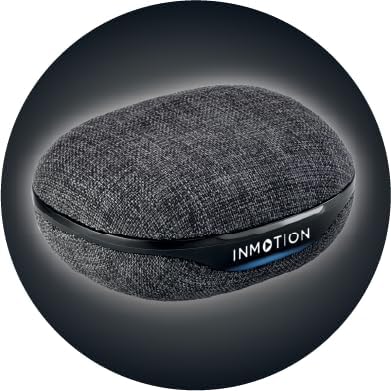
Mufananidzo: Mberi view of the InMotion ANC True Wireless Earbuds charging case, highlighting the charging port and indicator lights.
3.2 Pairing with Your Device (One-Step Pairing)
The InMotion ANC True Wireless Earbuds feature one-step pairing for quick and easy connection.
- Ita shuwa kuti maearbuds akachajwa uye ari mukati mekesi yekuchaja.
- Vhura chivharo chebhesi yekuchaja. Maearbuds anozopinda otomatiki maitiro ekubatanidza.
- Pamudziyo wako (smartphone, piritsi, laptop), enda kuBluetooth marongero uye batidza Bluetooth.
- Tsvaga "InMotion ANC Earbuds" (or similar name) in the list of available devices.
- Select the earbuds to connect. Once connected, you will hear an audible confirmation, and the indicator lights on the earbuds may change.
Maearbud anozobatana otomatiki kumudziyo wekupedzisira wakabatana kana abviswa mubhokisi, kana Bluetooth yakabatidzwa pamudziyo.
4. Operating Instructions
4.1 Kubata Kudzora
The earbuds are equipped with intuitive touch controls on each earbud. Specific functions may vary slightly by device, but common controls include:
- Tamba/Kumbomira: Top kamwechete pane imwe earbud.
- Next Track: Tokonya kaviri pane earbud yekurudyi.
- Previous Track: Tokonya kaviri kuruboshwe rwenzeve.
- Pindura/Pedzisa Kufona: Tokonya kamwe chete pane imwe earbud panguva yekufona.
- Ramba Kufona: Dzvanya uye ubate pane imwe earbud panguva yekufona.
- Shandisa Izwi Mubatsiri: Tokonya katatu pane imwe earbud.
- Shandura ANC/Transparency Mode: Press and hold on either earbud (duration may vary, refer to specific product details if available).

Mufananidzo: Side view of a single InMotion ANC True Wireless Earbud, illustrating its ergonomic design and the touch-sensitive area.
4.2 Kudzima Ruzha Runoshanda (ANC)
The Active Noise Cancelling feature reduces ambient noise, allowing for a more immersive listening experience. To activate or deactivate ANC, use the designated touch control gesture (typically a press and hold). Some models may also feature a Transparency Mode, which allows you to hear your surroundings while still enjoying your audio.
5. Kuchengeta
Proper maintenance ensures the longevity and performance of your InMotion ANC True Wireless Earbuds.
5.1 Kuchenesa
- Pukuta zvinyoro nyoro maearbuds nekesi yekuchaja nejira rakapfava, rakaoma, risina lint.
- Usashandise abrasive cleaners, doro, kana makemikari zvinonyungudutsa.
- Carefully remove any earwax or debris from the ear tips and speaker mesh using a small, soft brush or cotton swab.
5.2 Kuchengeta
Kana isiri kushandiswa, chengetedza maearbuds mukesi yekuchaja kuti azvidzivirire kubva kuguruva, tsvina, uye kukuvara. Chengetedza kesi yacho munzvimbo inotonhorera, yakaoma kure nechiedza chezuva uye tembiricha yakanyanyisa.

Mufananidzo: Kumashure view of the InMotion ANC True Wireless Earbuds charging case, showing its compact and portable design.
6. Kugadzirisa matambudziko
Kana ukasangana nematambudziko nema earbuds ako, edza mhinduro dzinotevera:
| Dambudziko | Solution |
|---|---|
| Maearbuds haasi kubatanidza/kubatanidza. |
|
| Hapana ruzha runobva kune rimwe kana ese ari maviri earbuds. |
|
| Kesi yekuchaja haichaji. |
|
| ANC haisi kushanda nemazvo. |
|
7. Zvinotsanangurwa
| Feature | Detail |
|---|---|
| Model Name | ANC Yechokwadi Wireless Nzeve |
| Noise Control | Adaptive Noise Cancellation |
| Kubatana Technology | Wireless (Bluetooth) |
| Inosanganisirwa Zvikamu | Kuchaja takura kadhi |
| Inowirirana Devices | Laptops, Smartphone, Tablets |
| Kudzora Nzira | Bata |
| Audio Driver Type | Dynamic Driver |
| Special Feature | Call Kupindura |
| Mugadziri | InMotion |
| Item Weight | 3.2 ounces |
| Color | Nhema |
| Kuiswa Nzeve | Munzeve |
| Fomu Factor | Munzeve |
| Impedance | 16 Ohm |
| Hupenyu hwebhatiri (Earbuds) | Kusvikira kumaawa makumi maviri nemashanu |
| Kuchaja Nguva | Approx. 1.5 hours (for earbuds and case) |
8. Warranty uye Tsigiro
InMotion products are manufactured with high-quality standards. For warranty information and customer support, please refer to the warranty card included with your product or visit the official InMotion website. You can also contact InMotion customer service through their Amazon store page:
Visit the InMotion Store on Amazon
InMotion is committed to providing excellent customer service and support for their products.