
1. Nhanganyaya
This manual provides instructions for the proper use and care of your Zoop Digital Watch, Model 16051PP04. This watch features a digital display, chronograph, stopwatch, and alarm functions, designed for durability and everyday use.

Mufananidzo 1: Mberi view of the Zoop Digital Watch 16051PP04.
Zvinokosha:
- Dhijitari Display: Clear and easy-to-read time display.
- Chronograph: Zvezviitiko zvenguva.
- Stopwatch: Precise time measurement.
- Basa reAlarm: Kugadzirisa alamu yezuva nezuva.
- Quartz Movement: Inovimbisa kuchengetedza nguva kwakaringana.
- Acrylic Glass: Durable and impact-resistant watch face.
- Kuramba Mvura: Up to 50 meters (suitable for splashes, not swimming).
- Durable Construction: ABS case and PU strap with military camouflage print.
2. Kutanga Setup
Before using your watch, please familiarize yourself with the buttons and their basic functions.

Mufananidzo 2: Rutivi view showing watch buttons.
Bhatani Mabasa:
- CHIEDZA (Kumusoro Kuruboshwe): Illuminates the display.
- MODE / ADJ (Bottom Left): Cycles through modes (Time, Alarm, Stopwatch) and enters adjustment mode.
- ST/STOP (Top Right): Starts/stops stopwatch or chronograph.
- RESET / SET/STOP (Bottom Right): Resets stopwatch/chronograph or confirms settings in adjustment mode.
Kuisa Nguva uye Zuva:
- Kubva pane yakajairika nguva inoratidza, tinya MODE / ADJ bhatani kakawanda kusvika nguva yekugadzirisa yatanga kushanda (kazhinji inoratidzwa nenhamba dzinopenya).
- Shandisa iyo ST/MIRA button to adjust the flashing digit (hours, minutes, year, month, day).
- Press the MODE / ADJ bhatani kuti uende kune chinhu chinotevera chekugadzirisa.
- Kana zvese zvangoitwa, tinya bhatani rekuti RESET / SET/STOP bhatani rekubuda musetting mode.
3. Operating Instructions
Kushandisa Stopwatch:
- Press the MODE / ADJ button until the stopwatch display appears (usually '00:00:00').
- Press ST/MIRA kutanga nguva.
- Press ST/MIRA again to stop timing.
- Press RESET / SET/STOP kuseta zvakare stopwatch kusvika zero.
Kuseta Alarm:
- Press the MODE / ADJ bhatani kusvikira alarm yekuseta kuratidza yaoneka.
- Shandisa iyo ST/MIRA bhatani rekugadzirisa nhamba yeawa inopenya.
- Press the MODE / ADJ bhatani rekuti uende kumamiriro emaminitsi.
- Shandisa iyo ST/MIRA button to adjust the flashing minute digit.
- Press RESET / SET/STOP to confirm the alarm time and activate/deactivate the alarm.
Kushandisa Chiedza:
Press the CHIEDZA button (top left) to illuminate the display for a few seconds, allowing for visibility in low-light conditions.
4. Kuchengeta uye Kuchengeta
Kuramba Mvura:
Your watch is water resistant up to 50 meters. This means it is suitable for everyday use, splashes, rain, and brief immersion in water. It is not suitable for swimming, diving, or showering with hot water. Usashandise mabhatani wachi yako ichinyorova kana kuti yakanyura mumvura.
Kuchenesa:
Wipe the watch case and strap with a soft, dry cloth. For stubborn dirt, a slightly damp cloth can be used, followed by drying thoroughly. Avoid using chemical cleaners or solvents, as these can damage the watch materials.
Kutsiva Bhatiri:
The watch is powered by a long-lasting quartz battery. When the display becomes dim or the watch stops functioning, the battery may need replacement. It is recommended to have the battery replaced by a qualified watch technician to ensure proper sealing and water resistance.
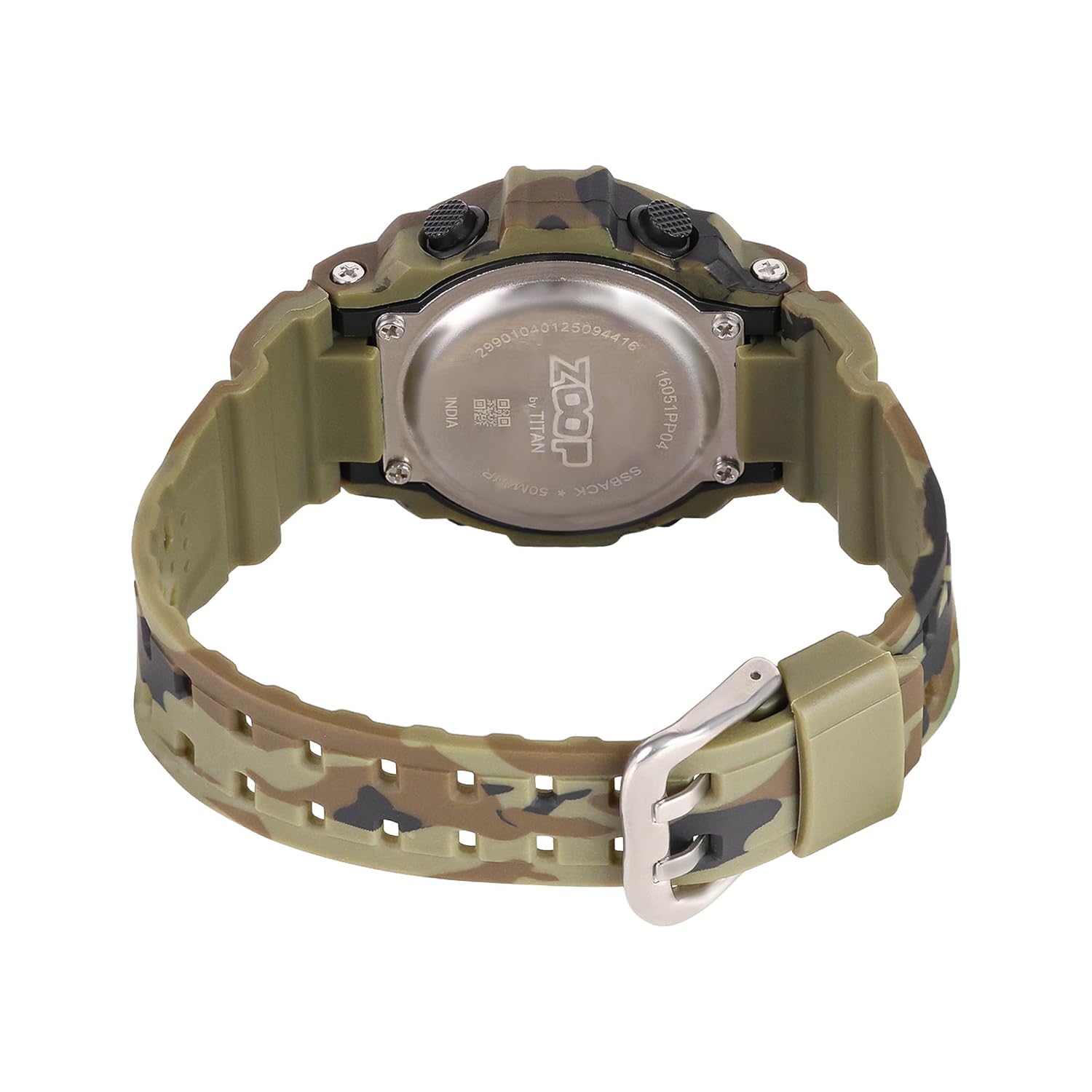
Figure 3: Watch case back, showing water resistance and model details.
5. Kugadzirisa matambudziko
| Dambudziko | Zvinogona Kukonzera | Solution |
|---|---|---|
| Kuratidza hakuna chinhu kana kudzima. | Bhatiri rakaderera. | Tsiva bhatiri. |
| Nguva haina kururama. | Kugadzirisa nguva isiriyo kana kuti bhatiri rakaderera. | Reset time; if problem persists, replace battery. |
| Mabhatani haapindure. | Wachi inogona kunge iri mumodhi yakakiyiwa kana kuti isina kushanda zvakanaka mukati. | Try pressing all buttons to reset. If unresponsive, consult service. |
| Mvura mukati mewachi. | Water resistance compromised (e.g., buttons pressed underwater, extreme temperature changes). | Immediately take to a service center. Do not attempt to dry it yourself. |
6. Zvinotsanangurwa

Figure 4: Watch dimensions, showing case size.
- Model Number: 16051PP04
- Ratidza Rudzi: Digital
- Movement Type: Quartz
- Nyaya Yenyaya: ABS Plastiki
- Strap Material: PU (Polyurethane)
- Zvinhu zveKristaro: Acrylic
- Case Diameter: Mamirimita gumi
- Nyaya Ukobvu: Mamirimita gumi
- Band Width: 2.1 masendimita
- Kudzika Kwemvura: 50 Mamita
- Clasp Type: Buckle
- Chinhu Weight: 150 magiramu
- Nyika Yekwakabva: India
7. Warranty uye Tsigiro
Two Year Guarantee:
This Zoop Digital Watch comes with a two-year limited guarantee from the date of purchase, covering manufacturing defects. This warranty does not cover damage resulting from improper use, accidents, unauthorized repairs, or normal wear and tear.
Ruzivo rwekusangana neMugadziri:
For warranty claims, service, or support, please contact:
Iyo kambani Titan Company Limited
#3, SIPCOT Industrial Complex
Hosur - 635126, Tamil Nadu, India