Nhanganyaya
This manual provides detailed instructions for the safe and effective use of your Generic ZQ01337 7-in-1 Stage Light System. This versatile lighting unit is designed for various events, including parties, DJ sets, clubs, and stage performances. Please read this manual thoroughly before operation and retain it for future reference.
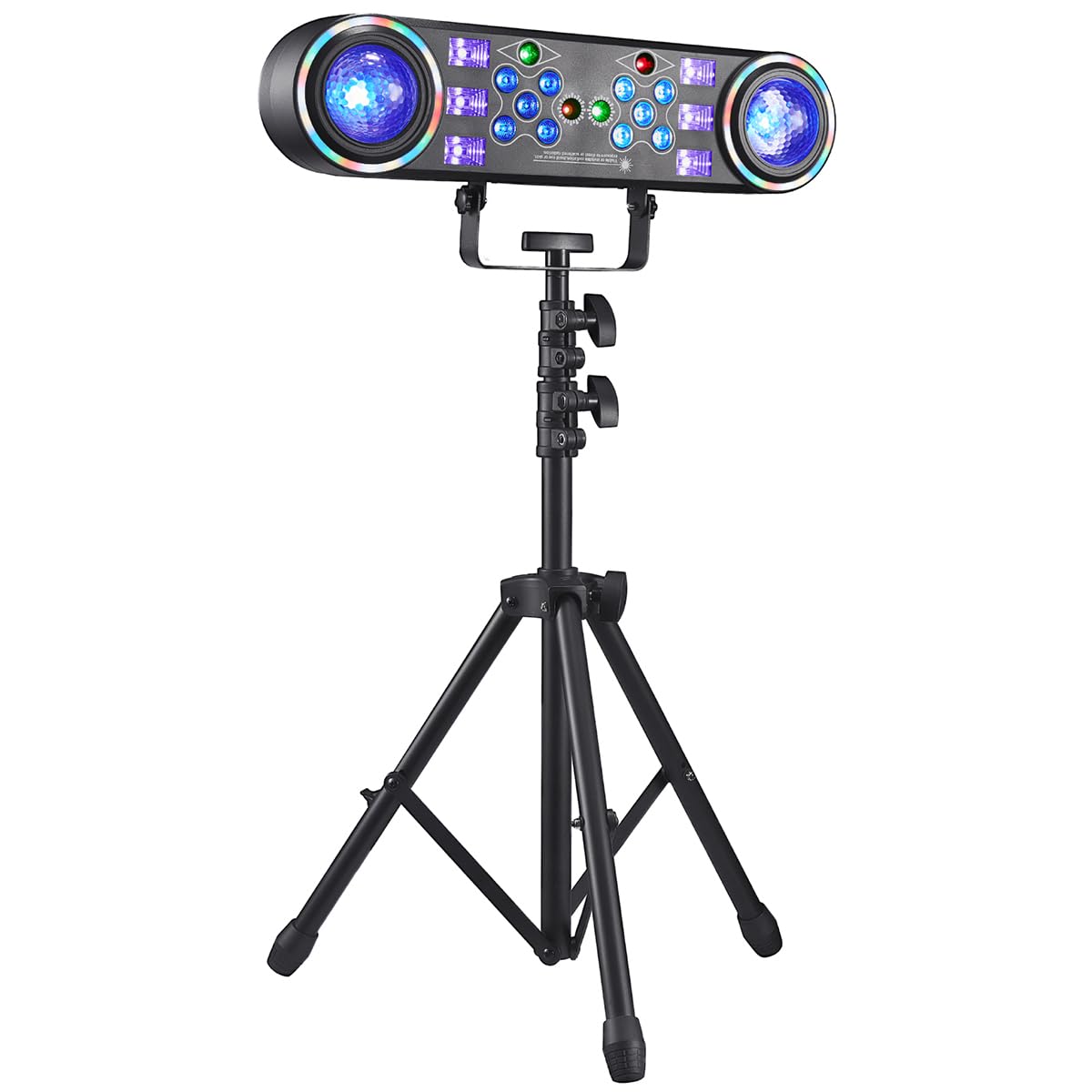
Mufananidzo 1: Kupfuuraview of the Generic ZQ01337 7-in-1 Stage Light System.
Package Zviri mukati
Tarisa kuti zvinhu zvese zvakanyorwa pazasi zvinosanganisirwa mupakeji yako. Kana chero zvinhu zvisipo kana kukuvadzwa, ndapota taura nerutsigiro rwevatengi.
- 7-mu-1 Stage Light System Unit
- Chiedza Chiedza
- Power Cable
- Mushandisi Chinyorwa (gwaro iri)
Yakakosha Mirayiridzo Yekuchengetedza
Kuti uderedze njodzi yekuvhundutswa nemagetsi, moto, kana kukuvara, gara uchitevera izvi zvakakosha zvekuchengetedza:
- Verenga mirairo yose usati washandisa chigadzirwa.
- Usafumure chikwata kune mvura kana hunyoro.
- Do not open the housing. There are no user-serviceable parts inside. Refer all servicing to qualified service personnel.
- Ensure the unit is placed on a stable surface or securely mounted to the stand.
- Ramba kure nezvinhu zvinobvira moto.
- Bvisa mudziyo wacho kubva pamagetsi kana usiri kushandiswa kana usati wachenesa.
- Do not look directly into the light source when the unit is operating.
- Ita shuwa kufefetera kwakaringana kutenderedza unit kudzivirira kupisa.
Setup Guide
- Unganidza Stand: Carefully unpack the light stand components. Follow the stand's specific instructions to assemble it securely. Ensure all locking mechanisms are tightened.
- Mount the Light Unit: Attach the 7-in-1 Stage Light System to the top of the assembled stand using the provided mounting hardware. Ensure it is firmly secured and balanced.
- Positioning: Place the assembled light system in the desired location, ensuring it is stable and has adequate clearance for ventilation.
- Batanidza Simba: Insert the power cable into the power input port on the light unit, then plug the other end into a standard electrical outlet (AC 100-240V, 50/60Hz).
- Kutanga Kubatidza Locate the power switch on the unit and turn it to the "ON" position. The lights should illuminate, indicating the unit is receiving power.
Operating Instruction
The ZQ01337 offers multiple lighting effects and control modes. Familiarize yourself with the control panel or remote control (if included) to navigate these options.
Kudzora Panel Pamusoroview
The control panel typically includes a display screen and several buttons (e.g., MODE, UP, DOWN, ENTER) to select and adjust settings.
Lighting Modes
- Auto Mode: The light system cycles through various pre-programmed patterns and colors automatically.
- Sound Activated Mode: The lights respond to ambient sound or music. Adjust sensitivity if available.
- Strobe Mode: Produces rapid flashes of light. Speed can often be adjusted.
- UV (Blacklight) Mode: Emits ultraviolet light, causing certain materials to glow.
- Disco Ball Effect: Projects rotating patterns, simulating a traditional disco ball.
- Colorful/RGB Mode: Allows selection of specific colors or color combinations (Red, Green, Blue, White, etc.).
- DMX Mode: For professional control using a DMX controller (requires DMX cables and a compatible controller, not included). Refer to the DMX channel chart in the specifications for details.
Kugadzirisa Zvirongwa
Use the UP/DOWN buttons to navigate through options and the ENTER button to confirm selections. The MODE button typically switches between main operating modes.
Maintenance
Regular maintenance ensures the longevity and optimal performance of your stage light system.
- Kuchenesa: Disconnect power before cleaning. Use a soft, dry cloth to wipe the exterior of the unit. For lenses, use a soft, lint-free cloth and a mild glass cleaner if necessary. Do not use abrasive cleaners or solvents.
- Kufefetedza Ensure ventilation openings are clear of dust and debris. Periodically use compressed air to clear vents.
- Kuchengeta: When not in use for extended periods, store the unit in its original packaging or a protective case in a cool, dry place, away from direct sunlight and extreme temperatures.
- Cable Inspection: Regularly inspect the power cable and any other connected cables for signs of damage. Replace damaged cables immediately.
Kugadzirisa matambudziko
If you encounter issues with your stage light system, refer to the following common problems and solutions:
| Dambudziko | Zvinogona Kukonzera | Solution |
|---|---|---|
| Light unit does not power on. | No power supply; Power cable loose; Unit switch off. | Check power outlet; Ensure power cable is securely connected; Turn power switch to ON. |
| Sound activated mode not working. | Microphone sensitivity too low; No sound detected; Mode not selected. | Increase microphone sensitivity (if adjustable); Ensure music/sound is playing near the unit; Select Sound Activated Mode. |
| Mwenje hadzina kujeka kana kupenya. | Low power supply; Overheating; Internal fault. | Ensure stable power supply; Check for proper ventilation; Contact customer support if problem persists. |
| Remote control isiri kudaira. | Dead battery; Obstruction; Not pointed correctly. | Replace remote battery; Remove obstructions; Point remote directly at the unit's IR receiver. |
Zvinotsanangurwa
| Brand | Generic |
| Model Number | ZQ01337 |
| Chikamu Nhamba | ZQ01337X1US |
| Zviyero zveChigadzirwa (L x W x H) | 15.7 x 8.5 x 31.5 inches (dzakaunganidzwa) |
| Material | Plastiki |
| Inosanganisirwa Zvikamu | Light kit included (main unit, stand, power cable) |
| Mabhatiri Anodiwa | Aihwa |
| Power Input | AC 100-240V, 50/60Hz (typical for stage lights, inferred) |
Warranty uye Support
This product is covered by a standard manufacturer's warranty. For specific warranty terms and conditions, please refer to the documentation provided with your purchase or contact the retailer.
For technical support, troubleshooting assistance, or to inquire about replacement parts, please contact Generic customer service through your purchase platform or the contact information provided by the seller.
Note: Protection plans may be available for purchase separately. These plans are offered by third parties and are not directly associated with the manufacturer's warranty.