
FLEXISPOT V9-Max-AR
FLEXISPOT V9-Max-AR Exercise Bike with 2D Desktop User Manual
Model: V9-Max-AR (Exercise Bike with Desk)
1. Nhanganyaya
This manual provides essential information for the safe and effective use of your FLEXISPOT V9-Max-AR Exercise Bike with 2D Desktop. Please read all instructions carefully before assembly and operation. Retain this manual for future reference.
Ruzivo Rwakakosha Chekuchengetedza
- Ita shuwa kuti zvikamu zvese zvakasungirirwa zvakachengeteka pamberi pese kushandiswa.
- Usapfuure huremu hwakakurudzirwa hwe300 pounds.
- Keep children and pets away from the exercise bike during operation.
- Bvunza chiremba usati watanga chero chirongwa chitsva chekurovedza muviri.
- Use the product on a stable, level surface.
2. Chigadzirwa Pamusoroview uye Zvikamu
The FLEXISPOT V9-Max-AR is a versatile exercise bike designed for indoor use, featuring an integrated 2D adjustable desktop. It combines a stationary bike with a functional workspace, allowing for simultaneous exercise and productivity.

Figure 2.1: User operating the FLEXISPOT V9-Max-AR Exercise Bike with the desktop in use.
Key features include an 8-level quiet magnetic resistance system, an LCD display for tracking workout metrics, and a robust design supporting up to 300 lbs. The adjustable seat and desktop accommodate various user heights and preferences.
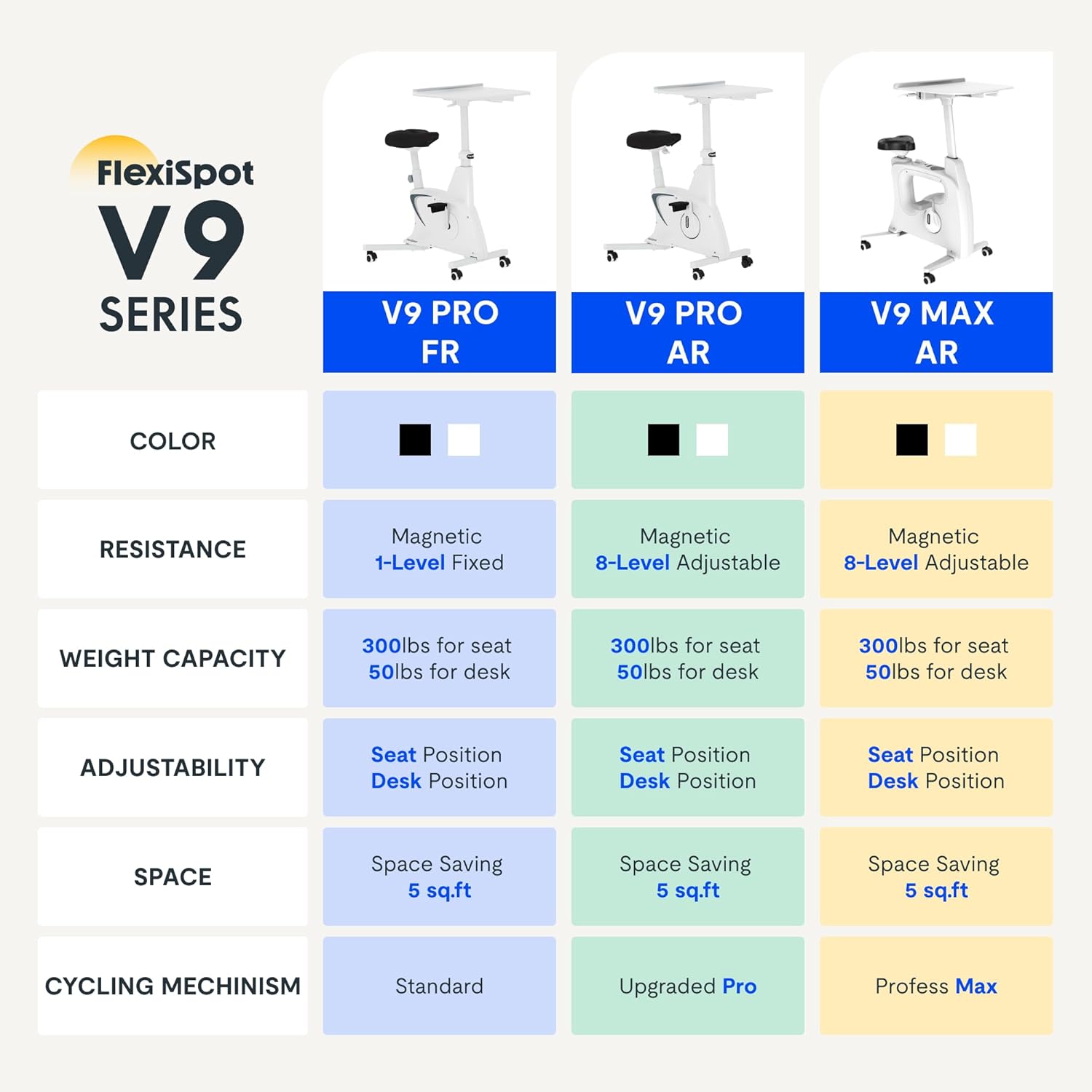
Figure 2.2: Comparison of FlexiSpot V9 series models, highlighting features like resistance and adjustability.
Zvikamu Zvikuru:
- Main Frame with Flywheel and Resistance Mechanism
- Adjustable Seat
- Adjustable Desktop
- Pedals
- LCD Display Console
- Mavhiri ekutakura
3. Setup uye Gungano
The FLEXISPOT V9-Max-AR is designed for quick and straightforward assembly, typically requiring about 10 minutes.
Matanho eGungano:
- Vhura zvese zvikamu uye simbisa uchipesana nerondedzero yekurongedza.
- Attach the front and rear stabilizers to the main frame using the provided screws.
- Install the pedals, ensuring the left pedal is tightened counter-clockwise and the right pedal clockwise.
- Mount the seat post and seat onto the main frame, securing them firmly.
- Attach the desktop support column to the main frame.
- Secure the desktop to its support column.
- Insert batteries into the LCD display (batteries not included) and connect the sensor wire.
- Ensure all screws and connections are tightened before first use.

Figure 3.1: Illustration of adjustable components for personalized setup.
4. Operating Instructions
Adjusting Seat and Desktop:
- Seat Height: Use the quick-release lever located on the seat post to adjust the seat to a comfortable height. Ensure your leg has a slight bend at the knee when the pedal is at its lowest point.
- Desktop Height: The desktop can be adjusted vertically. Locate the adjustment lever beneath the desktop and raise or lower the desktop to your desired working height.
- Desktop Depth: The desktop can also be adjusted horizontally (forward/backward) to optimize your working posture.
Resistance Levels:
The V9-Max-AR features 8 levels of quiet magnetic resistance. Rotate the resistance knob, located below the desktop, clockwise to increase resistance and counter-clockwise to decrease it.

Figure 4.1: LCD display and resistance control knob.
Kushandisa LCD Display:
The built-in LCD display monitors your workout statistics. It tracks:
- Nguva
- Speed
- Distance
- Macalorie Akapiswa
- Total Distance Covered (Odometer)
- Kutenderera Speed
Press the button on the display to cycle through different metrics or hold it to reset values (refer to display specific instructions for exact operation).
Using the 2D Desktop:
The spacious desktop (20" x 22.8") is designed to hold a laptop, notebook, mobile phone, or water cup. It provides a stable surface for working or entertainment while exercising.

Figure 4.2: Desktop in use for studying or working.
Portability:
Equipped with movable silent wheels, the exercise bike can be easily relocated within your home or office. Simply tilt the bike and roll it to your desired position.
5. Kuchengeta
Regular maintenance ensures the longevity and optimal performance of your FLEXISPOT V9-Max-AR Exercise Bike.
- Kuchenesa: Wipe down the bike regularly with a damp jira uye nyoro detergent. Dzivisa abrasive cleaners kana solvents.
- Kuongorora: Periodically check all bolts, nuts, and moving parts for tightness. Tighten any loose components immediately.
- Lubrication: Hapana mafuta chaiwo anodiwa kune system yekudzivirira magineti.
- Kuchengeta: Chengeta bhasikoro munzvimbo yakaoma, inotonhorera kure nezuva rakananga uye tembiricha yakanyanya.
6. Kugadzirisa matambudziko
Chikamu chino chinotarisa matambudziko akajairika aungasangana nawo nebhasikoro rako rekurovedza muviri.
| Dambudziko | Zvinogona Kukonzera | Solution |
|---|---|---|
| LCD kuratidza haisi kushanda | Mabhatiri akafa kana kuiswa zvisirizvo. | Replace batteries (AAA, not included) or ensure correct polarity. |
| Unstable or wobbly bike | Mabhaudhi akasununguka kana nzvimbo isina kuenzana. | Check and tighten all assembly bolts. Ensure the bike is on a flat, stable surface. |
| Kuramba kusachinja | Resistance mechanism issue. | Iva nechokwadi chekuti bhatani rekudzivirira rakabatwa nemazvo. Kana dambudziko rikaramba riripo, taura nerutsigiro rwevatengi. |
| Squeaking or unusual noises | Loose components or friction. | Inspect all connections and tighten any loose parts. Ensure no foreign objects are interfering with moving parts. |
7. Zvinotsanangurwa
Detailed specifications for the FLEXISPOT V9-Max-AR Exercise Bike:
- Muenzaniso: V9-Max-AR (Exercise Bike with Desk)
- Brand: FLEXISPOT
- Ruvara: Nhema
- Resistance Mechanism: Magnetic
- Nhamba yeResistance Levels: 8
- Maximum Weight Kurudzira: 300 Pondo
- Zviyero zveChigadzirwa (D x W x H): 37.6" x 23.2" x 47.2"
- Desktop Dimensions: Approximately 20" x 22.8"
- Minimum Height (Seat): 29.6 inches
- Maximum Height (Overall): 47.2 Inches (desktop height can go up to 47.2")
- Kunobva Simba: Inoshandisa pedal (isiri yemagetsi)
- Drive System: Bhandi
- Special Feature: Adjustable Seat, Adjustable Desktop
- Zvinokurudzirwa Zvishandiso: Indoor
- Space Occupied: Inenge 5 sq ft

Mufananidzo 7.1: Zviyero zvechigadzirwa.
8. Warranty uye Tsigiro
FLEXISPOT is committed to providing quality products and customer satisfaction.
- Inodzoka: Ichi chigadzirwa chinokodzera 30-mazuva ekudzoka zviri nyore. Ndokumbira utarise kune yako yekutenga puratifomu mutemo wekudzoka kuti uwane ruzivo.
- Warranty: For specific warranty terms and conditions, please refer to the official FLEXISPOT websaiti kana kubata tsigiro yavo yevatengi zvakananga.
- Tsigiro yeVatengi: For any questions, assistance, or troubleshooting not covered in this manual, please contact FLEXISPOT customer support. Contact information can typically be found on the manufacturer's websaiti kana magwaro ekutenga kwako.
9. Ruzivo Rwokuwedzera
While no specific official product videos were provided in the product data, users may find helpful assembly or usage guides on the manufacturer's official website or their authorized channels. Always ensure the source is official for accurate information.
Ask a question about this manual
Ask about setup, troubleshooting, compatibility, parts, safety, or missing instructions. Manuals+ will review the question and use this page’s manual context to help answer it.