1. Nhanganyaya
This manual provides detailed instructions for the installation, operation, and maintenance of your Generic 5-inch Motorcycle Multimedia System. Please read this manual thoroughly before using the device to ensure proper function and safety. Keep this manual for future reference.
2. Chigadzirwa Pamusoroview uye Key Features
The Generic 5-inch Motorcycle Multimedia System is designed to enhance your riding experience with advanced connectivity and navigation features. It integrates seamlessly with your smartphone, offering wireless CarPlay and Android Auto functionality.
Zvinokosha:
- 5-inch IPS Bata Screen: High-resolution (800x480P) display for clear visuals and responsive touch control, even in bright sunlight.
- Kudzivirira Mvura neGuruva reIP67: Ensures durability and reliable performance in various weather conditions, protecting against rain and dust.
- CarPlay isina waya uye Android Auto: Connect your smartphone wirelessly for navigation, music, calls, and messages directly on the device screen.
- Dual Bluetooth Connectivity: Pair two devices simultaneously for managing calls, streaming audio, or voice commands.
- Tsigiro yemitauro yakawanda: Supports multiple languages for a personalized user experience.
- Kuisa Nyore: Designed for motorcycle handlebar mounting with a U-shaped bracket.
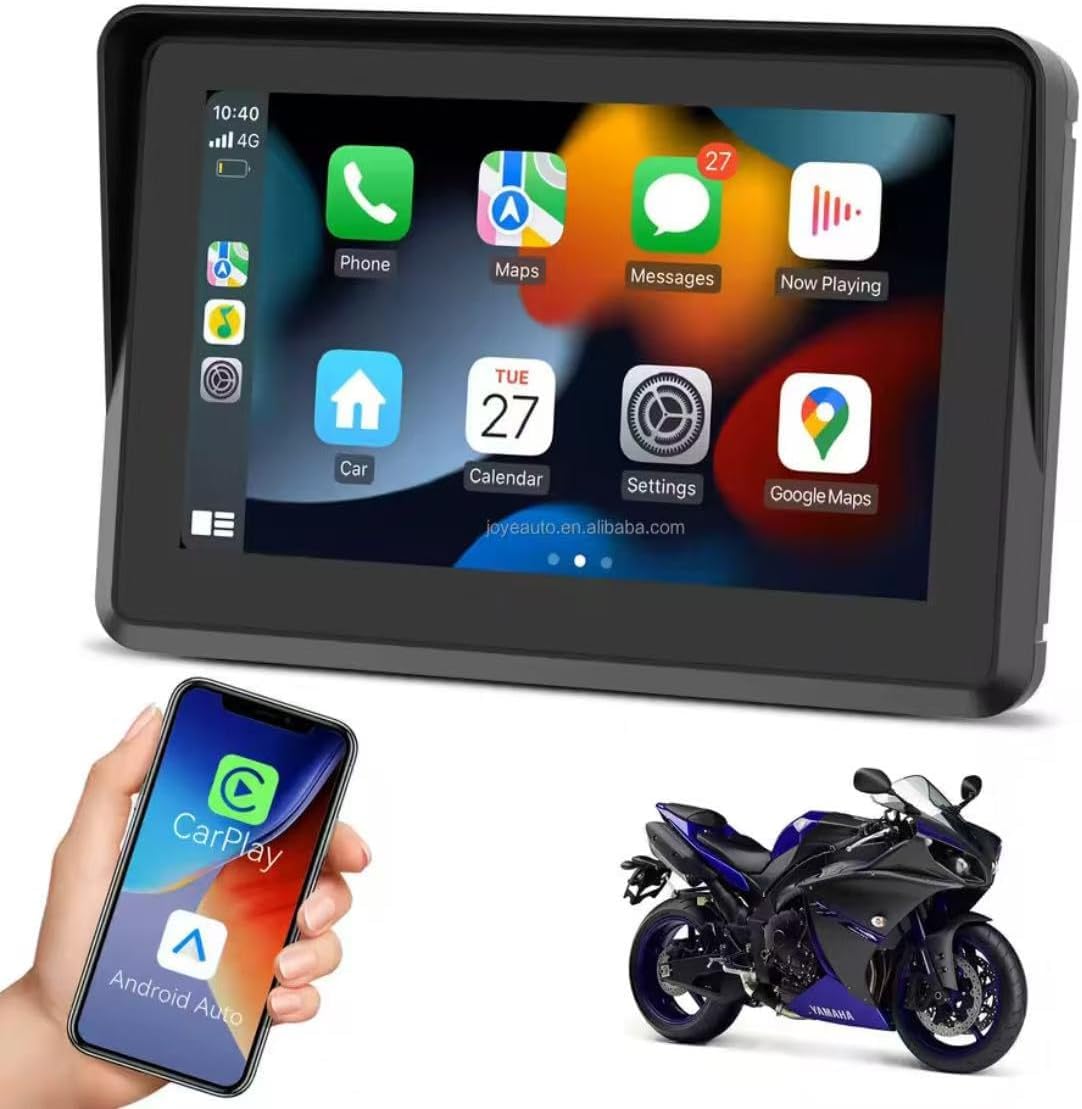
Figure 2.1: Device displaying the CarPlay interface with various applications.

Figure 2.2: Demonstrating the device's resilience in various riding conditions, including snow, dirt, water, and extreme temperatures.
3. Package Zviri mukati
Ndapota tarisa zviri mupakeji kana wabvisa zvinhu mubhokisi. Kana paine zvinhu zvisipo kana kuti zvakakuvara, taura nemutengesi wako.
- Motorcycle Multimedia System Unit
- U-shaped Handlebar Mounting Bracket (approx. 33 mm diameter)
- Power Cable (9V-12V)
- Mounting Accessories (screws, spacers, ball joints)

Figure 3.1: Included mounting accessories and power cable.
4. Setup uye Kuiswa
Follow these steps to properly install your multimedia system on your motorcycle.
4.1 Kuisa Chishandiso
- Select a suitable position on your motorcycle handlebar for mounting. Ensure it does not obstruct your view or control of the motorcycle.
- Attach the U-shaped mounting bracket to the handlebar. The bracket is designed for handlebars with an approximate diameter of 33 mm. Use the provided screws and spacers to secure it firmly.
- Connect the multimedia system unit to the mounting bracket using the ball joint and tightening mechanism. Adjust the viewing angle yekunyatsoonekwa.

Figure 4.1: Device mounted on a handlebar bracket.
4.2 Simba Connection
- Connect the provided power cable to the multimedia system.
- Connect the other end of the power cable to your motorcycle's 9V-12V power supply. Ensure correct polarity (red for positive, black for negative). Consult your motorcycle's manual or a professional if unsure about wiring.
- Secure all cable connections to prevent accidental disconnection or damage during riding.
5. Operating Instructions
This section details how to operate your multimedia system.
5.1 Kubatidza/Kudzima
- Power On: Once connected to power, the device should automatically power on. If not, press and hold the power button (if available) until the screen illuminates.
- Power Off: To turn off the device, press and hold the power button until a power-off prompt appears, then confirm. Alternatively, disconnect from the power source.
5.2 Touchscreen Navigation
The device features an IPS touch screen for intuitive control.
- Top: Sarudza chinhu kana kuti ita kuti basa rishande.
- Rova zvakasimba: Navigate through menus or screens.
- Pinch/Zoom: Adjust map views (where applicable).
5.3 Wireless CarPlay / Android Auto Connection
This device supports wireless connectivity for both Apple CarPlay and Android Auto.
- Iva nechokwadi chekuti Bluetooth neWi-Fi zvefoni yako zvashanda.
- On the multimedia system, navigate to the CarPlay or Android Auto icon and tap it.
- The system will enter pairing mode. On your smartphone, search for the device's Bluetooth name (e.g., "MP5-M5" or similar) and pair with it.
- Once Bluetooth is paired, the system will automatically establish a Wi-Fi connection for CarPlay or Android Auto.
- Follow any on-screen prompts on both the device and your smartphone to complete the connection.
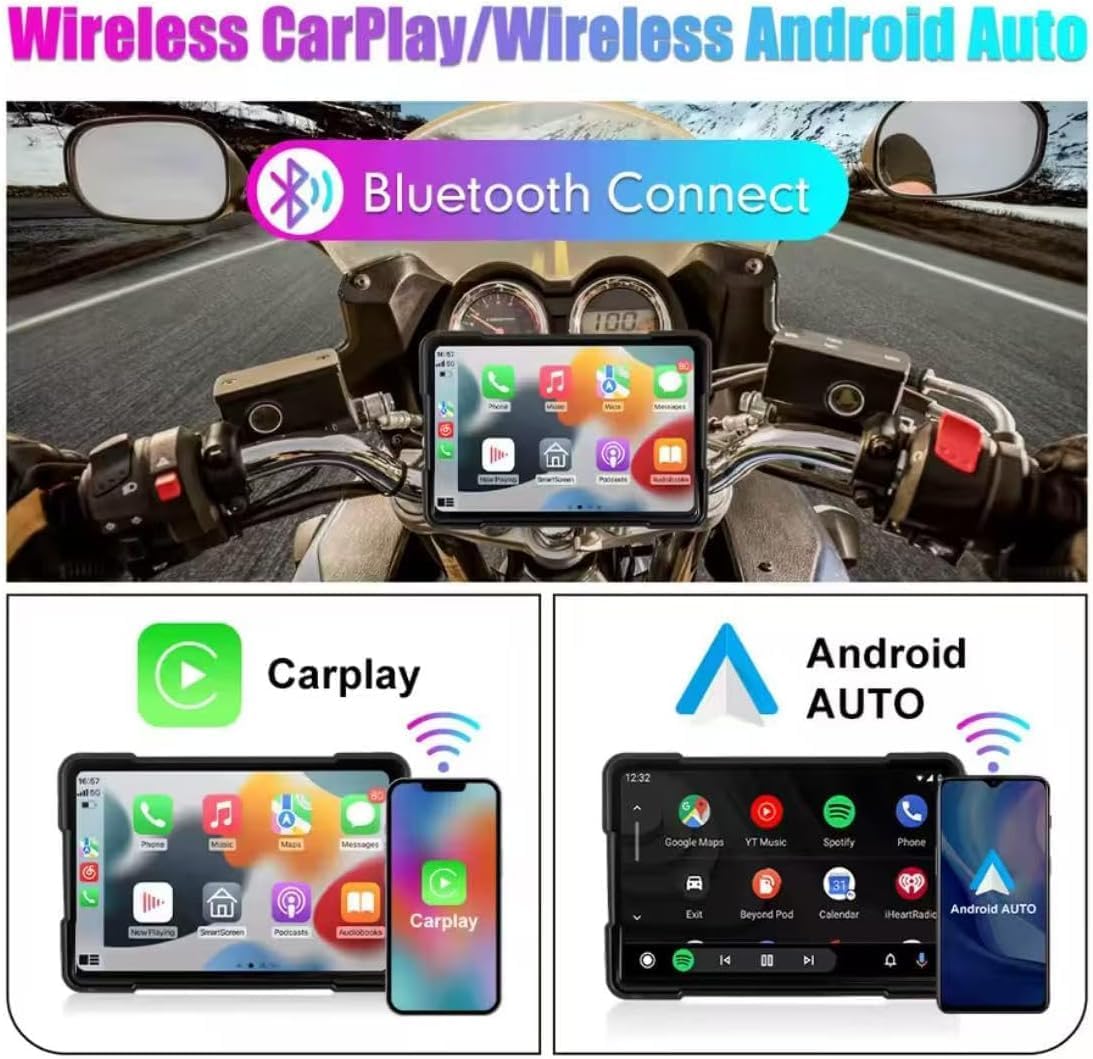
Figure 5.1: Wireless CarPlay and Android Auto connectivity.
5.4 Using Navigation, Music, and Calls
Once connected via CarPlay or Android Auto, you can access your smartphone's features directly from the multimedia system.
- Navigation Use your preferred map application (e.g., Google Maps, Apple Maps) for turn-by-turn directions.
- Mumhanzi: Stream audio from your favorite music apps.
- Kufona: Ita uye gamuchira mafoni pasina kushandisa maoko.
- Izwi Mubatsiri: Utilize voice commands for various functions (e.g., "Hey Siri" or "Ok Google").

Figure 5.2: Device mounted on a motorcycle, showing key functions.
5.5 Bluetooth Dual Connectivity
The device supports connecting two Bluetooth devices simultaneously. This allows for flexible use, such as connecting your phone for CarPlay/Android Auto and a Bluetooth headset for audio output.
5.6 Zvirongwa zveMutauro
Kuti uchinje mutauro wesystem:
- Navigate to the 'Settings' menu on the device.
- Locate and select 'Language' or a similar option.
- Choose your desired language from the list.
6. Kuchengeta
Proper maintenance ensures the longevity and optimal performance of your multimedia system.
- Kuchenesa Screen: Shandisa jira rakapfava, risina ruvara kuti upukute sikirini zvinyoro nyoro. Kana paine tsvina yakaoma, pukuta zvishomaampsn jira rine mvura kana chidzitiro-chisina njodzi chekuchenesa. Dzivisa makemikari ane hasha kana abrasive zvinhu.
- Kuramba Mvura (IP67): While the device is IP67 rated for water and dust resistance, avoid submerging it for extended periods or exposing it to high-pressure water jets. Ensure all ports are properly sealed if applicable.
- Tembiricha: Operate the device within the specified temperature range (-20°C to 80°C). Avoid prolonged exposure to extreme heat or cold, which can affect battery life and screen performance.
- Cable Connections: Nguva nenguva tarisai zvese zvakabatana netambo kuti zvionekwe kuti zvakabata here kana kuti hazvina kunyatsoshanda zvakanaka.
7. Kugadzirisa matambudziko
If you encounter issues with your multimedia system, refer to the following common problems and solutions.
- Mudziyo haubatike:
- Check the power cable connection to both the device and the motorcycle's power source.
- Ensure the motorcycle's power supply is active (e.g., ignition is on).
- Verify the power cable for any damage.
- CarPlay / Android Auto isiri kubatanidza isina waya:
- Ita shuwa kuti Bluetooth neWi-Fi zvinogoneswa pane yako smartphone.
- Kanganwa mudziyo kubva pazvirongwa zveBluetooth zvefoni yako uye edza kubatanidza zvakare.
- Restart both the multimedia system and your smartphone.
- Ita shuwa kuti nharembozha yekushandisa yako ndeyemazuva ano.
- Bata sikirini haidaire:
- Tangazve mudziyo.
- Ita shuwa kuti skrini yakachena uye haina tsvina kana unyoro.
- Hapana audio inobuda:
- Check the volume settings on both the multimedia system and your connected smartphone/headset.
- Ensure your Bluetooth audio device is properly paired and selected as the output.
Kana matanho aya akasagadzirisa nyaya, ndapota taura nerutsigiro rwevatengi.
8. Zvinotsanangurwa
| Feature | Tsanangudzo |
|---|---|
| Screen Size | 5 inches |
| Screen Type | IPS Bata Screen |
| Screen Resolution | 800x480P |
| Kuramba Mvura | IP67 |
| Kubatana | Wireless CarPlay, Wireless Android Auto, Bluetooth |
| Magetsi | 9V-12V |
| Operating Temperature | -20°C kusvika 80°C (-4°F kusvika 176°F) |
| Handlebar Mount Diameter | Approx. 33 mm |
| Dimensions (Packaging) | 15 x 10 x 8 cm |
| Huremu (Packaging) | 500 g |
| Special Features | Android Auto and Carplay, Touchscreen |
9. Warranty uye Tsigiro
This product comes with a standard manufacturer's warranty. Please refer to your purchase documentation for specific warranty terms and duration. For technical support, troubleshooting assistance, or warranty claims, please contact your retailer or the manufacturer's customer service department.


