
1. Nhanganyaya
Thank you for choosing the Oilsky M1 MP3 Player. This device is designed to provide a portable and versatile music experience. It features Bluetooth 5.4 for wireless audio, a 2.4-inch full touch screen for easy navigation, and 128GB of internal storage, expandable via MicroSD card. Beyond music playback, it includes functions such as FM radio, voice recording, e-book reading, and picture viewing. Please read this manual thoroughly to understand the player's features and ensure optimal performance.
2. Chii chiri muBhokisi
Carefully unpack your Oilsky M1 MP3 Player and check for the following items:
- 1x Oilsky M1 Music Player
- 1x Maearphone
- Cable ye USB 1x (yekuchaja uye yekutumira data)
- 1x Inodzivirira Nyaya
- 1x Chinyorwa cheMushandisi

Image: All items included in the Oilsky M1 MP3 Player package.
3. Chigadzirwa Pamusoroview
The Oilsky M1 MP3 Player features a compact design with a full touch screen interface. Familiarize yourself with the device's physical components:
- 2.4-inch Full Touch Screen: Main interface for navigation and control.
- Bhatani reSimba: Iri padivi, inoshandiswa kubatidza / kudzima mudziyo uye kukiya / kuvhura skrini.
- Mabhatani eVolume: Gadzirisa nhanho yekubuda kweaudio.
- USB-C Chiteshi: For charging and connecting to a computer for data transfer.
- 3.5mm Headphone Jack: For wired earphone connection.
- MicroSD Kadhi Slot: For expanding storage capacity (card not included).
- Mutauri Akavakirwa-mukati: Allows audio playback without headphones.
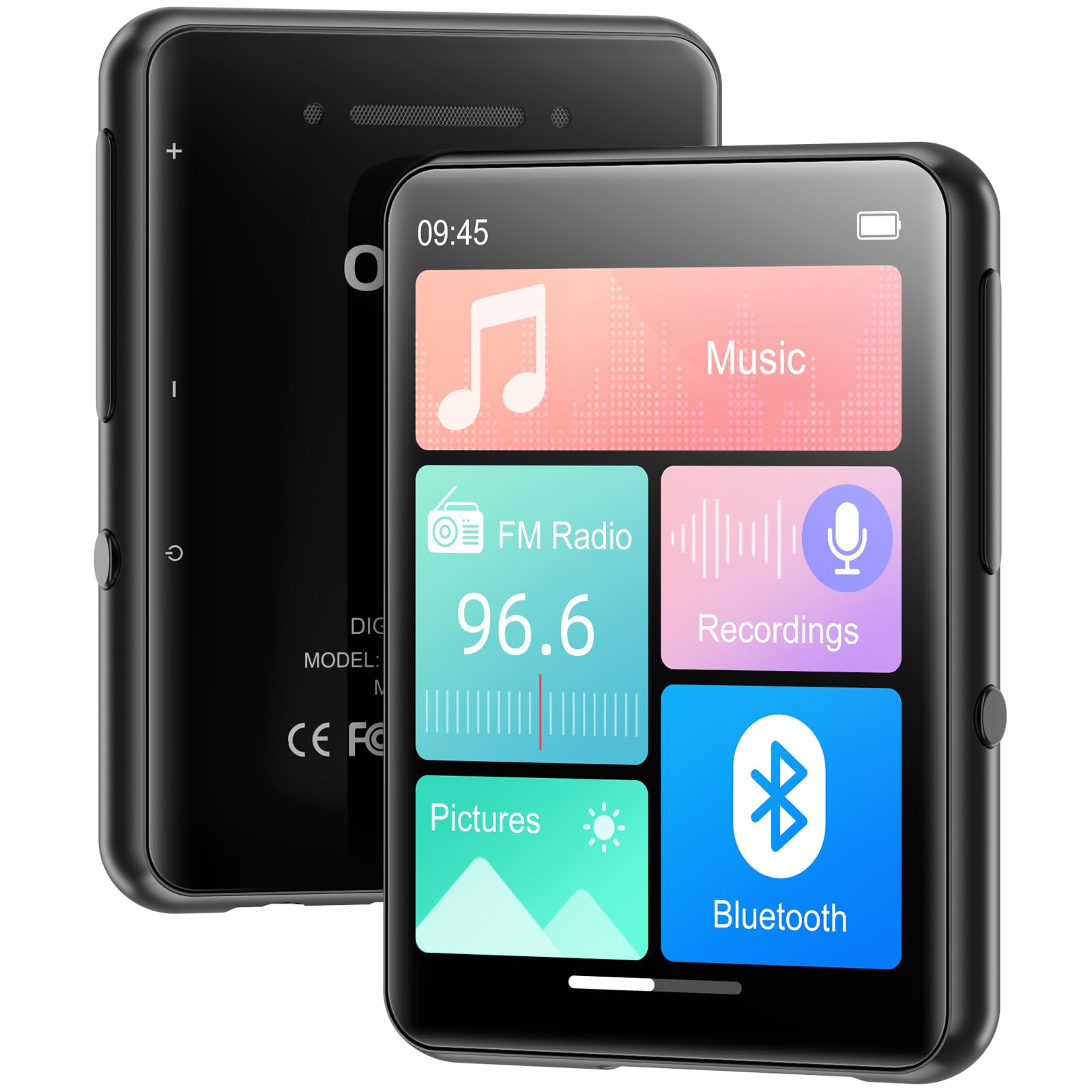
Mufananidzo: Mberi view of the MP3 player displaying its main screen.
4. Setup
4.1 Kuchaja Chishandiso
Before first use, fully charge the MP3 player. Connect the provided USB cable to the device's USB-C port and the other end to a USB power adapter (not included) or a computer's USB port. The battery indicator on the screen will show charging status.
4.2 Simba On/Kudzima
- Kubatidza: Dhinda uye ubatisise bhatani reMasimba kusvikira iyo skrini yasimuka.
- Kudzima: Dzvanya wobata bhatani rekuti Power, wobva wasarudza 'Power Off' pachiratidziri.
- Screen Lock/Vhura: Briefly press the Power button to lock or unlock the screen during use.
4.3 Zvirongwa zveMutauro
Upon first power-on, you may be prompted to select your preferred language. If not, navigate to Zvirongwa > Mutauro to choose from the available options.
4.4 Kuendesa Mimhanzi uye Files
The Oilsky M1 MP3 Player has 128GB of internal storage and supports MicroSD cards up to 128GB (not included).
- Batanidza MP3 player kukombiyuta yako uchishandisa tambo ye USB.
- Mutambi wacho achaonekwa sedhisiki rinobviswa pakombiyuta yako.
- Dhonza uye udonhedze mimhanzi yako files (MP3, WMA, APE, FLAC, WAV, AAC), pictures (JPEG, BMP), or e-books (TXT) into the appropriate folders on the player or MicroSD card.
- Bvisa mudziyo wacho zvakachengeteka kubva pakombuta yako usati wabvisa tambo yeUSB.

Image: Visual representation of the 128GB internal storage and MicroSD card expansion capability.
5. Operating Instructions
5.1 Kuridza Mumhanzi
From the main menu, tap the 'Music' icon to access your music library. You can browse by artist, album, genre, or all songs. Tap a song to begin playback. Use the on-screen controls for play/pause, skip tracks, and adjust volume. The player supports MP3, WMA, APE, FLAC, WAV, and AAC audio formats.

Image: User interacting with the touch screen for music playback.
5.2 Bluetooth Pairing
The Oilsky M1 features Bluetooth 5.4 for connecting to wireless headphones or speakers. Cherechedza: This device cannot pair with mobile phones or personal computers via Bluetooth.
- Enda ku Zvirongwa > Bluetooth or tap the 'Bluetooth' icon from the main menu.
- Batidza 'Bluetooth'.
- Iva nechokwadi chekuti mahedhifoni ako eBluetooth kana sipika ari mu pairing mode.
- Iyo MP3 inoridza inotarisisa zvishandiso zviripo. Sarudza mudziyo wako kubva pakurongwa kuti uwirirane.
- Once paired, audio will be routed to your Bluetooth device.

Image: MP3 player demonstrating Bluetooth connectivity with headphones.
5.3 FM Radio
To use the FM Radio, connect wired earphones to the 3.5mm jack, as they act as the antenna. Tap the 'FM Radio' icon from the main menu. You can manually tune to stations or use the auto-scan feature to find available frequencies.
5.4 Voice Recorder
Tap the 'Recordings' icon to access the voice recorder. The built-in microphone allows you to capture audio. Start, pause, and save recordings using the on-screen controls. Recorded files are saved in the 'Recordings' folder.
5.5 Mamwe Mabasa
The Oilsky M1 MP3 Player includes several other useful applications:
- Mifananidzo: View stored image files (JPEG, BMP).
- E-bhuku: Verenga zvinyorwa files (TXT format).
- Alarm Clock: Set alarms with your favorite music.
- Karenda: View zuva razvino.

Image: Main menu showing various functions of the MP3 player.
Vhidhiyo: Kuperaview of the Oilsky MP3 Player's features and interface, demonstrating its functionality.
6. Kuchengeta
- Chengetedza mudziyo wakaoma. Dzivisa kusangana nehunyoro kana zvinwiwa.
- Geza sikirini uye muviri nejira rakapfava, rakaoma. Usashandise abrasive cleaners.
- Dzivisa kupisa kwakanyanya.
- Usadonhedze kana kuisa mudziyo kune zvinokanganisa zvakasimba.
- Store the device in the provided protective case when not in use.
7. Kugadzirisa matambudziko
| Dambudziko | Possible Solution |
|---|---|
| Mudziyo haubatike. | Ita shuwa kuti bhatiri rachajwa. Batanidza kune sosi yemagetsi uye edza zvakare. |
| Cannot connect to Bluetooth device. | Ensure the Bluetooth device is in pairing mode and within range. Confirm the MP3 player's Bluetooth is enabled. Remember, it cannot pair with phones or PCs. |
| Hapana ruzha runobva kumahedhifoni. | Check headphone connection. Ensure volume is not muted or too low. Test with different headphones. |
| Music files not appearing. | Verify files are in supported formats (MP3, WMA, APE, FLAC, WAV, AAC). Ensure files are transferred to the correct folders. Refresh the music library if available in settings. |
| Sikirini haibatike. | Restart the device by holding the power button. If unresponsive, allow the battery to drain completely and then recharge. |
8. Zvinotsanangurwa
| Feature | Detail |
|---|---|
| Model Name | M1 |
| Brand | Oilsky |
| Kubatana Technology | Bluetooth 5.4, USB |
| Memory Storage Capacity | 128 GB (Internal), supports up to 128 GB Micro SD |
| Screen Size | 2.4 inches |
| Special Features | FM Radio, Touch Screen, Built-in Speaker, Voice Recorder, E-book, Picture Viewer, Alarm Clock, Calendar |
| Inowirirana Devices | Headphones, Bluetooth Speakers |
| Anotsigirwa Midiya Mhando | Micro SD |
| Inotsigirwa Audio Formats | MP3, WMA, APE, FLAC, WAV, AAC |
| Item Weight | 5.9 ounces (inenge 167 gramu) |
| Package Dimensions | 5.87 x 5.83 x 0.75 inches |
| Bhatiri | 1 Lithium Ion bhatiri (inosanganisirwa) |
9. Warranty uye Tsigiro
The Oilsky M1 MP3 Player comes with a standard manufacturer's warranty. Please refer to the warranty card included in your package for specific terms and conditions. For technical support, troubleshooting assistance, or warranty claims, please contact Oilsky customer service through the retailer where the product was purchased.