
Nhanganyaya
Welcome to the user manual for your CORBOBO LINGBAO K108 Pro Wireless Mechanical Keyboard. This guide provides detailed instructions to help you set up, operate, and maintain your new keyboard, ensuring optimal performance and an enhanced typing experience.

Figure 1: LINGBAO K108 Pro Wireless Mechanical Keyboard, showcasing chimiro chayo chizere uye RGB backlighting.
Chii chiri muBhokisi
- Yekhibhodi x 1
- User Manual x 1
- Keycap Puller x 1
- USB-C Cable x 1
- Two extra switches x 1
Gadzirira
1. Powering On / Off
Locate the power switch on the back of the keyboard. Slide the switch to the 'ON' position to power on the device. To power off, slide the switch to the 'OFF' position.
2. Maitiro Ekubatanidza
The LINGBAO K108 Pro supports three connection modes: 2.4G Wireless, Bluetooth (BT), and Wired (USB-C). You can easily switch between these modes using the multi-functional knob or dedicated keys.
- 2.4G Wireless Mode: Insert the 2.4G USB receiver into your device's USB port. Select 2.4G mode using the keyboard's knob or shortcut.
- Makaralı Mode: Activate Bluetooth on your device. Select one of the three Bluetooth channels (BT1, BT2, BT3) on the keyboard. Tsvaga "LINGBAO K108 Pro" in your device's Bluetooth settings and pair. The keyboard can store up to 5 different devices.
- Wired Mode: Connect the keyboard to your device using the provided USB-C cable. The keyboard will automatically switch to wired mode.

Figure 2: Visual representation of the keyboard's tri-mode connection capabilities, supporting wireless 2.4GHz, wired USB-C, and Bluetooth 5.0.
3. Kuchaja kiyibhodhi
The keyboard is equipped with a 10000mAh battery. To charge, connect the keyboard to your computer's USB port using the USB-C cable. Avoid using mobile phone fast chargers or chargers with excessive current/voltage kudzivirira kukanganisa.

Figure 3: The keyboard's large 10000mAh battery, providing extended usage time.
4. Kuiswa kwemutyairi
For full customization options, including screen time calibration, GIF animation uploads, and macro programming, install the dedicated driver. The driver can be downloaded from: bit.ly/m/corbobo. Note that the driver is only compatible with Windows operating systems and requires a wired connection for setup.
Video 1: Demonstrates the method for uploading custom animations to the K108 Pro's smart screen via the driver software.
Operating Instruction
1. Smart Screen & Multi-functional Knob
The 1.14-inch smart display shows essential information such as date, time, connection mode, and battery level. The multi-functional knob allows you to navigate and adjust various settings:
- Tenderedza Knob: Adjust keyboard lighting effects, language, and computer volume.
- Press Knob: Confirm selections or return to the previous menu.
- FN + Knob: Switch between multimedia control (volume) and screen control modes.
With the driver installed, you can upload custom GIF animations to personalize the screen display.
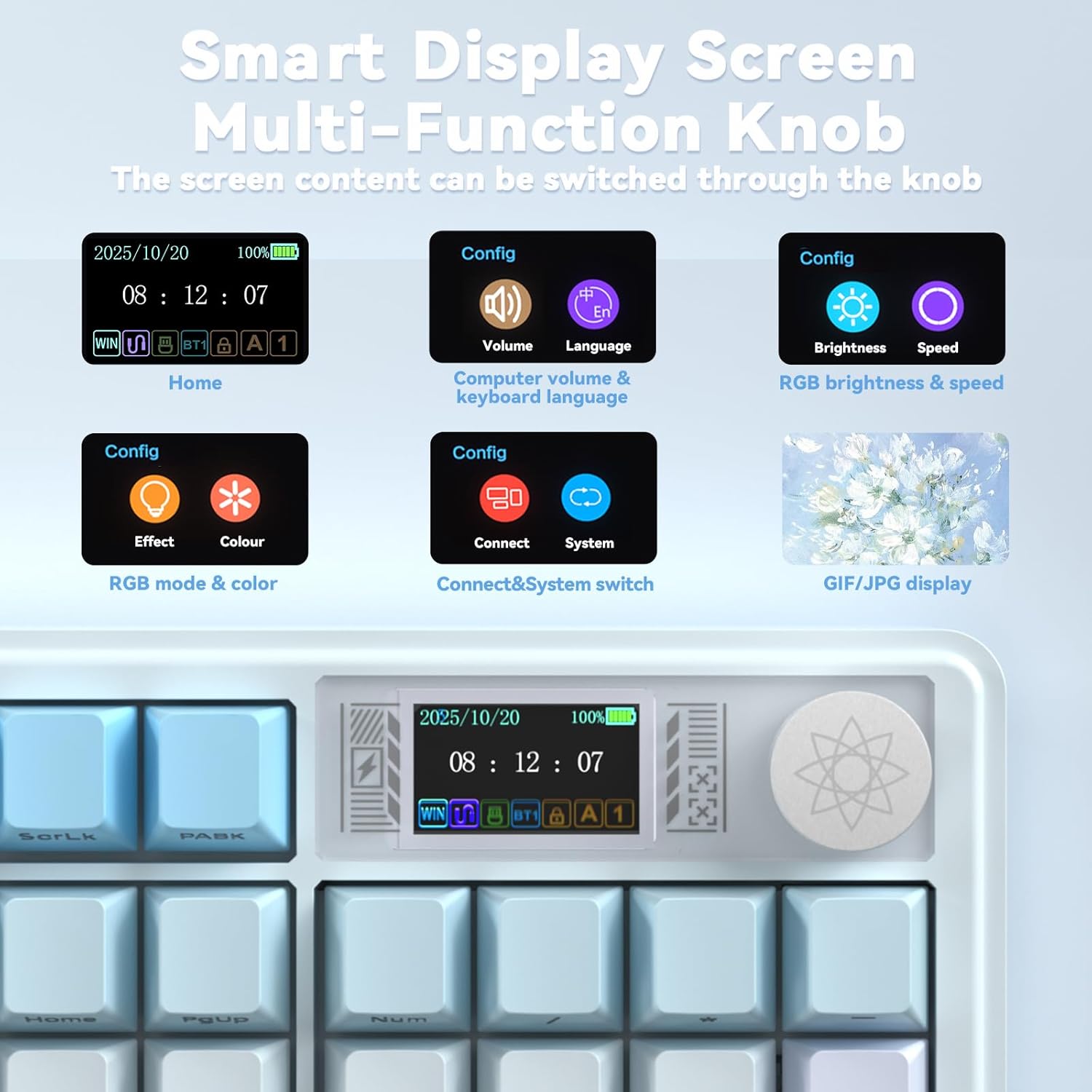
Figure 4: Close-up of the smart display screen and multi-functional knob, illustrating various configuration options like volume, language, brightness, speed, RGB mode, and system switching.
Video 2: Demonstrates the functionality of the K108 Pro's multi-function knob for adjusting settings and controlling media.
2. RGB Backlight Control
The keyboard features 16.8 million RGB colors. You can customize lighting effects, brightness, and speed using the knob or dedicated shortcut keys:
- FN + \|: Toggle light effect.
- FN + Tab: Switch colors.
- FN + ↑/↓: Rongedza kupenya.
- FN + ←/→: Rongedza kumhanya.
A unique music rhythm lighting effect mode is also available.
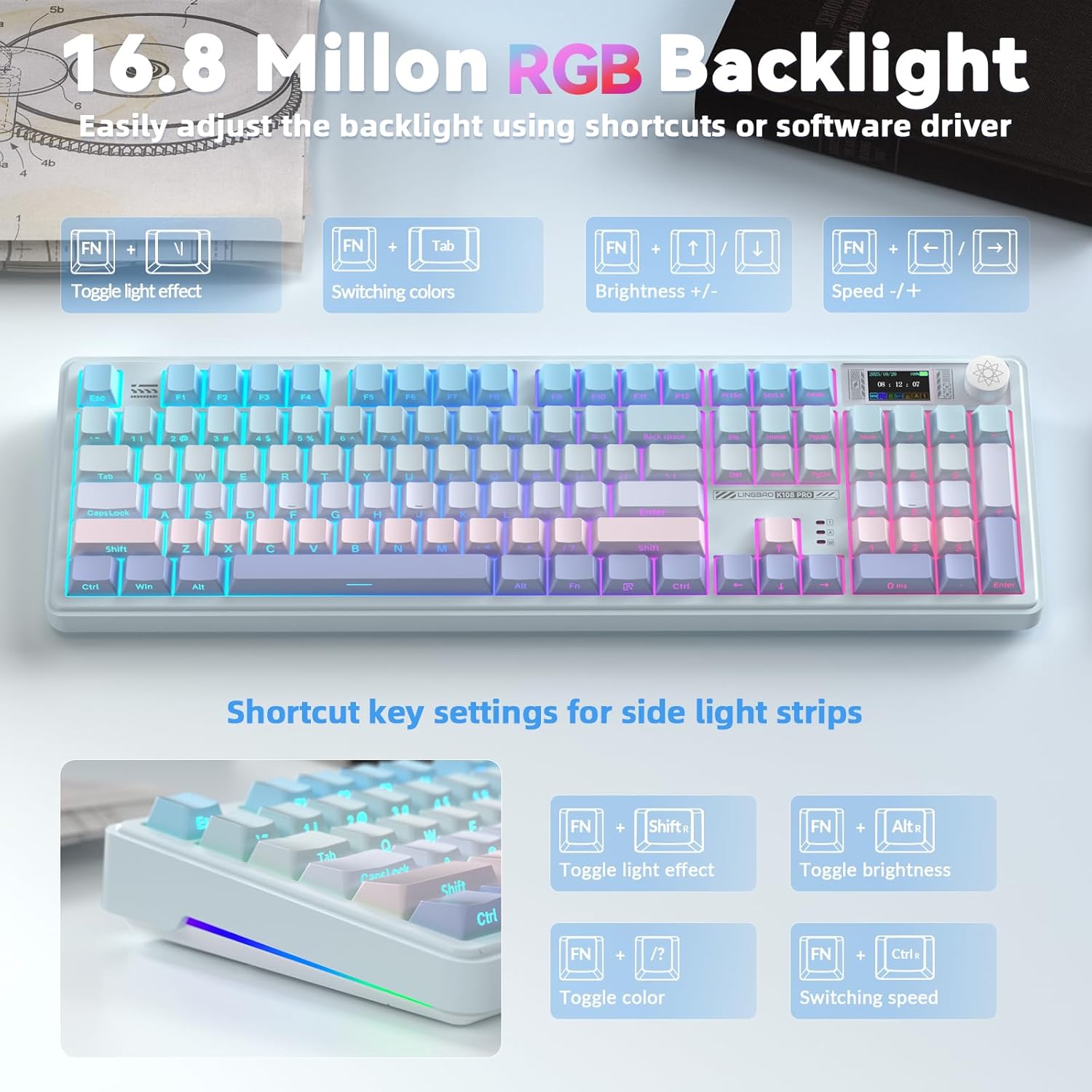
Figure 5: The keyboard displaying its 16.8 million RGB backlight, with shortcut key settings for various lighting adjustments.
3. Key Customization & Macro Programming
The programmable driver allows for full-key macro command programming, enhancing work efficiency or game performance. This feature is accessible only via a wired connection within the driver software.

Figure 6: The multi-functional software driver interface for the K108 Pro, showing options for full key customization, RGB settings, music rhythm, and TFT screen animation customization.
Key Features
1. Hot-Swappable Sockets & Linear Mechanical Switches
The keyboard features a hot-swappable base, supporting both 3-pin and 5-pin switches. This allows users to easily replace mechanical switches for a customized typing experience. Pre-lubricated linear switches provide a smooth, creamy typing feel, preventing accidental presses and offering comfort for both office work and gaming.

Figure 7: Detail of the hot-swappable sockets and linear mechanical switches, highlighting the ease of customization.
2. Five-Layer Gasket Structure & PBT Keycaps
The LINGBAO K108 incorporates a single-key slot PCB design and a five-layer gasket structure. This design reduces noise and delivers a more satisfying, "HIFI creamy-like" typing sound with a soft tactile feel. The keyboard is equipped with durable two-color injection-molded PBT keycaps, ensuring wear resistance and preventing character fade over time.

Mufananidzo 8: Yakaputika view illustrating the five-layer gasket structure, including PBT keycaps, positioning plate, foam layers, and silicone base pad, contributing to a comfortable typing experience.
Maintenance
- Kuchenesa: Use a soft, dry cloth to wipe the keyboard surface. For keycaps, a damp cloth with mild soap can be used. Ensure no liquid enters the keyboard.
- Keycap/Switch Replacement: Use the provided keycap/switch puller for safe removal and installation. Apply gentle, even pressure to avoid damaging components.
- Kuchengeta: Chengetedza kiibhodhi munzvimbo inotonhorera, yakaoma kure nechiedza chezuva uye tembiricha yakanyanyisa.
Kugadzirisa matambudziko
- Kiyibhodhi haisi kudaira:
- Ita shuwa kuti kiibhodhi yakabatidzwa.
- Check the connection mode (2.4G, BT, Wired) and ensure it matches your device's connection.
- For wireless modes, ensure the battery is charged.
- Edza kubatanidza ne USB-C tambo kuti ubvise nyaya dzisina waya.
- Bluetooth nyaya dzekubatanidza:
- Ita shuwa kuti Bluetooth yakabatidzwa pane chako kifaa.
- Kanganwa mudziyo muzvirongwa zvako zveBluetooth uye gadzirisazve.
- Try a different Bluetooth channel (BT1, BT2, BT3).
- Smart screen not displaying correctly:
- Ensure the driver is installed and updated.
- Connect the keyboard in wired mode and check driver settings for screen calibration.
- RGB mwenje haisi kushanda:
- Check lighting settings via the knob or shortcut keys.
- Ensure the keyboard is not in a low power state.
Zvinotsanangurwa
| Feature | Detail |
|---|---|
| Product Dimensions | 19.09 x 7.45 x 2.36 inches (48.5 x 18.9 x 6 cm) |
| Item Weight | 3.79 makirogiramu (1.72 kg) |
| Brand | CORBOBO |
| Model Number | K108 Pro |
| Kubatana Technology | 2.4GHz Wireless, Bluetooth (BT), USB-C Wired |
| Keyboard Tsanangudzo | Mechanical, Hot-swappable (3-pin/5-pin) |
| Special Features | Backlit (RGB), Ergonomic, Smart Screen & Knob, Gasket Structure, PBT Keycaps |
| Bhatiri | 10000mAh (2 Nonstandard Battery batteries included) |
| Battery Life (RGB On) | Kusvikira kumaawa makumi maviri nemashanu |
| Battery Life (RGB Off) | Kusvikira kumaawa makumi maviri nemashanu |
| Inowirirana Devices | Gaming Console, Laptop, PC, Smartphone, Tablet |
Warranty uye Support
For warranty information and technical support, please refer to the official CORBOBO website or contact their customer service directly. The driver download link (bit.ly/m/corbobo) also serves as a resource for software updates and advanced customization.