1. Nhanganyaya
This manual provides detailed instructions for the installation, operation, and maintenance of your Generic Android 15 Car Stereo, Model Y4 8Core 4+64G. This multimedia player is specifically designed for Toyota Hilux Pickup AN120 models from 2015 to 2023, offering advanced features such as GPS navigation, wireless CarPlay, Android Auto, Bluetooth connectivity, and a high-resolution touch screen display.
Please read this manual thoroughly before using the product to ensure correct operation and to prevent damage.

Image 1.1: Main unit of the Android 15 Car Stereo.
2. Safety Information
- Professional Installation Inokurudzirwa: Installation of this car stereo requires specialized skills and knowledge of car electronics. It is highly recommended to have the unit installed by a qualified professional at an authorized auto repair shop.
- Magetsi: Ensure the car stereo is connected to a 12V DC power supply with negative grounding. Incorrect voltage can cause damage to the unit or vehicle.
- Wiring: Follow all wiring diagrams carefully. Incorrect wiring can lead to malfunctions, electrical shorts, or fire hazards.
- Driving Safety: Usashandise mudziyo nenzira inokuvhiringidza pakutyaira. Gara uchikoshesa kuchengetedzeka mumugwagwa.
- Tembiricha: Regedza kuisa chikamu kune tembiricha yakanyanyisa kana zuva rakananga kwenguva refu.
- Unyoro: Keep the unit dry. Exposure to moisture can cause electrical shock or damage.
3. Package Zviri mukati
Ndokumbira utarise kuti zvinhu zvese zvakanyorwa pazasi zvinosanganisirwa mupakeji yako:
- Android Host (Screen)
- Power Cable
- RAC Cable
- Maikorofoni (MIC)
- USB Cable
- 4G Kanyanga
- GPS Antenna
- AHD720P Reversing Camera (Gift)
- All other necessary cable adapters

Mufananidzo 3.1: Pamusoroview of included components in the package.
4. Setup & Installation
This car stereo is designed for a precise fit in Toyota Hilux Pickup AN120 models (2015-2023). Due to the complexity of automotive electrical systems, professional installation is strongly recommended. Incorrect installation can lead to damage to the unit or your vehicle's electrical system.
4.1. Wiring Connections
Refer to the wiring diagrams provided with your unit and consult a professional installer. Ensure all cables are securely connected to their corresponding ports. Pay close attention to power, ground, speaker, and accessory connections.

Image 4.1: Wiring diagrams for different models (Y3/Y4, Y5/Y6, Y8/Y9) showing audio, video, and power connections.
Cherechedza: If your vehicle requires a CANBUS connection, ensure it is properly connected as indicated in the diagram.
4.2. Reverse Camera Installation
The included AHD720P reversing camera requires proper connection to the unit's camera input. Ensure the camera is mounted securely and provides a clear view yekumashure kwemota.
After installation, you may need to adjust the reverse video resolution settings in the system's factory settings menu. Access this menu by entering the password (consult your installer or technical support for the default password).
Video 4.2: This video demonstrates how to check and adjust the reverse video resolution settings for your car radio. This is crucial for ensuring optimal display from your rearview kamera.
5. Operating Instructions
5.1. Simba On / Off uye Basic Navigation
Press the power button to turn the unit on or off. The touch screen interface allows for intuitive navigation through menus and applications. Swipe left or right to access different screens or widgets.

Image 5.1: The car stereo integrated into the Toyota Hilux dashboard, displaying the main interface with navigation.
5.2. CarPlay isina waya uye Android Auto
The unit supports both wireless CarPlay and Android Auto for seamless smartphone integration.
- For Wireless CarPlay:
- Unganidza kuBluetooth.
- Click on "BT Link-K" and wait for connection.
- Kune Wireless Android Auto:
- Unganidza kuBluetooth.
- Click on "Android Auto APP" and wait for connection.
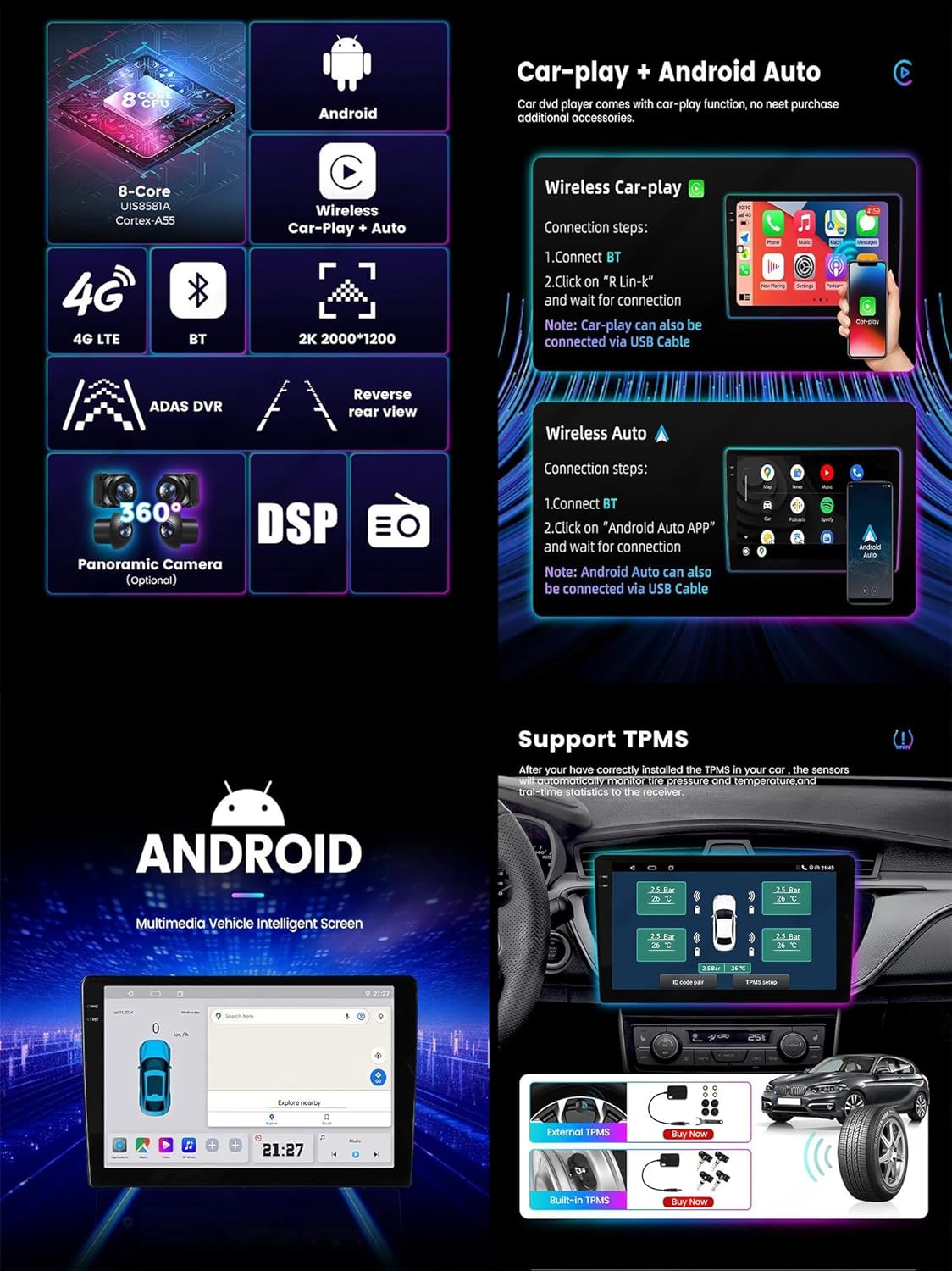
Image 5.2: Visual guide for connecting wireless CarPlay and Android Auto, highlighting TPMS support.
5.3. Bluetooth Kushanda
The built-in Bluetooth 5.0 module allows for hands-free calling and audio streaming. Pair your smartphone to make and receive calls, sync contacts, and play music wirelessly.
- Kubatanidza: Go to the Bluetooth settings on the car stereo and your phone. Select the car stereo's Bluetooth name from your phone's available devices and confirm pairing.
- Kufona Kwemahara: Once paired, you can dial numbers directly from the car stereo's screen or use the synced contacts.
- Bluetooth Mumhanzi: Stream audio from your phone to the car stereo.
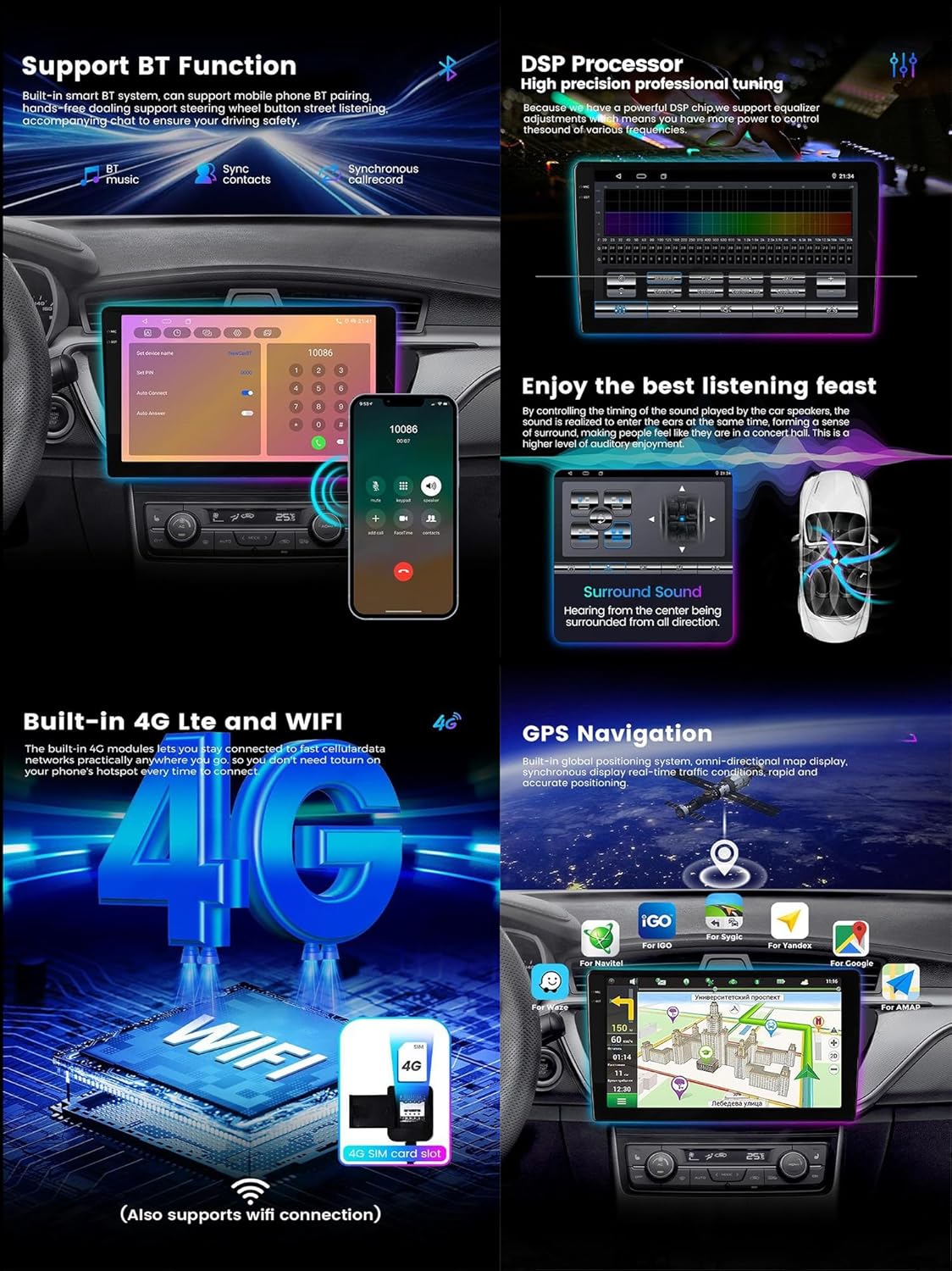
Image 5.3: Bluetooth features including music playback, contact synchronization, and call interface.
5.4. GPS Navigation
The unit features an integrated GPS module supporting both online and offline maps. Access navigation applications directly from the main menu. Ensure the GPS antenna is properly installed for optimal signal reception.
Supported map types include North America. You can download additional maps or use online navigation services via 4G LTE or WiFi connectivity.
5.5. Radio Tuner
Access the FM/AM radio tuner from the main menu. You can scan for stations, save presets, and enjoy clear audio quality. The unit supports RDS (Radio Data System) for displaying station information where available.
6. Zvimiro
- Operating System: Android 15.0
- processor: 8-Core CPU
- Memory: 4GB RAM + 64GB ROM (for Y4 model)
- Ratidza: 9-inch 2.5D IPS high-resolution capacitive multi-touch screen (1280*720 resolution).
- Kubatana: Built-in 4G LTE, 5G WiFi, Bluetooth 5.0, USB.
- Smartphone Kubatanidzwa: Wireless and wired CarPlay, wireless and wired Android Auto.
- Audio: Built-in DSP (Digital Sound Processor) for surround sound, bass, and treble adjustment. Amplifier IC: Toshiba 7388/TCB001.
- Multimedia: Supports mp3, mp4, mp5, wma, jpeg formats. 1920*1080 video recording and playback, 4K video playback.
- Navigation Integrated GPS module with support for online and offline maps (North America map type).
- Mamwe Mabasa: Steering wheel control support, built-in speaker/microphone, picture-in-picture split screen.
- Optional External Support: ADAS DVR, TPMS (Tire Pressure Monitoring System), OBD2, DAB+, Dash Cam.
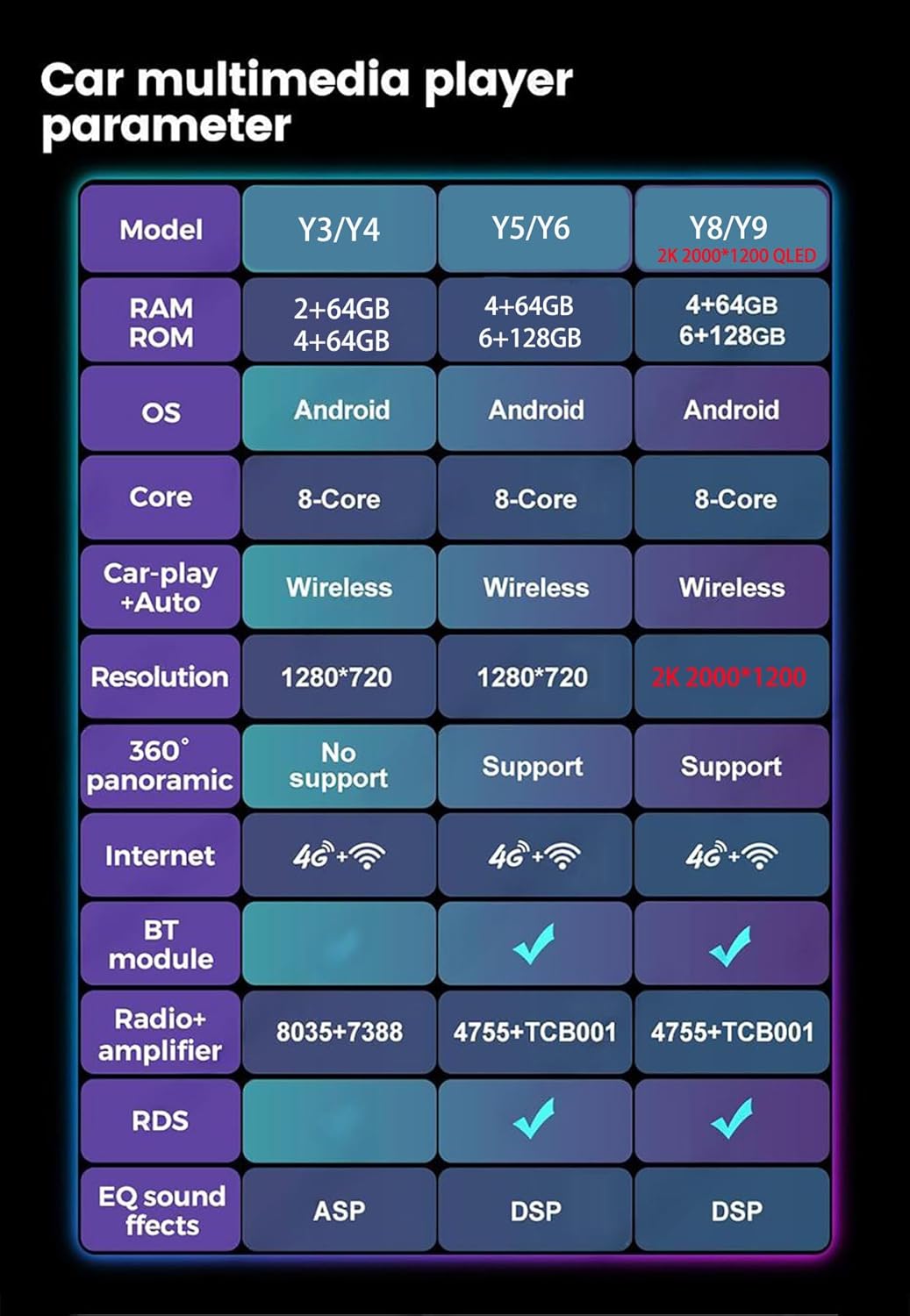
Image 6.1: Parameter comparison table for various models, including RAM, ROM, OS, Core, Car-play+Auto, Resolution, 360 panoramic, Internet, BT module, Radio+amplifier, RDS, and EQ sound effects.
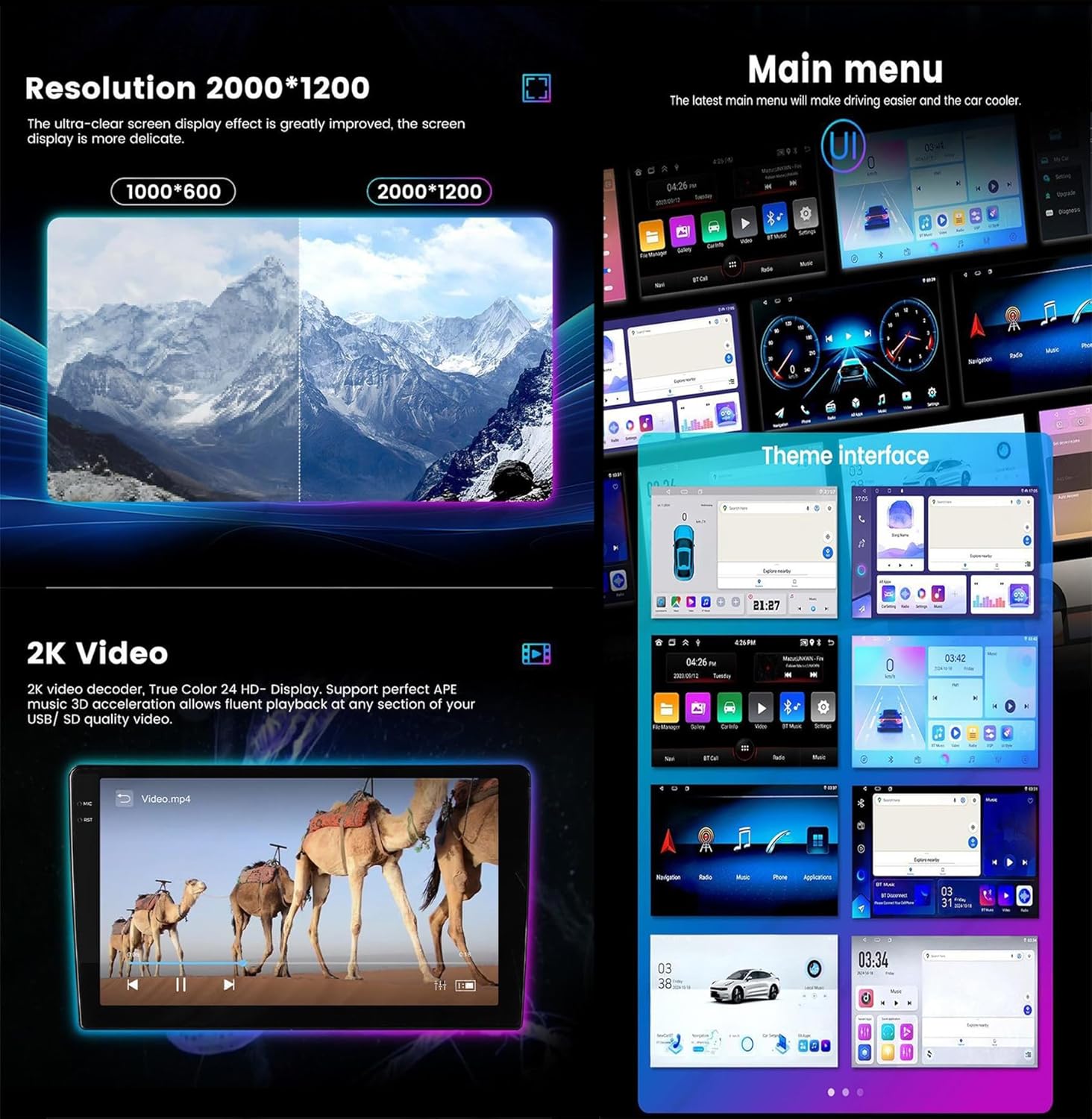
Image 6.2: Demonstrates 2K video resolution, main menu layout, and customizable theme interfaces.
7. Kugadzirisa matambudziko
- Hapana Simba:
- Tarisa zvese zvinobatanidzwa nemagetsi nemafuyusi.
- Iva nechokwadi chekuti mota yabatidzwa.
- Hapana Inzwi:
- Verify speaker connections.
- Check volume levels and mute settings.
- Ensure the correct audio source is selected.
- Kurasikirwa kweChiratidzo cheGPS:
- Ita shuwa kuti GPS antenna yakaiswa zvakanaka uye ine yakajeka view yedenga.
- Check antenna connection to the unit.
- Bluetooth Pairing Nyaya:
- Iva nechokwadi chekuti Bluetooth yakabatidzwa pa stereo nefoni yako.
- Delete previous pairings and try again.
- Tangazve zvese zvishandiso.
- Reverse Camera Not Displaying:
- Check camera power and video signal connections.
- Verify reverse gear signal wire is connected.
- Adjust "Reverse video resolution settings" in Factory Settings (refer to Section 4.2).
- Bata Sikirini Haidaire:
- Tangazve iyo unit.
- If persistent, contact technical support.
8. Zvinotsanangurwa
| Feature | Tsanangudzo |
|---|---|
| Model Number | Y4 8Core 4+64G |
| Operating System | Android 15.0 |
| RAM | 4GB |
| ROM (Kuchengetera Kwemukati) | 64GB |
| Kukura Kwekuratidza | 9 inches |
| Resolution | 1280*720 (IPS) |
| Bata Screen Type | Capacitive Multi-touch |
| Kubatana Technology | 4G, Bluetooth 5.0, USB, Wi-Fi (5G) |
| Special Features | Bluetooth, Touchscreen, GPS, FM/AM, CarPlay, Android Auto, DSP |
| Mepu Type | North America |
| Item Weight | 4.84 pounds (2.2 Makirogiramu) |
| Package Dimensions | 17.72 x 15.75 x 7.48 inches |
9. Warranty & Tsigiro
9.1. Product Warranty
Ichi chigadzirwa chinouya ne 2-makore waranti from the date of purchase. The warranty covers manufacturing defects and malfunctions under normal use. Please retain your proof of purchase for warranty claims.
For specific details regarding warranty coverage and exclusions, please refer to the warranty card included with your product or contact customer service.
9.2. Technical Support
For any technical assistance, installation queries, or troubleshooting not covered in this manual, please contact our customer service. Our technical support team is available to provide ongoing assistance.
If you are unsure about the compatibility of the Android radio with your car, you can send us a photo of your car's model, year of manufacture, and dashboard center console via chat or Amazon mail for verification.


