1. Nhanganyaya
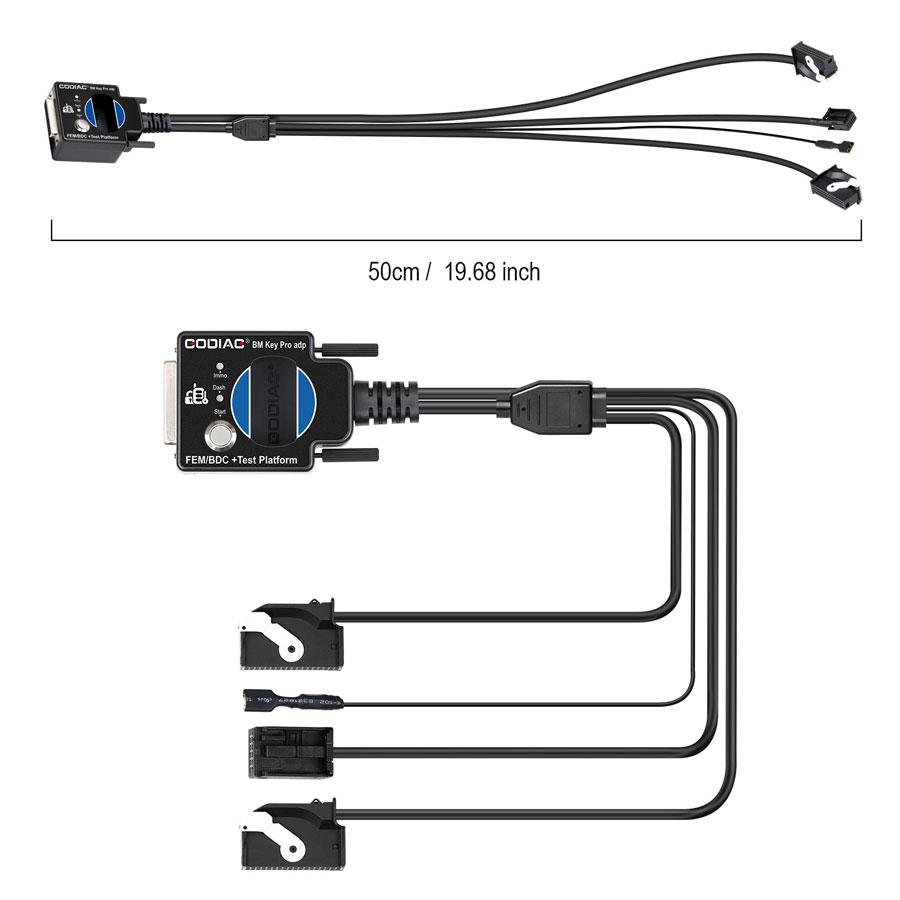
The GODIAG FEM/BDC Test Platform is a specialized tool designed for BMW FEM/BDC immobilizer system programming. It facilitates key programming directly on the workbench via OBD, eliminating the need for repeated disassembly and installation of the control unit in the vehicle. This platform is an essential tool for locksmiths and automotive maintenance engineers.
Zvinokosha:
- Provides easy and convenient connection for FEM/BDC immobilizer systems.
- Enables synchronization testing for programmed FEM/BDC modules and keys.
- Offers a dedicated test environment for professional FEM/BDC recycling.
- Assists in verifying correct synchronization between FEM/BDC and keys.
- Connects FEM/BDC modules with various diagnostic instruments.
- User-friendly design with high quality.

2. Package Zviri mukati
Ita shuwa kuti zvese zvinotevera zvinhu zviripo mupakeji yako:
- 1 x GODIAG For BMW FEM/BDC Programming Test Platform
- 1 x GODIAG OBD2 to OBD25 Cable
3. Product Structure and Dimensions

- DB25 female connector (for connecting to GODIAG GT100 DB25 male port)
- Ignition simulated start switch
- Immobilizer dashboard simulated indicator
- Key sensing area
- Sikirisa bhaudhi
- CON7 connector
- Source connection port
- Appearance (general view)
- CON8 connector
4. Setup Instructions
Follow these steps to set up the GODIAG FEM/BDC Test Platform for use:
- Connect Jumper Cables to ECU: Following the provided wiring diagram, connect the colored jumper cables to the ECU. Ensure correct pin assignments for CAN H (Pin 68), CAN L (Pin 67), and GND (Pin 1).

Connect the colored jumper cables to the ECU according to the wiring diagram. - Connect Test Platform to ECU: Connect the appropriate connectors (CON7, CON8, Odometer, Power) from the test platform to the corresponding ports on the FEM/BDC module. The dedicated OEM FEM/BDC fast connectors ensure a stable and reliable connection without damaging pins.

Connect the test platform to the FEM/BDC module using the labeled connectors. - Chishandiso Chekuongorora Kubatana: Use the OBD 2-in-1 extension cable to connect the GODIAG GT100 (or similar compatible device) to your diagnostic tool, such as ThinkCar Pro, Xhorse Key Tool Plus Pad, VVDI2, or Autel IM608.

The GT100 connected to a diagnostic tablet for programming. - Power On: Plug the power adapter into the GT100. Turn on the power switch of the GT100, then the ECU power switch, and finally the ignition switch.
5. Operating Instructions
This section outlines the general operation for key programming and diagnostics using the GODIAG FEM/BDC Test Platform in conjunction with a compatible diagnostic tool.
Key Programming and Diagnostics Workflow:
- Dhawunirodha uye Isa App: Open the Google Play Store (or equivalent app store) on your diagnostic tablet and search for the "ThinkCar" app (or the app corresponding to your diagnostic tool). Download and install it.
- Connect and Power On: Ensure the GODIAG Test Platform is correctly connected to the FEM/BDC module and powered on as described in the Setup section.
- Launch Diagnostic App: Open the installed diagnostic app on your tablet.
- Vehicle Identification: The app will attempt to auto-detect the VIN. If auto VIN identification fails, you will be prompted to manually select your car model.
- Sarudzo yeSistimu: Navigate to the "All System Diagnostic" or "System Selection" menu within the app. Choose the relevant module, such as "01 Engine Control Module 1" or "02 Transmission Control Module".
- Perform Diagnostics/Programming: Depending on your task, select options like "Read DTC" (Diagnostic Trouble Codes), "Clear Fault Code", "Read Data Stream", or specific key programming functions.
- Generate Report: After completing the diagnostic or programming process, the app can generate a diagnostic report detailing the findings or programming status.
Synchronization Test:
Before reinstalling the FEM/BDC module into the car, use the test platform to verify that the newly programmed key synchronizes correctly with the FEM/BDC module. Place the key in the key sensing area (4) on the platform and observe the immobilizer dashboard simulated indicator (3).

6. Zvinotsanangurwa
| Attribute | Value |
|---|---|
| Brand Name | GODIAG |
| Model Name | SK348 |
| Item Type | Car Diagnostic Cables and Connectors |
| Item Name | GT100 AUTO TOOLS OBD II Break Out Box ECU Connector |
| Function | ECU Connector |
| Feature | Compatible with a lot of devices |
| Hardware Version | Latest |
| Software Shanduro | Programming Test Platform |
| External Testing Certification | CE |
| Item Weight | 1kg |
| Item Height | 24inch |
| Item Width | 8inch |
| Item Length | 12inch |
| Material | Best Quality |
| Performance | Excellent |
| Origin | Mainland China |
| Mabhatiri Anosanganisirwa | Aihwa |
| Mushonga wepamusoro-soro | Hapana |
| Shandisa | Not Telecommunication |
| Electronic | Aihwa |
7. Kugadzirisa matambudziko
- Key Programming: This platform is specifically designed for BMW FEM/BDC key programming. It can be used to program duplicate keys or add new keys for compatible BMW models. It is not suitable for programming keys for other car brands like Chevrolet Matiz.
- Compatibility with Diagnostic Tools: The GODIAG FEM/BDC Test Platform is compatible with various diagnostic tools such as Xhorse Key Tool Plus Pad, VVDI2, and Autel IM608. If you encounter issues, ensure your diagnostic tool's software is up to date.
- VIN Identification Failure: If the diagnostic app fails to auto-detect the VIN, you will be prompted to manually select your car model. Proceed with manual selection to continue the diagnostic or programming process.
- Key Not Starting Car: If a programmed key does not start the car, use the synchronization test feature on the test platform to determine if the issue is a mismatch between the FEM/BDC module and the key.
8. Kuchengeta
To ensure the longevity and optimal performance of your GODIAG FEM/BDC Test Platform, follow these maintenance guidelines:
- Chengetedza mudziyo wakachena uye usina guruva nemarara.
- Store the device in a dry environment, away from moisture and extreme temperatures.
- Dzivisa kudonhedza kana kuisa mudziyo kune zvinokanganisa zvakasimba.
- Regularly check cables and connectors for any signs of wear or damage.
9. Mazano emushandisi
- For lost keys, car owners can remove the FEM/BDC module and the corresponding ECU, then send them to a locksmith. The locksmith can then program a new key and perform a synchronization test on the workbench using this platform before the module is reinstalled in the car.
- Always ensure your diagnostic software is updated to the latest version for the best compatibility and functionality.
- When connecting, utilize the dedicated OEM connectors to prevent damage to the FEM/BDC module's communication pins.
10. Warranty uye Tsigiro
The GODIAG FEM/BDC Test Platform comes with a one-year warranty. For technical support, product inquiries, or warranty claims, please contact your official GODIAG dealer or the manufacturer's customer service channels.


