1. Nhanganyaya
This manual provides essential information for the safe and effective use of your APC AP9870 2.5m C13 to C14 Power Cord. This power cord is designed for connecting devices requiring an IEC-320 C14 input to a power source with an IEC-320 C13 output.
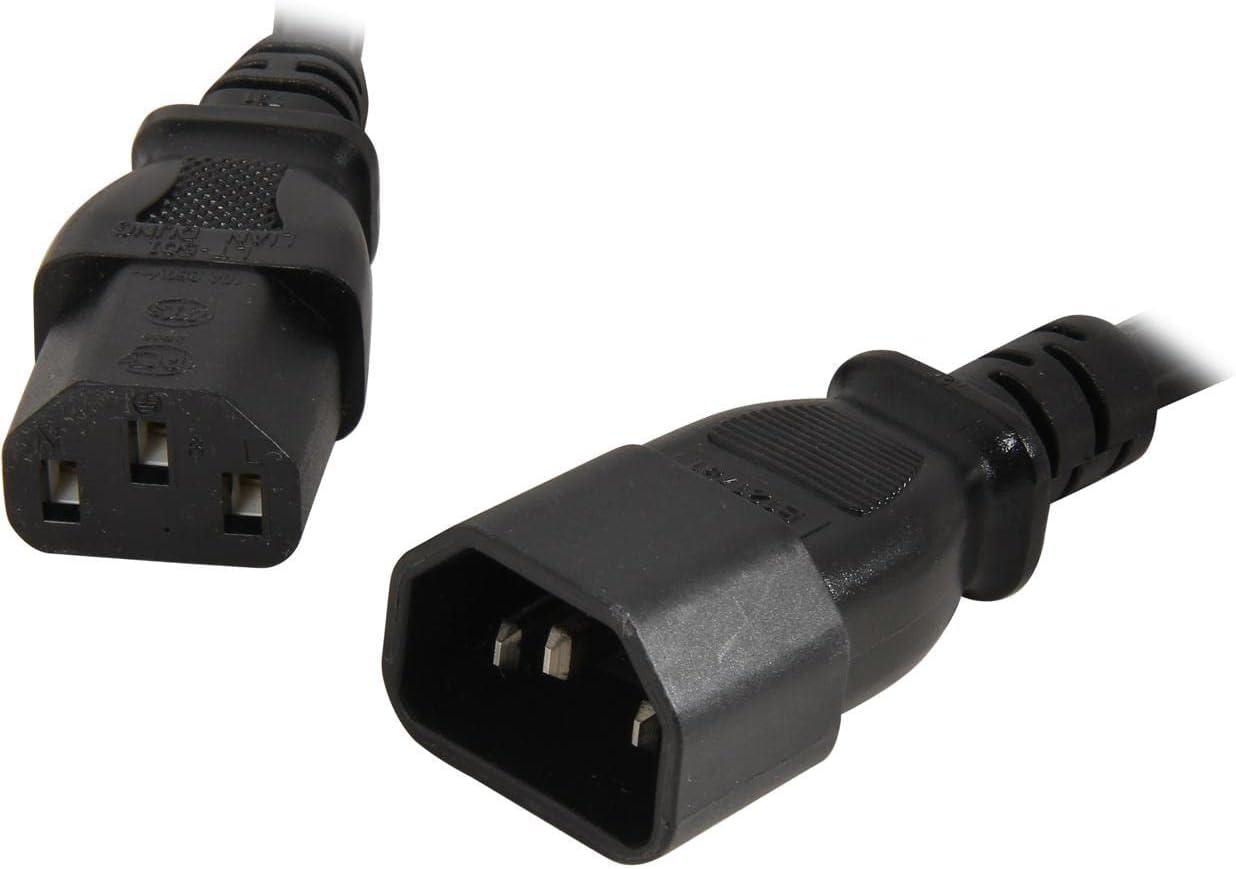
Figure 1: APC AP9870 2.5m C13 to C14 Power Cord, showing both C13 (female) and C14 (male) connectors.
2. Safety Information
- Ensure the power cord is compatible with the voltage and current requirements of your equipment.
- Usaremedze magetsi emagetsi kana tambo dzekuwedzera.
- Dzivisa kukotama kana kupwanya tambo yemagetsi zvakanyanya.
- Keep the power cord away from heat sources, water, and sharp objects.
- Do not use the power cord if it is damaged or frayed.
- Always grasp the plug when disconnecting, not the cord itself.
3. Setup uye Connection
The APC AP9870 power cord facilitates power connection between devices. Follow these steps for proper setup:
- Identify the C14 (male) connector on your power cord. This connector plugs into the C13 (female) receptacle of your power distribution unit (PDU), uninterruptible power supply (UPS), or other power source.
- Identify the C13 (female) connector on your power cord. This connector plugs into the C14 (male) inlet of your computer, server, monitor, or other compatible electronic device.
- Ensure both connections are firm and secure to prevent accidental disconnections or power interruptions.
- Verify that the power source is switched off before connecting or disconnecting the power cord to prevent electrical hazards.

Mufananidzo 2: Pedyo-kumusoro view of the C13 (female) and C14 (male) connectors, illustrating their distinct shapes for correct connection.
4. Kushanda
Once properly connected, the APC AP9870 power cord operates passively to supply power to your connected device. No user interaction is required during operation other than ensuring a stable power supply from the source.
- Ensure the power source is active and providing the correct voltage (90-250 VAC) and frequency (50/60 Hz).
- The cord is rated for a maximum total current draw of 10A per phase. Do not exceed this rating.
5. Key Features
- Urefu: 2.5 metres (anenge 8 tsoka)
- Connectors: IEC 320 EN 60320 C13 (female) to IEC 320 C14 (male)
- Ruvara: Nhema
- Dhirowa Yakanyanya Yazvino: 10A pachikamu
- Chiyamuro Voltage Kuenderana: 90 ~ 250 VAC
- Input Frequency: 50/60 Hz

Figure 3: The APC AP9870 power cord, illustrating its coiled form and typical packaging.
6. Zvinyorwa zveUnyanzvi
| Attribute | Value |
|---|---|
| Model Number | AP9870 |
| Brand | APC |
| Urefu | 2.5 metres (8 ft) |
| Inzwa Zvinotaurwa Connector | IEC-320 C14 (Male) |
| Kuburitsa Chibatanidza | IEC 320 C13 (Female) |
| Color | Nhema |
| Maximum Current | 10A |
| Inobvumirwa Input Voltage | 90 ~ 250 VAC |
| Input Frequency | 50/60 Hz |
| Item Weight | 0.32 ounces |
7. Kuchengeta
The APC AP9870 power cord requires minimal maintenance. Regular inspection can help ensure its longevity and safe operation.
- Periodically inspect the cord for any signs of damage, such as cuts, abrasions, or kinks.
- Check the connectors for any signs of wear, corrosion, or loose pins.
- Keep the cord clean and free from dust and debris. Use a dry, soft cloth for cleaning.
- Store the cord in a cool, dry place when not in use, avoiding tight coiling that could stress the cable.
8. Kugadzirisa matambudziko
If you experience issues with your power connection, consider the following troubleshooting steps:
- Hapana Simba reMudziyo:
- Ensure both the C13 and C14 connectors are fully seated.
- Check if the power source (PDU, UPS, wall outlet) is active and supplying power.
- Test the device with another known-good power cord, if available.
- Inspect the power cord for visible damage. If damaged, replace it immediately.
- Simba repakati:
- Verify that the connectors are not loose.
- Ensure the power cord is not being moved or disturbed during operation.
- Check for any signs of internal damage by gently flexing the cord; if issues persist, replace the cord.
- Kupisa zvakanyanya:
- Ensure the connected device's power draw does not exceed the cord's 10A rating.
- Verify proper ventilation around the power cord and connected devices.
- If the cord feels excessively hot, disconnect it immediately and investigate the cause.
9. Warranty uye Tsigiro
For information regarding warranty coverage and technical support for your APC AP9870 power cord, please refer to the official APC website or contact APC customer service directly. Specific warranty terms may vary by region and purchase date.


