1. Nhanganyaya
Thank you for choosing the Hunter 44760 Multi-Stage Heat Pump Thermostat. This device is designed to provide efficient and precise control over your home's heating and cooling system. It is compatible with single and multi-stage heat pump systems, controlling one stage of cooling and two stages of heat.
Key features of your Hunter 44760 thermostat include:
- Auto Season Changeover: Automatically switches between heating and cooling modes.
- INDIGLO Backlit Display: Provides clear visibility in various lighting conditions.
- Pre-Programmed Temperature & Vacation Overrides: Allows temporary adjustments or extended holds.
- Energy Monitor: Tracks system usage time to help manage energy consumption.
- Chiratidzo Chekuchinja Kwesefa: Reminds you when to replace your system's air filter.
- Auto Recovery: Helps maintain comfort while optimizing energy use.
- Yambiro Yebhatiri Yakaderera: Inokuzivisa kana mabhatiri achida kutsiviwa.
- Battery Back-up: Inochengetedza marongero panguva yemagetsitages (inoda mabhatiri matatu eAAA, asipo).
2. Kuiswa
The Hunter 44760 thermostat is designed for easy do-it-yourself installation. Please follow these instructions carefully to ensure proper setup and operation.
2.1 Usati Watanga
- Dzima simba to your heating and cooling system at the main circuit breaker or fuse box before beginning installation.
- Ensure you have the necessary tools: screwdriver, wire stripper/cutter, and electrical tape.
- Confirm your system is compatible with a multi-stage pombi yekupisa thermostat.
2.2 Removing Your Old Thermostat and Wiring
- Bvisa chifukidziro chethermostat yako yauri kushandisa nokungwarira.
- Before disconnecting any wires, label each wire with the corresponding terminal letter from your old thermostat. This is crucial for correct wiring of the new thermostat.
- Disconnect the wires and remove the old thermostat's wall plate.
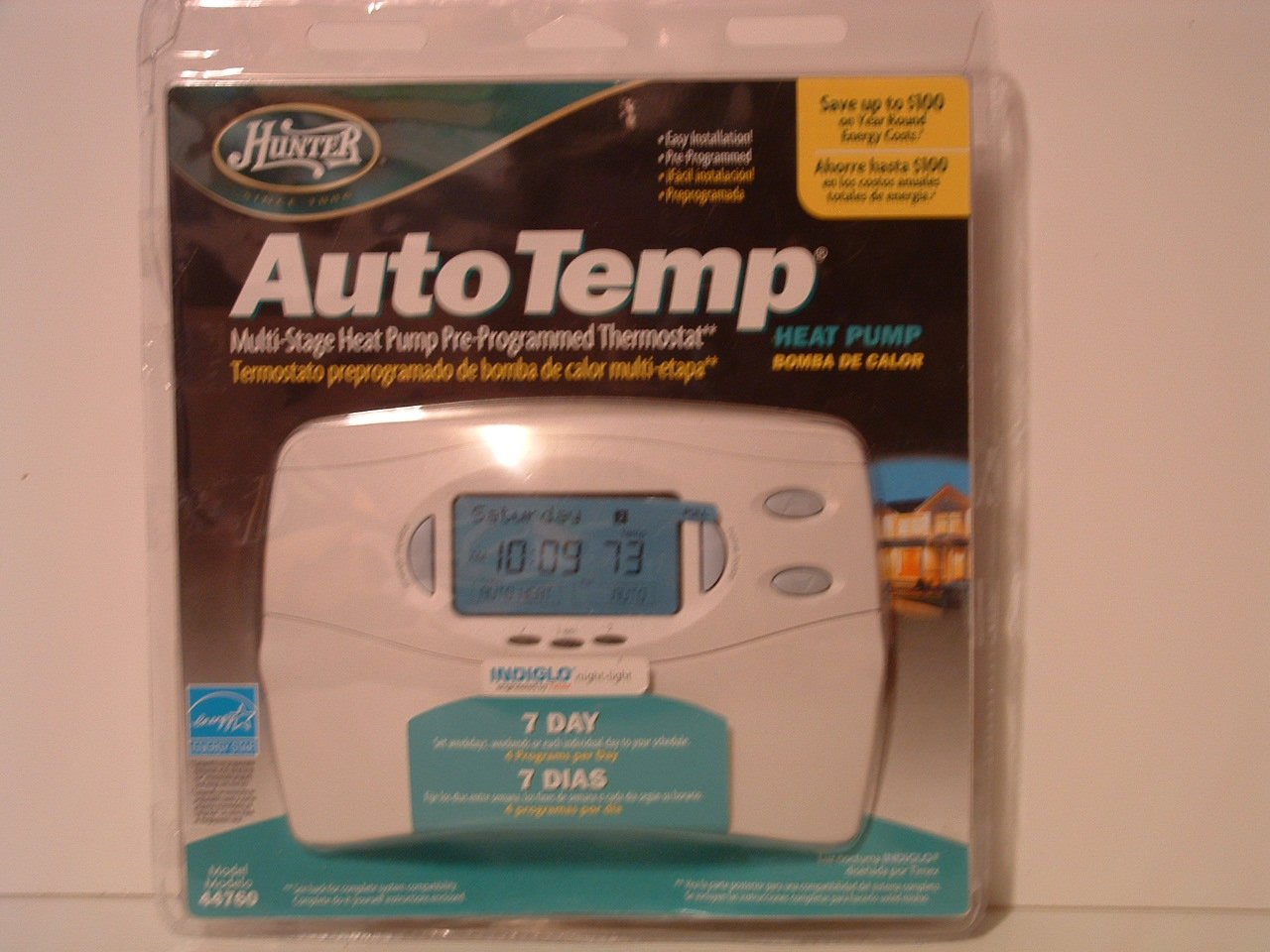
Image: Hunter 44760 Thermostat packaging illustrating key features and simplified installation steps. The top right corner shows a visual guide for removing the existing thermostat, labeling wires, installing the new wall plate, and attaching the cover.
2.3 Kuisa iyo New Thermostat
- Install the new wall plate provided with your Hunter 44760 thermostat. Secure it to the wall using the included screws.
- Batanidza mawaya akanyorwa kune materminal anoenderana pawall plate itsva. Tarisa kune dhayagiramu yewaya mubhuku rakazara rekubatanidza kwakananga.
- Isa mabhatiri mana eAAA (asina kubatanidzwa) muchikamu chebhatiri.
- Attach the thermostat cover to the wall plate, ensuring it clicks securely into place.
- Restore power to your heating and cooling system at the circuit breaker.
3. Kushanda
This section details how to operate your Hunter 44760 thermostat, including basic controls and programming features.
3.1 Ratidza Pamusoroview
The thermostat features an INDIGLO backlit display that shows the current temperature, set temperature, time, and system status. The display is designed for clear readability.
Image: Hunter 44760 Thermostat packaging showing the thermostat's front panel with its digital display (showing 10:09 and 73 degrees) and various control buttons below it.
3.2 Basic Controls
- Temperature UP/DOWN Buttons: Use these buttons to adjust the desired temperature setting.
- Fan Switch:
- AUTO: The fan runs only when the heating or cooling system is operating.
- ONI: Iyo fani inomhanya ichienderera, zvisinei nekuti yekudziya kana kutonhora system iri kushanda.
- System Switch:
- KUSVIRA: Iyo thermostat inodzora kudziyisa system.
- KUTONHORA: Iyo thermostat inodzora kutonhora system.
- DZIMA: The heating and cooling systems are turned off.
3.3 Programming Features
The Hunter 44760 offers advanced programming options for energy efficiency and comfort.
- Auto Season Changeover: This feature automatically switches between heating and cooling modes as needed, eliminating the need for manual adjustment.
- Home Today & Vacation Overrides: Use these functions for temporary temperature adjustments or to set an extended hold for vacation periods.
- Energy Monitor: Svika pachinhu ichi view the run time of your heating and cooling system, helping you understand and manage energy usage.
- Chiratidzo Chekuchinja Kwesefa: A reminder will appear on the display when it's time to check or replace your system's air filter.
- Auto Recovery: This intelligent feature ensures your home reaches the desired temperature by the start of a programmed period, optimizing system operation.
- Permanent and Vacation Hold: These settings allow you to maintain a specific temperature indefinitely or for a set vacation duration, overriding the regular program.
- Returns to Programmed Settings: The thermostat can easily revert to your pre-programmed schedule.
4. Kuchengeta
Kugadziriswa kwakakodzera kunovimbisa kugara kwenguva refu uye kushanda zvakanaka kwethermostat yako.
4.1 Kutsiviwa kwebhatiri
The thermostat requires two AAA batteries (not included) for operation and to maintain settings during power outages. A low battery warning will appear on the display when replacement is needed.
- Gently pull the thermostat body away from the wall plate to access the battery compartment.
- Remove the old batteries and insert two new AAA alkaline batteries, ensuring correct polarity (+/-).
- Reattach the thermostat body to the wall plate.
4.2 Kuchenesa
Geza kunze kwe thermostat nekanyoro, damp jira. Usashandise abrasive cleaners kana solvents, sezvo izvi zvinogona kukuvadza kupedzisa kana mukati mezvikamu.
5. Kugadzirisa matambudziko
If you encounter issues with your thermostat, refer to the following common problems and solutions.
- Thermostat Display is Blank:
- Check if the power to your HVAC system is on at the circuit breaker.
- Replace the AAA batteries in the thermostat.
- Sisitimu Haisi Kupindura (Hapana Kudziisa/Kutonhodza):
- Ensure the system switch is set to HEAT or COOL, not OFF.
- Verify the fan switch is set to AUTO or ON.
- Check if the set temperature is above (for heat) or below (for cool) the current room temperature.
- Confirm all wiring connections are secure.
- Kuverenga Kusiri Kodzero
- Ita shuwa kuti thermostat haina kuratidzwa kuchiedza chezuva chakananga, madhirafita, kana kunopisa.
- Allow time for the thermostat to acclimate to the room temperature after installation.
- Filter Change Indicator Remains On:
- Replace your system's air filter.
- Reset the filter change indicator through the thermostat's settings menu (refer to the full manual for specific steps).
6. Zvinotsanangurwa
Below are the technical specifications for the Hunter 44760 Multi-Stage Heat Pump Thermostat.
| Feature | Tsanangudzo |
|---|---|
| Brand | Hunter |
| Model Number | 44760 |
| Voltage | 24 Volts |
| Color | Chena |
| Special Features | Low Battery Indicator, INDIGLO Backlight, Energy Star Compliant |
| Product Dimensions | 2 x 7 x 5 inches |
| Item Weight | 1.1 makirogiramu |
| Mabhatiri Anodiwa | 2 AAA mabhatiri (asina kuisirwa) |
| Control Type | Bhatani Kudzora |
7. Ruzivo rweWaranti
The Hunter 44760 Multi-Stage Heat Pump Thermostat comes with a Yakaganhurirwa Yegore Rimwechete Warranty from the date of purchase. This warranty covers defects in materials and workmanship under normal use. Please retain your proof of purchase for warranty claims. For full details regarding warranty terms and conditions, refer to the documentation included with your product or contact Hunter Fan Company customer support.
8. Mutengi Tsigiro
If you have any questions, require technical assistance, or need further support regarding your Hunter 44760 thermostat, please contact the Hunter Fan Company customer service. Contact information can typically be found on the manufacturer's websaiti kana mune yekutanga chigadzirwa kurongedza.


