Nhanganyaya
This manual provides comprehensive instructions for the setup, operation, and maintenance of your Coby CT-P9040 5.8 GHz Analog Cordless Phone. Please read this manual thoroughly before using your phone to ensure proper functionality and to prevent damage.
Package Zviri mukati uye Zvikamu
Usati watanga, iva nechokwadi chekuti zvese zviri mupakeji:
- Cordless Handset
- Base Unit
- AC Simba Adapter
- Mutsara Wefoni
- Rechargeable Battery Pack
- Mushandisi Chinyorwa (gwaro iri)
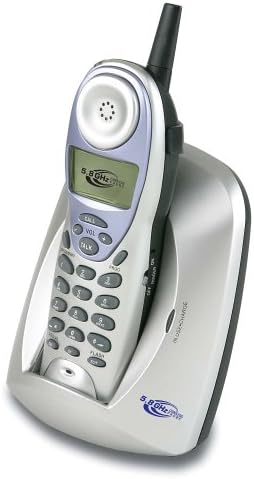
Image: The Coby CT-P9040 cordless phone, showing the handset docked in its silver base unit. The handset features a display screen, numeric keypad, and function buttons. The base unit has a charging cradle for the handset.
Setup Guide
1. Kuiswa kwebhatiri
- Tsvaga mukamuri yebhatiri kuseri kweruoko.
- Vhura chivharo chebhatiri.
- Connect the rechargeable battery pack connector to the jack inside the compartment.
- Place the battery pack into the compartment and close the cover securely.
2. Kubatanidza Chikamu Chekutanga
- Connect one end of the telephone line cord to the "LINE" jack on the back of the base unit.
- Connect the other end of the telephone line cord to a standard telephone wall jack.
- Connect the AC power adapter to the "DC IN" jack on the back of the base unit.
- Batanidza adapta yemagetsi yeAC muchikamu chemagetsi chakajairika.
3. Kutanga Kuchaja
Place the handset in the base unit's charging cradle. Ensure the "IN CHARGE" indicator light on the base unit illuminates, indicating proper charging. For optimal battery performance, charge the handset for at least 12-14 hours before initial use.
Operating Instruction
Kuita Kufona
- Pick up the handset from the base unit or press the TALK bhatani.
- Teerera kune dial toni.
- Dzvanya nhamba yefoni yaunoda.
- Kuti upedze kufona, tinya iyo TALK button again or place the handset back in the base unit.
Kupindura Call
Kana foni yarira, simudza ruoko kana kudzvanya iyo TALK bhatani rekupindura kufona.
Redial Function
Kudzokorora nhamba yekupedzisira inonzi, pinda iyo REDIAL bhatani paruoko.
Kugadzirisa Inzwi
Panguva yekufona, shandisa iyo VOL+ uye VOL - mabhatani ari pafoni kuti ugadzirise vhoriyamu yehedhi.
Flash Function
Press the FLASH button to use call waiting or transfer calls if supported by your telephone service provider.
Storing Phone Numbers (Speed Dial)
Your phone can store up to 10 numbers for frequently called contacts. Refer to the detailed instructions in the full manual for programming speed dial entries.
Maintenance and Care
- Keep the phone away from heat sources, direct sunlight, and moisture.
- Chenesa nzvimbo dzefoni neruoko rwakapfava, damp jira. Usashandise abrasive cleaners kana solvents.
- Ensure the charging contacts on the handset and base unit are clean to maintain proper charging.
- Kana foni isingazoshandiswi kwenguva yakareba, bvisa bhatiri kubva pafoni.
Kugadzirisa matambudziko
| Dambudziko | Zvinogona Kukonzera | Solution |
|---|---|---|
| Hapana dial toni | Telephone line cord is disconnected. | Ita shuwa kuti tambo yefoni yakabatana zvakachengeteka kune ese base base unit uye jack madziro. |
| Handset haichaji | Handset not properly seated in cradle or dirty charging contacts. | Reseat the handset in the base unit. Clean the charging contacts on both the handset and base unit with a dry cloth. |
| Hunhu husina kunaka / Static | Interference from other electronic devices or out of range. | Move the base unit away from other electronic devices (e.g., microwaves, Wi-Fi routers). Move closer to the base unit. |
| Haikwanise kuita/kugamuchira mafoni | Power adapter disconnected or battery low. | Check if the AC power adapter is securely plugged in. Ensure the handset battery is fully charged. |
Zvinotsanangurwa
- Muenzaniso: CT-P9040 SVR
- Frequency: 5.8 GHz Analog
- Zviteshi: 40 Channel Auto Scan
- Memory: 10-number speed dial storage
- Mabasa: Flash, Redial, Pause, Tone/Pulse Switch
- Headset Jack: Built-in 2.5mm
- Kukwidza: Desk and Wall Mountable
- Zviyero (L x W x H): 5 x 8 x 4 inches
- Kurema 1.8 makirogiramu
- Ruvara: Sirivha
- Caller ID: Haina Kutsigirwa
- Multiline Operation: Kushanda Kwemutsara Mumwe
Warranty uye Support
For warranty information and technical support, please refer to the warranty card included with your product or visit the official Coby website. Chengetedza risiti yako yekutenga sehumbowo hwekutenga kwezvichemo zvewaranti.
For further assistance, you may contact Coby customer service. Contact details are typically available on the manufacturer's websaiti kana mune chigadzirwa kurongedza.


