1. Nhanganyaya
The Extech EX310 is a compact, manual-ranging digital multimeter designed for a variety of electrical measurements. It features an extra-large 2000-count LCD and a built-in Non-Contact AC Voltage Detector (NCV) for enhanced safety. This device is capable of measuring AC/DC Voltage, AC/DC Current, Resistance, Diode, and Continuity, and includes a battery test function for 1.5V and 9V batteries. Its robust design, including a protective rubber holster and tilt stand, makes it suitable for field use.
2. Safety Information
Gara uchitevedzera matanho ekuchengetedza paunenge uchishandisa chero mudziyo wekuyedza wemagetsi. Kukundikana kuita izvi kunogona kukonzera kukuvara kana kukuvara kwemita kana mudziyo uri kuyedzwa.
- The Extech EX310 is UL listed with a CAT III – 600 Volt safety rating.
- Usashandise zvinopfuura zvakatemerwa voltage, as marked on the meter, between terminals or between any terminal and ground.
- Always inspect test leads for damage before use. Replace if insulation is compromised.
- Chenjerera zvakanyanya paunenge uchishanda nemagetsi aripo.
- Use the Non-Contact Voltage (NCV) detector as a preliminary check for live AC voltage, but always verify with direct contact measurements when possible.
- Ensure the function switch is set to the correct range before making measurements.
3. Zvigadzirwa zveChigadzirwa
- 9-Function Manual-Ranging DMM: Zviyero AC/DC voltage, AC/DC current (up to 10 A), resistance, diode, continuity, plus 1.5 V/9 V battery tests.
- Isiri-Yekubatanidza VoltagChinoongorora e (NCV): Built-in NCV with red LED and audible beeper alerts to the presence of live AC (100-600 VAC) without probes.
- Extra-Large 2000-Count Display: Clear, easy-to-read 1-inch digits on a high-count LCD ensure readability.
- Rugged, Portable Design: Compact meter (5.7 × 2.9 × 1.6 in, 9 oz) with protective rubber holster, tilt stand, and low-battery indicator.
- Reliable Safety & Accuracy: 0.5% basic accuracy. Designed to UL/CAT II-1000 V & CAT III-600 V safety standards.
4. Package Zviri mukati
The Extech EX310 package includes the following items:
- Extech EX310 Mini Digital Multimeter
- Test Leads
- 9 Volt Battery
- Tilt Stand
5. Chigadzirwa Pamusoroview (Controls and Display)
Familiarize yourself with the components of your EX310 multimeter:

Mufananidzo: Mberi view of the Extech EX310 Mini Digital Multimeter, showing the large LCD display, function dial, NCV button, and input jacks.
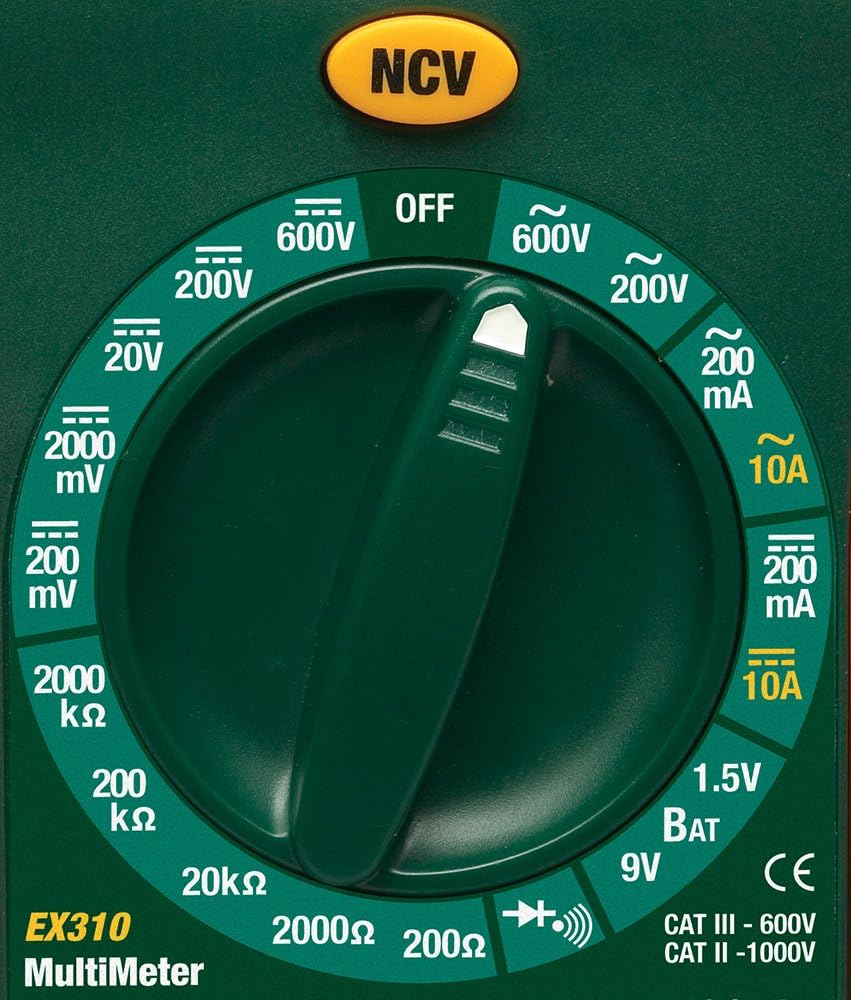
Image: Close-up of the Extech EX310's function dial, illustrating the various measurement ranges and functions such as voltage, current, resistance, diode, continuity, and battery test.
- Chiratidziro cheLCD: Inoratidza kuyerwa kuverenga, mayuniti, uye zviratidzo zvebasa.
- Function Switch: Rotary dial to select the desired measurement function and range.
- Bhatani reNCV: Activates the Non-Contact Voltage detection feature.
- Input Jacks: Terminals for connecting test leads (COM, VΩmA, 10A).
6. Setup
6.1. Kuiswa kwebhatiri
- Ita shuwa kuti multimeter yakadzimwa.
- Tsvaga chivharo chebhatiri kuseri kwemamita.
- Vhura siruu (s) yekuchengeta uye bvisa kavha.
- Isa bhatiri idzva re9V, uchiona polarity chaiyo.
- Tsiva chifukidziro wochisunga ne screws.
Chiratidzo chebhatiri rakaderera chichaonekwa pachiratidziro kana bhatiri richida kutsiviwa.
6.2. Kubatanidza Test Leads
Batanidza bvunzo inotungamira kune akakodzera ekuisa jacks:
- Isa mutema bvunzo lead mu COM (common) jack.
- Kune zviyero zvakawanda (Voltage, Resistance, Diode, Continuity, mA Current), insert the red test lead into the VΩmA jack.
- Kana paine magetsi akakwira (kusvika ku10A), isa tambo tsvuku yekuyedza mu 10A jack.
7. Operating Instructions
Before making any measurement, ensure the test leads are correctly connected and the function switch is set to the desired range.
7.1. AC/DC Voltage Kuyera
- Set the function switch to the desired ACV (~) or DCV (---) range (e.g., 200V, 600V).
- Connect the red test lead to the VΩmA jack and the black test lead to the COM jack.
- Bata ma probes ekuyedza kusvika panzvimbo dzedunhu panowanikwa voltage inofanira kuyerwa.
- Verenga bhukutage kukosha paLCD.
7.2. AC / DC Current Measurement
Yambiro: Never attempt to measure current on a circuit with voltage present across the current terminals. This can blow the fuse or damage the meter.
- Dzima simba kudunhu.
- Set the function switch to the desired ACA (~) or DCA (---) range (e.g., 200mA, 10A).
- Connect the red test lead to the appropriate current jack (VΩmA for mA, 10A for 10A) and the black test lead to the COM jack.
- Vhura dunhu rinofanira kuyerwa magetsi wobva wabatanidza mita yacho muzvikamu zvakatevedzana.
- Isa simba padunhu uye verenga kukosha kwazvino kuri paLCD.
7.3. Resistance Measurement
- Ita shuwa kuti dunhu kana chikamu hachina simba.
- Set the function switch to the desired Resistance (Ω) range (e.g., 200Ω, 20kΩ).
- Connect the red test lead to the VΩmA jack and the black test lead to the COM jack.
- Touch the test probes across the component or circuit to be measured.
- Verenga kukosha kwekudzivirira paLCD.

Image: The Extech EX310 Multimeter displaying a reading while test leads are connected to a circuit board, demonstrating a typical measurement scenario.
7.4. Diode Test
- Ensure the component is de-energized.
- Set the function switch to the Diode (→|) position.
- Connect the red test lead to the VΩmA jack and the black test lead to the COM jack.
- Bata probe tsvuku kuanode uye probe nhema ku cathode ye diode.
- Verenga bhuku remberitage drop on the LCD. Reverse the probes to check for an open circuit (OL).
7.5. Kuenderera mberi Muedzo
- Ita shuwa kuti dunhu kana chikamu hachina simba.
- Set the function switch to the Continuity (→))) position.
- Connect the red test lead to the VΩmA jack and the black test lead to the COM jack.
- Touch the test probes across the circuit or component.
- An audible tone will sound if continuity exists (resistance below approximately 30Ω).

Mufananidzo: Kuvhara view of the Extech EX310 Multimeter with its test leads connected to an internal electronic circuit, demonstrating precise measurement capabilities.
7.6. Vasina-Kubata Voltage (NCV) Kuonekwa
- Seta shanduko yebasa kune chero chinzvimbo.
- Press and hold the NCV button.
- Move the top of the meter (where the NCV sensor is located) close to the suspected AC voltage source (e.g., wire, outlet).
- A red LED will illuminate and an audible beeper will sound, increasing in intensity as the meter gets closer to the live AC voltage.

Image: A hand holding the Extech EX310 Multimeter near an electrical wall outlet, demonstrating the use of the Non-Contact Voltage (NCV) detection feature to identify live circuits.
7.7. Battery Test (1.5V/9V)
- Set the function switch to the 1.5V BAT or 9V BAT position.
- Connect the red test lead to the VΩmA jack and the black test lead to the COM jack.
- Touch the red probe to the positive terminal and the black probe to the negative terminal of the battery.
- Verenga bhatiri voltage paLCD.
8. Kuchengeta
8.1. Kutsiviwa kwebhatiri
Refer to Section 6.1 for detailed instructions on replacing the 9V battery when the low battery indicator appears.
8.2. Fuse Replacement
If the current measurement functions cease to operate, the internal fuse(s) may need replacement. The fuses are typically located beneath the battery compartment. Refer to the full product manual for specific fuse ratings and replacement procedures. Always replace with fuses of the identical type and rating.
8.3. Kuchenesa
Nguva nenguva pukuta kesi yacho nekushambadziraamp jira nesipo isina kunyorova. Usashandise zvinogumbura kana zvinonyungudutsa. Iva nechokwadi chekuti mita yacho yakaoma zvachose usati washandisa.
9. Kugadzirisa matambudziko
- Hapana Chiratidziro: Check the 9V battery. Ensure it is correctly installed and has sufficient charge.
- Kuverenga Kusina kururama: Verify that the function switch is set to the correct measurement type and range. Ensure test leads are properly connected and making good contact with the circuit.
- Chiyero Chazvino Haisi Kushanda: Check the internal fuse(s). Refer to the Maintenance section for fuse replacement.
- NCV Haisi Kuona: Ensure the NCV button is pressed and held. Confirm the presence of AC voltage (100-600 VAC) in the area being tested.
10. Zvinotsanangurwa
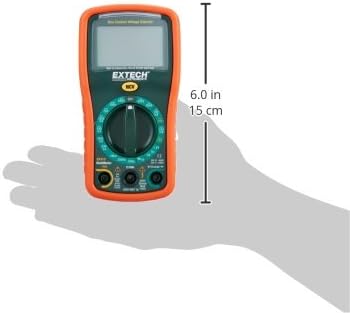
Image: Diagram illustrating the physical dimensions of the Extech EX310 Multimeter, showing a length of 6.0 inches (15 cm).
| Tsanangudzo | Value |
|---|---|
| Brand | Extech |
| Model Number | EX310 |
| Chiyero Type | Multimeter |
| Style | Manual Ranging |
| Kururama Kwechokwadi | +/-0.5% |
| Display | 2000-Count LCD |
| Safety Rating | UL listed CAT III - 600V, CAT II - 1000V |
| Simba Source | 9V bhatiri |
| Zviyero (L x W x H) | 5.7 x 1.6 x 2.9 inches (14.5 x 4.1 x 7.4 cm) |
| Item Weight | 0.704 ounces (0.02 Makirogiramu) |
| Inosanganisirwa Zvikamu | Test leads, 9 Volt battery, tilt stand |
11. Ruzivo rweWaranti
The Extech EX310 Mini Digital Multimeter is covered by a 1-makore zvikamu uye basa waranti from the date of purchase. Please retain your proof of purchase for warranty claims. This warranty covers manufacturing defects and workmanship under normal use.
12. Mutengi Tsigiro
For technical assistance, troubleshooting beyond this manual, or warranty service, please contact Extech customer support. Refer to the official Extech websaiti kana chigadzirwa kurongedza kune yazvino ruzivo ruzivo.


