1. Nhanganyaya
This manual provides comprehensive instructions for the safe and efficient use of your Logisys PS480D 480W ATX Power Supply. Please read this manual thoroughly before installation and operation to ensure proper functionality and to prevent damage to the unit or other components.

Figure 1: Logisys PS480D 480W ATX Power Supply, front view with cables bundled.
2. Safety Information
YAMBIRO: Power supplies contain high voltagzvikamu zve e. Usavhure magetsi casing. Iko hakuna zvikamu zvinoshandisika mushandisi mukati.
- Iva nechokwadi chekuti magetsi abviswa paAC socket usati waisa kana kugadzirisa.
- Always ground yourself to prevent electrostatic discharge (ESD) when handling internal computer components.
- Usashandise simba remagetsi munzvimbo dzakanyorova kana kuti dzakanyorovaamp mamiriro.
- Iva nechokwadi chekufefetedza kwakaringana kutenderedza magetsi kudzivirira kupisa.
- Use only the provided power cables and connectors.
3. Zvigadzirwa zveChigadzirwa
The Logisys PS480D is a 480W ATX power supply designed for personal computers. Key features include:
- Kubudirira Kwepamusoro
- Low Noise & Ripple
- Kupfuura Voltage Dziviriro
- Short Circuit Protection
- Built-in EMI Filter
- Insulation Resistance 100MΩ min.
- Complies with FCC part 15J class B 115VAC operation and CISPR 22 230 VAC operation.
- Meets UL 1950, CSA 22.2 LEVEL 3 Requirement.
- 100% Burn-in test / Vibration test / Hi-pot test / Leakage current test.
- MTBF above 100,000 hours at 25 °C.

Figure 2: Rear panel of the power supply with fan, AC inlet, and power switch.
4. Setup uye Kuiswa
Follow these steps to install the Logisys PS480D power supply into your computer system.
- Kugadzirira: Ensure your computer is completely powered off and unplugged from the wall outlet. Open your computer case according to its manufacturer's instructions.
- Bvisa Simba Rekare (kana zvichibvira): Disconnect all cables from the old power supply to the motherboard, drives, and other components. Unscrew and remove the old power supply from the case.
- Isa Simba Idzva: Carefully place the Logisys PS480D into the power supply bay of your computer case. Secure it with screws.
- Batanidza Simba Guru: Connect the 20+4 pin ATX mainboard connector to your motherboard. If your motherboard uses a 20-pin connector, detach the 4-pin section. If it uses a 24-pin connector, connect both sections.
- Batanidza Simba reCPU: Connect the 4-pin +12V power connector to the corresponding port on your motherboard.
- Connect Peripheral Power:
- Use the 4-pin standard drive connectors for HDDs and CD/DVD-ROM drives.
- Use the 4-pin 3.5" FDD or ZIP connectors for floppy disk drives or similar devices.
- Use the Serial ATA (SATA) connectors for SATA hard drives and SSDs.
- Cable Management: Route cables neatly to ensure proper airflow within the case.
- Vhara Nyaya: Kana zvese zvabatanidzwa zvakachengeteka, vhara bhokisi rekombuta yako.
- Batanidza AC Power: Plug the AC power cord into the power supply's AC inlet and then into a wall outlet.
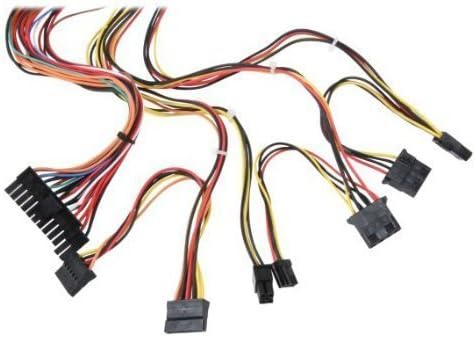
Mufananidzo 3: Kupfuuraview of power supply connectors.

Figure 4: Power supply dimensions and included AC power cord.
5. Operating Instructions
After successful installation, you can power on your computer.
- Ensure the power switch on the rear of the power supply (Figure 2) is in the "ON" (I) position.
- Dzvanya bhatani rekudzima simba riri pabhokisi rekombuta yako.
- The power supply will provide stable power to your system components.
- To power off, shut down your operating system normally. For complete power disconnection, switch the power supply to the "OFF" (O) position and unplug the AC cord.
6. Kuchengeta
Kugadziriswa nguva dzose kunobatsira kuona kuti magetsi ako anogara kwenguva refu uye kushanda zvakanaka.
- Kuchenesa: Periodically clean dust from the power supply's fan and vents using compressed air. Ensure the power supply is unplugged before cleaning.
- Kuyerera kwemhepo: Iva nechokwadi chekuti bhokisi rekombuta rine mhepo yakakwana uye kuti feni yemagetsi haina kuvharwa.
- Cable Integrity: Periodically check all power cables for secure connections and signs of wear or damage.
7. Kugadzirisa matambudziko
Kana ukasangana nematambudziko nemagetsi ako, tarisa matanho anotevera ekugadzirisa matambudziko:
- Hapana Simba:
- Tarisa kana tambo yemagetsi yeAC yakabatanidzwa zvakanaka mumagetsi nepamadziro.
- Ensure the power switch on the rear of the power supply is in the "ON" (I) position.
- Wona kuti madziro emadziro ari kushanda nekuisa imwe mudziyo.
- Check all internal power connections (20/24-pin ATX, 4-pin +12V, peripheral connectors) are firmly seated.
- Kusagadzikana kweSisitimu/Kudzima Zvisina Kurongeka:
- This could indicate an overloaded or failing power supply. Ensure your system's power requirements do not exceed the PS480D's 480W capacity.
- Tarisa kana mhepo ichifefetera zvakanaka uye iva nechokwadi chekuti feni yemagetsi iri kutenderera. Kupisa zvakanyanya kunogona kukonzera kusagadzikana.
- Ruzha rusina kujairika:
- A loud fan noise might indicate dust buildup or a failing fan bearing. Clean the fan as described in the Maintenance section.
If problems persist after attempting these steps, contact Logisys customer support or a qualified technician.
8. Zvinotsanangurwa
| Feature | Tsanangudzo |
|---|---|
| Brand | Logisys |
| Model Number | PS480D |
| Output Wattage | 480 Watts |
| Fomu Factor | ATX |
| Dimensions (LxWxH) | 6" L x 5.5" W x 3.25" H (15.24 x 13.97 x 8.25 cm) |
| Item Weight | 2.06 makirogiramu (0.93 kg) |
| Mainboard Connector | 1x 20+4 Pin ATX |
| CPU Simba Chinongedzo | 1x 4 Pin +12V |
| Standard Drive Connectors | 4x 4 Pin (Molex) |
| FDD/ZIP Connectors | 1x 4 Pin 3.5" |
| Serial ATA Connectors | 1x SATA |
| Kutonhodza Nzira | Air |
| Dziviriro | Kupfuura Voltage Dziviriro, Pfupi Kudzivirirwa Kwedunhu |
| Certifications | FCC part 15J class B, CISPR 22, UL 1950, CSA 22.2 LEVEL 3 |
9. Warranty uye Tsigiro
For warranty information, technical support, or service inquiries, please refer to the official Logisys websaiti kana kubata dhipatimendi ravo rebasa revatengi. Chengeta risiti rako rekutenga seumboo hwekutenga.

