1. Nhanganyaya
The Antec TruePower TPQ-1200 is a high-performance 1200-watt power supply designed for demanding computer systems. It features an 80 PLUS Silver certification, indicating high energy efficiency, and provides stable power delivery through its six +12V rails. This manual provides essential information for the safe installation, operation, and maintenance of your TPQ-1200 power supply.
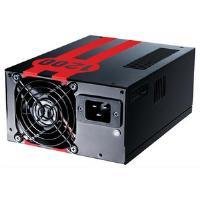
Image 1.1: The Antec TruePower TPQ-1200 Power Supply unit, showcasing its design and modular connectors.
2. Safety Information
Please read and understand all safety instructions before installing or operating the power supply. Failure to do so may result in personal injury or damage to your equipment.
- Always disconnect the power cord from the wall outlet before installing, removing, or cleaning the power supply.
- This power supply is designed for use in personal computers only. Do not use it for any other purpose.
- Usavhure magetsi casing. Voliyumu yepamusorotages are present inside, and there are no user-serviceable parts. Opening the casing will void the warranty.
- Iva nechokwadi chekuti komputa yako yakamira zvakanaka.
- Avoid operating the power supply in high humidity or extreme temperature environments.
- Keep the power supply away from liquids and sources of heat.
3. Package Zviri mukati
Ona kuti pasuru yako ine zvinhu zvinotevera:
- Antec TruePower TPQ-1200 Power Supply Unit
- Modular Cable Set (PCIe, SATA, Molex, Floppy)
- AC Power Cord
- Mounting Screws
- Mushandisi Chinyorwa (gwaro iri)
If any items are missing or damaged, please contact your retailer or Antec customer support.
4. Zvimiro
The Antec TruePower TPQ-1200 power supply offers advanced features for reliable and efficient performance:
- 1200 Watts Continuous Power: Inopa ample power for high-end gaming and workstation systems.
- 80 PLUS Silver Certified: Achieves up to 88% efficiency, reducing heat generation and operating costs.
- Six +12V Rails: Delivers stable and clean power to critical components.
- Advanced Cable Management: Semi-modular design allows for cleaner builds and improved airflow.
- PowerCache High Performance Capacitors: Enhances stability and transient response.
- Ultra-Quiet Pulse Width Modulation (PWM) Fan: Provides efficient cooling with minimal noise.
- Industrial Grade Protection Circuitry: Includes Over Current Protection (OCP), Over Voltage Dziviriro (OVP), Pasi Voltage Protection (UVP), Short Circuit Protection (SCP), Over Power Protection (OPP), and Over Temperature Protection (OTP).
5. Setup uye Kuiswa
Follow these steps carefully to install your Antec TruePower TPQ-1200 power supply.
5.1 Pre-Kuisa Rondedzero
- Ensure your computer case supports an ATX power supply.
- Unganidza maturusi anodiwa: sikurudhiraivha yemusoro wePhillips.
- Unplug your computer from the wall outlet and discharge any residual power by pressing the power button.
5.2 Kuisa Simba reKugovera
- Carefully place the power supply into the designated PSU bay in your computer case. Ensure the fan is oriented correctly (typically facing down for bottom-mounted PSUs, or according to case design for top-mounted).
- Align the screw holes on the power supply with those on the case.
- Secure the power supply using the provided mounting screws. Do not overtighten.
5.3 Kubatanidza Power Cables
Connect the necessary cables to your motherboard and components. The TPQ-1200 features both fixed and modular cables.
- 24-Pin ATX Motherboard Power: Connect the main 24-pin connector to the corresponding port on your motherboard. Ensure it clicks into place.
- 8-Pin EPS12V (CPU) Power: Connect the 8-pin (or 4+4 pin) EPS12V connector to the CPU power port on your motherboard.
- PCIe (Graphics Card) Power: For graphics cards requiring additional power, connect the appropriate 6-pin or 6+2 pin PCIe modular cables from the power supply to your graphics card(s).
- SATA Simba: Connect SATA modular cables to your SATA hard drives, SSDs, and optical drives.
- Molex (Peripheral) Power: Use Molex modular cables for older peripherals or case fans that require this connector type.
- Cable Management: Route cables neatly behind the motherboard tray or in other designated areas of your case to improve airflow and aesthetics.
5.4 Kutanga Simba-Kubatidza
- Ita shuwa kuti zvese zvinongedzo zvakachengeteka.
- Batanidza tambo yemagetsi yeAC kune simba remagetsi wobva wabatanidza kune pombi yemagetsi iri pasi pemadziro.
- Tenderedza switch yemagetsi iri kumashure kwesimba remagetsi kuenda panzvimbo yekuti 'ON' (I).
- Simba pakombuta yako.
6. Operating Instructions
The Antec TruePower TPQ-1200 is designed for continuous operation within its specified limits. Ensure adequate ventilation around your computer case to prevent overheating. The intelligent PWM fan will adjust its speed based on the power supply's temperature to maintain optimal cooling and noise levels.
Always shut down your computer properly through the operating system before turning off the power supply switch or unplugging the AC cord.
7. Kuchengeta
Kugadziriswa nguva dzose kunobatsira kuona kuti magetsi ako anogara kwenguva refu uye kushanda zvakanaka.
- Kuchenesa Hupfu: Periodically (e.g., every 6-12 months), disconnect the power supply from the wall outlet and use compressed air to gently clean dust from the fan grille and ventilation openings. Do not open the power supply casing.
- Cable Inspection: Occasionally check all power cable connections to ensure they are secure and free from damage.
8. Kugadzirisa matambudziko
If you encounter issues with your power supply, refer to the following troubleshooting guide:
| Dambudziko | Zvinogona Kukonzera | Solution |
|---|---|---|
| Komputa haibatike. | AC power cord not connected or loose. Power supply switch is OFF. Faulty power supply. | Ensure AC cord is firmly connected. Flip PSU switch to 'ON' (I). Test with another power supply if possible. |
| Sisitimu inobatidza asi inodzima ipapo ipapo. | Overload, short circuit, or overheating. | Check for short circuits (e.g., loose screws). Ensure adequate ventilation. Disconnect non-essential components to check for overload. |
| System instability or random reboots. | Insufficient power, faulty component, or power supply issue. | Verify all power connectors are secure. Ensure total system wattage does not exceed PSU capacity. Test components individually if possible. |
| Loud fan noise from PSU. | Dust accumulation, fan malfunction, or high load. | Clean dust from the fan grille. If noise persists and is excessive, contact support. |
If troubleshooting steps do not resolve the issue, contact Antec customer support for further assistance.
9. Zvinotsanangurwa
Detailed technical specifications for the Antec TruePower TPQ-1200 power supply:
- Zita remuenzanisi: TruePower TPQ-1200
- Output Wattage: 1200 Watts
- Fomu Factor: ATX12V
- Type yekubatanidza: ATX
- Kubudirira: 80 PLUS Silver Certified
- Kutonhodza nzira: Air (PWM Fan)
- Fan Count: 1
- Zvishandiso Zvinoenderana: Personal Computer
- Chinhu Weight: 4.96 makirogiramu (2.25 kg)
- Package Dimensions: 12.91 x 9.84 x 5.59 inches (32.8 x 25 x 14.2 cm)
- Zuva Rokutanga Kuwanikwa: Kubvumbi 17, 2012
10. Warranty uye Tsigiro
For warranty information and technical support, please refer to the official Antec webwebhusaiti kana kuti bata vatengi vavo zvakananga. Mitemo nemipimo yewarandi inogona kusiyana zvichienderana nedunhu nezuva rekutenga.
Antec Official Websaiti: www.antec.com


