1. Nhanganyaya
Ndatenda nekutengaasing the Edifier M1360 Wired Multimedia Speaker System. This 2.1 speaker system is designed to provide a convenient and high-quality audio solution for various multimedia applications, including computers, laptops, gaming consoles, and MP3 players. Featuring upward-angled satellites and a downward-angled subwoofer, the system delivers clear sound with steady bass output. The wired remote control offers easy volume adjustment and includes a headphone jack for private listening.
2. Ruzivo Rwakakosha Chekuchengetedza
- Verenga mirairo iyi zvakanaka usati washandisa chigadzirwa.
- Chengeta bhuku rino kuti ugozorishandisa mune ramangwana.
- Usaise mudziyo wacho pamvura kana hunyoro kudzivirira moto kana kuvhundutswa nemagetsi.
- Usavhare chero mazaru emhepo. Isa maererano nemirairo yemugadziri.
- Usaise padhuze nechero zvitubu zvekupisa zvakaita semaradiator, marejita ekupisa, zvitofu, kana zvimwe midziyo (kusanganisira amplifiers) zvinoburitsa kupisa.
- Chengetedza tambo yemagetsi kubva pakufambiswa kana kudzvanywa, kunyanya pamapulagi, midziyo yekurerutsira, nenzvimbo yavanobuda kubva mumidziyo.
- Shandisa zvinonamirwa/zvishandiso zvinotsanangurwa nemugadziri chete.
- Bvisa mudziyo uyu panguva yemadutu emheni kana kuti usina kushandiswa kwenguva yakareba.
- Tumira masevhisi ese kuvashandi vanokwanisa. Kushumira kunodiwa kana mudziyo wakuvadzwa neimwe nzira, senge tambo yemagetsi-yekugovera kana plug yakuvadzwa, mvura yadeuka kana zvinhu zvawira mumidziyo, iyo midziyo yave ichinaya mvura kana hunyoro, haishande zvakajairika. , kana kuti yadonha.
3. Package Zviri mukati
Ndapota tarisa zviri mupakeji yako. Kana paine zvinhu zvisipo kana kuti zvakakuvara, taura nemutengesi wako.
- 1x Edifier M1360 Subwoofer
- 2x Vatauri veSatellite
- 1x Wired Remote Control
- 1x 3.5mm Audio Input Cable
- 1x Chinyorwa cheMushandisi (gwaro iri)
4. Chigadzirwa Pamusoroview
4.1 System Zvikamu
- Subwoofers: Houses the main amplifier and bass driver. Connects to the satellite speakers and the audio source.
- Satellite Speakers: Two compact speakers for mid-range and high-frequency audio.
- Wired Remote Control: Features a volume dial, power switch, and headphone output.
4.2 Chikamu Kuzivikanwa

Mufananidzo 1: Mberi view of the Edifier M1360 speaker system, showing the central subwoofer, two angled satellite speakers, and the wired remote control unit.
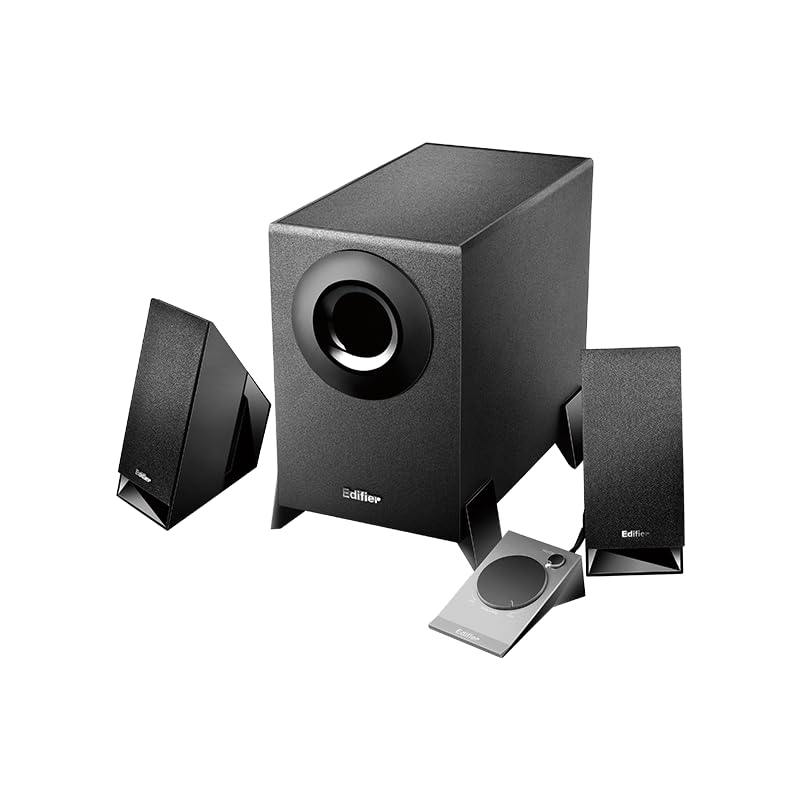
Figure 2: Another perspective of the Edifier M1360 speaker system, highlighting the compact design of the satellite speakers and the wired remote's placement.
5. Setup
5.1 Kuiswa
- Place the subwoofer on the floor or a sturdy surface near your computer or audio source.
- Position the satellite speakers on either side of your monitor or listening area, ensuring they are angled towards you for optimal sound.
- Ensure adequate ventilation around all components.
5.2 Kubatana
- Connect the satellite speakers to the corresponding output jacks on the back of the subwoofer. Ensure the left and right speakers are connected correctly.
- Connect the wired remote control cable to the dedicated port on the subwoofer.
- Connect the 3.5mm audio input cable from the "AUDIO IN" port on the subwoofer to the audio output (headphone jack) of your computer, laptop, MP3 player, or other audio source.
- Plug the power cord of the subwoofer into a standard AC power outlet.
6. Operating Instructions
6.1 Simba On/Kudzima
- To turn on the speaker system, press the power button located on the wired remote control. The power indicator light will illuminate.
- To turn off the speaker system, press the power button again. The power indicator light will turn off.
6.2 Kudzora Inzwi
- Rotate the large dial on the wired remote control clockwise to increase the volume.
- Rotate the large dial counter-clockwise to decrease the volume.
6.3 Musoro Wekubuda
- To listen privately, plug your headphones into the 3.5mm headphone jack on the wired remote control.
- When headphones are connected, the speaker output will automatically mute.
- Unplug the headphones to resume audio playback through the speakers.
7. Kuchengeta uye Kuchengeta
- Kuchenesa: Use a soft, dry cloth to clean the surfaces of the speakers and subwoofer. Do not use liquid cleaners or aerosol sprays.
- Kufefetedza Ensure that the ventilation openings on the subwoofer are not blocked. Proper airflow prevents overheating.
- Kuchengeta: Kana muchichengeta sisitimu kwenguva yakareba, bvisai magetsi moichengeta munzvimbo inotonhorera, yakaoma kure nezuva rakananga uye tembiricha yakanyanya.
- Dzivisa Unyoro: Keep the speaker system away from water, humidity, and other liquids.
8. Kugadzirisa matambudziko
| Dambudziko | Zvinogona Kukonzera | Solution |
|---|---|---|
| Hapana ruzha |
|
|
| Inzwi rakakanganiswa |
|
|
| Mumwe mutauri haasi kushanda |
|
|
9. Zvinotsanangurwa
| Feature | Detail |
|---|---|
| Model Name | M1360 |
| Mutauri Rudzi | Multimedia |
| Kutenderedza Inzwi Channel Configuration | 2.1 |
| Kubatana Technology | Wired (3.5mm stereo input) |
| Audio Output Mode | Stereo |
| Mutauri Mukuru Wekubuda Simba | 8.5 Watts |
| Subwoofer Dhayamita | 5 inches |
| Sravana Sameeralu Serial 4th Tweeter Diameter | 1 inches |
| Chiratidzo-ku-Ruzha Ratio | 85 dB |
| Frequency Response | 20 KHz (Note: This is likely the upper limit, not the full range. Common for speakers to list only max freq.) |
| Inowirirana Devices | Smartphone, Laptop, Desktop, Gaming Console, MP3 Player |
| Product Dimensions | 6.4D x 11.2W x 14H Masendimita |
| Item Weight | 2.5 kg (2500 magiramu) |
| Simba Source | AC |
| Color | Nhema |
| Nyika Yekwakabva | China |
10. Warranty uye Tsigiro
For detailed warranty information and customer support, please refer to the warranty card included with your product packaging or visit the official Edifier website.
Manufacturer: Edifier
Importer: Nikita Distributors - Green Terrace Building, Lane Number 5, South Koregaon Park, Pune 411001, MH, India


