1. Nhanganyaya
This manual provides comprehensive instructions for the setup, operation, and maintenance of your RadioShack CTR-121 Desktop Cassette Recorder. Please read this manual thoroughly before using the device to ensure proper function and longevity.
Key features of the CTR-121 include voice-activated (VOX) recording, auto-level recording, auto stop mechanism, and various input/output jacks for enhanced functionality.
2. Safety Information
Observe the following safety precautions to prevent damage to the unit and ensure user safety:
- Usafumure chikwata kune mvura kana hunyoro.
- Dzivisa kuisa chikwata pedyo nezvinopisa kana muzuva rakananga.
- Shandisa chete iyo yakatsanangurwa magetsi adapta.
- Usavhura casing; endesa masevhisi ese kuvashandi vanokwanisa.
- Chengetedza pasingasvikirwi nevana.
3. Package Zviri mukati
Tarisa uone kuti zvinhu zvese zviripo mupakeji:
- RadioShack CTR-121 Desktop Cassette Recorder
- AC Power Cord
- Gwaro reMushandisi (gwaro iri)
- Mirayiridzo Yekuchengetedza
4. Chigadzirwa Pamusoroview
Familiarize yourself with the various parts of your CTR-121 recorder.

Mufananidzo 1: Mberi view of the RadioShack CTR-121 Desktop Cassette Recorder, showing the speaker, cassette compartment, and control buttons.
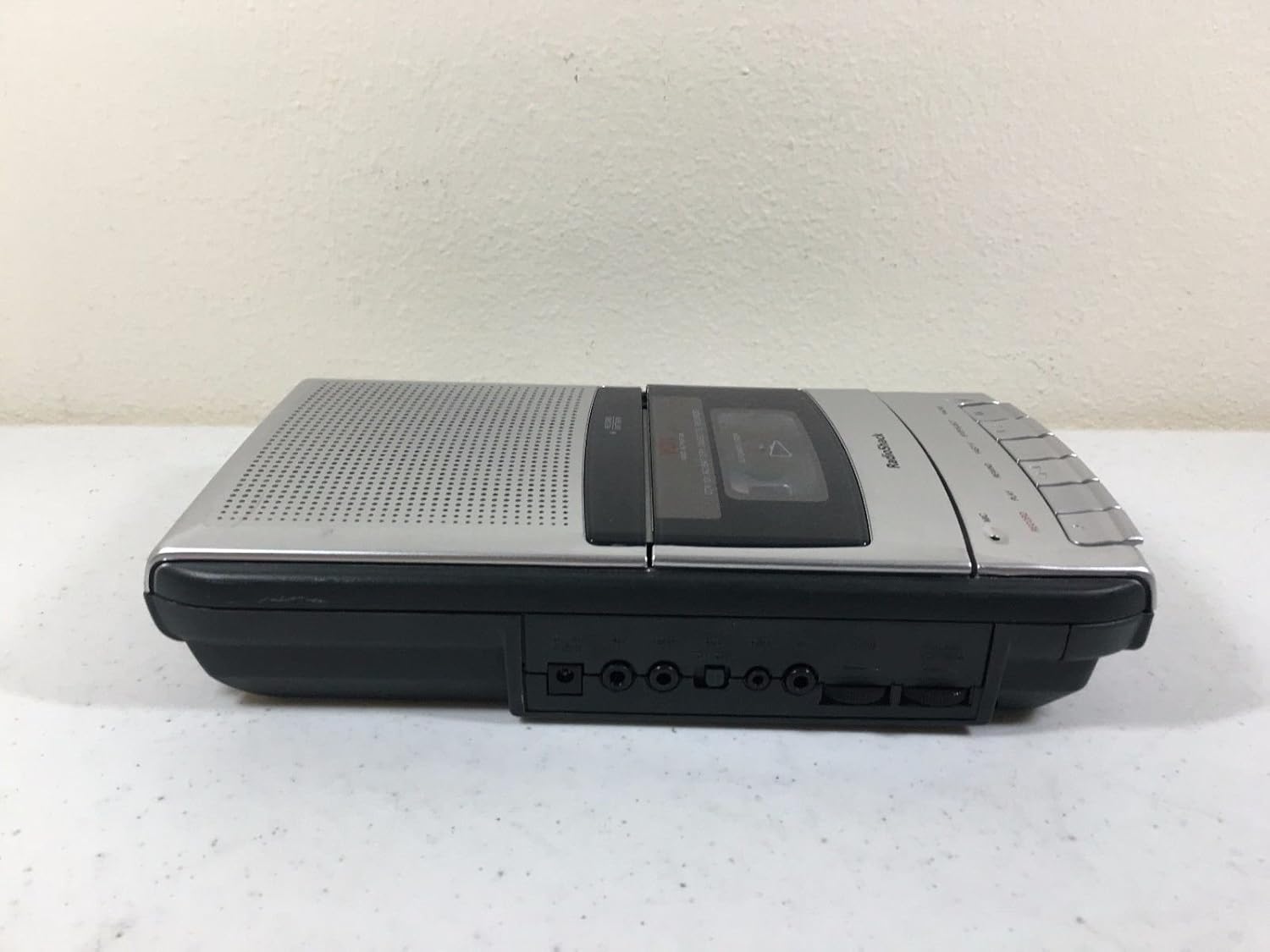
Mufananidzo 2: Rutivi rworuboshwe view of the recorder, illustrating the microphone, earphone, and remote control jacks.

Mufananidzo 3: Rutivi rworudyi view of the recorder, showing the DC power input jack.
The front panel includes controls for Record, Play, Rewind, Fast-F (Fast Forward), Stop/Eject, and Pause. A built-in microphone is located on the front, along with a speaker grille.
5. Setup
5.1 Kusimbisa Chikamu
The CTR-121 can be powered by either AC power or batteries.
AC Simba:
- Ensure the recorder is turned off.
- Connect the supplied AC power cord to the DC IN jack on the right side of the unit (refer to Figure 3).
- Batanidza rimwe divi retambo yemagetsi muchikamu chemagetsi cheAC chakajairika.
Battery Power:
(Note: Battery compartment details are not provided in the product data, so this section will be generic.)
- Open the battery compartment cover, usually located on the bottom or rear of the unit.
- Insert the required number of C-size batteries (not included), observing the correct polarity (+/-) as indicated inside the compartment.
- Vhara chivharo chebhatiri zvakachengeteka.
5.2 Kubatanidza Zvishandiso
The CTR-121 features several jacks for external devices (refer to Figure 2):
- MIC Jack: Connect an external microphone for improved recording quality or hands-free operation.
- EARPHONE Jack: Connect headphones or an earphone for private listening.
- REMOTE Jack: Connect a compatible remote control for convenient operation (remote control sold separately).
6. Operating Instructions
6.1 Loading a Cassette Tape
- Press the MIRA/EJECT bhatani rekuvhura gonhi rekaseti.
- Insert a standard audio cassette tape with the open edge facing upwards and the full reel on the left.
- Vhara zvinyoro nyoro gonhi rekaseti kusvika ravharwa.
6.2 Kurekodha
Kurekodha Kwakajairika:
- Isa tepi yekaseti isina chinhu kana inorekodhwa.
- Press the RECORD bhatani. The ITAMBA bhatani richabatanidzwawo otomatiki.
- The recording indicator light will illuminate.
- Speak into the built-in microphone or ensure an external microphone is connected and active.
- Kuti umise kurekodha, dzvanya iyo MIRA/EJECT bhatani.
Voice-Activated (VOX) Recording:
The VOX feature allows the recorder to start recording automatically when sound is detected and pause when silence occurs, conserving tape.
- Ensure the VOX switch (if present, location not specified in data) is set to the ON position.
- Press the RECORD button. The recorder will enter standby mode.
- Recording will begin when sound is detected and pause during periods of silence.
- To stop VOX recording, press the MIRA/EJECT bhatani.
Auto Level Recording:
The CTR-121 features an automatic level control (ALC) system that adjusts the recording volume to an optimal level, preventing distortion from overly loud sounds and ensuring softer sounds are audible.
6.3 Kutamba
- Isa tepi yekaseti yakarekodhwa.
- Press the ITAMBA bhatani.
- Adjust the volume control (if present, location not specified in data) to your desired listening level.
- Kumisa kutamba, tinya MIRA/EJECT bhatani.
6.4 Fast Forward and Rewind
- To fast forward the tape, press the FAST-F bhatani.
- To rewind the tape, press the REWIND bhatani.
- Press MIRA/EJECT kumira kutumira mberi nekukurumidza kana kudzokera shure.
6.5 Kumbomira Basa
During recording or playback, press the PAUSE button to temporarily stop the tape movement. Press it again to resume.
6.6 Kudzora Manzwi
The CTR-121 includes a tone control feature (if present, location not specified in data) to adjust the audio output's treble and bass frequencies, allowing for a customized listening experience.
7. Kuchengeta
7.1 Kuchenesa Misoro yeTepi
Regular cleaning of the tape heads, capstan, and pinch roller is essential for optimal sound quality and to prevent tape damage. Clean these components after every 10-12 hours of use or if sound quality deteriorates.
- Vhura imba yekaseti.
- Using a cotton swab lightly moistened with isopropyl alcohol or a specialized head cleaning fluid, gently wipe the tape heads, capstan, and pinch roller.
- Rega zvinhu zviome zvachose usati waisa tepi.
7.2 Kutarisira Kwese
- Keep the unit free from dust and dirt. Use a soft, dry cloth for cleaning the exterior.
- Usashandise abrasive cleaners kana solvents.
- When not in use for extended periods, remove batteries to prevent leakage.
8. Kugadzirisa matambudziko
| Dambudziko | Zvinogona Kukonzera | Solution |
|---|---|---|
| Unit haibatike. | No AC power; dead batteries; incorrect battery polarity. | Check AC cord connection and outlet; replace batteries; ensure correct battery polarity. |
| Hapana ruzha panguva yekutamba. | Volume too low; headphones connected; dirty tape heads; faulty tape. | Increase volume; disconnect headphones; clean tape heads; try another tape. |
| Hunhu husina kunaka hwekurekodha. | Dirty tape heads; microphone too far; faulty tape. | Clean tape heads; speak closer to microphone; try a new tape. |
| Tepi haifambi. | Tape jammed; auto stop engaged; unit not powered. | Open compartment and re-seat tape; ensure power is on. |
9. Zvinotsanangurwa
| Model Number | CTR-121 |
| Brand | RadioShack |
| Package Dimensions | 12.8 x 7 x 2.9 inches |
| Item Weight | 2.25 pounds (inenge 1.02 kg) |
| Mugadziri | Radio Shack |
| Inowirirana Devices | Personal Computer (via USB, if applicable) |
| Hardware inowanikwa | USB (for data transfer, if applicable) |
| Maikorofoni Fomu Factor | Yakavakwa-mukati |
| Format | MP3 Audio (for digital output, if applicable) |
| Maheadphone Jack | 3.5 millimeters |
| Memory Storage Capacity | 2.2 GB (for digital storage, if applicable) |
| UPC | 040293153236 |
Note: Specifications are subject to change without notice. The "Compatible Devices", "Hardware Interface", "Format", and "Memory Storage Capacity" listed may refer to digital conversion capabilities or compatibility with modern systems, as the primary function is analog cassette recording.
10. Warranty uye Tsigiro
For warranty information, please refer to the warranty card included with your product or contact RadioShack customer support. Keep your purchase receipt as proof of purchase.
For technical support or service inquiries, please visit the official RadioShack website or contact their customer service department using the information provided in your product packaging or on their website.


