1. Chigadzirwa Pamusoroview
The Eaton TR7740W-K is a combination USB charger and tamper-resistant AC receptacle designed for convenient charging of electronic devices and safe power access. This device integrates two USB charging ports and a standard 125V AC outlet into a single unit, eliminating the need for bulky adapters.
Zvinhu zvakakosha zvinosanganisira:
- Dual USB ports for charging most electronic devices.
- Energy-efficient design compared to traditional plug-in adapters.
- LED indicator light to show charging status; turns off upon full charge.
- 15A 125V tamper-resistant AC receptacle, compliant with 2011 NEC Article 406.12 for child safety.
- UL approved tamper-resistant shutters prevent insertion of foreign objects.
- Backwire clamps on side terminals for easy installation with #12 and #14 AWG wire.
- Designed to replace existing standard duplex receptacles.
2. Safety Information
YAMBIRO: To avoid fire, shock, or death, turn off power at the circuit breaker or fuse box and test that power is off before wiring. This device must be installed in accordance with national and local electrical codes.
- Gara uchidzima magetsi usati waisa kana sevhisi.
- Use only with copper wire. Do not use with aluminum wire.
- Ita shuwa kuti zvese zvinongedzo waya dzakachengeteka.
- Mudziyo uyu ndewekushandisa mumba chete.
- Do not exceed the maximum electrical ratings of the device.
- Kana usina chokwadi nezvechimwe chikamu chemirairo iyi, bvunza munhu anokwanisa magetsi.
Chirevo 65 Yambiro: Chigadzirwa ichi chingave chine makemikari anozivikanwa neHurumende yeCalifornia kuti anokonzera kenza uye kuremara kwekuzvarwa kana kumwe kukuvadza kubereka.
3. Package Zviri mukati
- Eaton TR7740W-K Combination USB Charger Receptacle (White)
- (3) Pre-stripped 6-inch wire leads
- Installation Hardware (screws)
4. Setup uye Kuiswa
Installation should be performed by a qualified individual. Follow these steps carefully:
- Dzima Simba: Locate the circuit breaker or fuse box controlling the outlet where you intend to install the receptacle. Turn off the power to that circuit. Verify power is off using a voltage muedzo.
- Bvisa Old Receptacle: Unscrew and carefully pull the existing receptacle from the wall box. Disconnect the wires from the old receptacle. Note the wire connections: typically, black (hot), white (neutral), and bare copper or green (ground).
- Gadzirira Waya: If necessary, strip approximately 1/2 inch (12.7 mm) of insulation from the ends of the circuit wires. The TR7740W-K includes pre-stripped wire leads for convenience.
- Wire Connections:
- Batanidza iyo waya yemhangura yakakuyiwa yegirini kana isina chinhu from the wall box to the green ground screw on the new receptacle.
- Batanidza iyo waya chena (isina kwayakarerekera) from the wall box to the silver screw terminal or the white pre-stripped wire lead on the new receptacle.
- Batanidza iyo waya nhema (inopisa) from the wall box to the brass screw terminal or the black pre-stripped wire lead on the new receptacle.
- For backwire clamps, insert the stripped wire end fully into the clamp opening and tighten the screw firmly.
- Mount Receptacle: Carefully push the wired receptacle back into the wall box. Secure it with the mounting screws provided.
- Isa Wallplate: Attach the decorative wallplate (not included) over the receptacle.
- Dzosera Simba: Dzorera simba kumashure pane circuit breaker kana fuse box.

Mufananidzo 1: Mberi view of the Eaton TR7740W-K, highlighting the USB ports and AC outlet.
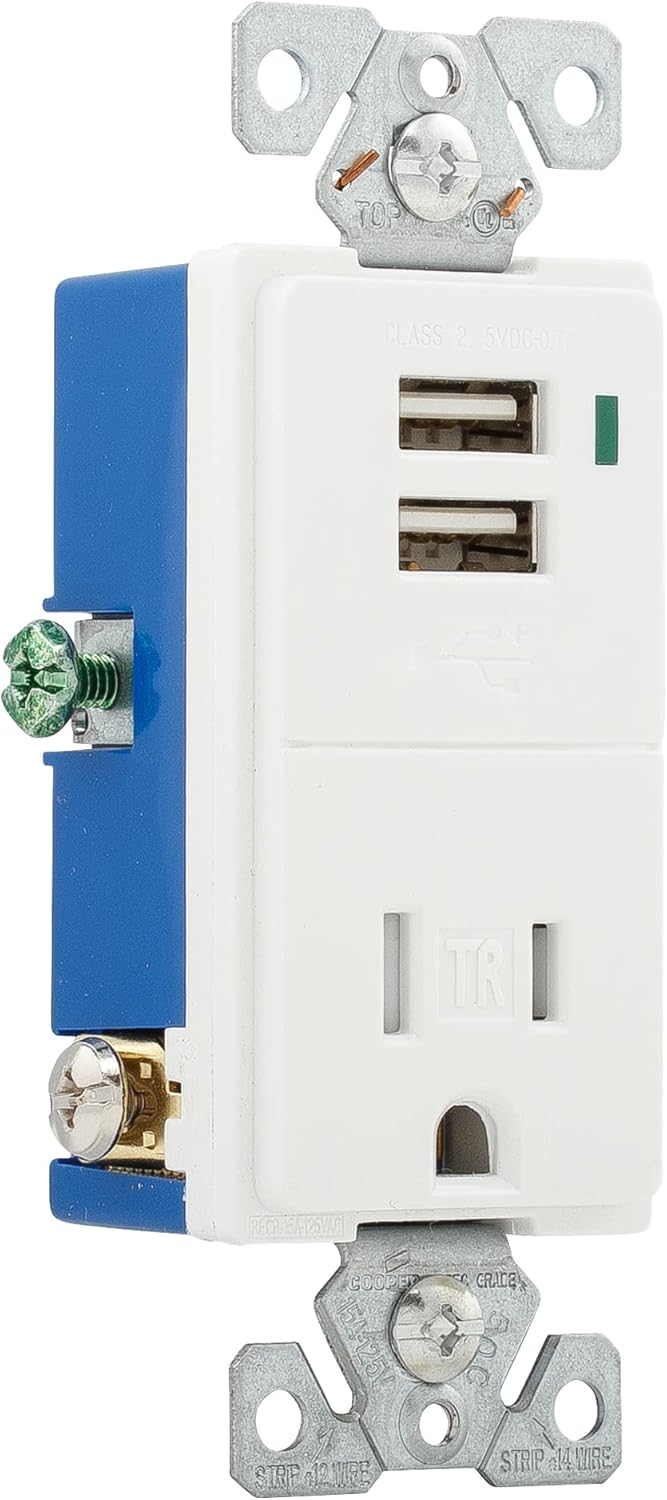
Mufananidzo 2: Kurutivi view of the Eaton TR7740W-K, illustrating the wiring terminals for installation.
5. Operating Instructions
Using your Eaton TR7740W-K combination receptacle is straightforward:
- Kuchaja USB: Insert your device's USB charging cable into one of the two USB ports. The LED indicator light will glow to confirm that the device is charging. The light will turn off when the device reaches a full charge.
- AC Simba: Plug any standard 125V AC appliance or charger into the tamper-resistant AC outlet. The tamper-resistant shutters require simultaneous pressure on both slots to open, preventing single-object insertion for enhanced safety.
The USB ports provide a total output of 0.7A (700mA) at 5V DC. While suitable for most smartphones and smaller electronic devices, some high-current devices like certain tablets (e.g., older iPads) may charge slower or not at full speed due to their higher power requirements.
6. Kuchengeta
The Eaton TR7740W-K requires minimal maintenance:
- Kuchenesa: Disconnect power before cleaning. Wipe the surface with a soft, damp jira. Usashandise abrasive cleaners kana solvents.
- Kuongorora: Periodically inspect the receptacle for any signs of damage, loose connections, or discoloration. If any issues are found, turn off power and consult a qualified electrician for repair or replacement.
7. Kugadzirisa matambudziko
| Dambudziko | Zvinogona Kukonzera | Solution |
|---|---|---|
| No power to AC outlet or USB ports. | Circuit breaker tripped or fuse blown. Loose wiring connection. | Check and reset the circuit breaker or replace the fuse. Turn off power and check wire connections. |
| USB device not charging or charging slowly. | Device requires higher current than supplied (0.7A total). Faulty USB cable. Device not properly connected. | Verify device's charging requirements. Use a different USB cable. Ensure cable is fully inserted. Note that some high-power devices may charge slower. |
| LED indicator not glowing when charging. | Device is fully charged. Faulty LED. | Check if the device is already fully charged. If not, and the device is charging, the LED may be faulty (does not affect charging function). |
| Difficulty inserting plug into AC outlet. | Tamper-resistant shutters engaged. | Apply firm, even pressure to both prongs of the plug simultaneously to engage the shutters. Do not force. |
8. Zvinotsanangurwa
| Feature | Detail |
|---|---|
| Model Number | TR7740W-K |
| Brand | Eaton |
| AC Receptacle Rating | 15A, 125V AC |
| USB Output | 5V DC, 0.7A (700mA) total |
| Wiring | 2-Pole, 3-Wire Grounding |
| Color | Chena |
| Material | Mhangura |
| Certifications | UL Listed, NEMA |
| Product Dimensions | Approximately 9.01 x 4.4 x 6.61 inches (overall package) / 1.9 x 3.8 x 5.9 inches (device) |
| Item Weight | 4.2 ounces |
9. Warranty uye Tsigiro
For warranty information and technical support, please refer to the official Eaton website or contact Eaton customer service directly. Keep your purchase receipt as proof of purchase for any warranty claims.
Eaton Customer Service: Ndapota shanya www.eaton.com for contact details and further product information.


