Nhanganyaya
Thank you for choosing the LD Systems LDWSECO2X2R2 Double Receiver. This manual provides essential information for the safe and efficient operation of your device. Please read it thoroughly before use and keep it for future reference.
Yakakosha Mirayiridzo Yekuchengetedza
- Verenga mirairo iyi: Mirayiridzo yose yekuchengetedza uye yekushanda inofanira kuverengwa chigadzirwa chisati chashandiswa.
- Keep these instructions: Mirayiridzo yekuchengeteka uye yekushanda inofanira kuchengetwa kuti ishandiswe mune ramangwana.
- Teerera yambiro dzese: Yese yambiro pamusoro pechigadzirwa uye mumirayiridzo yekushanda inofanira kutevedzwa.
- Tevedzera mirairo yose: Mirayiridzo yese yekushandisa uye yekushandisa inofanirwa kuteverwa.
- Usashandise mudziyo uyu pedyo nemvura: Usashandise chigadzirwa ichi pedyo nemvura kana unyoro.
- Clean only with dry cloth: Bvisa chigadzirwa ichi kubva pamadziro emadziro usati wachenesa.
- Kufefetedza Usavhare chero mazaru emhepo. Isa maererano nemirairo yemugadziri.
- Power Sources: Operate this product only from the type of power source indicated on the marking label.
- Sevhisi: Usaedze kushandira chigadzirwa ichi pachako nekuti kuvhura kana kubvisa zvivharo zvinogona kukuisa kune njodzi voltage kana dzimwe njodzi. Tumira masevhisi ese kuvashandi vanokwanisa.
Package Zviri mukati
Ndokumbira utarise kuti zvinhu zvese zvakanyorwa pazasi zvinosanganisirwa mupakeji yako:
- LD Systems LDWSECO2X2R2 Double Receiver Unit
- Power Adapter (12-18V DC, 300mA)
- Mushandisi Chinyorwa (gwaro iri)
- Antennas (quantity may vary based on model variant)
Product Overview
The LD Systems LDWSECO2X2R2 is a double receiver designed for wireless audio transmission. It operates on frequencies 863.900 MHz and 864.900 MHz, providing reliable signal reception for professional audio applications.
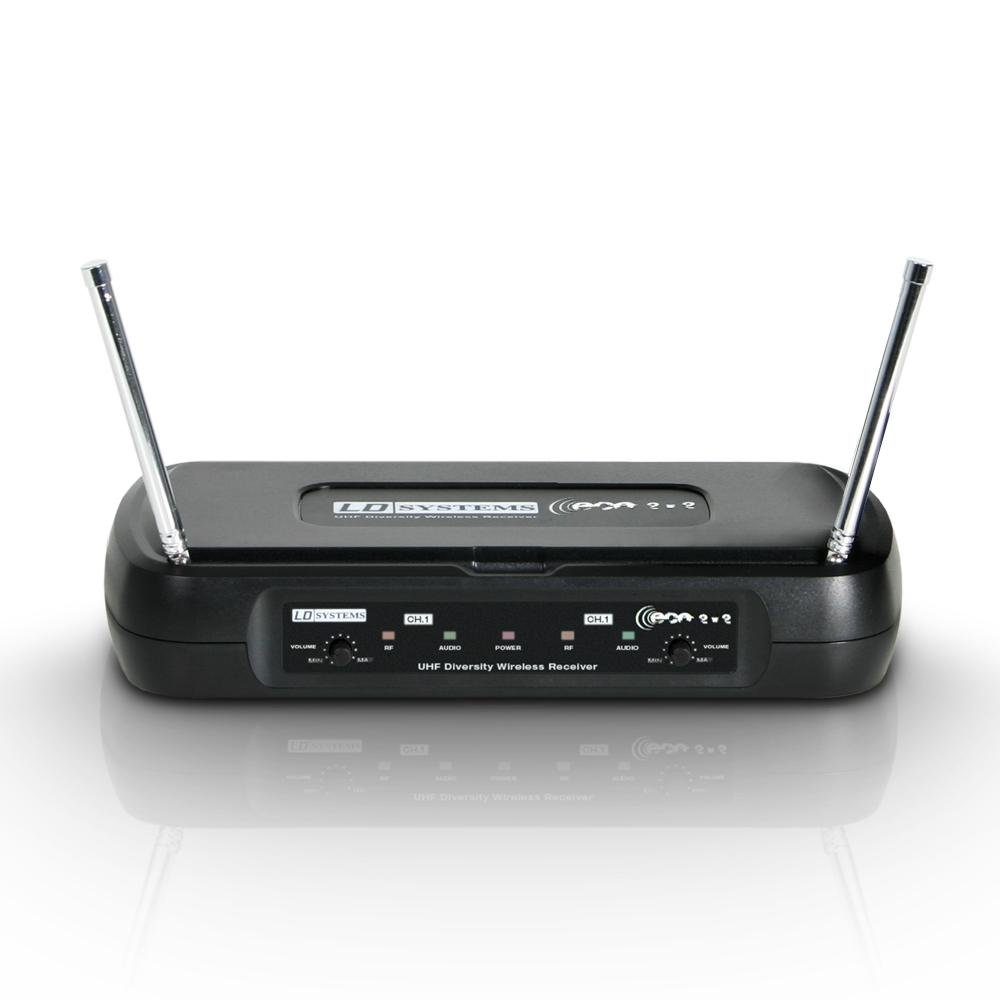
Mufananidzo: Mberi view of the LD Systems LDWSECO2X2R2 Double Receiver, showing controls and display.
Front Panel Controls:
- Bhatani reSimba: Inobatidza kana kudzima unit.
- Chiratidzo chechiteshi: Shows the currently selected channel for each receiver.
- Kudzora Kwevhoriyamu: Independent volume adjustment for each receiver channel.
- RF/AF Indicators: LEDs indicating RF signal presence and AF audio level.
Rear Panel Connections:
- Antenna Inputs: Batanidza antenna akapihwa.
- Zvakaringana Zvigadzirwa zveXLR: For connecting to professional audio mixers or amplifiers.
- Unbalanced 1/4" Jack Outputs: Alternative audio output connections.
- DC Power Input: Batanidza iyo yakapihwa magetsi adapta.
Setup Guide
Follow these steps to set up your LD Systems LDWSECO2X2R2 Double Receiver:
- Unpack the Receiver: Nyatsobvisa zvese zvikamu kubva pakurongedza.
- Batanidza Antennas: Screw the supplied antennas onto the antenna inputs located on the rear panel. Ensure they are securely fastened.
- Position the Receiver: Place the receiver in a stable location, away from potential sources of interference (e.g., computers, Wi-Fi routers). Ensure good line-of-sight to the intended transmitter.
- Batanidza Zvinobuda Muaudio:
- For balanced connections, use XLR cables to connect the receiver's XLR outputs to your mixer or amplifier.
- For unbalanced connections, use 1/4" jack cables to connect the receiver's 1/4" outputs to your audio equipment.
- Batanidza Simba: Connect the provided DC power adapter to the receiver's DC power input. Plug the adapter into a suitable power outlet.
- Power On: Press the power button on the front panel to turn on the receiver. The display should illuminate.
- Pair with Transmitters: Refer to your transmitter's manual for instructions on how to pair it with the receiver. Ensure the transmitter and receiver are set to the same frequency/channel.
Operating Instruction
- Power On: Ensure both the receiver and your wireless transmitters are powered on.
- Tarisa Chiratidzo: Observe the RF (Radio Frequency) indicator on the receiver. It should illuminate steadily when a signal from the paired transmitter is detected.
- Gadzirisa Inzwi: Use the independent volume controls on the front panel to set the desired audio output level for each channel. Start with a low volume and gradually increase it to avoid sudden loud sounds.
- Monitor Audio: The AF (Audio Frequency) indicator will light up when audio is being received. Ensure your audio equipment (mixer, amplifier) is also properly configured to receive the signal.
- Kusarudzwa kweChannel (kana zvichibvira): If your model supports manual channel selection, refer to the specific instructions for changing frequencies to avoid interference. The LDWSECO2X2R2 operates on fixed frequencies 863.900 MHz and 864.900 MHz.
- Power Off: When finished, power off your transmitters first, then power off the receiver.
Maintenance
- Kuchenesa: Disconnect the power before cleaning. Use a soft, dry cloth to wipe the exterior of the receiver. Do not use liquid cleaners or aerosol sprays.
- Kuchengeta: Kana usingashandiswe kwenguva yakareba, chengeta chinogadzikwa panzvimbo inotonhorera, yakaoma, kure nezuva rakananga uye tembiricha yakanyanya.
- Antennas: Ensure antennas are not bent or damaged. Replace if necessary to maintain optimal signal reception.
- Power Adapter: Regularly inspect the power adapter and cable for any signs of damage. Do not use a damaged adapter.
Kugadzirisa matambudziko
| Dambudziko | Zvinogona Kukonzera | Solution |
|---|---|---|
| Hapana simba | Power adapter haina kubatana kana kukanganisa. | Ensure power adapter is securely connected to the receiver and a working power outlet. Check the adapter for damage. |
| Hapana audio inobuda |
|
|
| Hunhu husina kunaka hweruzha / Kupindira kweruzha |
|
|
Zvinotsanangurwa
| Feature | Detail |
|---|---|
| Model | LDWSECO2X2R2 |
| Brand | LD Systems |
| Frequency Range | 863.900 MHz / 864.900 MHz |
| Frequency Response | 60 - 16,000 Hz |
| Audio Output Level (balanced) | 250 mv |
| Magetsi | 12 ~ 18 V DC, 300 mA |
| Nhamba yeChannels | 2 |
| Control Type | Manual Control |
| Dimensions (Package) | 53.4 x 28 x 9.2 cm |
| Huremu (Chinhu) | 500 g |
| International Article Code (EAN) | 04049521138928 |
Warranty uye Support
LD Systems products are designed for reliability and performance. For specific warranty information, please refer to the warranty card included with your product or visit the official LD Systems website. For technical support, troubleshooting assistance beyond this manual, or spare parts inquiries, please contact your local dealer or the LD Systems customer service department.
Cherechedza: Ruzivo rwekuwanikwa kwezvikamu zvekushandisa haruna kupihwa mumashoko echigadzirwa.


