1. Nhanganyaya
Thank you for choosing the Linq HB-02 Mini Speaker. This portable speaker is designed to provide amplified audio from a variety of devices, including smartphones, MP3/MP4 players, notebooks, and more. Its compact design and rechargeable battery make it ideal for on-the-go use. Please read this manual carefully before using the product to ensure proper operation and longevity.
2. Safety Information
- Usaisa chitauriri pamvura kana hunyoro hwakawandisa.
- Dzivisa kupisa kwakanyanya.
- Do not disassemble or attempt to repair the speaker yourself. This will void the warranty.
- Chengetedza pasingasvikirwi nevana.
- Shandisa chete tambo ye USB yakapihwa pakuchaja.
- Rasa bhatiri zvine hungwaru zvichienderana nemitemo yemuno.
3. Package Zviri mukati
The Linq HB-02 Mini Speaker package typically includes:
- Linq HB-02 Mini Speaker
- USB Kuchaja Cable
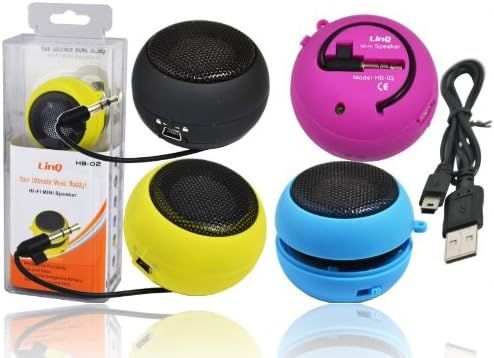
Image: Linq HB-02 Mini Speaker shown in its retail packaging, alongside other speakers and the included USB charging cable. This illustrates the typical contents and appearance of the product.
4. Zvigadzirwa zveChigadzirwa
- Mini Pocket Speaker: Compact uye inotakurika dhizaini yekutakura nyore.
- Kukodzera Kwose: Connects via 3.5mm audio jack to devices like iPhones, iPods, MP3/MP4 players, smartphones, notebooks, PSP, CD players, and more.
- Rechargeable Battery: Built-in lithium-ion battery for wireless use.
- Retractable Sound Resonator: Features a pneumatic suspension system that allows the acoustic membrane to be extended from one side, enhancing amplification and sound quality.
- Kuchaja USB: Conveniently recharges via the included USB cable.
- AmpLid Sound: Delivers excellent and pleasant acoustic performance despite its small size.

Image: Four Linq HB-02 Mini Speakers in pink, yellow, purple, and blue, shown with their retractable sound resonators extended, demonstrating the design and color variety.
5. Setup
5.1 Kutanga Kuchaja
- Usati watanga kushandisa, chajisa mukurukuri.
- Connect the small end of the included USB charging cable to the mini USB port on the speaker.
- Connect the standard USB end of the cable to a USB power source (e.g., computer USB port, USB wall adapter).
- Chiedza chekuchaja (kana chiripo) chichavheneka panguva yekuchaja uye chichadzima kana kuchinja ruvara kana chachaja zvizere.
5.2 Connecting to an Audio Device
- Locate the integrated 3.5mm audio jack on the speaker. This jack is often stored neatly within the speaker's body.
- Plug the 3.5mm audio jack into the headphone port of your audio device (e.g., smartphone, MP3 player, notebook).
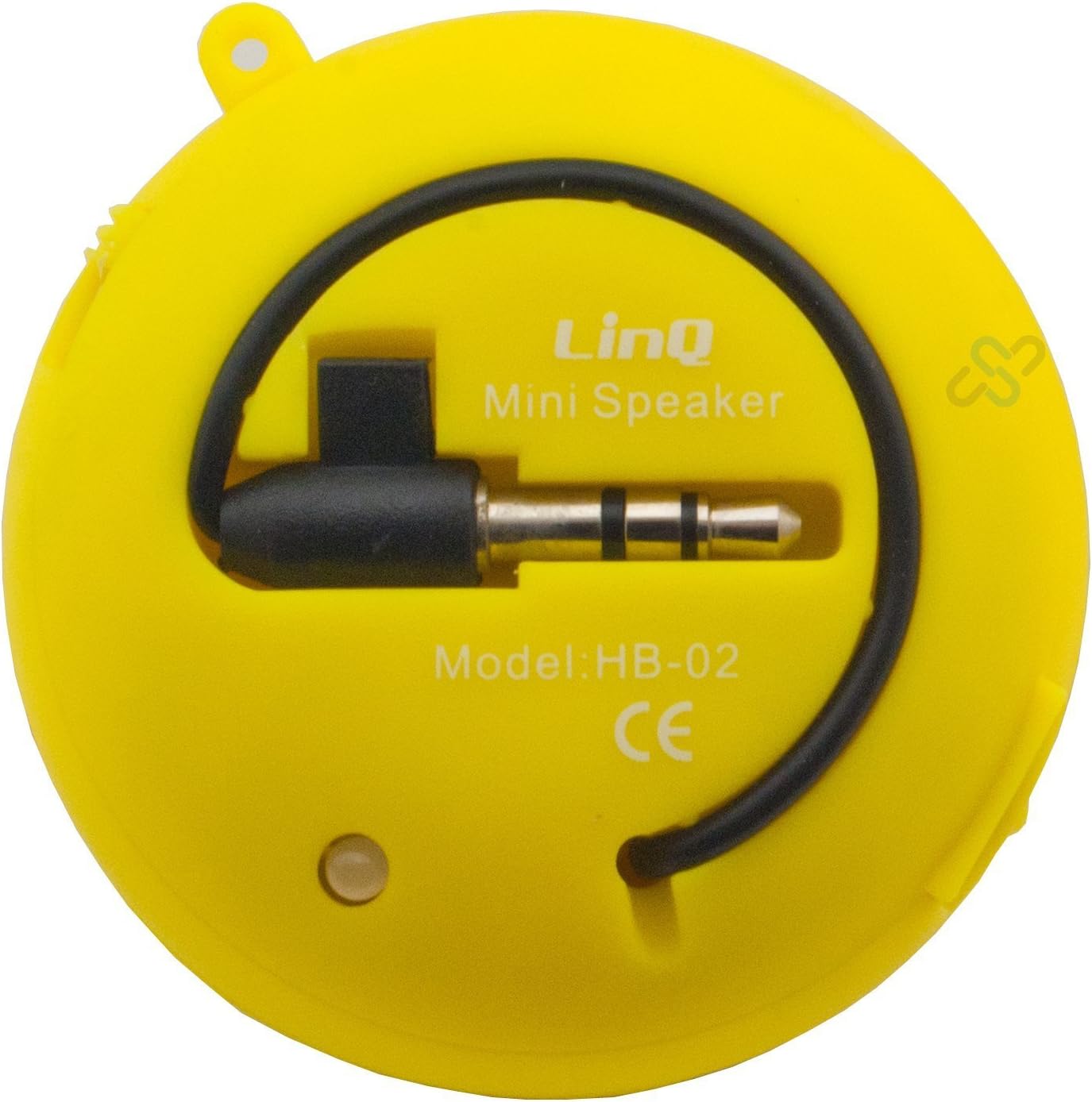
Image: A yellow Linq HB-02 Mini Speaker, viewed from the back, clearly showing the integrated 3.5mm audio jack coiled around the speaker and the model number 'HB-02'.
6. Operating Instructions
6.1 Kubatidza/Kudzima
Locate the power switch on the speaker. Slide it to the 'ON' position to turn on the speaker. Slide it to the 'OFF' position to turn it off.
6.2 Kuridza Audio
- Ensure the speaker is connected to your audio device via the 3.5mm jack.
- Batidza sipika.
- Start playing audio on your connected device. The sound will now be amplified through the Linq HB-02 speaker.
- Adjust the volume directly from your connected audio device. The speaker itself does not have volume controls.
6.3 Using the Retractable Sound Resonator
For enhanced amplification and sound quality, gently pull and extend the acoustic membrane from one side of the speaker. This engages the 'Retractable Sound Resonator' system. To return to a more compact form, gently push the membrane back into the speaker body.
7. Kuchengeta
- Kuchenesa: Use a soft, dry cloth to clean the speaker's exterior. Do not use liquid cleaners or aerosols.
- Kuchengeta: Kana usingashandise, chengeta sipika munzvimbo inotonhorera, yakaoma, kure nezuva rakananga uye tembiricha yakanyanya.
- Battery Care: Kuti urebese hupenyu hwebhatiri, dzivisa kuburitsa sipika nguva zhinji. Ichajise nguva nenguva, kunyangwe isiri kushandiswa kwenguva yakareba.
8. Kugadzirisa matambudziko
8.1 Hapana Inzwi
- Ensure the speaker is turned ON.
- Check if the 3.5mm audio jack is fully inserted into both the speaker and your audio device.
- Verify that your audio device's volume is turned up and not muted.
- Ensure the speaker's battery is charged.
8.2 Hunhu Husina Kusimba
- Tarisa kwaunobva ruzha kuti uone kana paine matambudziko emhando yepamusoro.
- Ensure the 3.5mm audio jack connection is secure.
- Try extending the 'Retractable Sound Resonator' for improved sound.
- Ensure the speaker is fully charged. Low battery can affect sound quality.
8.3 Speaker Not Charging
- Verify that the USB cable is correctly connected to both the speaker and the power source.
- Edza imwe chiteshi che USB chakasiyana kana adapta yemagetsi.
- Ensure the USB cable is not damaged.
9. Zvinotsanangurwa
| Brand | Linq |
| Model | HB-02 |
| Maximum Output Power | 2 Watt |
| Kubatana Technology | AUX (3.5mm Jack), USB (for charging) |
| Mounting Type | Tabletop |
| Mutauri Rudzi | Portable Nomukurukuri |
| Impedance | 8 Ohm |
| Simba Source | Battery Powered (Rechargeable) |
| Kurema | Not specified, designed for portability. |
10. Warranty uye Tsigiro
This product comes with a standard manufacturer's warranty. Please refer to the warranty card included with your purchase or contact your retailer for specific warranty terms and conditions. For technical support or further assistance, please contact the retailer or the manufacturer's customer service.


