1. Chigadzirwa Pamusoroview
The Dell Ultrasharp 1909Wf is a 19-inch widescreen LCD monitor designed for various computing needs. It features a highly adjustable stand, offering swivel, tilt, and height adjustments, including the ability to rotate to a vertical orientation. The monitor also provides multiple connectivity options and integrated USB ports and an SD card reader for enhanced convenience.

Mufananidzo 1: Mberi view of the Dell Ultrasharp 1909Wf monitor, showcasing its widescreen display and Dell branding.
2. Setup Instructions
2.1 Kusunungura uye Gungano
- Bvisa chitarisiko nezvikamu zvacho nokungwarira kubva mupakeji.
- Place the monitor base on a stable surface.
- Attach the monitor panel to the stand, ensuring it is securely fastened.
2.2 Kubatanidza Monitor
The Dell 1909Wf monitor offers various ports for connecting to your computer and other devices.
- Power Connection: Connect the standard power cable to the monitor's power input and then to a power outlet.
- Video Input: Use either a VGA or DVI-D cable to connect the monitor to your computer's video output port.
- USB Ports: The monitor includes USB ports for connecting peripherals.
- SD Card Reader: An integrated SD card reader is available for convenient data transfer.
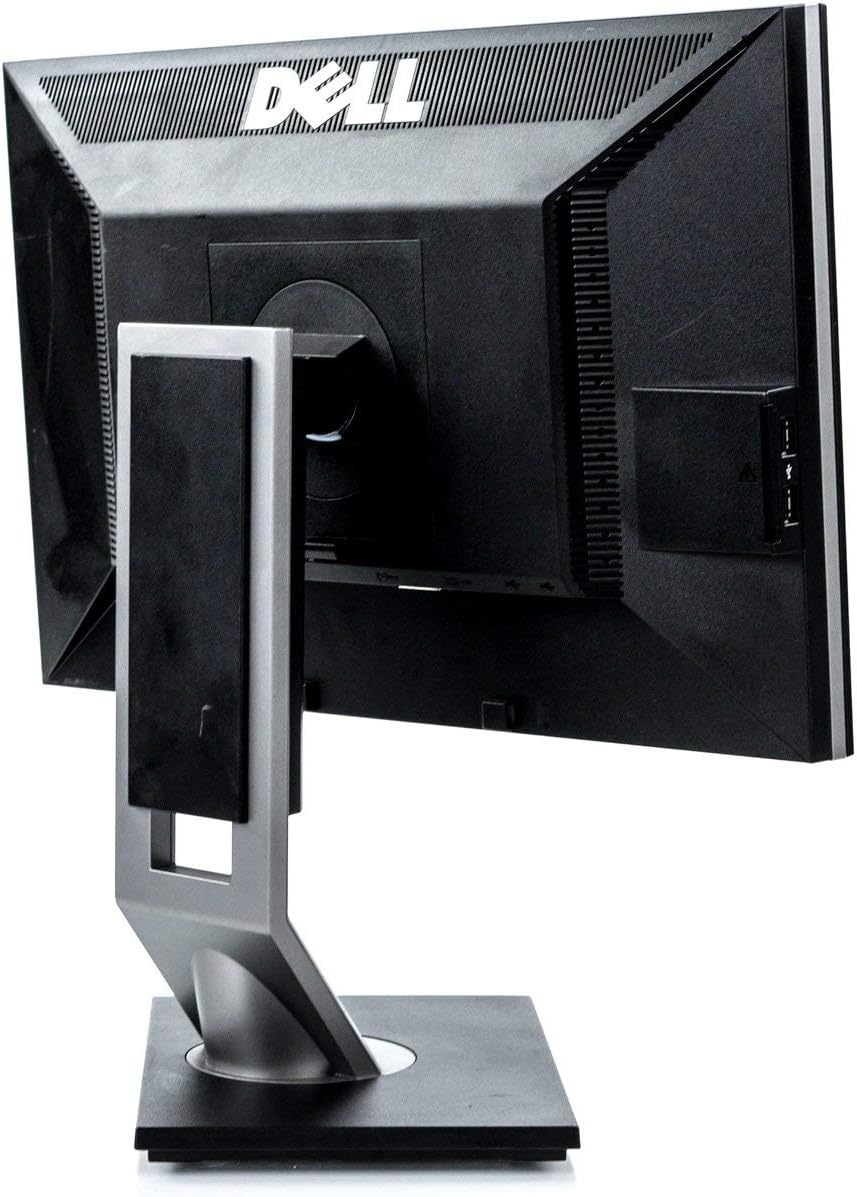
Mufananidzo 2: Kumashure view of the monitor, highlighting the various input and output ports for connectivity.

Mufananidzo 3: Rutivi view of the monitor, showing the conveniently located USB ports and SD card reader.
3. Kushandisa Monitor
3.1 Kubatidza/Kudzima
Press the power button located on the front bezel of the monitor to turn it on or off. The power indicator light will illuminate when the monitor is active.
3.2 Kugadzirisa Chiratidziro
The Dell 1909Wf monitor features a versatile stand for optimal viewing comfort:
- Kugadzirisa Hurefu: Gently push or pull the monitor panel up or down to adjust its height.
- Tilt Adjustment: Tilt the monitor screen forwards or backwards to find your preferred vieweng angle
- Swivel Adjustment: Tenderedza monitor kuruboshwe kana kurudyi pahwaro hwayo.
- Pivot (Vertical Orientation): The monitor can be rotated 90 degrees to a vertical (portrait) orientation. This is useful for viewing long documents or web mapeji.

Mufananidzo 4: Mberi view of the monitor with the screen off, showing the Dell logo and control buttons.
3.3 Pa-Screen Display (OSD) Menyu
Use the buttons on the front bezel to navigate the On-Screen Display (OSD) menu. This menu allows you to adjust various display settings such as brightness, contrast, color temperature, and input source selection.
4. Kuchengeta
4.1 Kuchenesa Monitor
- Gara uchidzima uye bvisa cheki chekutarisa usati wachenesa.
- Shandisa jira rakapfava, risina jira zvinyoro dampened with water or a non-abrasive screen cleaner to wipe the screen and exterior surfaces.
- Avoid using harsh chemicals, solvents, or abrasive materials, as these can damage the monitor's finish.
4.2 Kutarisira Kwese
- Chengetedza chekutarisa kure nechiedza chezuva chakananga, kunobva kupisa, uye hunyoro hwakanyanya.
- Ita shuwa kufefetera kwakaringana kwakatenderedza cheki kudzivirira kupisa.
- Dzivisa kuisa zvinhu zvinorema pamonitor kana tambo dzayo.
5. Kugadzirisa matambudziko
This section addresses common issues you might encounter with your Dell Ultrasharp 1909Wf monitor.
5.1 Hapana Mufananidzo Pachiratidziro
- Check if the monitor is powered on and the power indicator light is active.
- Verify that the video cable (VGA or DVI-D) is securely connected to both the monitor and the computer.
- Ensure the correct input source is selected via the OSD menu.
- Test the monitor with another computer or a different video cable if possible.
5.2 Mamiriro Emifananidzo
- Adjust brightness and contrast settings through the OSD menu.
- Ensure the display resolution on your computer is set to the monitor's native resolution (e.g., 2048 x 1536 or FHD 1080p, depending on specific configuration).
- Check for any physical damage to the screen or video cable.
5.3 Stand Adjustment Issues
- Ensure no cables are obstructing the movement of the stand.
- Apply gentle, even pressure when adjusting height, tilt, or swivel.
6. Zvinotsanangurwa
| Feature | Detail |
|---|---|
| Brand | Dell |
| Model Number | 1909Wf |
| Screen Size | 19 inches |
| Aspect ratio | 16:9 |
| Resolution | 2048 x 1536, FHD 1080p |
| Mufananidzo Kupenya | 300 cd/m² |
| Kusiyanisa Ratio | 1000:1 |
| Nguva Yekupindura | 5ms |
| Color Gamut | 83% |
| Screen Surface Tsananguro | Glossy |
| Kubatana | VGA, DVI-D, USB Ports, SD Card Reader |
| Kushandisa Simba | Average 25 watts (2 Cold Cathode Fluorescent Lamps) |
| Item Weight | 12.25 makirogiramu |
| Package Dimensions | 18.23 x 18.07 x 7.01 inches |
| Mugadziri | Dell Makombiyuta |
7. Warranty uye Tsigiro
For warranty information and technical support, please refer to the documentation provided with your purchase or visit the official Dell support webUnogona zvakare kuwana mamwe mashoko uye ruzivo rwekuonana pawebhusaiti iyi. Dell Store on Amazon.


