1. Nhanganyaya
This manual provides detailed instructions for the proper setup, operation, and maintenance of your Grundig 72847 Azerty USB Keyboard. Please read this manual thoroughly before using the product to ensure optimal performance and longevity.
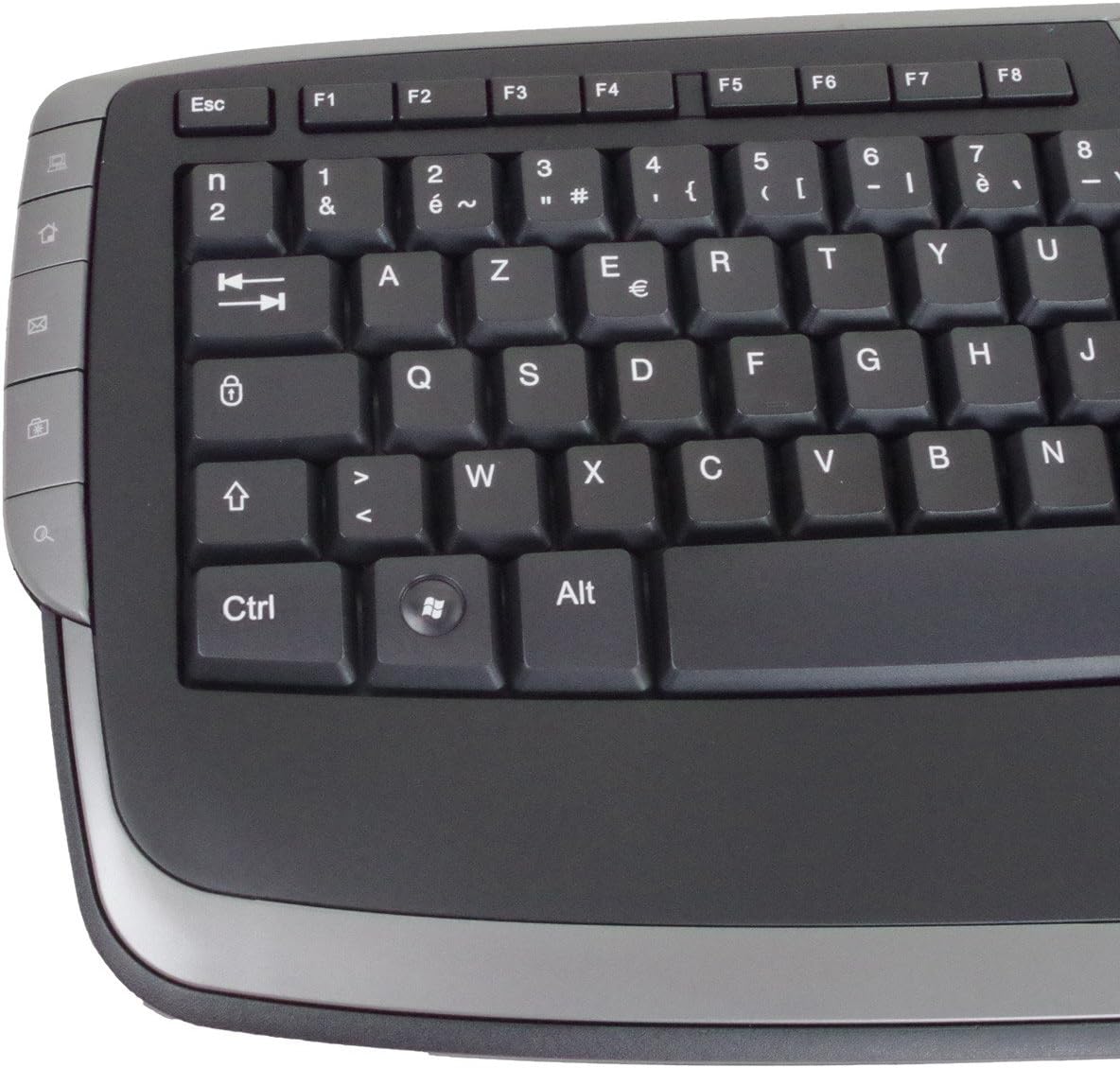
The Grundig 72847 keyboard features an Azerty layout, a wired USB connection, and an ergonomic design. It includes dedicated multimedia and office direct keys for enhanced functionality and supports both Windows and Mac operating systems.
2. Chigadzirwa Pamusoroview
The Grundig 72847 keyboard is designed for comfortable and efficient typing. It features a standard Azerty key layout, along with additional function keys.
2.1 Mamiriro Akakosha
- Azerty Layout: Standard key arrangement primarily used in French-speaking regions.
- Wired USB Connection: Ensures stable and reliable connectivity.
- Ergonomic Dhizaini: Contoured shape for comfortable use and reduced strain.
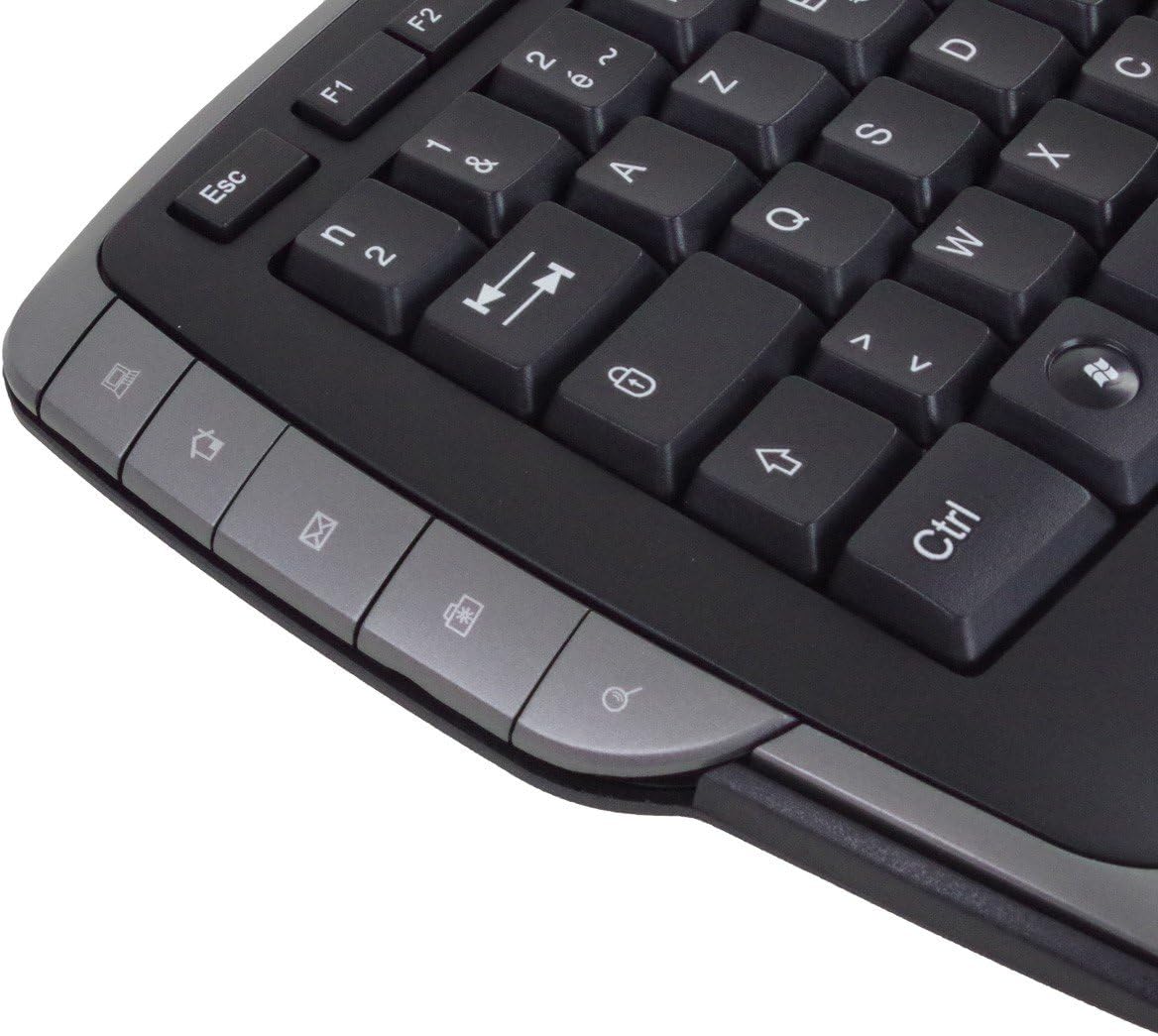
- Multimedia Keys: 8 dedicated keys for quick access to media controls (volume, play/pause, etc.).
- Office Direct Keys: 17 additional keys for common office functions, enhancing productivity.
- Blue LED Indicators: Signal illumination for various functions.
- Wide Compatibility: Inotsigira masystem ekushanda eWindows neMac.
2.2 Keyboard Components
Familiarize yourself with the main components of your Grundig 72847 keyboard:

- Standard Azerty Keys: Alphanumeric, symbol, and function keys (F1-F12).
- Numeric Keypad: Located on the right side for data entry.
- Multimedia Control Keys: Located above the function keys and on the left/right sides.
- Office Direct Keys: Additional shortcut keys for common office applications.
- USB Cable: For connecting the keyboard to your computer.

3. Setup
Follow these steps to connect your Grundig 72847 keyboard to your computer.
- Bvisa kiyibhodhi: Bvisa kiibhodhi nokungwarira kubva pakurongedza kwayo.
- Locate a USB Port: Identify an available USB port on your computer (PC or Mac).
- Batanidza USB Cable: Insert the USB connector of the keyboard cable into the USB port on your computer.
- Kuisa Mutyairi (Otomatiki): Your operating system (Windows or Mac) should automatically detect and install the necessary drivers. This process may take a few moments.
- Simbisa Mashandiro: Once installed, test the keyboard by typing in a text editor or browser to ensure all keys are responsive.
No additional software or drivers are typically required for basic functionality.
4. Operating Instructions
The Grundig 72847 keyboard offers standard typing functionality along with convenient multimedia and office shortcut keys.
4.1 Standard Typing
Use the alphanumeric and symbol keys for text input. The Azerty layout is standard for regions like France and Belgium.
4.2 Multimedia Keys
The keyboard includes 8 dedicated multimedia keys for quick control of media playback and volume. These are typically located above the function keys (F1-F12) or on the side bezels.
- Vhoriyamu Kukwira/Kudzika/Kunyarara: Gadzirisa mwero weruzha.
- Tamba/Kumbomira: Dzora kutamba kwenhau.
- Yakapfuura/Inotevera Navigate kuburikidza nemedia files.
- Mira: Halt media playback.
4.3 Office Direct Keys
The 17 office direct keys provide shortcuts to frequently used functions, improving workflow efficiency. Refer to the key labels for specific functions, which may include:
- Email: Open your default email client.
- Web Browser Launch your default web browser.
- Komputa yangu: Vhura file muongorori.
- Tsvaga: Activate the system search function.
- Calculator: Open the calculator application.
- Kurara: Put the computer into sleep mode.
The exact functionality of these keys may depend on your operating system and installed software.
5. Kuchengeta
Proper care and maintenance will help extend the life of your keyboard.
- Kuchenesa:
- Bvisa kiibhodhi kubva pakombuta yako usati wachenesa.
- Shandisa jira rakapfava, risina lint zvishoma dampyakanyoroveswa nemvura kana mushonga wekuchenesa wakapfava wekupukuta pamusoro.
- Dzivisa kushandisa makemikari ane hasha, abrasive cleaners, kana zvinonyungudutsa.
- Shandisa mweya wakamanikidzwa kubvisa huruva nemarara kubva pakati pemakiyi.
- Kuchengeta: Store the keyboard in a clean, dry environment away from extreme temperatures and direct sunlight.
- Dzivisa Kurasika: Chengetedza zvinwiwa kure nekhibhodi kudzivirira kukuvadzwa kwezvinhu zvemukati.
6. Kugadzirisa matambudziko
If you encounter issues with your Grundig 72847 keyboard, try the following solutions:
- Kiyibhodhi Haisi Kupindura:
- Ita shuwa kuti tambo ye USB yakabatana zvakachengeteka kune zvese keyboard uye komputa.
- Edza kubatanidza kiibhodhi kune imwe nzvimbo ye USB pakombiyuta yako.
- Tangazve komputa yako.
- Edza kiyibhodhi pane imwe komputa kuti uone kana dambudziko riri pakiyibhodhi kana pakombuta yekutanga.
- Makiyi Akananga Asiri Kushanda:
- Check for any physical obstructions or debris under the key.
- Chenesa kiibhodhi sezvakatsanangurwa muchikamu cheMaintenance.
- Multimedia/Office Keys Not Functioning:
- Ensure your operating system and applications are up to date.
- Some functions may require specific software or settings within your operating system.
Kana dambudziko rikaramba riripo mushure mekuedza matanho aya, ndapota taura nerutsigiro rwevatengi.
7. Zvinotsanangurwa
| Feature | Detail |
|---|---|
| Model Number | 72847 |
| Design | Azerty |
| Color | Matte Black |
| Connection Type | USB (Wired) |
| Cable Length | Approx. 1.4 m |
| Zviyero (W x D x H) | Approx. 47.5 x 19.5 x 2.7 / 3.8 cm |
| Kurema | Approx. 910 g |
| Hupenyu Hunokosha | 8,000,000 actuations |
| Chinja Upenyu | 8,000,000 actuations |
| Operating Temperature | -5 kusvika 40 ° C |
| Kushanda Humidity | 20% kusvika 90% |
| LED Indicators | Bhuruu |
| Inowirirana Systems | Windows, Mac |
| Nhamba yeMultimedia Keys | 8 |
| Number of Office Direct Keys | 17 |
8. Warranty uye Tsigiro
For warranty information and customer support, please refer to the documentation provided with your purchase or contact your retailer. You may also visit the official Grundig website kuti uwane rumwe rubatsiro.
Ndapota chengetedza humbowo hwako hwekutenga kwezvichemo zvewaranti.


