1. Nhanganyaya
This manual provides detailed instructions for the installation, operation, and maintenance of your SpeaKa Professional DL-1117 In-Wall/Ceiling Speaker. Please read this manual thoroughly before installation and use to ensure proper function and safety. Keep this manual for future reference.
2. Chigadzirwa Pamusoroview
The SpeaKa Professional DL-1117 is a high-quality in-wall/ceiling speaker designed for various audio applications in both residential and industrial environments. Its robust metallic construction ensures durability and reliable performance.

Mufananidzo 2.1: Mberi view of the SpeaKa Professional DL-1117 In-Wall/Ceiling Speaker. This image shows the speaker's front grille and mounting frame.
Zvinokosha:
- Ideal for wall and ceiling mounting.
- Suitable for industrial and residential spaces.
- Solid metallic construction for enhanced durability.
3. Zvinotsanangurwa
| Tsanangudzo | Value |
|---|---|
| Brand | SpeaKa Professional |
| Model Name | DL-1117 |
| Item Model Number | SP-1207908 |
| Mutauri Rudzi | In-Wall/Ceiling Speaker |
| Mutauri Mukuru | 8 Inches (77mm INWALL SPEAKER as per label) |
| Impedance | 8 Ohms |
| Power (Nominal) | 15 Watts |
| Maximum Speaker Output Power | 25 Watts |
| Frequency Response | 90Hz - 17,000Hz (as per label) |
| Mounting Type | Ceiling Mount (also suitable for wall mount) |
| Zviyero zveChigadzirwa (L x W x H) | 11 x 11 x 7 cm |
| Item Weight | 520 magiramu |
| Color | Nhema |
| Nhamba Yezvikamu | 1 chikwata |
| Inokurudzirwa Zvishandiso | For computer (audio output), general audio systems |
| Inowirirana Devices | Desktop computer, Laptop (via ampchigadziriso chemvura (lifier/receiver) |

Mufananidzo 3.1: Dimensional drawing of the SpeaKa Professional DL-1117 speaker. This diagram illustrates the speaker's diameter (Ø100mm), depth (49mm), and cutout dimensions (Ø74mm, Ø81mm).
Mufananidzo 3.2: Back view of the SpeaKa Professional DL-1117 speaker, showing the product label with model number DL-1117BK8, frequency response, power rating, and impedance.
4. Mirayiridzo Yekuchengetedza
Ndokumbira utarise zvinotevera kuchengetedza kudzivirira kukuvara kana kukuvara kuchigadzirwa:
- Kuchengetedzwa Kwemagetsi: Ensure all power to the audio system is disconnected before making any connections or performing installation. Incorrect wiring can cause damage to the speaker or amplifier.
- Kuiswa: Installation should be performed by a qualified professional if you are unsure about electrical wiring or structural integrity. Ensure the mounting surface (wall or ceiling) can safely support the weight of the speaker.
- Environment: Do not expose the speaker to excessive moisture, extreme temperatures, or direct sunlight.
- Kuchenesa: Shandisa jira rakapfava, rakaoma pakuchenesa. Usashandise mishonga yekuchenesa yemvura kana maaerosols.
- Kubvarura: Do not attempt to disassemble or modify the speaker. This will void the warranty and may cause damage or injury.
5. Setup uye Kuiswa
Follow these steps for proper installation of your in-wall/ceiling speaker:
5.1 Zvishandiso Zvinodiwa
- Drill
- Hole saw (matching cutout diameter, approx. Ø74-81mm)
- Screwdriver
- Wire strippers
- Speaker wire (appropriate gauge for your amplifier and cable length)
5.2 Nzvimbo Yekumusoro
Choose a suitable location in your wall or ceiling. Ensure there are no electrical wires, plumbing, or structural elements behind the chosen area. Use a stud finder if necessary.
5.3 Kucheka Kuzaruka
- Carefully mark the desired cutout diameter on the wall or ceiling. Refer to the dimensions in Figure 3.1.
- Using a hole saw, carefully cut the opening.
5.4 Wiring
- Shandisa waya yespika kubva pakombuta yako amplifier/receiver to the cutout opening.
- Strip approximately 1/2 inch (12mm) of insulation from the ends of the speaker wire.
- Connect the speaker wires to the terminals on the back of the DL-1117 speaker. Ensure correct polarity (+ to + and - to -) from the amplifier to the speaker. The terminals are typically screw-type or spring-loaded.
5.5 Installing the Speaker
- Carefully insert the speaker into the cutout opening.
- Secure the speaker using the integrated mounting clips or screws, if applicable. For this model, the design suggests it is inserted and then secured from the front.

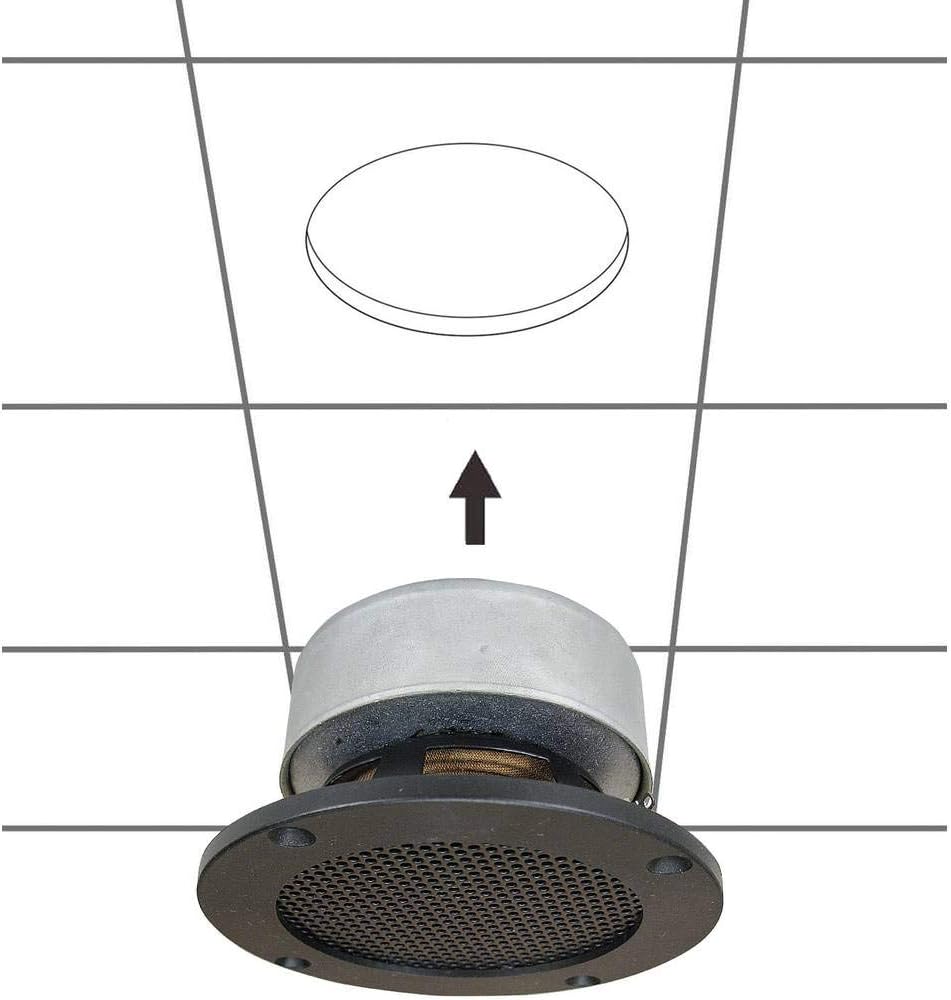
Mufananidzo 5.1: Diagram illustrating the installation process of the SpeaKa Professional DL-1117 speaker into a ceiling opening. The speaker is inserted from below into the pre-cut hole.
6. Operating Instructions
Once the speaker is correctly installed and wired to your amplifier or receiver:
- Ita shuwa kuti zvese zvinongedzo zvakachengeteka.
- Batidza yako amplifier/receiver.
- Start playing audio through your connected source.
- Gadzirisa inzwi pane yako amplifier/receiver to a comfortable listening level. Avoid excessively high volumes that could distort the sound or damage the speaker.
7. Kuchengeta
The SpeaKa Professional DL-1117 speaker requires minimal maintenance:
- Kuchenesa: Periodically wipe the speaker grille and frame with a soft, dry cloth to remove dust. Do not use abrasive cleaners or solvents.
- Kuongorora: Occasionally check the speaker for any visible damage or loose connections.
8. Kugadzirisa matambudziko
Kana ukasangana nematambudziko nemutauri wako, tarisa kune anotevera matambudziko akajairika uye mhinduro:
| Dambudziko | Zvinogona Kukonzera | Solution |
|---|---|---|
| Hapana ruzha kubva kumutauri | Wiring yakasununguka kana isiriyo Amplifier/receiver off or muted Chishandiso chepakutanga hachina kutamba odhiyo | Check all speaker wire connections for proper polarity and tightness. Iva nechokwadi amplifier/receiver is on and not muted, and volume is up. Verify audio is playing from the source device. |
| Inzwi rakakanganiswa | Bhuku rakakwirira kwazvo Yakashata mhando yeaudio source Waya yespika yakakuvara | Deredza vhoriyamu pa amplifier/receiver. Try a different audio source to rule out source issues. Inspect speaker wires for fraying or damage and replace if necessary. |
| Inzwi repakati | Lose connections Zvakaipa amplifier channel | Check and secure all speaker wire connections. Test the speaker with a different amplifier channel or a known working amplifier. |
If the problem persists after trying these solutions, please contact SpeaKa Professional customer support.
9. Warranty uye Tsigiro
For warranty information and customer support, please refer to the documentation provided with your purchase or visit the official SpeaKa Professional website. Chengetedza humbowo hwako hwekutenga kune warranty claim.
Mugadziri: SpeaKa Professional
ASIN: B00CS2V1AQ


