1. Nhanganyaya
The VOLTCRAFT DSO-2020 USB is a PC-based digital storage oscilloscope designed for precise signal measurement and analysis. This device connects to your computer via USB, utilizing software to display and process waveforms. It features a 20 MHz bandwidth, two independent channels, and a real-time sampling rate of 48 MSa/s, making it suitable for various electronic testing and development applications. This manual provides essential information for the safe and effective use of your oscilloscope.
2. Safety Information
Ndapota verengai uye nzwisisai mirairo yese yekuchengetedza musati mashandisa mudziyo. Kukundikana kutevedzera mirairo iyi kunogona kukonzera kukuvara kana kukuvara kwemudziyo.
- Always connect the oscilloscope to a computer using a certified USB cable.
- Ensure proper grounding of the PC and the measurement setup to prevent electrical shock.
- Usapfuure yakawandisa voltage ratings for each channel (e.g., MAX 45V for CH1/CH2).
- Avoid operating the device in wet or damp mamiriro.
- Usavhura mudziyo casing; hapana zvikamu zvinogona kushandiswa mukati.
- Use only probes and accessories specified for this oscilloscope.
3. Chigadzirwa Pamusoroview
The VOLTCRAFT DSO-2020 USB is a compact unit designed for portability and ease of use with a personal computer. Below are images illustrating the device and its key connection points.
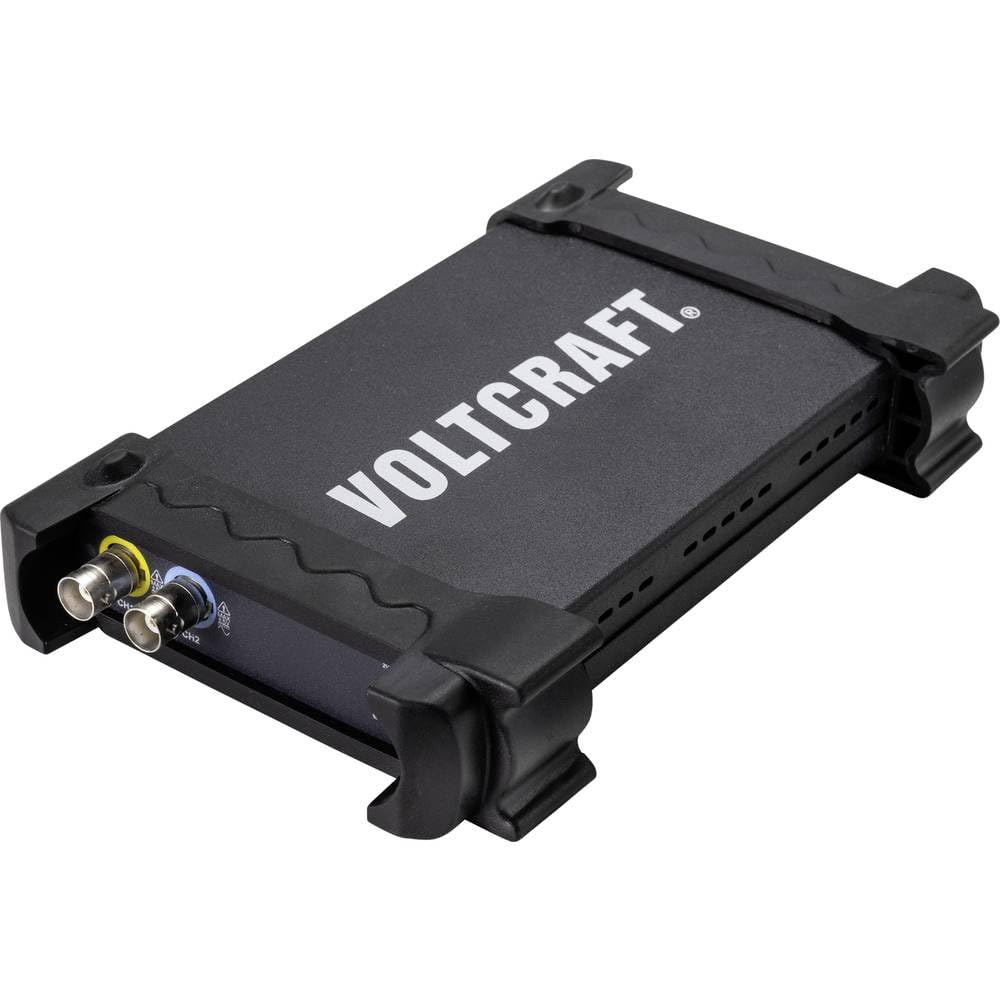
Mufananidzo 3.1: Mberi view of the VOLTCRAFT DSO-2020 USB PC Oscilloscope, showing its compact design and protective casing.

Mufananidzo 3.2: Angled view of the oscilloscope, highlighting the USB-B port for PC connection and the USBXI port.
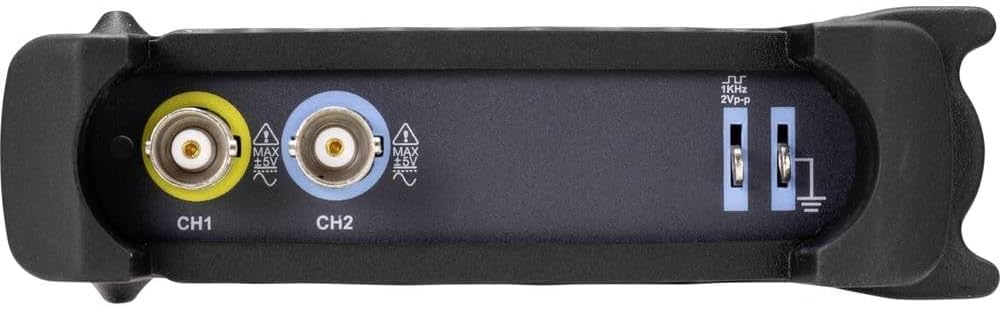
Mufananidzo 3.3: Kumashure view showing the BNC input connectors for Channel 1 (CH1) and Channel 2 (CH2), along with the 1KHz 2Vp-p calibration output and ground terminals.
4. Setup
4.1 Kuiswa kweSoftware
Before connecting the DSO-2020 USB, install the necessary software and drivers on your computer. Refer to the included software CD or the manufacturer's website for the latest version and installation instructions. Typically, this involves running an installer and following on-screen prompts.
4.2 Hardware Connection
- Connect the USB cable from the DSO-2020 USB device to an available USB port on your computer.
- Once connected, your operating system should detect the device. If drivers were installed correctly, the device should be recognized by the oscilloscope software.
- Connect your oscilloscope probes to the CH1 and/or CH2 BNC input connectors as required for your measurement. Ensure probes are securely attached.
- For accurate measurements, perform probe compensation if using passive probes. Refer to your probe's manual for specific instructions.
5. Operating Instructions
This section outlines the basic steps for operating your VOLTCRAFT DSO-2020 USB oscilloscope.
5.1 Kutanga Software
After successful installation and connection, launch the VOLTCRAFT oscilloscope application from your computer's desktop or start menu. The software interface will display a virtual oscilloscope screen, similar to a traditional benchtop unit.
5.2 Basic Signal Acquisition
- Connect Signal: Attach the probe to the circuit point you wish to measure.
- Kusarudzwa kweChannel: In the software, enable the desired channel (CH1 or CH2).
- Chikero Chakamira (Volts/Div): Adjust the vertical scale to fit the signal amplitude on the screen.
- Horizontal Scale (Time/Div): Adjust the horizontal scale to view the signal's period or frequency.
- Trigger Settings: Configure the trigger source, type (edge, pulse), and level to stabilize the waveform. The software provides controls similar to a physical oscilloscope.
- Auto Setup: Utilize the automatic setup function within the software. This feature automatically adjusts the vertical and horizontal settings to display the input signal optimally.
5.3 Data Processing and Export
The DSO-2020 USB allows for advanced data processing and storage:
- Kuchengetera Mafungu: Captured waveforms can be saved directly to your computer for later analysis.
- Kuyera Mabasa: The software includes various automatic measurement functions (e.g., Vpp, Vrms, Frequency, Period).
- Data Export: Measurement data can be exported to formats such as Excel for further analysis and reporting.
- LabVIEW Kuenderana: The device is compatible with LabVIEW, allowing for integration into custom measurement and automation systems.
6. Kuchengeta
Kuchengetedza kwakakodzera kunovimbisa kugara kwenguva refu uye kururama kwe oscilloscope yako.
- Kuchenesa: Shandisa jira rakapfava, rakaoma kuchenesa kunze kwechishandiso. Usashandise zvinochenesa zvinogumbura kana zvinonyungudutsa.
- Kuchengeta: Store the oscilloscope in a dry, dust-free environment when not in use. Avoid extreme temperatures.
- Probe Care: Bata ma probe nokungwarira. Dzivisa kukotama kana kumanikidza tambo. Chengeta zvakanaka kuti usakuvara.
- Zvigadziriso zveSoftware: Regularly check the VOLTCRAFT website for software and driver updates to ensure optimal performance and compatibility.
7. Kugadzirisa matambudziko
Ichi chikamu chinotarisa zvinowanzoitika zvaungasangana nazvo.
- Mudziyo Hauzivikanwe:
- Ensure the USB cable is securely connected to both the oscilloscope and the PC.
- Verify that the drivers are correctly installed. Reinstall if necessary.
- Edza imwe USB port pane komputa yako.
- Hapana Chiratidzo Chinoratidzwa:
- Check that the probe is properly connected to the input channel and the circuit under test.
- Ensure the correct channel is enabled in the software.
- Gadzirisa zviyero zve vertical (Volts/Div) uye horizontal (Time/Div).
- Check trigger settings; an incorrect trigger level can prevent a stable display.
- Verify the signal source is active and within the oscilloscope's measurement range.
- Mafungu Asina Kugadzikana:
- Adjust the trigger level and trigger type (e.g., edge trigger).
- Ensure the trigger source is set to the channel with the signal.
- Check for noise in the measurement environment.
8. Zvinotsanangurwa
The following table details the technical specifications of the VOLTCRAFT DSO-2020 USB PC Oscilloscope.
| Feature | Tsanangudzo |
|---|---|
| Mugadziri | VOLTCRAFT |
| Model Number | DSO-2020 USB |
| Bandwidth | 20 MHz |
| Channels | 2 |
| Sampling Rate (Real-time) | 48 MSa/s |
| Memory Depth | 1 Mpts |
| Resolution | 8 Bit |
| Dimensions (L x W x H) | 20.5 x 3.8 x 12.5 cm |
| Kurema | 430 g |
| Power Source Type | Hand-operated (USB powered) |
| Special Features | Two independent channels, display similar to standard oscilloscope, automatic setup function, data export to Excel, LabVIEW zvinoenderana. |
| Inosanganisirwa Zvikamu | 1 unit (oscilloscope) |
| Mabhatiri Anodiwa | Aihwa |
9. Warranty uye Tsigiro
For warranty information, technical support, or service inquiries, please refer to the documentation provided with your purchase or visit the official VOLTCRAFT website. Contact details for customer support can typically be found on the manufacturer's product page or in the included warranty card.
10. Official Product Videos
No official product videos from the seller were found in the provided data for this specific model. Please refer to the manufacturer's webwebhusaiti kana nzira dzepamutemo dzezvishandiso zvemavhidhiyo zviripo.