Product Overview
The Sagemcom Sixty Cordless Telephone and Answer Machine combines modern technology with a classic design. Its unique aesthetic, smooth finish, and touchscreen functionality make it a distinctive addition to any environment. Designed for user comfort, the Sixty offers a range of features including hands-free mode, extended battery life, and an intuitive interface for easy communication.
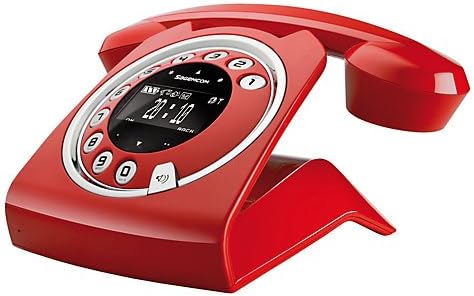
Image: The Sagemcom Sixty Cordless Telephone and Answer Machine in red, showcasing its unique retro-modern design with a circular dial and digital display.

Mufananidzo: Side view of the Sagemcom Sixty Cordless Telephone, highlighting its sleek profile and the cradle design.
Setup Guide
1. Kusunungura
Carefully remove all components from the packaging. Ensure you have the base unit, handset, power adapter, and telephone line cord.
2. Kubatanidza Base Unit
- Connect the power adapter to the 'DC IN' port on the back of the base unit and plug the other end into a wall outlet.
- Connect one end of the telephone line cord to the 'LINE' port on the base unit and the other end to your telephone wall jack.
3. Kuiswa kweBattery uye Kuchaja
- Vhura imba yebhatiri pane ruoko.
- Isa mabhatiri anochajwazve akapihwa, uchicherechedza polarity chaiyo (+ na -).
- Vhara nzvimbo yebhatiri.
- Place the handset on the base unit. The display will indicate charging. Allow the handset to charge for at least 16 hours before first use to ensure optimal battery performance.
Operating Instruction
Kuita uye kugamuchira mafoni
- Kufona: Simudza handset kana kudzvanya iyo Call button. Dial the number using the touchscreen keypad.
- Kugamuchira Call: Simudza handset kana kudzvanya iyo Call bhatani kana foni yarira.
- Kupedza Kufona: Place the handset back on the base unit or press the End Call bhatani.
Kushandisa Touchscreen
The Sixty features a responsive touchscreen for navigation and input. Tap icons or numbers to select functions or dial. Swipe to scroll through lists or menus.
Hands-Free Mode
Panguva yekufona, pinda iyo Mutauri bhatani rekushandisa hand-free mode. Dzvanya zvakare kuti udzokere kuhandset mode.
Phonebook Management
- Kuwedzera Munhu Wekutaura Naye: Navigate to the Phonebook menu, select 'Add New Contact', enter the name and number using the touchscreen, and save. The phonebook can store up to 150 names.
- Kutsvaga Munhu wekutaura naye: Access the Phonebook and use the search function or scroll through the list.
- Editing/Deleting a Contact: Select the desired contact from the Phonebook and choose the 'Edit' or 'Delete' option.
Answering Machine Functions
The integrated answering machine has a recording capacity of 10 minutes.
- Activating/Deactivating: Access the Answering Machine menu to turn it on or off.
- Kutamba maMessages: Select 'Play Messages' from the Answering Machine menu.
- Kurekodha Mharidzo Inobuda: Follow the prompts in the Answering Machine menu to record a personalized outgoing message.
Maintenance
Cleaning Your Phone
To clean the phone, wipe it with a soft, damp cloth. Do not use abrasive cleaners or solvents, as these can damage the surface. Ensure the phone is disconnected from power before cleaning.
Battery Care
- Shandisa mabhatiri anochajwazve nguva dzose.
- Kana foni isingazoshandiswe kwenguva yakareba, bvisa mabhatiri kudzivirira kubuda.
- Rasa mabhatiri ekare zvine ungwaru maererano nemitemo yenzvimbo.
Kugadzirisa matambudziko
| Dambudziko | Possible Solution |
|---|---|
| Hapana dial toni | Check if the telephone line cord is securely connected to both the base unit and the wall jack. Ensure the power adapter is plugged in. |
| Handset haichaji | Ensure the handset is correctly placed on the base unit. Clean the charging contacts on both the handset and base unit with a dry cloth. Verify the power adapter is working. |
| Hunhu husina kunaka | Move closer to the base unit. Check for interference from other electronic devices. Ensure the telephone line cord is not damaged. |
| Ratidza harina chinhu | Check if the handset battery is charged. If not, place it on the base unit to charge. Ensure the power adapter is connected to the base unit. |
| Hatikwanise kufona kana kugamuchira | Verify that the telephone line is active. Check all cable connections. Restart the base unit by unplugging and replugging the power adapter. |
Zvinotaurwa Nezvehunyanzvi
| Feature | Tsanangudzo |
|---|---|
| Brand | Sagemcom |
| Model | Makumi matanhatu |
| Color | Tsvuku |
| Rudzi Runhare | Cordless |
| Nguva Yekutaura Parunhare | Kusvikira kuMaawa mashanu |
| Standby Time | Kusvikira kuMaawa mashanu |
| Recording Capacity (Answering Machine) | 10 Maminitsi |
| Phonebook Capacity | 150 Mazita |
| ASIN | B00DX64LPI |
| Kutanga Kuwanikwa Zuva | Kubvumbi 15, 2014 |
Warranty uye Support
For warranty information and customer support, please refer to the documentation included with your purchase or visit the official Sagemcom website. Chengetedza humbowo hwako hwekutenga kune chero vimbiso yewaranti.