Nhanganyaya
The Phanteks Enthoo Primo is a full tower computer case designed for enthusiasts seeking exceptional cooling possibilities and functional design. This manual provides detailed instructions for setting up, operating, maintaining, and troubleshooting your Enthoo Primo case, ensuring optimal performance and longevity.

Figure 1: Phanteks Enthoo Primo Ultimate Full Tower Computer Case (Black/Blue)
Setup uye Installation
Proper installation is crucial for the performance and stability of your system. Follow these steps carefully.
1. Kuiswa kweChigadziko cheMagetsi (PSU)
The Enthoo Primo features a unique thermally isolated PSU location at the rear of the case, promoting cooler temperatures and improved cable management.
- Locate the PSU compartment at the bottom rear of the case.
- Slide your PSU into the designated area.
- Chengetedza PSU nezvikushi zvawapihwa kubva kumashure kwekesi.
Video 1: Animated demonstration of internal case features, including PSU placement, HDD trays, and cable management. This video highlights the thermally isolated PSU location and hidden cable routing.

Mufananidzo 2: Kumashure view of the Enthoo Primo case, showing the PSU mounting area at the bottom.
2. Drive Installation (HDD/SSD)
The case supports up to 6 HDDs with dual repositionable and removable HDD cages, and features Drop-n-Lock double stack SSD brackets.
- Access the hidden HDD trays by removing the side panel.
- Slide your 3.5" HDDs into the trays and secure them.
- For 2.5" SSDs, utilize the removable Drop-n-Lock brackets. These can be installed in three different locations within the case.
- Ensure all drives are securely fastened to prevent vibration.

Mufananidzo 3: Mukati view of the Enthoo Primo, highlighting the hidden HDD trays and SSD mounting points.
3. Kuisa Motherboard neComponent
The Enthoo Primo supports ATX motherboards and offers ample space for various components.
- Install your ATX motherboard onto the standoffs.
- Install your CPU, RAM, and graphics cards as per their respective manuals.
- Utilize the pre-installed cable management tools behind the motherboard tray to route cables neatly.
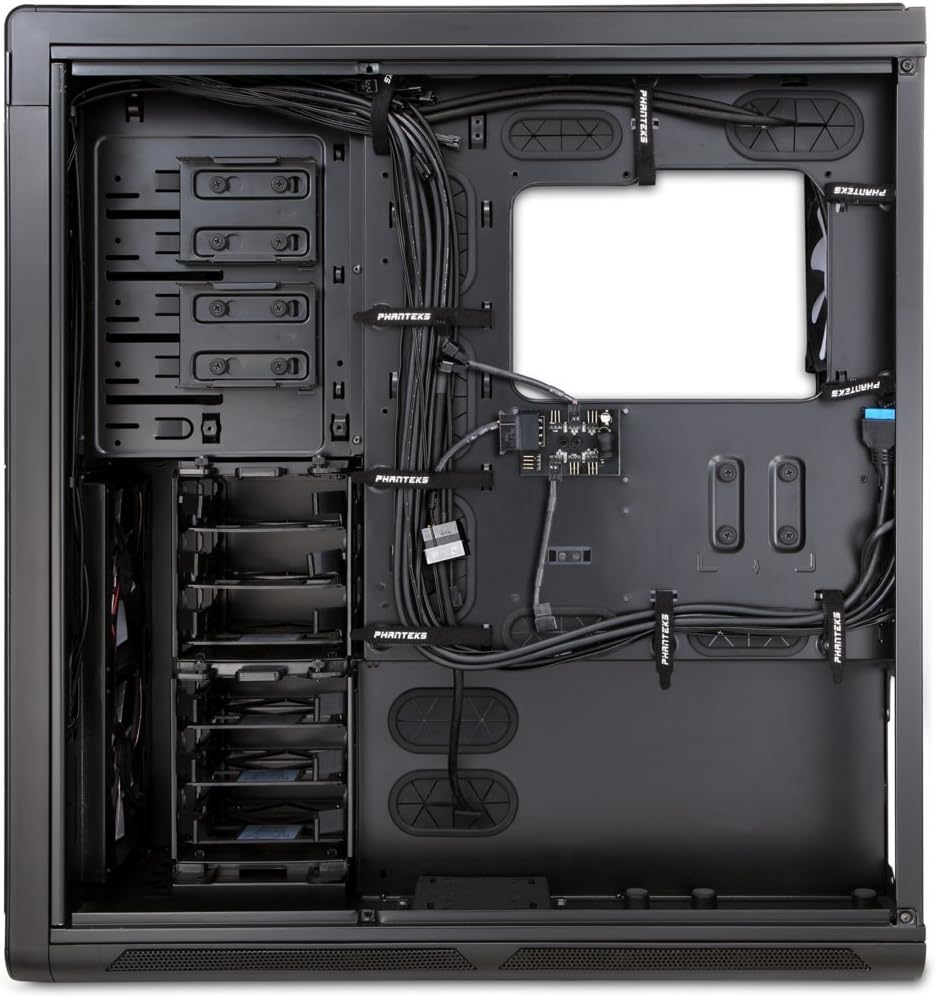
Mufananidzo 4: Mukati view of the Enthoo Primo, showcasing the cable management features behind the motherboard tray.
Zviratidzo zvekushanda
The Enthoo Primo is designed with user convenience and optimal performance in mind.
Pamberi Panel I / O
The front I/O panel provides easy access to essential ports and controls:
- 2x USB 3.0 Ports: Zvekumhanyisa data data.
- 2x USB 2.0 Ports: For standard peripheral connections.
- Maikorofoni Jack: Zvekupinza audio.
- 3.5mm Audio Jack: Zvekuburitsa audio.
- Akatungamirira chinja: Controls the integrated LED lighting (LED strip & Fan LED).

Figure 5: Top angled view of the Enthoo Primo, illustrating the accessible front I/O panel.
Kutonhodza System
The Enthoo Primo offers extensive cooling support for both air and liquid cooling configurations.
- Pre-installed Fans: Includes 1x 140mm fan on top, 2x 140mm LED fans in front, 1x 140mm fan in the rear, and 1x 140mm fan on the bottom. All are Phanteks' PH-F140SP fans.
- Kutonhodza Mhepo: Supports up to 14x 120mm fans or 11x 140mm fans for comprehensive airflow.
- Kutonhodza Kwemvura: Provides up to 5 different installation areas for slim and thick radiators (120mm and 140mm form factors), including clearance for push-pull fan configurations. Innovative liquid cooling mounting systems include radiator brackets and a versatile reservoir/pump bracket.

Mufananidzo 6: Mberi view of the Enthoo Primo, showcasing the clean design and intake areas.
Maintenance
Regular maintenance ensures optimal performance and extends the lifespan of your computer case.
- Dust Sefa: The Enthoo Primo features removable dust filters located at the front, top, bottom (2x), and side panel (2x). Regularly remove and clean these filters to maintain optimal airflow and prevent dust buildup inside the case.
- Kucheneswa Kwekunze: Shandisa nyoro, damp cloth to wipe down the aluminum front and top panels. Avoid abrasive cleaners.
- Kuchenesa Kwemukati: Periodically use compressed air to clear dust from internal components and fan blades. Ensure the system is powered off and unplugged before cleaning.
Kugadzirisa matambudziko
Ichi chikamu chinotarisa zvinowanzoitika zvaungasangana nazvo.
- Hapana Simba:
- Ensure the PSU is properly seated and connected to the motherboard and wall outlet.
- Verify that the front panel power switch cable is correctly connected to the motherboard's header.
- Fans Not Spinning / LED Not Lighting:
- Check fan connections to the motherboard or fan hub.
- Ensure the fan hub is powered (SATA connection).
- Verify the LED switch on the front panel is in the 'on' position.
- USB Ports Haisi Kushanda:
- Confirm that the USB 3.0 and USB 2.0 headers from the front panel are securely connected to the motherboard.
- Noise Yakanyanyisa:
- Check if all fans are securely mounted and free from obstructions.
- Ensure drive trays are properly secured to minimize vibration.
- Clean dust filters and fan blades if necessary.
Zvinotsanangurwa
| Feature | Detail |
|---|---|
| Model Name | PH-ES813P_BL |
| Nyaya Type | Yakazara Shongwe |
| Motherboard Kuenderana | ATX |
| Material | Aluminum Faceplates, Steel Chassis |
| Color | Dema/Blue |
| Dimensions (LxWxH) | 23.62 x 9.84 x 25.59 inches |
| Item Weight | 50 makirogiramu |
| USB 3.0 Ports | 2 |
| USB 2.0 Ports | 2 |
| Sravana Sameeralu Serial 4th Audio Ports | 1x Microphone, 1x 3.5mm Audio Jack |
| Kuwedzera Slots | 8 |
| Kutonhodza Nzira | Mhepo / Mvura |
| Pre-yakaiswa Fans | 5x 140mm (1 top, 2 front LED, 1 rear, 1 bottom) |
| Rutsigiro rweMax Fan | 14x 120mm or 11x 140mm |
| Radiator Tsigiro | Up to 5 locations (120mm/140mm form factors) |
Warranty uye Support
For warranty information and technical support, please refer to the official Phanteks websaiti kana bhuku rakazara remushandisi.
You can download the complete user manual in PDF format here: Phanteks Enthoo Primo User Manual (PDF)


