Eurotime LCD Digital Alarm Clock Model 23708-00 User Manual
Muenzaniso: 23708-00
Nhanganyaya
This manual provides instructions for the setup, operation, and maintenance of your Eurotime LCD Digital Alarm Clock, Model 23708-00. Please read this manual thoroughly before using the product to ensure proper function and longevity.
The Eurotime LCD Digital Alarm Clock features an LCD display, 7-color changing LED lighting, multiple natural alarm tones, and displays time, date, day of the week, and indoor temperature. It also includes a snooze function and a countdown feature.
Safety Information
- Chengetedza mudziyo kure nemvura uye hunyoro hwepamusoro.
- Usaisa mudziyo pachiedza chezuva kana kutonhora kwakanyanya.
- Shandisa chete rudzi rwebhatiri rwakatarwa (mabhatiri maviri e1.5V AAA).
- Usasanganise mabhatiri ekare uye matsva, kana marudzi akasiyana emabhatiri.
- Rasa mabhatiri akashandiswa zvine ungwaru maererano nemitemo yenzvimbo.
- Usaedze kudimbura kana kugadzirisa mudziyo wega. Bata vashandi vanokwanisa kuti vashande.
Package Zviri mukati
- Eurotime LCD Digital Alarm Clock (Model 23708-00)
- 3 x 1.5V AAA Mabhatiri
- Mushandisi Chinyorwa (gwaro iri)
Product Overview
Ziva zvinhu zvinoumba wachi yako yekuridza alarm uye zvinodzora.
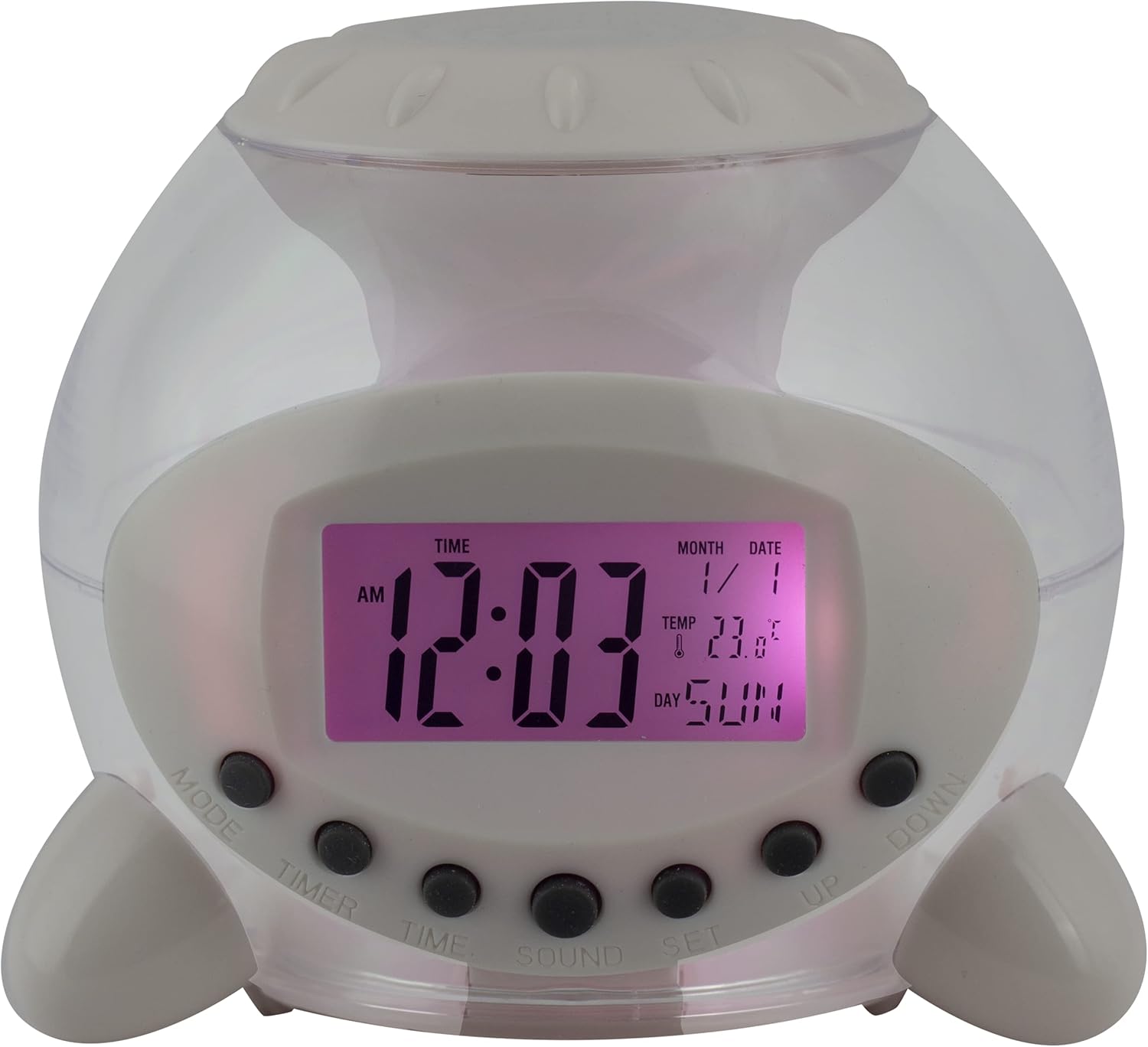
Mufananidzo 1: Mberi View of the Alarm Clock. This image displays the front of the Eurotime LCD Digital Alarm Clock, highlighting its transparent plastic housing and the central LCD screen. The screen shows the time (12:03 AM), month (1), date (1), temperature (23.8°C), and day (SUN). Below the screen are control buttons labeled MODE, TIMER, TIME, SOUND, and SET, along with UP and DOWN buttons.

Mufananidzo 2: Rutivi View with Control Buttons. This image shows a side perspective of the alarm clock, emphasizing the array of control buttons located on the front-bottom edge. The transparent housing allows a glimpse of the internal structure and the LED lighting effect. The buttons are clearly visible for user interaction.

Mufananidzo 3: Rutivi View with Internal Lighting. This image provides another side view, illustrating the transparent housing and the internal LED lighting. The light emanates from the base, creating a soft glow within the clock's structure, demonstrating its color-changing feature.
Mabhatani ekudzora:
- MUENZANISO: Switches between time display, alarm setting, and countdown timer.
- TIMER: Activates and sets the countdown timer.
- TIME: Used to set the current time and date.
- RUNZVA: Selects alarm tones or natural sounds.
- SET: Confirms settings or enters setting mode.
- UP / PASI: Adjusts values during setting modes.
Gadzirira
1. Kuiswa kwebhatiri
- Locate the battery compartment on the bottom of the alarm clock.
- Vhura chivharo chebhatiri.
- Isa mabhatiri matatu (3) e1.5V AAA, uchivimbisa kuti polarity (+/-) yakakodzera.
- Vhara chivharo chebhatiri zvakachengeteka.
Cherechedza: The clock will automatically power on after battery installation. The display may flash, indicating it's ready for time setting.
Operating Instruction
1. Kugadza Nguva uye Zuva
- Mune yakajairika nguva yekuratidzira modhi, tinya iyo NGUVA button once. The hour digits will flash.
- Shandisa iyo UP or PASI mabhatani ekugadzirisa awa.
- Press NGUVA again to move to minute setting. Adjust with UP or PASI.
- Ramba uchidzvanya NGUVA to cycle through year, month, and date settings, adjusting each with UP or PASI.
- After setting the date, press NGUVA one last time or wait a few seconds for the settings to be saved and return to normal display.
2. Kuisa Alarm
- Press the MODE button until "ALARM" appears on the display (or an alarm icon).
- Press the SET bhatani. Nhamba dzeawa yekuyambira dzichapenya.
- Shandisa iyo UP or PASI mabhatani ekugadzirisa awa yearamu.
- Press SET again to move to minute setting. Adjust with UP or PASI.
- Press SET one last time to confirm the alarm time.
- Kuti uvhure/kudzima alarm, tinya iyo UP button in alarm display mode. An alarm icon will appear/disappear.
3. Snooze Basa
Kana alarm yarira, tinya chero bhatani (kunze kwe SET or MODE) to activate the snooze function. The alarm will pause and sound again after a few minutes (duration is adjustable, refer to advanced settings if available).
Kuti udzime alarm zvachose, tinya SET button when it is sounding.
4. Color Changing LED Lighting
The alarm clock features a 7-color changing LED light. This function typically activates automatically when the alarm sounds or can be manually toggled. Refer to the MODE or SET button for specific controls related to the lighting, if available.
5. Natural Alarm Tones
To select an alarm tone:
- In alarm setting mode (after pressing MODE to display alarm time), press the KUSVIRA bhatani.
- Shandisa iyo UP or PASI buttons to cycle through the available natural alarm tones.
- Press SET kusimbisa sarudzo yako.
6. Countdown Feature
Kushandisa countdown timer:
- Press the MODE button until "TIMER" appears on the display.
- Press the TIMER bhatani. Nhamba dzeawa dzichapenya.
- Shandisa UP or PASI to set the desired countdown hour.
- Press TIMER again to set minutes, then seconds.
- Press SET kutanga kuverenga pasi.
- To pause or resume, press SET. Kuti uise patsva, tinya MODE.
Maintenance
Kuchenesa
- Pukuta wachi nemucheka wakapfava, wakaoma.
- Do not use abrasive cleaners or solvents, as they may damage the plastic housing or display.
Kutsiviwa kwebhatiri
When the display dims or functions become erratic, it is time to replace the batteries. Follow the "Battery Installation" steps in the Setup section.
Kugadzirisa matambudziko
| Dambudziko | Zvinogona Kukonzera | Solution |
|---|---|---|
| Kuratidza hakuna chinhu kana kudzima. | Low or depleted batteries. Incorrect battery installation. | Replace batteries with new 1.5V AAA batteries. Ensure correct polarity. |
| Alarm hainzwi. | Alarm is not activated. Alarm volume is too low (if adjustable). | Ensure the alarm icon is displayed. Check alarm settings. |
| Nguva/Zuva hazvina kururama. | Not set correctly after battery installation or power interruption. | Follow "Setting Time and Date" instructions to reset. |
| Color changing light not working. | Feature not activated or malfunction. | Check operating instructions for light activation. If problem persists, contact support. |
Zvinotsanangurwa
- Brand: Eurotime
- Model Number: 23708-00
- Zviyero zvechigadzirwa: 8.99 x 8.99 x 8 cm
- Kurema 120 g
- Material: Plastiki
- Ratidza Rudzi: Dhijitari LCD
- Special Features: Calendar display, Snooze, Alarm, 7-Color Changing LED, Natural Alarm Tones, Countdown Feature, Indoor Temperature Display
- Kunobva Simba: Mabhatiri maviri e1.5V AAA (akabatanidzwa)
Warranty uye Support
For warranty information or technical support, please refer to the retailer where the product was purchased or visit the official Eurotime website. Chengeta risiti rako rekutenga seumboo hwekutenga.


