1. Nhanganyaya
Welcome to the user manual for your new Salora SM508 mobile phone. This guide provides essential information to help you set up, operate, maintain, and troubleshoot your device. Please read this manual carefully to ensure proper use and to maximize the performance and longevity of your phone.
2. Chigadzirwa Pamusoroview
The Salora SM508 is a compact and reliable basic mobile phone designed for essential communication. It features a color display, a comfortable keypad, and dual SIM support.
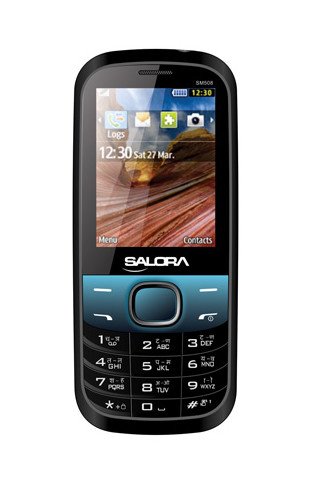
Mufananidzo uyu unoratidza kumberi view of the Salora SM508 mobile phone. It features a color display at the top, a central navigation button, and a standard alphanumeric keypad below. The phone has a black body with blue accents around the navigation cluster.
3. Setup
3.1 Inserting SIM Card(s)
- Turn off the phone and remove the back cover.
- Nyatsobvisa bhatiri.
- Locate the SIM card slots. The Salora SM508 supports dual SIM cards.
- Insert your SIM card(s) into the designated slot(s) with the gold contacts facing down. Ensure they are securely seated.
3.2 Inserting Battery
- Gadzirisa ma contacts ebhatiri ne contacts dziri mu bhatiri refoni.
- Gently press the 1800 mAh Li-Ion battery into place until it clicks.
- Dzorera chivharo chekumashure, uchiona kuti yakasungirirwa zvakachengeteka.
3.3 Inserting Memory Card (Optional)
- With the back cover and battery removed, locate the memory card slot.
- Insert a microSD card (up to 8GB) into the slot with the gold contacts facing down.
- Dzorera bhatiri uye chivharo chekumashure.
3.4 Kuchaja Chishandiso
- Batanidza charger pachiteshi chekuchaja chiri pafoni yako.
- Batanidza charger mudura remagetsi.
- The battery indicator on the screen will show the charging status. Charge the phone fully before first use.
3.5 Kudzima/Kubatidza Kwekutanga
- Kubatidza: Dzvanya wobata bhatani rePower/End Call kusvika skrini yabatidza.
- Kudzima: Press and hold the Power/End Call button until the power-off options appear, then select 'Power off'.
4. Operating Instructions
4.1 Basic Navigation
- Use the navigation keys (up, down, left, right) to move through menus and options.
- Press the central 'OK' or 'Select' button to confirm a selection.
- Use the 'Back' or 'Clear' button to return to the previous screen or delete characters.
4.2 Kuita uye kugamuchira mafoni
- Kufona: Enter the phone number using the keypad and press the Green Call button.
- Kugamuchira Call: When the phone rings, press the Green Call button to answer.
- Kupedza Kufona: Press the Red End Call button.
4.3 Sending and Receiving SMS
- Enda kumenyu ye'Messages'.
- Select 'Write Message' or 'New SMS'.
- Isa meseji yako uchishandisa keypad.
- Add the recipient's number or select from contacts.
- Dzvanya 'Tumira'.
4.4 Kushandisa Kamera
- Vhura application yekamera kubva kumenyu huru.
- The phone features a 1.3 MP primary (rear) camera.
- Rongedza pfuti yako uchishandisa chiratidziro.
- Press the 'OK' or 'Capture' button to take a photo.
4.5 Multimedia and Connectivity
- Audio Jack: The phone includes a 3.5 mm audio jack for connecting headphones or external speakers.
- Bluetooth: Enable Bluetooth from the settings menu to connect to compatible devices for file transfer or hands-free communication.
- GPRS: The phone supports GPRS for basic internet connectivity. Consult your network provider for data plan details.
5. Kuchengeta
5.1 Kuchenesa mudziyo wako
- Use a soft, dry, lint-free cloth to clean the phone's screen and body.
- Dzivisa kushandisa makemikari ane hasha, kuchenesa zvinonyungudutsa, kana mishonga yakasimba.
- Do not allow water or liquids to enter the phone.
5.2 Kuchengeta Battery
- Dzivisa kuisa bhatiri pakupisa kwakanyanya (kunopisa kana kutonhora).
- Usaboora, kupatsanura, kana kupfupisa bhatiri.
- If the battery is damaged or swollen, discontinue use immediately and replace it with an authorized Salora battery.
5.3 Kuchengeta
- Chengeta foni munzvimbo inotonhorera, yakaoma kure nezuva rakananga uye hunyoro.
- If storing for an extended period, ensure the battery is partially charged (around 50%) to preserve its lifespan.
6. Kugadzirisa matambudziko
If you encounter issues with your Salora SM508, please refer to the following common solutions:
- Nhare haisi kuvhurwa:
Ensure the battery is charged. Connect the charger and wait a few minutes before attempting to power on. Check if the battery is properly inserted. - Hapana chiratidzo chenetiweki:
Check if your SIM card is correctly inserted. Ensure you are in an area with network coverage. Try restarting the phone. - Haikwanise kufona/kugamuchira mafoni:
Verify that your SIM card is active and has sufficient balance/plan. Check network signal strength. Ensure call barring or flight mode is not enabled. - Kuchaja nyaya:
Ensure the charger is properly connected to both the phone and the power outlet. Try using a different compatible charger. Check the charging port for any debris. - Kiyibhodhi haipinduri:
Restart the phone. If the issue persists, ensure no physical damage to the keypad.
If the problem persists after trying these steps, please contact Salora customer support.
7. Zvinotsanangurwa
Below are the detailed technical specifications for the Salora SM508 mobile phone:
| Feature | Tsanangudzo |
|---|---|
| Brand | Salora |
| Model | SM508 |
| Operating System | Android 5.1, Android v5 1 OS (Note: This specification appears to be an error in the source data for a basic phone with a keypad interface. The phone operates on a proprietary feature phone OS.) |
| Screen Size | 6.1 Centimetres (2.4" TFT Screen) |
| Resolution | 320 x 240 pixels |
| Primary Camera | 1.3 MP (Kumashure) |
| Bhatiri | 1800 mAh, Li-Ion |
| Memory Storage Capacity | Inowedzera kusvika ku8GB |
| Tsigiro yeSIM | Dual SIM |
| Connectivity Technologies | Bluetooth, GPRS |
| Sravana Sameeralu Serial 4th Audio Jack | 3.5 mm |
| Device Interface - Primary | Keypad |
| Fomu Factor | Bar |
| Color | Dema, Bhuruu |
| Item Weight | 140 g |
| Package Dimensions | 14 x 9.4 x 6.2 cm |
| Zuva Rokutanga Kuwanikwa | 18 Kukadzi 2014 |
8. Warranty uye Tsigiro
8.1 Ruzivo rweWaranti
The Salora SM508 comes with a 1-gore mugadziri waranti yemudziyo kubva pazuva rakatengwa. In-box accessories, kusanganisira mabhatiri, akafukidzwa ne 6-mwedzi mugadziri waranti kubva pazuva rawakatenga. Waranti iyi inovhara zvikanganiso zvekugadzira uye matambudziko anokonzerwa nekushandiswa kwakajairika.
Ndapota chengetedza risiti yako yekutenga sehumbowo hwekutenga kwezvichemo zvewaranti.
8.2 Mutengi Tsigiro
For any technical assistance, warranty claims, or further inquiries regarding your Salora SM508 mobile phone, please contact Salora customer support directly. Refer to the packaging or the official Salora websaiti yeruzivo rwazvino rwekusangana.


