1. Nhanganyaya
This instruction manual provides essential information for the safe and efficient operation of your Nuwave Pro Plus Infrared Oven. Please read all instructions thoroughly before initial use to ensure proper function and to prevent injury or damage. Keep this manual for future reference.
2. Yakakosha Mirayiridzo Yekuchengetedza
Paunenge uchishandisa midziyo yemagetsi, matanho ekuchengetedza anofanirwa kuteedzerwa nguva dzose kuderedza njodzi yemoto, kuvhunduka kwemagetsi, uye kukuvara kwevanhu, kusanganisira zvinotevera:
- Verenga mirairo yese usati washandisa mudziyo.
- Usabata nzvimbo dzinopisa. Shandisa zvibato kana mapfundo.
- Kuti udzivirire pakuvhunduka kwemagetsi, usanyudze tambo, mapulagi, kana mudziyo mumvura kana imwe mvura.
- Kutariswa kwepedyo kunodiwa kana chero mudziyo uchishandiswa nevana kana pedyo.
- Bvisa paburiro kana isiri kushandiswa uye usati wachenesa. Bvumira kutonhora usati wapfeka kana kubvisa zvikamu.
- Usashandise chero mudziyo uine tambo yakakuvadzwa kana plug, kana mushure mekunge mudziyo watadza kushanda kana wakakuvadzwa chero nzira.
- Kushandiswa kwezvishandiso zvisina kukurudzirwa nemugadziri wemidziyo kunogona kukonzera kukuvara.
- Usashandise kunze.
- Usarege tambo ichirembera pamusoro petafura kana counter, kana kubata panopisa.
- Usaise pairi kana pedyo negasi rinopisa kana chibatiso chemagetsi, kana muovheni inopisa.
- Kuchenjerera kwakanyanya kunofanira kushandiswa pakufambisa mudziyo une mafuta anopisa kana zvimwe zvinwiwa zvinopisa.
- Gara uchibatanidza plug kune mudziyo kutanga, wobva waisa tambo mudura remadziro. Kuti udimbure, shandura chero chibatiso kuti 'chidzime', wozobvisa plug kubva pamadziro.
- Usashandise mudziyo kune zvimwe kunze kwechinangwa chekushandisa.
3. Zvigadzirwa zveChigadzirwa
The Nuwave Pro Plus Infrared Oven consists of several key components designed for efficient cooking.

Figure 3.1: The Nuwave Pro Plus Infrared Oven, shown with its instruction manual and a recipe CD.
- Power Head: Contains the heating element, fan, and control panel.
- Dome: A transparent, heat-resistant dome that covers the cooking area.
- Cooking Rack: Used to elevate food for even cooking.
- Base Pan: Collects drippings and holds the cooking rack.
- Digital Control Panel: For setting time, temperature, and other functions.

Mufananidzo 3.2: Pedyo-kumusoro view of the heating element and internal fan located within the power head.
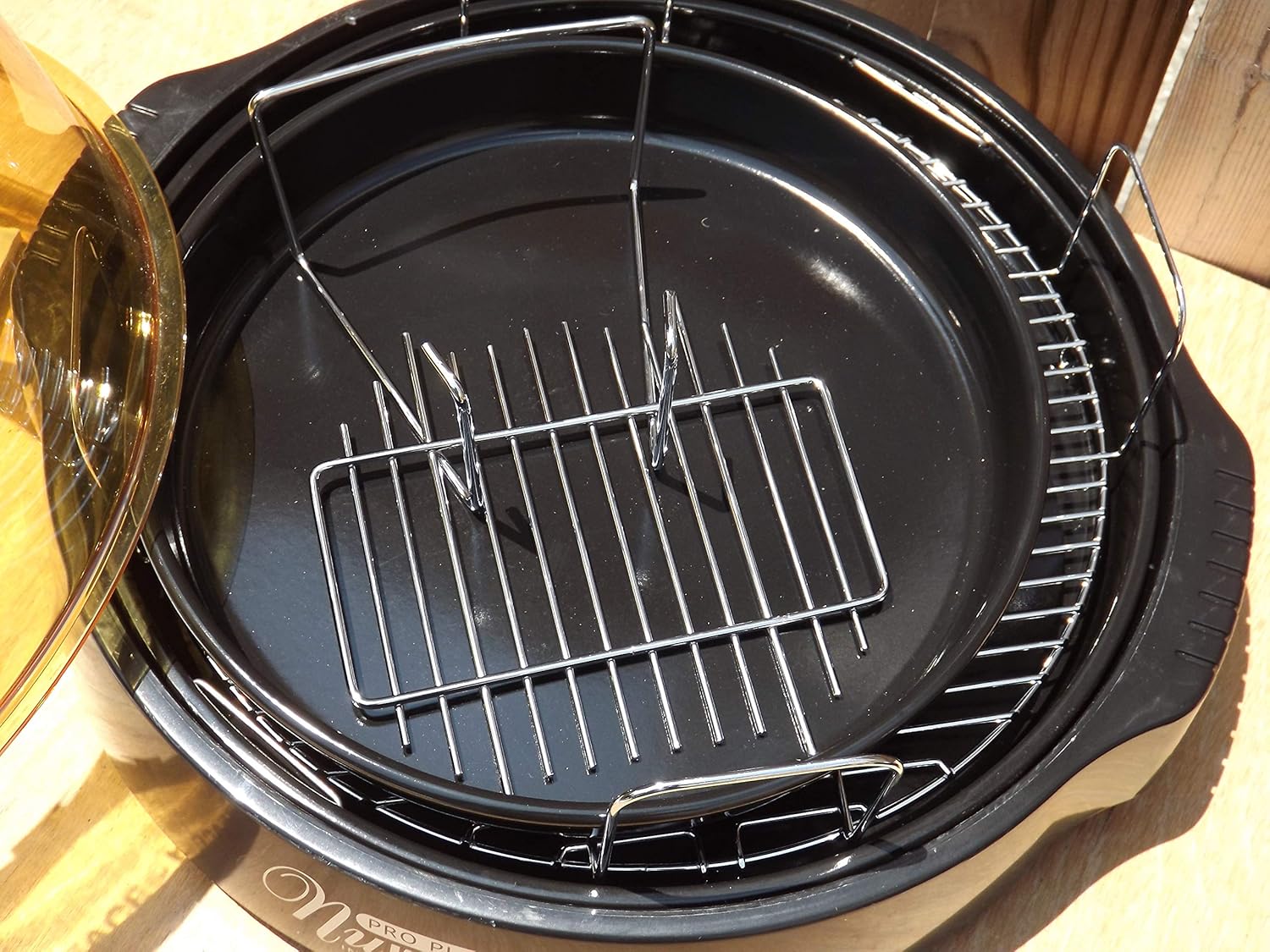
Figure 3.3: The cooking racks positioned within the oven's base pan, ready for food placement.
4. Setup
Before first use, ensure all packaging materials are removed and the appliance is assembled correctly.
- Bvisa zvinhu: Nyatsobvisa zvese zvikamu kubva pakurongedza.
- Kuchenesa: Wash the dome, cooking rack, and base pan with warm, soapy water. Rinse thoroughly and dry completely. The power head should only be wiped with a damp jira.
- Unganidza Place the base pan on a stable, heat-resistant surface. Insert the desired cooking rack into the base pan. Place the food on the rack. Carefully position the dome over the base pan. Finally, place the power head securely on top of the dome.
- Power Connection: Batai tambo yemagetsi mune yakajairwa 120V AC magetsi.
5. Operating Instructions
The Nuwave Pro Plus Infrared Oven features a digital control panel for precise cooking.

Figure 5.1: The digital control panel with buttons for Cook Time, Cook Temp, Reheat, Warm, Delay, Pause/Clear, Start, and numerical input.
- Power On: Once plugged in, the display will illuminate.
- Seta Nguva Yekubika: Press the 'Cook Time' button. Use the numerical keypad to enter the desired cooking duration in minutes. Press 'Start' to confirm.
- Set Cooking Temperature: Press the 'Cook Temp' button. Use the numerical keypad to enter the desired temperature in degrees Fahrenheit. Press 'Start' to confirm.
- Tanga Kubika: After setting time and temperature, press the 'Start' button to begin the cooking cycle.
- Pause/Clear: To temporarily stop cooking, press 'Pause/Clear'. Press 'Start' to resume. To cancel the current program, press 'Pause/Clear' twice.
- Reheat Basa: Press the 'Reheat' button for a preset reheating cycle. Adjust time if necessary using 'Cook Time'.
- Kushanda Kushanda: Press the 'Warm' button to keep food warm after cooking.
- Kunonoka Basa: Press the 'Delay' button to set a delayed start time for cooking. Follow on-screen prompts to set the delay duration.
Always monitor food during cooking. Cooking times may vary based on food type, quantity, and desired doneness.
6. Kuchengetedza uye Kuchenesa
Regular cleaning ensures optimal performance and extends the life of your Nuwave Pro Plus Infrared Oven.
- Bvisa uye Kutonhorera: Always unplug the oven from the power outlet and allow all components to cool completely before cleaning.
- Dome, Rack, and Base Pan: These components are dishwasher safe or can be washed by hand with warm, soapy water. Use a non-abrasive sponge or cloth. Rinse thoroughly and dry completely.
- Power Head: The power head contains electrical components and should NEVER be immersed in water. Wipe the exterior with a damp cloth. For stubborn stains, use a mild detergent on the cloth, then wipe with a clean, damp cloth. Ensure it is completely dry before storage or next use.
- Kuchengeta: Store the oven in a clean, dry place when not in use.
7. Kugadzirisa matambudziko
Tarisa kuchikamu chino kune zvinowanzoitika uye mhinduro dzadzo.
| Dambudziko | Zvinogona Kukonzera | Solution |
|---|---|---|
| Ovheni haibatike. | Haina kubatirwa mukati; power iwetage; kukanganisa kubuda. | Iva nechokwadi chekuti tambo yemagetsi yakabatanidzwa zvakanaka. Tarisa chinopwanya dunhu. Edza imwe nzira yekuburitsa magetsi. |
| Chikafu chisina kubikwa zvakaenzana. | Improper food placement; too much food; incorrect temperature/time. | Ensure food is placed on the rack and not directly on the base. Do not overcrowd the oven. Adjust cooking time or temperature as needed. |
| Utsi kana hwema husingawanzoitiki panguva yekuvhiyiwa. | Food drippings on heating element; residue from previous cooking. | Unplug immediately. Allow to cool and clean all components thoroughly. Ensure no food particles are on the heating element. |
| Control panel haipindure. | Temporary electrical glitch; power head not seated correctly. | Unplug the oven for 1 minute, then plug back in. Ensure the power head is securely placed on the dome. |
8. Zvinotsanangurwa
Detailed technical specifications for the Nuwave Pro Plus Infrared Oven.
- Brand: Nuwave
- Zita remuenzanisi: Nu-Wave Oven
- Kudzora Type: Knob (Digital Keypad)
- Door Style: Side Swing (Dome Lift)
- Zvinosanganisirwa Zvikamu: Crumb Tray (Base Pan), Cooking Rack
- Pedzisa Type: Painted
- Door Material Type: Stainless Steel (referring to internal components/accents)
- Kunobva Simba: AC adapta
- Nhamba Yemasherufu: 1 (Cooking Rack)
- Saizi Pakati
- Chinhu Weight: 14.26 makirogiramu
- Package Dimensions: 15.8 x 14.9 x 12.1 inches
- ASIN: B00IXC09QC
- UPC: 652185206021
9. Warranty uye Tsigiro
For warranty information and customer support, please refer to the documentation included with your purchase or visit the official Nuwave website. Chengetedza risiti yako yekutenga sehumbowo hwekutenga kune chero vimbiso yewaranti.
For further assistance, you may contact Nuwave customer service directly. Contact details are typically found on the product packaging or the manufacturer's official website.


