1. Nhanganyaya
Welcome to the user manual for the Audiovox Prestige APS901E One-Way Remote Start System. This system is designed to provide the convenience of remotely starting your vehicle from a distance of up to 1,500 feet. This manual contains essential information for the proper setup, operation, and maintenance of your remote start system, ensuring safe and effective use.
2. Safety Information
Please read all safety instructions carefully before proceeding with installation or operation of this device.
- Professional installation is highly recommended for this product. Improper installation can lead to vehicle damage, system malfunction, or safety hazards.
- Always ensure the vehicle is in Park (automatic transmission) or Neutral with the parking brake engaged (manual transmission) before attempting remote start.
- Do not remote start the vehicle in an enclosed space without adequate ventilation to prevent carbon monoxide buildup.
- Keep remote transmitters out of reach of children.
- Chigadzirwa ichi chinogona kunge chine makemikari anozivikanwa neHurumende yeCalifornia kukonzeresa gomarara nekuremara pakuzvara kana kumwe kukuvadza pakuzvara (Proposition 65 yambiro).
For additional product information and resources, please visit: http://bit.ly/ZHsi2Z
3. Zvigadzirwa zveChigadzirwa
The Audiovox Prestige APS901E system typically includes the following main components:
- Kudzora Module
- Two One-Button Metal Long Range Transmitters
- Glass Mount Antenna with Built-in LED Light and Valet Switch
- Wiring sunga
- Hood Pin Switch

Tsanangudzo yemufananidzo This image displays the complete Audiovox Prestige APS901E remote start system package. It includes the product box, two one-button remote transmitters, and various wiring harnesses. The box highlights key features such as 1-way transmitters, glass mount antenna, flashing parking lights, selectable run times, telematics port, and limited lifetime warranty.

Tsanangudzo yemufananidzo A pedyo-up view of the two one-button metal remote transmitters included with the APS901E system. Each transmitter features a single button for remote start functionality and a key ring attachment.

Tsanangudzo yemufananidzo The main control module for the Audiovox Prestige APS901E remote start system. It is a black rectangular unit with the "PRESTIGE" logo embossed on top, featuring various ports for wiring harnesses on its sides.

Tsanangudzo yemufananidzo A side view of the APS901E control module, showing the various multi-pin connectors and ports for connecting the wiring harnesses and other accessories.
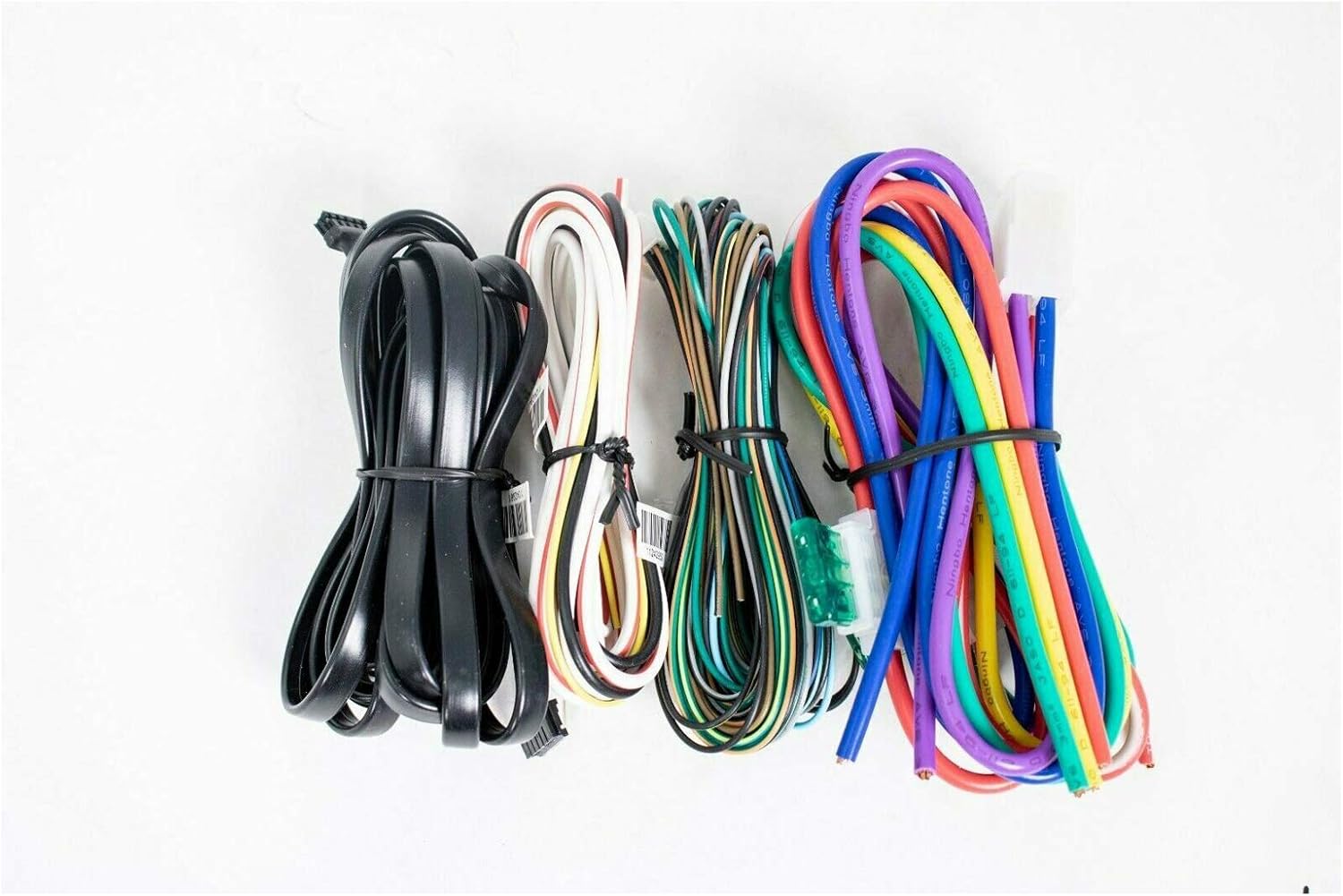
Tsanangudzo yemufananidzo A collection of color-coded wiring harnesses included with the APS901E system, essential for connecting the control module to the vehicle's electrical system.

Tsanangudzo yemufananidzo The glass mount antenna for the APS901E system, featuring a built-in LED light and a valet switch. This component is typically mounted on the vehicle's windshield for optimal signal reception and user interaction.

Tsanangudzo yemufananidzo A hood pin switch component, typically used as a safety feature to prevent remote starting when the vehicle's hood is open, ensuring user safety during maintenance.
4. Setup uye Kuiswa
Installation of the Audiovox Prestige APS901E system requires advanced automotive electrical knowledge and specialized tools. It is strongly recommended that this system be installed by a certified professional to ensure proper functionality and to avoid damage to your vehicle.
Zvinhu Zvikuru Zvekuisa:
- On-board ignition 1 & 2 relay
- On-board accessory relay
- On-board start relay
- Ignition 2 relay selectable on or off during cranking
- On-board parking light relay
- Ignition 3 / shock by-pass / GM VAT output (relay required)
- Tach signal learning circuit
- Two (+) and two (-) safety shutdown circuits
- Alarm by-pass output
- Accessory outputs (pulse before & after start, during crank and after shut down)
- Selectable steady or flashing parking lights for run indication
- Telematics port - Carlink ready
- DBI port - plug in flash logic by-pass capable
Wiring Connections Overview:
The system utilizes various wiring harnesses to connect to the vehicle's electrical system. These connections typically include:
- Simba uye Ground kubatana
- Ignition Wires (Ignition 1, Ignition 2, Accessory, Starter)
- Parking Light Output
- Door Lock/Unlock Outputs (if optional feature is enabled and wired)
- Hood Pin Switch Input (safety feature)
- Brake Switch Input (safety feature)
- Tachometer Input (for engine sensing)
- Valet Switch and LED connections (via antenna cable)
Refer to the detailed wiring diagram and vehicle-specific installation guide provided with the product packaging for precise connection points and procedures.
5. Operating Instructions
The APS901E is a one-way remote start system operated by a single-button transmitter.
Remote Starting Your Vehicle:
- Ensure the vehicle is in Park (automatic transmission) or Neutral with the parking brake engaged (manual transmission, if configured for remote start).
- Press and hold the button on your remote transmitter for approximately 2-3 seconds.
- The vehicle's parking lights will flash to confirm the signal has been received.
- The engine will start after a short delay. The parking lights will remain on or flash steadily to indicate the vehicle is running under remote start.
- The system has selectable run times. The engine will shut off automatically after the programmed duration.
Kupinda Mumota Mushure meKutanga Kure:
- Unlock the vehicle doors using your vehicle's key or remote.
- Pinda mumotokari.
- Insert the key into the ignition and turn it to the "ON" or "RUN" position (do not turn to "START").
- Press the brake pedal. This action will disengage the remote start and transfer control to the vehicle's ignition key.
Shutting Down Remote Start:
To manually shut down the remote start before the programmed run time expires:
- Press and hold the button on your remote transmitter for approximately 2-3 seconds. The vehicle's parking lights will turn off, indicating the engine has shut down.
- Alternatively, pressing the brake pedal or opening the hood will also shut down the remote start.
Valet Mode:
Valet mode disables the remote start function, allowing the vehicle to be serviced without accidental remote starting.
- Turn the ignition key to the "ON" position.
- Press and release the valet switch (located on the antenna) once.
- The LED on the antenna will illuminate steadily to indicate valet mode is active.
- To exit valet mode, repeat the steps. The LED will turn off.
6. Kuchengeta
The Audiovox Prestige APS901E system requires minimal maintenance to ensure optimal performance.
- Remote Transmitter Batteries: If the operating range decreases significantly, the remote transmitter battery may need replacement. Refer to the transmitter's specific instructions for battery type and replacement procedure.
- Kuchenesa System: Keep the control module and antenna free from excessive dust or moisture. Do not use harsh chemicals for cleaning.
- Wiring Inspection: Periodically inspect visible wiring for any signs of wear, fraying, or loose connections. Address any issues promptly to prevent system malfunction.
7. Kugadzirisa matambudziko
If you experience issues with your remote start system, consider the following common problems and solutions:
Remote Start Does Not Activate:
- Kunze kweRange: Ensure you are within the 1,500-foot operating range. Obstacles like buildings or other vehicles can significantly reduce range.
- Mamiriro Emotokari: Verify all vehicle doors are closed, the hood is closed, and the parking brake is engaged. The system will not start if any safety inputs are active.
- Valet Mode: Check if the system is in valet mode. Exit valet mode if necessary (refer to Valet Mode section).
- Transmitter Battery: Replace the remote transmitter battery if it is weak or depleted.
- System Error: If the parking lights flash a specific pattern after attempting to start, consult the full installation manual for error codes.
Engine Cranks but Does Not Start:
- Fuel/Ignition Issues: Ensure the vehicle has sufficient fuel and there are no underlying engine issues preventing it from starting normally with the key.
- Tach Signal: Verify the tach signal learning circuit is properly configured. An incorrect or absent tach signal can cause starting issues.
- Bypass Module: If a bypass module is used for the vehicle's immobilizer system, ensure it is functioning correctly and is properly programmed.
Remote Start Shuts Down Prematurely:
- Safety Inputs: Check if any safety inputs (e.g., hood opened, brake pedal pressed, door opened) are being triggered.
- Nguva Yekumhanya: The system may have reached its programmed run time and shut down automatically.
- Yakadzika Voltage: A weak vehicle battery can cause the system to shut down prematurely to protect the vehicle's electrical system.
For persistent issues that cannot be resolved with these steps, contact a professional installer or Audiovox customer support.
8. Zvinotsanangurwa
| Feature | Tsanangudzo |
|---|---|
| Model | APS901E |
| Brand | Audiovox Prestige |
| System Type | One-Way Remote Start Only |
| Operating Range | Kusvika ku1,500 tsoka |
| Transmitters | Two one-button metal long range transmitters |
| Relays | On-board ignition 1 & 2, accessory, start, parking light |
| Kugarisana | Hybrid vehicle compatible for remote start |
| Product Dimensions | 7.5 x 5.5 x 3.5 inches (Likely packaging dimensions) |
| Item Weight | 0.01 ounces (Note: This weight is unusually low and may refer to a single component or be an error in source data.) |
9. Ruzivo rweWaranti
The Audiovox Prestige APS901E system comes with a Yakaganhurirwa Hupenyu Hwarandi.
For specific terms, conditions, and claim procedures, please refer to the warranty card included with your product packaging or contact Audiovox customer support directly. Proof of purchase is typically required for warranty claims.
10. Tsigiro
For technical assistance, installation inquiries, or warranty claims, please contact Audiovox customer support or visit their official websaiti yeruzivo rwechizvino-zvino.
It is recommended to have your product model number (APS901E) and proof of purchase available when contacting support to facilitate a quicker resolution.


