Nhanganyaya
This manual provides essential instructions for the setup, operation, and maintenance of your Gigaset Handset and Charging Station. This product is compatible with various Gigaset phone systems, including models S2, S44, S200, S440, S445, S645, SX440, and SX445. Please read this manual carefully to ensure proper use and to maximize the lifespan of your device.
1. Setup
1.1 Kusunungura uye Kwekutanga Kuongorora
Carefully unpack all components. Ensure that the handset, charging station, and power adapter are present and undamaged. If any items are missing or damaged, contact your retailer.
1.2 Connecting the Charging Station
- Connect the power adapter cable to the charging station.
- Batanidza dhiraivha yemagetsi mugetsi remagetsi.
- Place the charging station on a flat, stable surface, away from heat sources and direct sunlight.

Mufananidzo 1.1: Pamusoro view of the Gigaset charging station. This image shows the compact design of the charging station, ready to receive the handset.
1.3 Inserting the Battery and Charging the Handset
- Vhura chivharo chebhatiri kuseri kweruoko.
- Isai bhatiri rinochajwa zvakare, muchiva nechokwadi che polarity chaiyo.
- Vhara chivharo chebhatiri.
- Place the handset into the charging station. Ensure it is seated correctly and the charging indicator (if present) illuminates.
- Bvumira ruoko ruchichaja kweinenge 6-8 maawa usati watanga kushandisa kuti uve nechokwadi chekuti bhatiri rakazara.
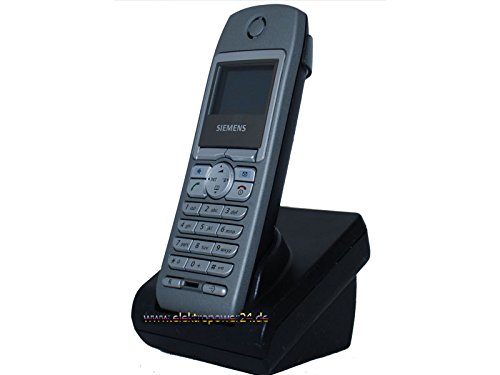
Mufananidzo 1.2: Mberi view of the Gigaset handset securely placed in its charging station. The display shows "Wahlvorbereitung" (dialing preparation) and a phone number, indicating it's powered on and ready.
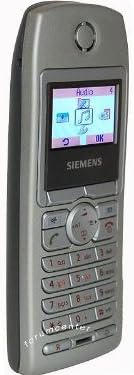
Mufananidzo 1.3: Kurutivi view of the Gigaset handset, highlighting its ergonomic design and button layout. The display shows menu options like "Audio" and "OK".

Mufananidzo 1.4: Kumashure view of the Gigaset handset, showing the smooth casing and the location of the battery compartment cover.
1.4 Kunyoresa Handset kuBase Station
This handset is designed to be compatible with various Gigaset base stations. The registration process may vary slightly depending on your specific base station model. Refer to your base station's manual for detailed instructions. Generally, the steps involve:
- Activate registration mode on your Gigaset base station (usually by pressing and holding a registration button).
- On the handset, navigate to the "Settings" or "Registration" menu.
- Select "Register Handset" and follow the on-screen prompts. You may need to enter a PIN (default is usually 0000).
- Once registered, the handset display will confirm successful connection to the base station.
2. Operating Instructions
2.1 Basic Mabasa
- Kufona: Isa nhamba yefoni wodzvanya bhatani regirinhi rekufona.
- Kupindura Kudanwa: Dzvanya bhatani regirini rekufona kana foni yarira.
- Kupedza Kufona: Press the red end call key.
- Kufona Kwemahara: During a call, press the dedicated hands-free key (often backlit) to activate the speakerphone.
2.2 Bhuku reNhare (Bhuku reDhairekitori)
The handset features a directory capable of storing up to 200 phone numbers and names.
- Kuwedzera Entry: Navigate to the "Directory" or "Phonebook" menu, select "New Entry," and enter the name and number.
- Calling from Directory: Open the directory, scroll to the desired entry, and press the green call key.
2.3 Kuratidzwa uye Zviratidzo
The handset features a 5-line illuminated graphic display. Key indicators include:
- Date/Time Display: Always visible on the idle screen.
- CLIP Function (Call Display): Shows the caller's number or name (if stored in the directory) for incoming calls.
- Chiratidzo chebhatiri: Inoratidza huwandu hwekuchaja kwebhatiri huripo.
- Chiratidzo cheSimba reSignal: Displays the connection quality to the base station.
3. Kuchengeta
3.1 Kuchenesa
- Wipe the handset and charging station with a soft, damp jira.
- Usashandise abrasive cleaners kana solvents.
- Ita shuwa kuti hapana mvura inopinda mumazaru emudziyo.
3.2 Kuchengeta Battery
- Always use the original or approved replacement rechargeable batteries.
- Dzivisa kuisa bhatiri kune tembiricha yakanyanyisa.
- If the handset will not be used for an extended period, remove the battery.
4. Kugadzirisa matambudziko
| Dambudziko | Zvinogona Kukonzera | Solution |
|---|---|---|
| Handset does not turn on. | Bhatiri harina kuiswa zvakanaka kana kudzima. | Check battery insertion. Place handset in charging station for several hours. |
| Hapana dhoni yekudaira. | Handset not registered to base station or out of range. | Ensure handset is registered. Move closer to the base station. Check base station power. |
| Hunhu hwekufona husina kunaka. | Interference or handset too far from base station. | Move away from other electronic devices. Move closer to the base station. |
| Hatikwanise kufona kana kugamuchira. | Line issue or base station problem. | Check your telephone line connection. Restart the base station by unplugging and replugging its power. |
5. Zvinotsanangurwa
- Brand: Gigaset
- Inoenderana Models: Gigaset S2, S44, S200, S440, S445, S645, SX440, SX445
- Runharembozha Up to 200 entries (names and numbers)
- Ratidza: 5-line illuminated graphic display
- Features: Backlit hands-free key, Date/Time display, CLIP function (Call Display)
- Mugadziri: Gigaset
- ASIN: B0102FULTW
Note: Information regarding spare parts availability and guaranteed software updates is not provided. This product is currently not listed as discontinued by the manufacturer.
6. Warranty uye Tsigiro
Specific warranty details for this Gigaset Handset and Charging Station are not provided within the available product information. For warranty claims, technical support, or service inquiries, please refer to the documentation included with your original purchase or visit the official Gigaset webnzvimbo yedunhu rako.
Unogonawo kubata mutengesi wako kuti akubatsire.


