Nhanganyaya
This manual provides instructions for the HAVIT HV-KB366L RGB Backlit Mechanical Gaming Keyboard. This keyboard features blue mechanical switches, full anti-ghosting, and customizable RGB backlighting, designed for reliable performance.
Setup Instructions
Kubatanidza Keyboard
- Tsvaga inowanikwa USB port pakombuta yako.
- Connect the USB cable from the HAVIT HV-KB366L keyboard to the USB port on your computer.
- Kiyibhodhi iyi inongoshanda uye inofanira kuonekwa otomatiki nesystem yako yekushandisa.
Kugarisana Kwehurongwa
- Compatible with Windows 10 and other Windows operating systems.
- Mac OS supports 6-key rollover only.
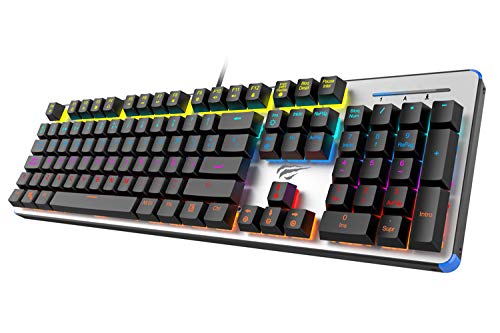
Figure 1: HAVIT HV-KB366L RGB Backlit Mechanical Gaming Keyboard. An overhead view of the keyboard, showcasing its full layout with RGB lighting on the keys and a white frame.
Operating Instruction
Mechanical Key Swichi
The keyboard is equipped with blue mechanical switches, providing tactile feedback and an audible click with each keystroke. This design is intended for precise input during typing and gaming.
Anti-Ghosting Feature
The full key anti-ghosting mechanism ensures that all key presses are registered accurately, even when multiple keys are pressed simultaneously. This feature is beneficial for fast-paced gaming.
Backlight Adjustment
- To change the backlight color or mode, press the Fn kiyi panguva imwe chete ne Backlit key. Repeated presses will cycle through available modes and colors.
- Marquee Mode: In 7-color backlit mode (non-breathing), press the Backlit key once to activate marquee mode. Press the Backlit key again to deactivate marquee mode and return to 7-color backlit mode.
- Kupenya Kwemazinga: The backlight offers 4 levels of brightness adjustment.
- Mwero wekufema: The breathing effect has 10 adjustable levels.
Maintenance
Kuchenesa Keyboard
- Bvisa kiibhodhi kubva pakombuta yako usati wachenesa.
- Use a soft, dry cloth to wipe the surface of the keyboard.
- Kune guruva nemarara pakati pekiyi, shandisa mweya wakamanikidzwa.
- Avoid using harsh chemicals or abrasive materials, as these can damage the finish or keycaps.
Kugara kwenguva refu
The keyboard features an aluminum top housing with a sanded finish and a metal base, contributing to its overall durability and stable performance.
Kugadzirisa matambudziko
Keyboard Haisi Kupindura
- Ita shuwa kuti tambo ye USB yakabatana zvakachengeteka kune zvese keyboard uye komputa.
- Edza kubatanidza kiibhodhi kune imwe nzvimbo ye USB pakombiyuta yako.
- Edza kiibhodhi pane imwe komputa kuti uone kana dambudziko riri pakiibhodhi kana pachiteshi cheUSB chekombuta.
Chiedza chekumashure hachisi kushanda kana kuti hachina kururama
- Verify that the keyboard is properly connected and receiving power.
- Press Fn + Backlit key to cycle through backlight modes and ensure it is not turned off or set to a very low brightness.
- Refer to the "Backlight Adjustment" section for detailed instructions on changing modes and brightness.
Zvinotsanangurwa
| Brand | HAVIT |
| Model Number | HV-KB366L |
| Mugadziri | HAVIT |
| Product Dimensions | 50.5 x 17.6 x 6 Masendimita |
| Item Weight | 1.33 kg |
| Kubatana Technology | Wired (USB) |
| Keyboard Tsanangudzo | Mutambo Mechanical Keyboard |
| Special Feature | RGB Backlit, Anti-Ghosting |
| Hardware Platform | Laptop, PC |
| Operating System | Windows 10 (and compatible), Mac OS (6-key rollover) |
| Voltage | 5 Volts |
| Inosanganisirwa Zvikamu | USB Cable |
Warranty & Support
Warranty Information
Specific warranty details for the HAVIT HV-KB366L keyboard are not provided in the product data. Please refer to the product packaging or contact HAVIT directly for warranty terms and conditions.
Mutengi Support
For technical assistance, troubleshooting, or further inquiries, please contact HAVIT customer support through their official websaiti kana ruzivo rwekuonana rwakapihwa nekutenga kwako.


