
Nhanganyaya
Thank you for choosing the Calypso K5684/6 Digital Watch. This manual provides essential information for the proper setup, operation, and maintenance of your watch. Please read it carefully to ensure optimal performance and longevity of your device.
The Calypso K5684/6 is a sporty and fashionable digital multifunction watch featuring a clear LCD display, 10 ATM (100 meters) water resistance, a durable plastic strap, chronograph, alarm, and dual time zone functions.
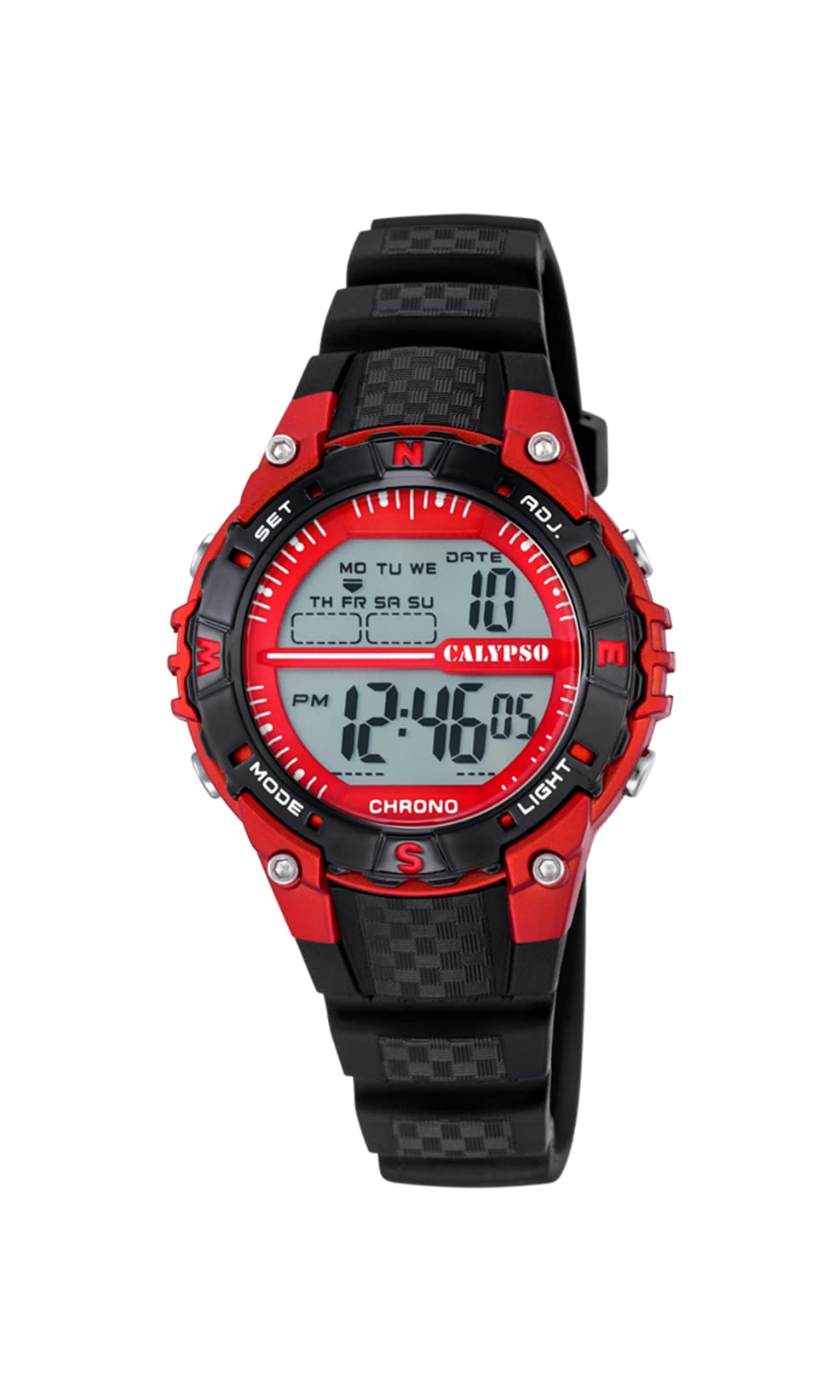
A kumberi view of the Calypso K5684/6 digital watch, showcasing its LCD display, black plastic case, and strap. The display shows time, date, and mode indicators.
Kutanga Setup
Bhatani Mabasa Pamusoroview
Your Calypso K5684/6 watch features four primary control buttons:
- MUENZANISO: Cycles through different display modes (Time, Alarm, Chronograph, Dual Time).
- SET: Used to enter and confirm settings in various modes.
- ADJ (Adjust): Used to adjust values (increment/decrement) during setting. Also functions as Start/Stop for Chronograph.
- CHIEDZA: Inoita kuti mwenje wekumashure uoneke kana chiedza chakaderera.

A pedyo-up view of a Calypso digital watch, highlighting the 'MODE', 'SET', 'ADJ', and 'LIGHT' buttons on the sides of the watch case. The display shows 'MON 12:44 8-17 06'.
Operating Instruction
1. Nguva uye Date Setting
- Kubva pane yakajairika nguva inoratidza, tinya MODE button repeatedly until the seconds begin to flash. This indicates you are in time setting mode.
- Press the SET bhatani rekutenderera kuburikidza nemarongero: Masekondi → Maawa → Maminetsi → Gore → Mwedzi → Zuva.
- Kunyange zvazvo kukosha kuri kupenya, shandisa ADJ button to increase or decrease the value. Hold ADJ kuti zvigadziriswe nekukurumidza.
- Kana zvese zvagadziriswa zvakanaka, tinya bhatani rekuti MODE bhatani rekubuda mumodhi yekuisa uye kudzokera kuchiratidzo chenguva yakajairika.
2. Alarm Basa
- Press the MODE button until the alarm time is displayed (usually indicated by 'AL' or a bell icon).
- Dzvanya uye ubate iyo SET bhatani kusvikira maawa aramu atanga kupenya.
- Shandisa iyo ADJ bhatani rekuseta yaunoda alarm awa.
- Press SET again to move to the alarm minutes, then use ADJ kuseta maminetsi.
- Press SET to confirm and exit the alarm setting.
- To activate/deactivate the alarm, in alarm mode, press the ADJ bhatani. Chiratidzo chealamu chichaonekwa/chinonyangarika pachiratidziro.
3. Chronograph (Chinomira Nguva)
- Press the MODE button until 'CHRONO' or 'STW' is displayed. The display will show '00:00:00'.
- Press the ADJ button to start the chronograph.
- Press ADJ zvakare kumisa chronograph.
- Kuti udzorere chronograph kusvika pazero, tinya bhatani rekuti SET button while the chronograph is stopped.
4. Dual Time Zone
- Press the MODE button until 'DT' or 'DUAL TIME' is displayed.
- Dzvanya uye ubate iyo SET bhatani kusvikira maawa atanga kupenya.
- Shandisa iyo ADJ button to set the desired hour for the second time zone.
- Press SET again to move to the minutes, then use ADJ to set the minutes (minutes are usually synchronized with the main time zone).
- Press SET to confirm and exit the dual time setting.
5. Backlight
Press the CHIEDZA bhatani rekuvhenekera chiratidziro kwemasekonzi mashoma. Chinhu ichi chinobatsira munzvimbo dzine rima.
Kuchengeta uye Kuchengeta
1. Kuchenesa
- Pukuta bhokisi rewachi wobva wasunga jira rakapfava, rakaoma nguva dzose kuti ubvise tsvina nehunyoro.
- Patsvina yakasindimara, shandisa zvishoma damp jira nesipo yakapfava, wozopukuta pakaoma.
- Dzivisa kushandisa mishonga yekuchenesa ine makemikari, zvinonyungudutsa, kana zvinhu zvinogumbura, sezvo izvi zvinogona kukuvadza magumo ewachi nezvisimbiso zvayo.
2. Water Resistance Precautions
Your Calypso K5684/6 watch is water-resistant up to 10 ATM (100 meters), making it suitable for swimming and snorkeling. However, please observe the following:
- Usashandise mabhatani chero api zvawo wachi yacho yakanyudzwa mumvura. This can compromise the water resistance.
- Avoid exposing the watch to hot water, steam, or extreme temperature changes, as this can affect the seals.
- Mushure mekunwa mvura ine munyu, sukurudza wachi nemvura yakachena woiomesa zvakanaka.
3. Kutsiviwa kwebhatiri
When the display becomes dim or the watch stops functioning, the battery may need replacement. It is recommended to have the battery replaced by a qualified watch technician to ensure the water resistance is maintained.
Kugadzirisa matambudziko
| Dambudziko | Zvinogona Kukonzera | Solution |
|---|---|---|
| Kuratidza hakuna chinhu kana kudzima. | Bhatiri rakaderera kana rapera. | Chinja bhatiri. Bvunza nyanzvi yewachi. |
| Mabhatani haapindure. | Wachi inogona kunge iri mumodhi yakakiyiwa kana kuti bhatiri rakaderera. | Try pressing the MODE button to cycle through modes. If unresponsive, consider battery replacement. |
| Nguva haina kururama. | Time was not set correctly or watch was exposed to strong magnetic fields. | Tarisa chikamu che "Nguva neZuva" kuti ugadzirise nguva. |
| Mvura mukati mewachi. | Water resistance compromised (e.g., buttons pressed underwater, damaged seals). | Enda newachi nekukurumidza kune nyanzvi yekugadzirisa wachi kuti udzivise kukuvara kwakawanda. |
Zvigadzirwa Zvinotsanangurwa
| Feature | Detail |
|---|---|
| Model Number | K5684/6 |
| Brand | Calypso |
| Display Type | Dhijitari LCD |
| Nyaya Yenyaya | Polycarbonate with Stainless Steel Back |
| Strap Material | Plastiki |
| Kuramba Mvura | 10 ATM (mamita makumi matatu) |
| Mabasa | Time, Date, Day, Alarm, Chronograph, Dual Time Zone, Backlight |
| Zviyero zveChigadzirwa (L x W x H) | 17.4 x 8.99 x 8.2 cm |
| Item Weight | 50 magiramu |
| Nyika Yekwakabva | Speini |
Warranty Information
Calypso watches typically come with a manufacturer's warranty covering defects in materials and workmanship. The specific terms and duration of your warranty are usually provided with your purchase documentation. Please retain your proof of purchase for any warranty claims.
The warranty does not cover damage resulting from improper use, accidents, unauthorized repairs, or normal wear and tear.
Mutengi Support
For further assistance, technical support, or service inquiries regarding your Calypso K5684/6 Digital Watch, please contact your retailer or the official Calypso customer service in your region. Contact details can often be found on the Calypso official websaiti kana mumidziyo yekurongedza.


