1. Chigadzirwa Pamusoroview
The Grandstream GXP1630 is a powerful Gigabit IP phone designed for small businesses. This Linux-based, 3-line IP Phone model includes 8 BLF keys and 4-way conferencing. It features a 132x64 backlit LCD screen for clear display, dual HD audio, multi-language support, integrated Power over Ethernet (PoE), and 3 XML programmable soft keys. The GXP1630 incorporates state-of-the-art security encryption technology (SRTP and TLS) and supports various automated provisioning options for easy mass deployment.
Zvinokosha:
- 3 SIP accounts, 3 line keys, 4-way conferencing
- 3 XML programmable context-sensitive soft keys
- HD audio on speakerphone and handset
- Up to 1000 contacts, call history up to 200 records
- Dual-switched Gigabit ports, integrated PoE
- 8 dual-colored BLF/speed dial keys
- EHS support for Plantronics headsets
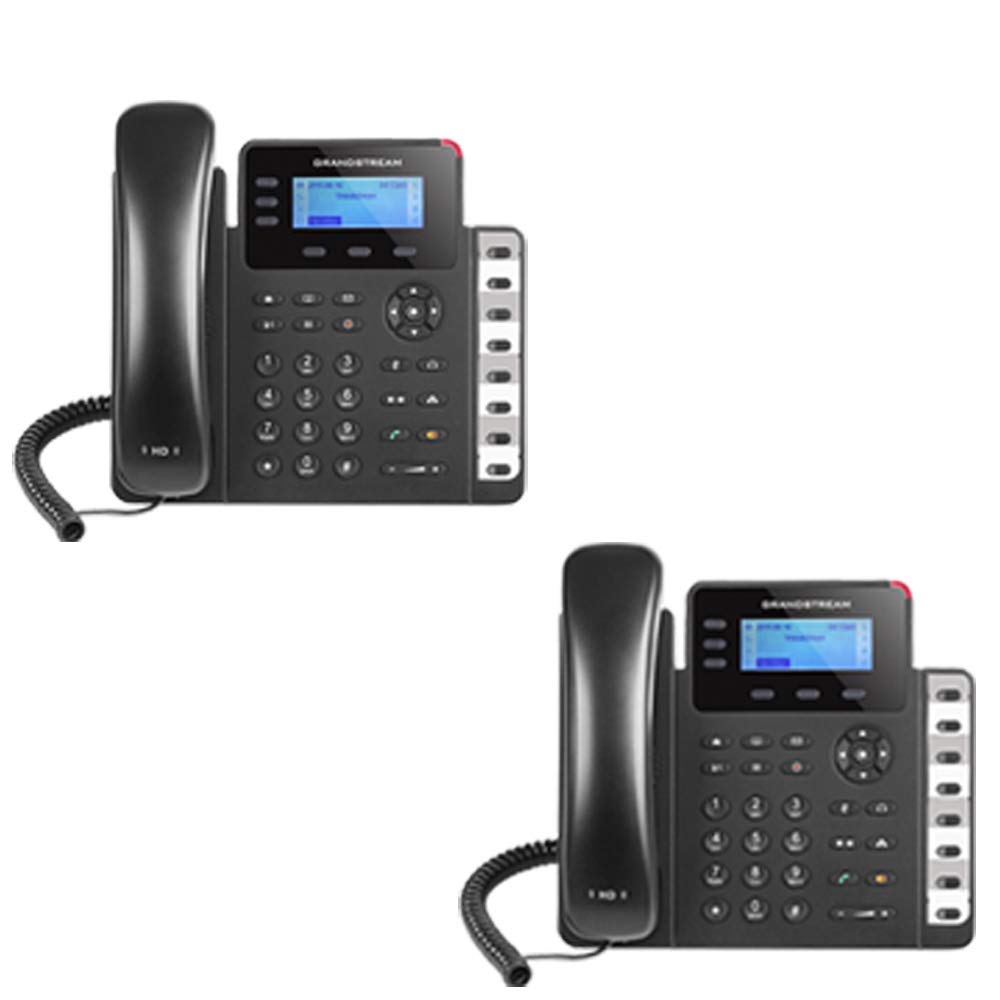
Figure 1: Grandstream GXP1630 Gigabit IP Phone
2. Setup uye Kuiswa
2.1 Package Zviri mukati
Iva nechokwadi chekuti zvikamu zvese zviripo:
- Grandstream GXP1630 IP Phone unit
- Handset uye coiled tambo
- Ethernet tambo
- Adapta yemagetsi (kana isiri kushandisa PoE)
- Phone stand
2.2 Kubatanidza Nhare
- Connect the coiled cord to the handset and the handset port on the phone base.
- Connect the Ethernet cable from your network switch (with PoE) or router to the LAN port on the phone. If not using PoE, connect the power adapter to the phone and a power outlet.
- Optionally, connect a headset to the headset port.
- Attach the phone stand to the base unit.
2.3 Kugadzirisa uye Kugadzirisa Pakutanga
Once connected, the phone will power on and begin the boot-up sequence. The LCD screen will display status information. The GXP1630 supports automated provisioning options, including zero-configuration with Grandstream’s UCM series IP PBXs, encrypted XML files, and TR-069, to facilitate easy mass deployment and configuration.
3. Operating the Phone
3.1 Using the Headset or Speaker
- To turn the speaker on or off during a call, press the Mutauri bhatani.
- To use a connected headset, press the Headset bhatani.
Vhidhiyo 1: Pamusoroview of using headset and speaker functions on Grandstream GXP1600 series IP phones.
3.2 Kufona
There are three primary ways to initiate a call:
- Handset/Headset: Simudza handset kana kudzvanya iyo Headset bhatani.
- Mutauriri wefoni: Press the Mutauri bhatani.
- Line Key Selection: Press an available line key.
Once you hear a dial tone (the corresponding line key will turn green), enter the phone number using the keypad. Then, press the Send bhatani kana # key to place the call. To use a different SIP account, simply press a different line key before dialing.
3.3 Redialing a Number
To redial the last number called:
- Simudza handset kana kudzvanya iyo Mutauri bhatani.
- Press the Send bhatani kana Kudzorera soft key displayed on the phone screen.
The phone will redial using the same SIP account as the previous call.
3.4 Kudavira runhare
When an incoming call rings:
- Ingori Kuuya Kufona: Lift the handset, press the Mutauri button, or press the corresponding flashing line key.
- Multiple Incoming Calls (Call Waiting): If you are on an active call and another call comes in, you will hear a call waiting tone. The new incoming call's line key will flash red. Press the flashing red line key to answer the new call. Your current call will be placed on hold. You can toggle between calls by pressing the line key corresponding to each call.
3.5 Kupedza Kufona
Kuti upedze kufona:
- Gadzirisa ruoko.
- Press the End Call soft key on the phone screen.
3.6 Hold and Resume a Call
- Kuti umbomira runhare, tinya Bata button. The line key will typically flash.
- To resume a call that was placed on hold, press the corresponding blinking line key.
3.7 Volume Adjustment and Mute
- When the phone is idle, use the Volume bhatani rekugadzirisa vhoriyamu yemhete.
- Munguva yekufona unoshanda, tinya iyo Volume button to adjust the call volume for the handset, headset, or speaker.
- To mute or unmute your microphone during a call, press the Mute bhatani.
4. Kuchengeta
To ensure optimal performance and longevity of your Grandstream GXP1630 IP Phone, consider the following maintenance tips:
- Kuchenesa: Shandisa jira rakapfava, rakaoma kuchenesa pamusoro pefoni. Dzivisa zvinochenesa kana zvinonyungudutsa.
- Firmware Dzokorora: Regularly check for and apply firmware updates provided by Grandstream. Keeping the firmware up to date can improve performance, add new features, and address security vulnerabilities.
- Environmental Conditions: Operate the phone within recommended temperature and humidity ranges to prevent damage.
5. Kugadzirisa matambudziko
If you encounter issues with your GXP1630 IP Phone, try the following basic troubleshooting steps:
- Hapana Dial Toni/Haikwanise Kufona: Check all cable connections (Ethernet, handset, power). Ensure the phone is properly registered with your SIP server.
- Hapana Simba: Verify the power adapter is securely connected to both the phone and a working power outlet, or that your network switch is providing Power over Ethernet (PoE).
- Hunhu Hwekunzwika Husina kunaka: Check network connectivity. Ensure the handset/headset cord is properly connected. Adjust the call volume using the volume buttons.
- Phone Unresponsive: As with any electronic device, occasional reboots can resolve minor issues. Disconnect the power for a few seconds and then reconnect it.
- Ratidza Nyaya: If the screen is blank or frozen, try rebooting the phone.
For more advanced issues, consult your IT administrator or Grandstream's official support resources.
6. Zvinotsanangurwa
| Feature | Tsanangudzo |
|---|---|
| SIP Accounts | 3 |
| Line Keys | 3 |
| Conferencing | 4-nzira |
| BLF/Speed Dial Keys | 8 dual-colored |
| Vadivelu Comedy Audio | HD audio on speakerphone and handset |
| Network inowanikwa | Dual-switched Gigabit ports |
| POE | Integrated Power over Ethernet |
| Display | 132x64 backlit LCD |
| Dimensions | 8 x 12 x 6 inches |
| Kurema | 6 Pondo |
| Color | Nhema |
| Material | Plastiki |
| Inowirirana Devices | Grandstream IP phones, Plantronics headsets with EHS feature, devices supporting TR-069 and XML config files |
7. Warranty uye Tsigiro
7.1 Warranty yemugadziri
The Grandstream GXP1630 IP Phone comes with a 1 Year Manufacturer Warranty. Ndapota chengetedza humbowo hwako hwekutenga kwezvichemo zvewaranti.
7.2 Tsigiro yehunyanzvi
For technical assistance, product registration, or to access additional resources, please visit the official Grandstream website or contact your product vendor. Support resources often include FAQs, knowledge bases, and community forums.


