1. Nhanganyaya
The Muse M-192 CR is a versatile clock radio designed to provide reliable timekeeping, alarm functions, and FM radio reception. It features a large, easy-to-read digital display, dual alarms, and convenient functions such as snooze, sleep, and NAP. This manual provides detailed instructions for the proper setup, operation, and maintenance of your device.
2. Mirayiridzo Yekuchengetedza
- Verenga mirairo yese zvakanaka usati washandisa mudziyo.
- Chengetedza mudziyo kure nemvura kana mwando.
- Usavhare nzvimbo dzinopinda mhepo. Iva nechokwadi chekuti pane nzvimbo yakakwana yakakomberedza mudziyo kuti mweya ufambe zvakanaka.
- Use only the AC adapter supplied with the unit.
- Rega kuisa mudziyo kune tembiricha yakanyanyisa, zuva rakananga, kana hunyoro hwepamusoro.
- Usaedze kuparadzanisa kana kugadzirisa iyo unit. Tumira masevhisi ese kuvashandi vanokwanisa.
3. Package Zviri mukati
Ndokumbira utarise pasuru yezvinhu zvinotevera:
- 1 x Muse M-192 CR Clock Radio
- 1 x AC Adapter
- 1 x Chinyorwa Chekuraira (gwaro iri)
4. Chigadzirwa Pamusoroview
Familiarize yourself with the various parts and controls of your Muse M-192 CR Clock Radio.

Mufananidzo 1: Kumberi kwekona view of the Muse M-192 CR Clock Radio, showcasing its large digital display and control buttons.
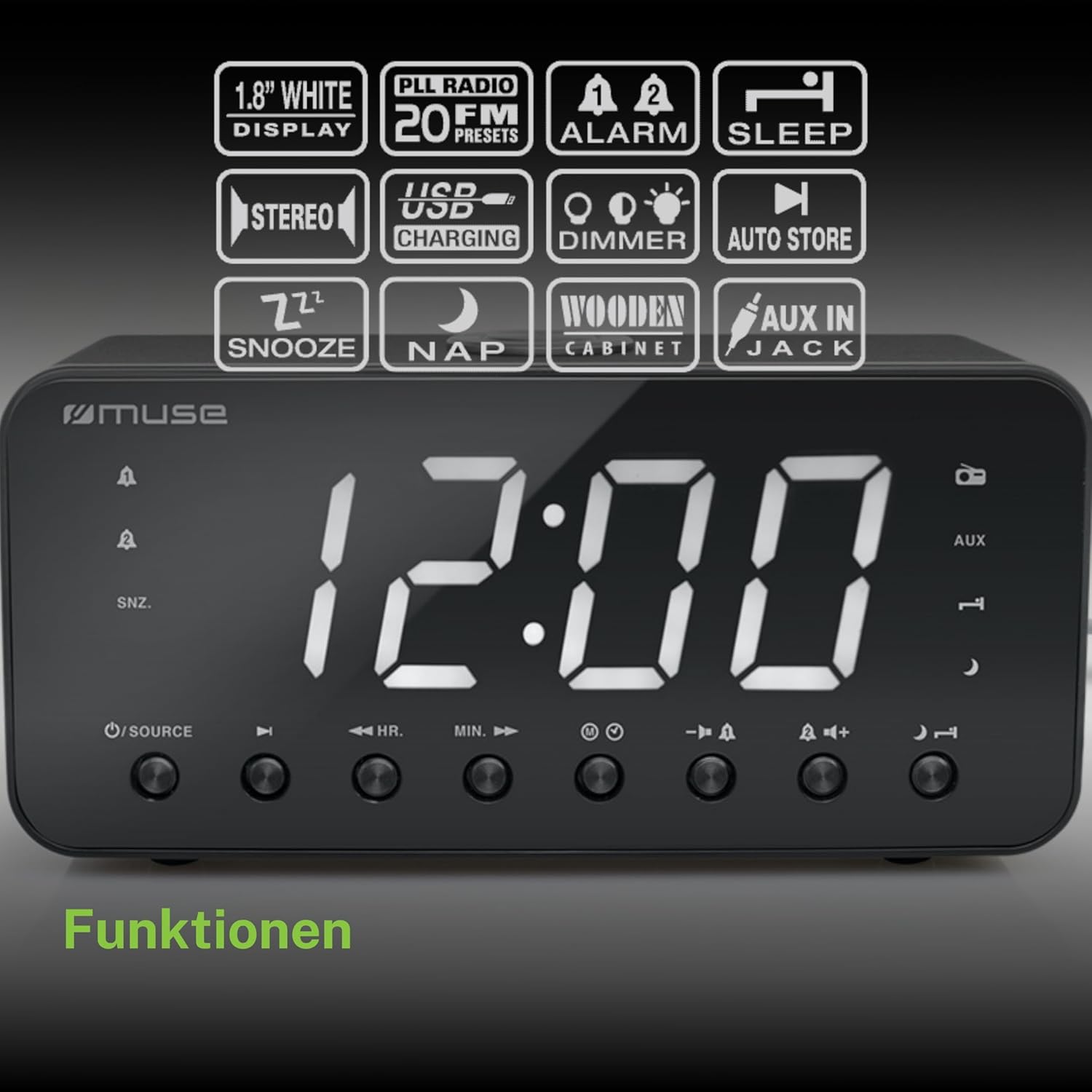
Figure 2: Diagram illustrating the key features and control buttons on the Muse M-192 CR Clock Radio, including the 1.8-inch white display, PLL FM radio with 20 presets, dual alarms, sleep, snooze, NAP functions, USB charging, dimmer, auto store, and AUX input jack.
Front Panel Controls:
- Ratidza: Large 1.8-inch white LED display for time and status.
- SOURCE Bhatani: Selects between FM radio and AUX input.
- HR (Hour) Button: Adjusts hour for time and alarm settings.
- MIN (Minute) Button: Adjusts minute for time and alarm settings.
- ALARM 1 Button: Sets and activates/deactivates Alarm 1.
- ALARM 2 Button: Sets and activates/deactivates Alarm 2.
- SNOOZE/DIMMER Button: Activates snooze during an alarm; adjusts display brightness (High/Low/Off) when not alarming.
- SLEEP Bhatani: Sets the sleep timer for radio playback.
- NAP Button: Sets a short nap alarm.
- Vhoriyamu Kumusoro / Pasi Mabhatani: Inogadzirisa vhoriyamu yekuteerera.
Rear Panel Connections:
- AUX IN Jack: Inobatanidza ekunze maodhiyo emidziyo.
- USB kuchaja Port: Provides power to charge compatible devices.
- DC IN Jack: Connects the AC adapter for power.
- Battery Compartment: Holds backup batteries.
5. Setup
5.1 Simba Connection
- Insert the small plug of the supplied AC adapter into the DC IN jack on the rear of the clock radio.
- Plug the AC adapter into a standard wall outlet. The display will light up.
5.2 Kuisa Bhatiri Rekuchengetedza
The clock radio requires 2 x 1.5V AAA batteries (not included) for backup power. These batteries maintain the time and alarm settings during a power outage.
- Vhura chifukidziro chebhatiri chiri pasi pechishandiso.
- Isa mabhatiri maviri eAAA, uchicherechedza polarity chaiyo (+ na -) sezvakaratidzwa mukati mechikamu.
- Vhara chivharo chebhatiri zvakachengeteka.
Note: Battery backup only preserves settings; the display will not illuminate and alarms will not sound during a power outage if only running on battery backup.
6. Operating Instructions
6.1 Kuisa Nguva
- In standby mode (when the radio is off), press and hold the NGUVA ISETA button (if available, otherwise use HR/MIN directly or a dedicated time set button not explicitly listed but implied by HR/MIN). If no dedicated button, proceed to step 2.
- Press the HR bhatani kugadzirisa iyo nguva.
- Press the MIN bhatani kugadzirisa miniti.
- Release the buttons to confirm the time. The time will automatically set after a few seconds of inactivity.
6.2 Kugadzirisa Maaramu (Ararm 1 & Alarm 2)
The Muse M-192 CR features two independent alarms.
- Dzvanya uye ubate iyo ALARAMU 1 button until the alarm time flashes on the display.
- Shandisa iyo HR uye MIN mabhatani ekuseta yaunoda alarm nguva.
- Press the ALARAMU 1 bhatani zvakare kuti usarudze kwakabva alarm: Buzzer or Radio.
- Press the ALARAMU 1 button a third time to confirm and activate Alarm 1. An alarm icon will appear on the display.
- Repeat the process for ALARAMU 2 kushandisa ALARAMU 2 bhatani.
To deactivate an alarm, press the corresponding ALARM button until its icon disappears from the display.
6.3 Zivai Rinoshanda
Kana alarm yarira, tinya iyo SNOOZE / DIMMER bhatani rekunyaradza alarm kwenguva pfupi. Alarm icharira zvakare mushure memaminitsi angangoita mapfumbamwe.
6.4 Kurara Basa
The sleep function allows you to fall asleep to the radio, which will automatically turn off after a set period.
- Redhiyo ichiri kurira, dzvanya iyo RARA bhatani kakawanda kuti udzokorore nguva dzekurara dziripo (semuenzaniso, maminetsi gumi, makumi matatu, makumi matanhatu, makumi mapfumbamwe, kana kuti OFF).
- Redhiyo icharira kwenguva yakasarudzwa yobva yadzima yega.
6.5 NAP Function
The NAP function sets a short alarm for a specified duration.
- Press the NAP button repeatedly to select a nap duration (e.g., 10, 20, 30, 60, 90, 120 minutes, or OFF).
- The alarm will sound after the selected duration.
6.6 Radio Operation (FM)
- Press the SOURCE bhatani rekusarudza FM radio mode.
- Dzvanya uye ubate iyo HR or MIN button to automatically scan for the next available station. Briefly press to manually tune.
- Chinja vhoriyamu uchishandisa iyo Volume Up/Down mabhatani.
Setting Radio Presets:
The unit supports up to 20 FM radio presets.
- Tune to your desired FM station.
- Dzvanya uye ubate iyo PRESET button (often combined with a number or memory button, if not explicitly labeled, refer to the full manual for specific button). If no dedicated PRESET button, the HR/MIN buttons might serve this function in radio mode.
- Shandisa iyo HR or MIN buttons to select a preset number (P01-P20).
- Press the PRESET button again to save the station.
- To recall a preset, briefly press the PRESET bhatani wobva washandisa HR or MIN kusarudza inodiwa nhamba yakatarwa.
6.7 AUX Input
Connect an external audio device (e.g., MP3 player, smartphone) to the AUX IN jack on the rear of the unit using a 3.5mm audio cable (not included).
- Connect one end of the audio cable to your external device's headphone jack.
- Connect the other end to the AUX IN jack on the clock radio.
- Press the SOURCE button to select AUX mode. The display will show "AUX".
- Play audio from your external device. Adjust volume using the clock radio's Volume Up/Down buttons and your external device's volume control.
6.8 USB Kuchaja
The USB port on the rear of the unit can be used to charge compatible devices.

Figure 3: The Muse M-192 CR Clock Radio highlighting its jumbo white display and the USB charging port located on the rear of the unit.
- Connect your device's USB charging cable to the USB charging port on the clock radio.
- Ensure the clock radio is powered on.
- Your device should begin charging.
Note: The USB port is for charging only and does not support data transfer or audio playback.
6.9 Dhiramu reKuratidza
Adjust the brightness of the display to suit your preference.
- Mune standby mode, tinya iyo SNOOZE / DIMMER bhatani kakawanda.
- Cycle through the brightness levels: High, Low, and Off.
7. Kuchengeta
- Kuchenesa: Pukuta chikwata nemucheka wakapfava, wakaoma. Usashandise abrasive cleaners, wax, kana solvents.
- Kufefetedza Chengeta mazariro ekufemesa asina guruva nemarara.
- Kuchengeta: If storing the unit for an extended period, disconnect it from the power outlet and remove the backup batteries.
8. Kugadzirisa matambudziko
| Dambudziko | Zvinogona Kukonzera | Solution |
|---|---|---|
| Hapana simba / Kuratidzwa kwakadzimwa | Adapta yeAC haina kubatana kana kuti haina kunaka. | Ensure AC adapter is securely plugged into the unit and a working wall outlet. |
| Alarm hainzwi | Alarm haina kushanda kana kuiswa zvisizvo. | Verify alarm time and source are set correctly and the alarm icon is visible on the display. |
| Kugamuchirwa kweredhiyo kweFM kusina kunaka | Antenna haina kuwedzerwa kana kukanganisa. | Extend the FM wire antenna fully. Reposition the unit to improve reception. |
| Display too bright/dim | Kugadzirisa dimmer kunoda kugadziriswa. | Press the SNOOZE / DIMMER bhatani rekutenderera nepakati pemazinga ekupenya. |
9. Zvinotsanangurwa

Figure 4: Technical drawing illustrating the dimensions of the Muse M-192 CR Clock Radio (226mm length, 86mm width, 108mm height).
- Muenzaniso: M-192 CR
- Ratidza: 1.8-inch White Digital LED
- Redhiyo FM PLL Radio with 20 Presets
- Alarm Mabasa: Dual Alarm, Snooze, Sleep, NAP
- Alarm Source: Radio or Buzzer
- Kubatana: AUX-in, USB Charging Port
- Simba: AC Power (Adapter Included), Battery Backup (2 x 1.5V AAA batteries, not included)
- Output Power: 2 Watts
- Zviyero (L x W x H): 22.6 x 8.6 x 10.8 cm
- Kurema 800 g
10. Warranty uye Tsigiro
For detailed warranty information and technical support, please refer to the documentation provided with your purchase or contact your retailer. Keep your proof of purchase for any warranty claims.


