Nhanganyaya
This manual provides detailed instructions for the safe and efficient operation of your Telefunken RC1007BM Bluetooth Boombox. Please read this manual thoroughly before using the device and retain it for future reference.

Mufananidzo: Mberi view of the Telefunken RC1007BM Bluetooth Boombox, showcasing its speakers, central control panel, and antenna.
Mirayiridzo Yekuchengetedza
- Usaise mudziyo pamvura kana hunyoro kudzivirira moto kana kuvhundutswa nemagetsi.
- Usavhare chero mazaru emhepo. Isa maererano nemirairo yemugadziri.
- Usaise padhuze nechero zvitubu zvekupisa zvakaita semaradiator, marejita ekupisa, zvitofu, kana zvimwe midziyo (kusanganisira amplifiers) zvinoburitsa kupisa.
- Chengetedza tambo yemagetsi kubva pakufambiswa kana kudzvanywa, kunyanya pamapulagi, midziyo yekurerutsira, nenzvimbo yavanobuda kubva mumidziyo.
- Shandisa zvinonamirwa/zvishandiso zvinotsanangurwa nemugadziri chete.
- Bvisa mudziyo uyu panguva yemadutu emheni kana kuti usina kushandiswa kwenguva yakareba.
- Tarisa ese servicing kune vanokwanisa basa revashandi. Kushanda kunodiwa kana midziyo yacho yakanganisa chero nzira.
Package Zviri mukati
Ndapota tarisai kuti zvinhu zvese zviripo:
- Telefunken RC1007BM Bluetooth Boombox
- Power Adapter
- Shaulder Strap
- Remote Control
- Mushandisi Chinyorwa (gwaro iri)
Product Overview
Front Panel Controls uye Connections
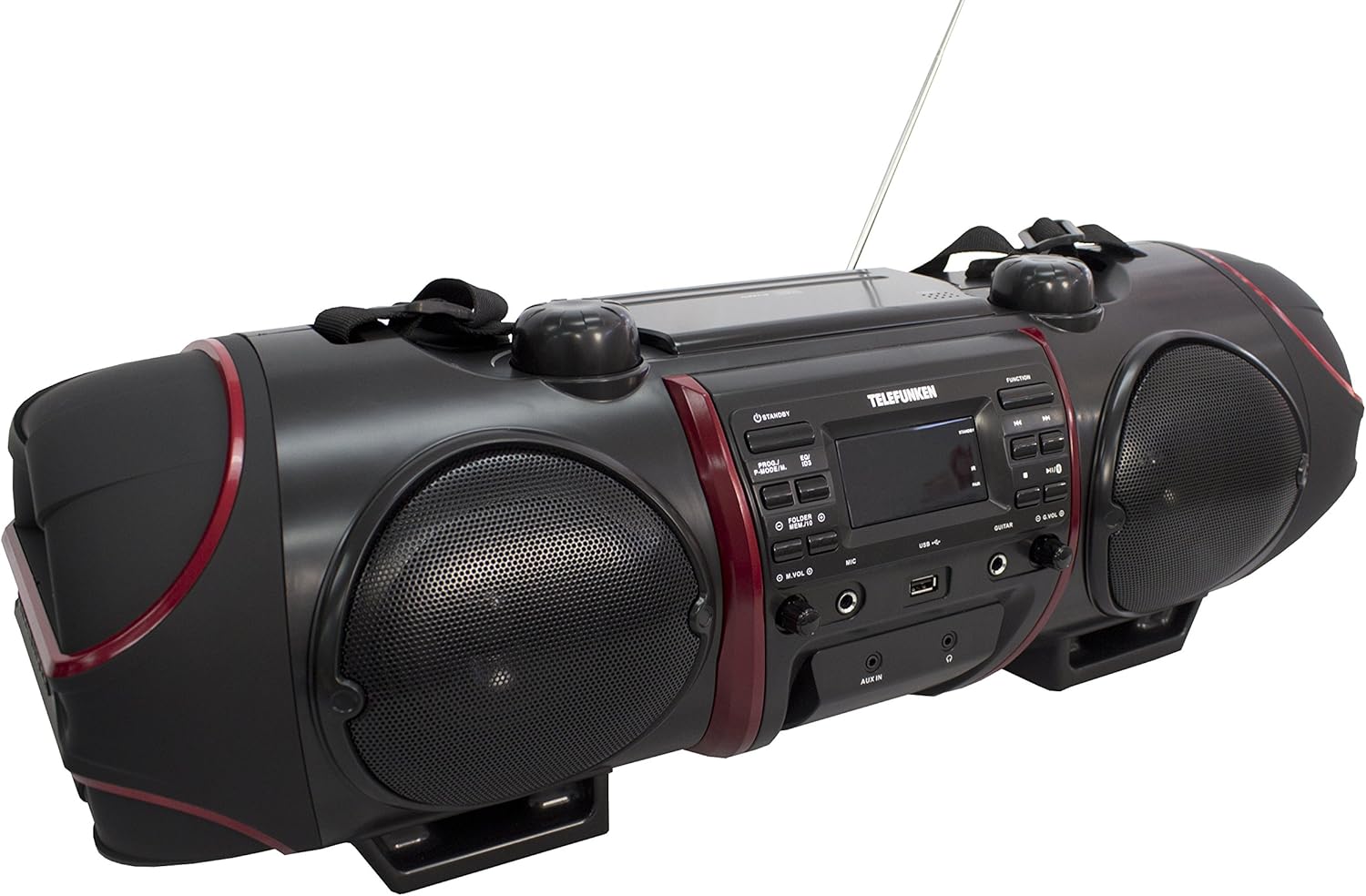
Image: Close-up of the central control panel, showing buttons, LCD display, USB port, and input jacks.
- Bhatani reKUMIRA: Inobatisa kana kudzima unit.
- PROG./P-MODE/M. Button: Program CD tracks, select playback mode, or store/recall radio presets.
- EQ/ID3 Button: Select equalizer presets or display ID3 tag information for MP3s.
- FOLDER/MENU/TS Button: Navigate folders on USB/CD or access menu options.
- M.VOL (Microphone Volume) Knob: Adjusts microphone input volume.
- MIC (Microphone) Input: 3.5mm jack for microphone connection.
- USB Port: Yekubatanidza USB midziyo yekuchengetedza.
- Kupinza Gitare: 3.5mm jack for guitar connection.
- G.VOL (Guitar Volume) Knob: Adjusts guitar input volume.
- Bhatani reBASA: Selects input source (CD, FM, Bluetooth, AUX).
- PLAY/PAUSE Bhatani: Inotanga kana kumbomira kutamba.
- STOP Bhatani: Inomira kutamba.
- SKIP/TUNE Buttons (Previous/Next): Skips tracks or tunes radio frequencies.
- PAIR Bhatani: Inotanga kubatana kweBluetooth.
- Knob yeVOL (Vhoriyamu): Inogadzirisa inzwi guru.
- AUX IN Jack: 3.5mm yekuisa manzwi ekunze.
- Jack wefoni yemumusoro: 3.5mm kubuda kwemahedhifoni.
- Chiratidziro cheLCD: Shows current status, track information, and radio frequency.
Top Panel (CD Compartment)

Mufananidzo: Pamusoro view of the boombox, highlighting the CD compartment with 'PUSH TO OPEN' label.
The CD compartment is located on the top of the unit. Press the 'PUSH TO OPEN' area to open the lid and insert a CD.
Rear Panel (Power and Battery Compartment)

Mufananidzo: Rear view of the boombox, displaying the AC power input and the battery compartment cover.
The AC power input and battery compartment are located on the rear of the unit. Ensure the correct power source is connected or batteries are inserted correctly.
Remote Control

Image: The remote control for the Telefunken RC1007BM, showing various function buttons.
The remote control provides convenient access to most functions of the boombox. Refer to the button labels on the remote for specific operations.
Gadzirira
Power Connection
- AC Simba: Connect the supplied power adapter to the AC input jack on the rear of the unit and then to a standard wall outlet.
- Battery Power: For portable use, open the battery compartment on the rear of the unit and insert the required batteries (not included), ensuring correct polarity.
Antenna Adjustment
Extend the telescopic antenna fully for optimal FM radio reception. Adjust its position for the best signal.
Kusungirirwa Kwetambo Yemafudzi
Attach the provided shoulder strap to the designated loops on the sides of the boombox for easy portability.
Operating Instruction
Kubatidza/Kudzima
Press the MIRA NE button on the front panel or remote control to turn the unit on or off.
CD/MP3-CD Playback
- Press the BASA bhatani kusarudza CD modhi.
- Open the CD compartment lid by pressing 'PUSH TO OPEN' on the top.
- Place a CD or MP3-CD with the label side facing up. Close the lid.
- Kutamba kuchatanga otomatiki. Kana zvisina kudaro, tinya bhatani rekuti TAMBA/KUMIRA bhatani.
- Shandisa iyo SKIP/TUNE mabhatani ekusvetuka makwara.
- Press the MIRA bhatani kumisa kutamba.
- Kutamba Kwechirongwa: While in stop mode, press PROG./P-MODE/M. to program tracks.
- Dzokorora/Random Playback: Press PROG./P-MODE/M. during playback to cycle through repeat modes (e.g., repeat one, repeat all) or random play.
FM Radio Operation
- Press the BASA bhatani rekusarudza FM radio mode.
- Auto Scan and Store: Dzvanya uye ubate iyo PROG./P-MODE/M. bhatani rekuti uskene otomatiki uye uchengete zviteshi zveFM zviripo.
- Chinyorwa Kugadziridza: Shandisa iyo SKIP/TUNE mabhatani ekugadzirisa nemaoko mafrequency aunoda.
- Recall Presets: Press PROG./P-MODE/M. repeatedly to cycle through stored preset stations.
Bluetooth Kubatanidza
- Press the BASA button to select Bluetooth mode. The display will show "BT" and flash, indicating it's in pairing mode.
- Activate Bluetooth on your smartphone or tablet and search for available devices.
- Select "RC1007BM" from the list of devices.
- Once paired, the display will stop flashing, and you can play music from your device.
- The effective transmission range is up to 10 meters.
AUX Input
- Batanidza mudziyo wekunze wekuteerera (semuenzaniso, MP3 inoridza) kune iyo AUX IN jack using a 3.5mm audio cable (not included).
- Press the BASA bhatani rekusarudza AUX mode.
- Ridza odhiyo kubva pane chako chakabatana.
Maikorofoni uye Gitare Input
- Batanidza maikorofoni kune MIC input jack and/or a guitar to the GITARA jack yekupinda.
- Gadzirisa maikorofoni vhoriyamu uchishandisa iyo M.VOL knob and the guitar volume using the G.VOL knob.
Inzwi Yakaenzana
Press the EQ/ID3 button repeatedly to cycle through the 6 preset equalizer levels: Flat, Classic, Pop, Jazz, Rock, and 3D. Select the one that best suits your audio preference.
Maintenance
- Kuchenesa: Shandisa jira rakapfava, rakaoma kuchenesa kunze kwechikwata. Usashandise abrasive cleaners kana solvents.
- CD Care: Bata maCD ari pamucheto wawo. Chenesa maCD akasviba nejira rakapfava, risina jira, uchipukuta kubva pakati nekunze.
- Battery Care: Kana iyo unit isingashandiswe kwenguva yakareba, bvisa mabhatiri kudzivirira kubuda uye kukuvara.
Kugadzirisa matambudziko
| Dambudziko | Zvinogona Kukonzera | Solution |
|---|---|---|
| Hapana simba | Tambo yemagetsi haina kubatana; Mabhatiri apera kana kuti akaiswa zvisiri izvo. | Ensure AC adapter is securely connected. Replace batteries or check polarity. |
| Hapana ruzha | Vhoriyamu yakaderera zvakanyanya; Kwakabva zvisiri izvo kwakasarudzwa; Mahedhifoni akabatana. | Increase volume. Press FUNCTION to select correct source. Disconnect headphones. |
| CD haisi kutamba | CD inserted incorrectly; CD dirty or scratched; Disc format not supported. | Insert CD with label side up. Clean or replace CD. Ensure it's a CD-R/RW or MP3-CD. |
| Bluetooth haina kubatanidza | Device too far; Bluetooth not enabled on external device; Unit not in pairing mode. | Move device closer. Enable Bluetooth on your device. Press FUNCTION to select BT mode and PAIR button. |
| Kugamuchirwa kweredhiyo kusina kunaka | Antena haina kutambanudza kana kuiswa zvakanaka; Chiratidzo chisina kusimba. | Kuwedzera uye gadzirisa iyo telescopic antenna. Edza kuendesa chikwata kune imwe nzvimbo. |
Zvinotsanangurwa
- Muenzaniso: RC1007BM
- Brand: TELEFUNKEN
- Kunobva Simba: AC 100-240V ~ 50/60Hz or Batteries (not included)
- Total Output Power (RMS): 52 W (2 x 8 W speakers, 2 x 18 W subwoofer)
- Bluetooth Version: 3.0
- Bluetooth Range: Kusvika 10 metres
- Tuner: Digital PLL FM/FM-Stereo
- FM Presets: 30
- CD Kutamba: CD, CD-R/-RW, MP3-CD
- Maodhiyo Anotsigirwa Mafomati: MP3, WMA, AAC, WAV
- Zvinopinza 3.5mm AUX-in, 3.5mm Microphone, 3.5mm Guitar, USB
- Zvinobuda: 3.5mm Nhare mbozha
- Ratidza Rudzi: LCD
- Zvigadziriso zveEqualizer: 6 (Flat, Classic, Pop, Jazz, Rock, 3D)
- Zviyero zveChigadzirwa (L x W x H): 68 x 23 x 22 cm
- Chinhu Weight: 6 kg
Warranty uye Support
For warranty information and technical support, please refer to the documentation provided at the time of purchase or contact your local Telefunken dealer or service center. Keep your proof of purchase for any warranty claims.


