Nhanganyaya
This manual provides essential information for the safe and efficient operation of your Insignia 1.2 Cu. Ft. Countertop Microwave. Please read all instructions carefully before use and retain this manual for future reference. This microwave is designed to simplify cooking with its spacious interior and versatile programmed settings.
Ruzivo Rwakakosha Chekuchengetedza
- Verenga mirairo yese usati washandisa mudziyo.
- Ensure the microwave is properly grounded.
- Usashandise ovheni kana isina chinhu.
- Usaedza ku tamper with, or make adjustments or repairs to the door, control panel, safety interlock switches, or any other part of the oven.
- Shandisa midziyo yekubikira isingashandise microwave nguva dzose.
- This microwave features a child-safe lock-out function to prevent unintended operation.
Gadzirira
1. Kusunungura
Carefully remove all packaging materials from the microwave oven and its interior. Check for any damage. If the oven is damaged, do not operate it and contact customer service.
2. Kugadzwa
Place the microwave on a flat, stable surface that can support its weight. Ensure there is adequate ventilation around the unit (at least 10 cm / 4 inches of space on the top, back, and sides). Do not block air vents. Keep the microwave away from heat sources and water.
3. Kuungana kweTurntable
Place the roller ring in the center of the microwave oven floor. Position the glass turntable securely on top of the roller ring. Ensure the turntable rotates freely.
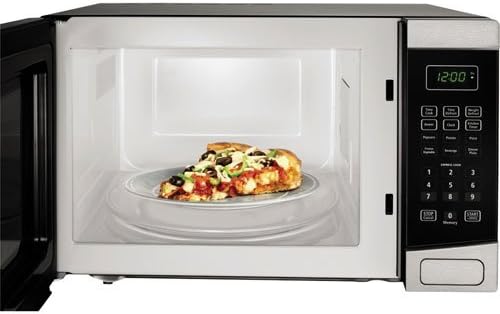
The interior of the microwave is shown with a pizza on the glass turntable, demonstrating the spacious 1.2 cubic feet capacity.
4. Simba Connection
Plug the microwave into a dedicated, properly grounded 3-prong electrical outlet. Do not use extension cords.
Operating Instruction
1. Control Panel Pamusoroview
The electronic control panel features an LED display, quick touch preset buttons, number pad, and function buttons for power, cook time, defrost, clock, and timer.
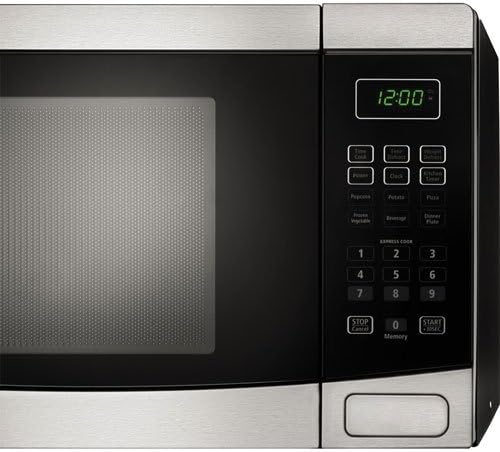
A akadzama view of the electronic control panel, displaying the LED screen, quick touch presets for various foods, power level, defrost, and timer buttons.
2. Basic Cooking
- Isa chikafu mune microwave-yakachengeteka mudziyo pane turntable.
- Vhara gonhi zvakasimba.
- Isa nguva yaunoda yekubika uchishandisa padhi renhamba.
- Press the 'Power' button to adjust the power level (default is 100%). Press repeatedly to cycle through 11 power levels.
- Dzvanya 'Tanga' kuti utange kubika.
3. Quick Touch Presets
For convenience, the microwave includes 6 quick touch presets:
- Pizza: Zvekudziisa zvidimbu zvepizza zvakare.
- Popcorn: For popping standard microwave popcorn bags.
- Mbatata: Zvekubika mbatatisi.
- Frz. Veggie: Kubika miriwo yakachengetwa muchando.
- Chinwiwa: Zvekudziisa zvinwiwa.
- Kudya kwemanheru: For reheating dinner plates.
Simply press the desired preset button to start cooking with optimized settings.
4. Kukanda mapfumo pasi
Microwave ine nzira mbiri dzekudzikisa chando:
- Weight Defrost: Press 'Wgt Def', enter the food's weight, then press 'Start'.
- Nguva Defrost: Press 'Time Def', enter the defrost time, then press 'Start'.
5. Clock and Timer
- Kuisa wachi: Press 'Clock', enter the current time, then press 'Clock' again to confirm.
- Using the Kitchen Timer: Press 'Timer', enter the desired time, then press 'Start'. This functions as a countdown timer and does not activate the microwave.
6. Kiyi yemwana
To activate the child lock, press and hold the 'Stop/Cancel' button for 3 seconds. The display will show a lock indicator. To deactivate, press and hold 'Stop/Cancel' again for 3 seconds.
Maintenance
1. Kuchenesa Mukati
Pukuta gomba remukati nekushambadziraamp cloth after each use. For stubborn stains, use a mild detergent or a microwave-safe cleaner. Do not use abrasive cleaners or scouring pads.
2. Kuchenesa Kunze
Chenesa nzvimbo dzekunze nekanyoro, damp cloth. Avoid getting water into the ventilation openings. The stainless steel finish can be maintained with a specialized stainless steel cleaner.
3. Turntable Care
The glass turntable and roller ring can be removed for cleaning. Wash them in warm, soapy water or in the dishwasher. Ensure they are completely dry before placing them back in the microwave.
Kugadzirisa matambudziko
- Microwave haisi kutanga: Check if the power cord is securely plugged in. Ensure the door is fully closed. Check for blown fuses or tripped circuit breakers.
- Chikafu hachidziyi: Verify that the cooking time and power level are set correctly. Ensure the door is closed properly.
- Turntable isingatenderere: Check if the turntable and roller ring are correctly positioned and free from obstructions.
- Ruzha rusina kujairika: Ensure the turntable is properly seated. Remove any foreign objects from the microwave cavity.
If problems persist, refer to the warranty and support section for assistance.
Zvinotsanangurwa
| Feature | Tsanangudzo |
|---|---|
| Model Number | BBYCA10377846 |
| Capacity | 1.2 Cu. Ft. |
| Wattage | 1000 W |
| Control Panel Type | Electronic, Touchscreen |
| Matanho Emagetsi | 11 |
| Kubika Zvirongwa | 6 (Defrost, Reheat, Cook) |
| Turntable Diameter | 12.4 mukati. |
| Zviyero (W x H x D) | 52 masendimita x 32.57 masendimita x 40.3 masendimita |
| Kurema | 18 kg |
| Material | Simbi isina ngura |

This diagram illustrates the microwave's external dimensions: 52 cm width, 32.57 cm height, and 40.31 cm depth.
Warranty uye Support
Warranty Information
This Insignia microwave oven is covered by a 1-year warranty on parts from the date of purchase. Please retain your proof of purchase for warranty claims.
Mutengi Support
For technical assistance, troubleshooting, or warranty service, please contact Insignia Customer Support. Refer to the product packaging or the official Insignia websaiti yeruzivo rwazvino.


