Nhanganyaya
This manual provides detailed instructions for the safe and efficient installation, operation, and maintenance of your Legrand Valena 774405 White Double Light Switch. Please read this manual thoroughly before installation and retain it for future reference.
The Legrand Valena series is designed for reliable electrical control, featuring a careful design with practical and elegant finishes. This double switch mechanism is rated for 10A at 230V and is supplied with a metal stand and keys, ready to be combined with decorative plates.
Safety Information
YAMBIRO: Njodzi Yemagetsi Shock.
- Always turn off power at the circuit breaker or fuse box before installing or servicing the switch.
- Kuiswa kunofanira kuitwa nemunhu ane ruzivo rwemagetsi kana maererano nemakodhi emagetsi emunharaunda.
- Usaise mune wet kana damp nzvimbo kunze kwekunge zvakatarwa zvakanangana nenzvimbo dzakadaro.
- Iva nechokwadi chekuti waya dzese dzakabatana dzakachengeteka uye dzakadzivirirwa zvakanaka.
Installation Guide
Zvishandiso Zvinodiwa:
- Screwdrivers (Phillips uye Flathead)
- Wire Strippers
- Voltage Tester
- Electrical Tape (optional)
Kuisa Matanho:
- Dzima Simba: Locate the circuit breaker or fuse that controls the power to the switch location and turn it OFF. Verify power is off using a voltage muedzo.
- Bvisa Old Switch (kana zvichibvira): Carefully remove the existing wall plate and switch from the electrical box. Disconnect the wires, noting their connections.
- Gadzirira Waya: Strip approximately 1/2 inch (12-15 mm) of insulation from the ends of the electrical wires if necessary.
- Batanidza Waya: The Legrand Valena 774405 switch uses screw terminals for connection. Connect the wires as follows:
- Batanidza iyo Rarama (Chikamu) wire to the terminal marked 'L' or 'COM'.
- Batanidza iyo Akachinja Live wires (one for each switch output) to the terminals marked '1' and '2' or 'L1' and 'L2'.
- Ita shuwa kuti zvese zvinongedzo zvakasimba uye zvakachengeteka.
- Mount the switch: Gently fold the wires into the electrical box. Secure the switch mechanism to the electrical box using the provided screws or claws. The mechanism is supplied with a metal stand for secure mounting.
- Attach Decorative Plate: Once the switch is securely mounted, attach the decorative wall plate (sold separately) over the switch mechanism.
- Dzosera Simba: Dzorera magetsi pa circuit breaker kana pa fuse box.
- Test Mashandiro: Test both switches to ensure they operate correctly.
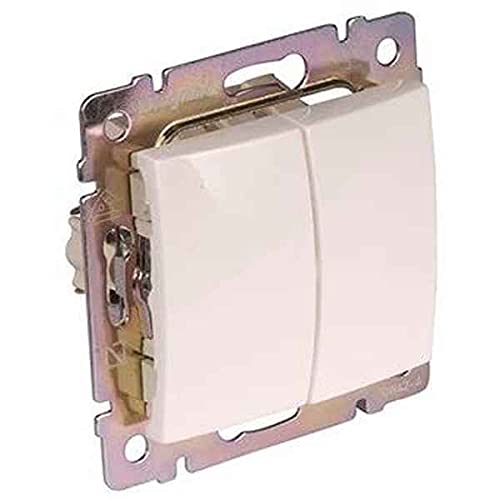
Image showing the front view of the Legrand Valena 774405 White Double Light Switch, illustrating its design and two push-button actuators.
Operating Instruction
The Legrand Valena 774405 is a double light switch, meaning it controls two separate lighting circuits from a single unit. Each button operates independently.
- Kubatidza ON/OFF: Press the upper part of a switch button to turn the connected light circuit ON. Press the lower part of the same switch button to turn the connected light circuit OFF.
- Kuzvimiririra Kudzora: Each of the two buttons controls its own circuit, allowing for independent operation of two different lights or groups of lights.
- Remote Control Kugona: This mechanism supports remote control functionality. Refer to your specific remote control device's manual for pairing and operation instructions with Legrand Valena mechanisms.
Maintenance
- Kuchenesa: To clean the switch and decorative plate, wipe with a soft, damp jira. Usashandise abrasive cleaners, solvents, kana makemikari ane hukasha, sezvo izvi zvinogona kukanganisa kupera.
- Kuongorora: Periodically inspect the switch for any signs of damage, loose connections, or discoloration. If any issues are observed, turn off power and consult a qualified electrician.
- Hapana Zvikamu Zvishandiswe Mushandisi: The internal components of the switch are not user-serviceable. Do not attempt to disassemble the switch.
Kugadzirisa matambudziko
| Dambudziko | Zvinogona Kukonzera | Solution |
|---|---|---|
| Chiedza hachibatiki. |
|
|
| Chinja chinoita sechisina kugadzikana kana kuti chinodedera. | Mounting screws dzakasununguka. | Turn off power, tighten mounting screws. |
| Remote control haisi kushanda. |
|
|
If you experience persistent issues not covered here, please consult a qualified electrician.
Zvinotaurwa Nezvehunyanzvi
| Feature | Tsanangudzo |
|---|---|
| Model Number | Valena 774405 |
| Brand | Legrand |
| Type | Kaviri Chiedza Chinja |
| Operation Mode | YAKABVA-INOBVA-INOBVA |
| Current Rating | 10 Amps |
| Kushanda Voltage | 230 Volts |
| Wattage | 2300 watts |
| Contact Type | Kazhinji Open |
| Connector Type | Zvikururu |
| Terminal Type | Chikururu |
| Actuator Type | Push Bhatani |
| Circuit Type | 2-nzira |
| Material | Metal |
| Color | White (bianco) |
| International Protection Rating | IP20 |
| Nhamba Yezvinzvimbo | 2 |
| Zviyero (L x W x H) | 21.06 x 16.14 x 5.91 inches |
| Item Weight | 1.76 ounces |
| Kubatana Protocol | Wi-Fi |
| Kudzora Nzira | Kure, Push Bhatani |
Warranty uye Support
Legrand products are manufactured to high standards and are backed by a manufacturer's warranty. For specific warranty details, please refer to the warranty card included with your purchase or visit the official Legrand website.
For technical support, troubleshooting assistance, or to inquire about replacement parts, please contact Legrand customer service or visit their official support portal. Contact information can typically be found on the Legrand websaiti: www.legrand.us (kana dunhu rakakodzera websaiti).


