1. Nhanganyaya
This manual provides comprehensive instructions for the installation, operation, and maintenance of your Mitsubishi NR-MZ033-2 In-Dash Navigation System. Please read this manual thoroughly before using the product to ensure correct operation and to prevent damage.
2. Safety Information
Observe the following safety precautions to prevent injury or damage to the device.
- Always operate the vehicle safely. Distraction from the navigation system can lead to accidents.
- Do not attempt to install or service the unit yourself. Professional installation is recommended.
- Ensure all wiring is correctly connected to prevent electrical hazards or malfunction.
- Keep the unit free from moisture and extreme temperatures.
- Usadzivirire kuvhurika kwemhepo.
3. Chigadzirwa Pamusoroview
3.1 Mamiriro Akakosha
- 7V type WVGA Monitor for clear display.
- Integrated DVD and CD mechanism for media playback.
- Built-in Bluetooth for connectivity.
- Features a multi-way scroll function for map screen navigation, similar to smartphone operation.
- Supports VICS WIDE for traffic and road information, utilizing FM multi-broadcast transmission.
- Provides a straight-line display from the current location to the destination for clear directional guidance.
- Navigation panel with incurve and outcurve buttons designed for ease of operation.
- Intuitive menu design for straightforward function selection.
3.2 Chigadzirwa Mufananidzo
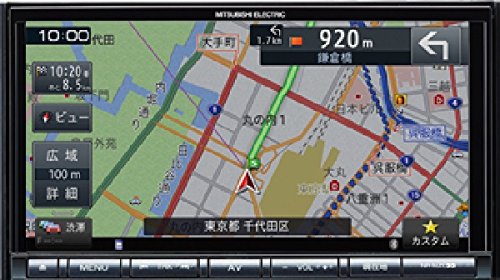
Mufananidzo: Mberi view of the Mitsubishi NR-MZ033-2 In-Dash Navigation System, showing the 7V WVGA monitor and control buttons.
4. Setup
4.1 Kuiswa
The Mitsubishi NR-MZ033-2 is designed for in-dash installation. Due to the complexity of vehicle electrical systems, professional installation by a qualified technician is strongly recommended. The product dimensions are approximately 178 mm (W) x 100 mm (H) x 164 mm (D).
4.2 Kutanga Simba-Kubatidza
After installation, turn on your vehicle's ignition. The system should power on automatically. Follow any on-screen prompts for initial setup, such as language selection or time zone settings.
5. Operating Instructions
5.1 Navigation Functions
- Map Screen Navigation: Use the multi-way scroll function on the touch screen to pan and zoom the map.
- Kupinda Kwekuenda: Access the navigation menu to input destinations via address, points of interest, or recent history.
- Gwara reNzira: The system provides turn-by-turn directions and a straight-line display to your destination.
- VICS WIDE: Access real-time traffic and road information through the VICS WIDE feature to optimize your route.
5.2 Media Playback (DVD/CD)
- Inserting Discs: Gently insert a DVD or CD into the disc slot. The system will automatically detect and begin playback.
- Zvinodzora: Use the on-screen touch controls or physical buttons for play, pause, skip, and volume adjustment.
5.3 Kubatana kweBluetooth
- Kubatanidza Chishandiso: Go to the Bluetooth settings menu on the navigation system and enable pairing mode. On your mobile device, search for available Bluetooth devices and select 'NR-MZ033-2'. Follow the on-screen prompts to complete pairing.
- Kutenderera Kwemumhanzi: Once paired, you can stream audio from your mobile device to the navigation system.
5.4 Kuratidza uye Kudzora
- Bata Sikirini: The 7-inch WVGA monitor is a touch screen interface for most operations.
- Mabhatani enyama: Incurve and outcurve buttons provide tactile control for frequently used functions.
- Menu Layout: The menu system is designed for clarity, allowing quick access to navigation and AV functions.
5.5 Audio Settings
Access the audio settings menu to adjust sound parameters. This includes adjusting the sound image position relative to the listening position and fine-tuning sound quality to suit your preferences within the vehicle environment.
6. Kuchengeta
Regular maintenance ensures optimal performance and longevity of your navigation system.
- Kuchenesa Screen: Shandisa jira rakapfava, risina lint kupukuta skrini zvinyoro nyoro. Pazvibodzwa zvakasindimara, zvishoma dampen the cloth with water or a screen-safe cleaner. Do not use abrasive cleaners.
- Kuchenesa Chikamu: Wipe the exterior of the unit with a dry, soft cloth. Avoid using solvents or harsh chemicals.
- Disc Slot: Keep the disc slot free from dust and debris. Do not insert foreign objects.
7. Kugadzirisa matambudziko
Tarisa kune tafura iri pazasi kune zvinowanzoitika uye mhinduro dzadzo.
| Dambudziko | Zvinogona Kukonzera | Solution |
|---|---|---|
| Hapana simba | Waya dzisina kururama; Fuse yakaputika; Motokari yadzima | Check wiring connections; Replace fuse; Turn vehicle ignition on |
| Hapana chiratidzo cheGPS | GPS antenna obstructed; Poor satellite reception | Iva nechokwadi chakajeka view of sky for GPS antenna; Move to an open area |
| Hapana ruzha | Volume too low; Mute activated; Incorrect audio source; Speaker wiring issue | Increase volume; Deactivate mute; Select correct audio source; Check speaker connections |
| Bata sikirini haidaire | System freeze; Screen calibration needed | Restart the unit (refer to installation manual for reset procedure); Recalibrate touch screen via settings |
8. Zvinotsanangurwa
| Feature | Tsanangudzo |
|---|---|
| Brand | Mitsubishi |
| Model Name | NR-MZ033-2 |
| YeMotokari Sevhisi Type | Car |
| Screen Size | 7 inches |
| Special Features | VICS/VICS WIDE |
| Kubatana Technology | Bluetooth |
| Mepu Type | Street |
| Resolution | WVGA |
| Human Interface Input | Mabhatani |
| Kudzora Nzira | Bata |
| Chigadzirwa Zviyero (W x H x D) | Approx. 178 x 100 x 164 mm |
| Mabhatiri Akabatanidzwa | Aihwa |
9. Warranty uye Tsigiro
This product is covered by a manufacturer's warranty. Please refer to the warranty card included with your purchase for specific terms and conditions. For technical support or service inquiries, please contact your authorized Mitsubishi dealer or the customer support provided in your warranty documentation.


