1. Nhanganyaya
The SureCall Flare is a cellular signal booster designed to improve voice, text, and 4G LTE data signals for all North American cellular carriers. This system is ideal for homes, cabins, or small offices up to 2,500 square feet, providing reliable connectivity in areas with weak outdoor signal.
The Flare features 2XP technology, which enhances uplink transmission power, and integrates the indoor antenna directly into the booster unit for simplified installation.

Image: The SureCall Flare Cell Signal Booster kit, including the booster unit, outdoor omni-directional antenna, and coaxial cable, shown in its retail packaging.
2. Package Zviri mukati
Verify that all components are present in your SureCall Flare kit:
- Flare Signal Booster (Indoor Unit)
- Omni Outdoor Antenna
- 50 ft RG-6 Coaxial Cable
- AC Power Cord
- Mounting Kit for Outdoor Antenna
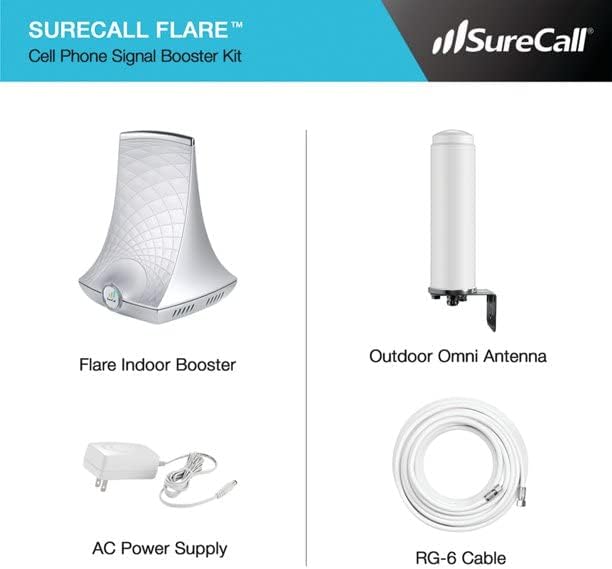
Image: A visual representation of the SureCall Flare kit contents, including the Flare Indoor Booster, Outdoor Omni Antenna, AC Power Supply, and RG-6 Cable.
3. Setup uye Kuiswa
The SureCall Flare is designed for straightforward installation. Follow these steps for optimal performance:
3.1 Pre-Instalation Check
- Before installing, confirm you have at least one bar of usable cell signal outside your home. The booster amplifies existing signal; it does not create signal where none exists.

Image: A diagram illustrating the importance of checking for at least one bar of usable cell signal outside the home before installing a cell booster.
3.2 Outdoor Antenna Placement
- Mount the Omni outdoor antenna as high as possible on the side of the building that receives the strongest existing cell signal. This typically means facing the nearest cell tower.
- Use the provided mounting kit to secure the antenna.

Image: A diagram illustrating antenna installation tips, showing the outdoor antenna mounted high on the side of a building for best signal reception.
3.3 Cable Routing
- Route the 50 ft RG-6 coaxial cable from the outdoor antenna into your home. Ensure the cable is protected from weather and physical damage.
3.4 Indoor Booster Placement
- Place the Flare cellular amplifier (base unit) in the area where you desire improved cellular signal. The indoor antenna is integrated into this unit.
- Maintain a minimum separation of 30 feet between the outdoor antenna and the indoor booster unit to prevent oscillation and ensure optimal performance.

Image: A diagram showing how the SureCall Flare Booster works, illustrating the connection between the outdoor antenna, cable, and indoor booster unit, emphasizing the 30 ft separation.
3.5 Simba Connection
- Connect the power cord to the Flare booster unit and plug it into a standard electrical outlet.
- The booster will automatically begin to ampsimudza chiratidzo.
4. Operating Instructions
Once installed and powered on, the SureCall Flare operates automatically to enhance your cellular signal.
4.1 Signal Enhancement
- The Flare boosts weak signals for all North American carriers, including AT&T, T-Mobile, Verizon, Sprint, and others.
- It improves voice quality, reduces dropped calls, speeds up data, and extends battery life for connected devices.
4.2 Coverage Area
The indoor coverage area provided by the Flare varies based on the strength of the available outdoor signal:
- 1-2 bars outdoor signal: Approximately 1,000 sq. ft. coverage.
- 3-4 bars outdoor signal: Approximately 1,500 sq. ft. coverage.
- 5 bars outdoor signal: Up to 2,500 sq. ft. coverage.

Image: A floor plan diagram illustrating how the indoor coverage area is distributed from the booster unit within a home.
4.3 5G Compatibility
- The SureCall Flare is compatible with all 5G phones and devices. It will boost voice and 4G LTE data signals on these devices.
4.4 Multi-User Support
- The system supports multiple simultaneous users, allowing everyone in the coverage area to benefit from improved signal.
5. Kuchengeta
The SureCall Flare Cell Signal Booster requires minimal maintenance.
- Ensure the outdoor antenna remains clear of obstructions (e.g., tree branches, snow, ice).
- Nguva nenguva tarisai kubatana kwetambo kuti muve nechokwadi chekuti dzakachengeteka.
- Keep the indoor booster unit clean and free from dust.
6. Kugadzirisa matambudziko
If you experience issues with your SureCall Flare, consider the following:
6.1 No Signal Improvement
- Check Outdoor Signal: Verify that there is at least one bar of usable signal outside where the outdoor antenna is mounted. If there is no signal outside, the booster cannot create one.
- Kutungamirirwa kweAntena: Ensure the outdoor antenna is oriented towards the strongest available signal from a cell tower.
- Cable Connections: Confirm all coaxial cable connections are tight and secure.
6.2 Flashing Lights or Reduced Performance
- Distance yekuparadzanisa: Ensure there is adequate separation (minimum 30 feet) between the outdoor antenna and the indoor booster unit. Insufficient separation can cause oscillation, indicated by flashing lights on the booster, and reduce performance. Try increasing the distance or adding physical barriers between the antennas.
- Power Cycle: Unplug the power cord from the booster, wait 10 seconds, and then plug it back in.
6.3 Poor Indoor Coverage
- Booster Placement: The indoor booster unit should be placed in the central area where signal improvement is most desired. Obstacles like thick walls can reduce signal penetration.
- Outdoor Signal Strength: The indoor coverage area is directly related to the strength of the outdoor signal. A weaker outdoor signal will result in a smaller indoor coverage area.
7. Zvinotsanangurwa
| Feature | Tsanangudzo |
|---|---|
| Model Number | SC-Poly-DT-O-Kit |
| Product Dimensions | 17.3 x 9.1 x 6.1 inches |
| Item Weight | 5.89 makirogiramu |
| Wireless Kutaurirana Standard | Radio Frequency |
| Noise Figure | 7 dB |
| Maximum Gain | 72 dB |
| Inowirirana Devices | All Cell Phones, Hotspots, and any Devices that use Cellular Data 2G, 3G, 4G & 4G LTE 700, 800, 1900, 1700/2100 MHz |
| Vanotsigirwa Vatakuri | AT&T, Verizon, Sprint, T-Mobile, USCellular, Bell, Telus, Rogers, Freedom, and more. |
8. Warranty uye Tsigiro
8.1 Ruzivo rweWaranti
The SureCall Flare Cell Signal Booster is backed by an industry-leading 3-year manufacturer's warranty. Please refer to the warranty card included with your product for full details and terms.
8.2 Mutengi Tsigiro
SureCall provides a 100% US-based customer support team to assist with any questions or issues you may encounter. For technical assistance, troubleshooting, or warranty claims, please contact SureCall customer support directly.


