Nhanganyaya
Thank you for choosing the Platinet PDLU2BR Desk LampBhuku rino rinopa ruzivo rwakakosha rwekushandisa dhesiki rako idzva zvakachengeteka uye zvinobudirira.amp, which features an integrated thermometer, clock, and calendar display. Please read these instructions carefully before use and retain them for future reference.
Yakakosha Mirayiridzo Yekuchengetedza
- Ita shuwa kuti magetsi emagetsi awandatage inofanana nelamp's requirements (5V/1A).
- Usafumura lamp mvura kana hunyoro hwakawandisa.
- Dzivisa kupatsanura kana kugadzirisa lampTumira mabasa ese ekugadzirisa mabasa kuvashandi vane hunyanzvi.
- Chengeta lamp away from heat sources and direct sunlight to prevent damage to the display and internal components.
- Use only the provided power cable or a compatible replacement.
- Izvi lamp yakagadzirirwa kushandiswa kwemukati chete.
Package Zviri mukati
- Platinet PDLU2BR Desk Lamp
- Power Cable (USB to DC5V)
- Mushandisi Chinyorwa (gwaro iri)
Setup Guide
1. Kusunungura
Carefully remove all components from the packaging. Inspect the lamp for any signs of damage. If any damage is found, do not proceed with setup and contact customer support.
2. Simba Connection
Connect the provided power cable to the DC 5V input port on the back of the lamp base. Plug the other end of the power cable into a compatible USB power adapter (not included) or a USB port on a computer. Ensure the connection is secure.
3. Kutanga Kuiswa
Isa iyo lamp on a stable, flat surface. The flexible arm allows for various lighting angles. Position the lamp to achieve optimal illumination for your workspace.

Mberi view of the Platinet PDLU2BR Desk Lamp, kuratidzaasing its brown finish, flexible arm, and integrated digital display.
Operating Instruction
1. Power On/Off and Brightness Adjustment
Locate the touch-sensitive power button on the lamp hwaro. Kubata kamwe chete kuchatenderedza lamp on or off. To adjust brightness, press and hold the power button; the brightness will cycle through different levels. Release the button when the desired brightness is reached.
2. Flexible Arm Adjustment
Iyo lamp features a flexible arm that can be adjusted to direct light precisely where needed. Gently bend the arm to achieve your desired lighting angle. Avoid excessive force to prevent damage.

Image demonstrating the flexible and adjustable arm of the Platinet PDLU2BR Desk Lamp, ichiratidza kufamba kwayo kwakawanda.
3. Display Functions: Clock, Calendar, and Thermometer
The integrated digital display shows the current time, date (day of the week), and ambient temperature. The temperature is displayed in Celsius. Specific buttons for setting the time and date are typically located near the display. Refer to the small icons next to the buttons for their functions (e.g., 'M' for Mode, 'S' for Set, 'Up/Down' arrows for adjustment). Press 'Mode' to cycle through settings (Time, Date), then use 'Set' to enter adjustment mode and 'Up/Down' to change values.

Detailed view zve lamp's digital display, showing the current time, date, and temperature.
Kuchengeta uye Kuchengeta
- Kuchenesa: Bvisa magetsi usati wageza. Shandisa jira rakapfava, rakaoma kupukuta jira remagetsi.amp's surface. Do not use abrasive cleaners, solvents, or harsh chemicals.
- Kuchengeta: Kana kuchengeta lamp Kwenguva yakareba, iva nechokwadi chekuti yakachena uye yakaoma. Chengeta munzvimbo inotonhorera, yakaoma kure nezuva rakananga.
- LED Chiedza Source: The LED light source is integrated and not user-replaceable. Do not attempt to replace the LEDs.
Kugadzirisa matambudziko
| Dambudziko | Zvinogona Kukonzera | Solution |
|---|---|---|
| Lamp haina kubatidza. | Hapana simba rekupa kana kusununguka kubatana. | Check if the power cable is securely connected to both the lamp and the power source. Ensure the power source is active. |
| Display is blank or incorrect. | Power interruption or incorrect settings. | Ensure stable power. Reset time/date settings if necessary using the display buttons. |
| Brightness adjustment not working. | Kushanda kusina kururama. | Ensure you are pressing and holding the power button to cycle through brightness levels, not just tapping it. |
Zvinotaurwa Nezvehunyanzvi
| Feature | Tsanangudzo |
|---|---|
| Brand | Platinet |
| Model | PDLU2BR |
| Item Model Number | 821003 |
| Simba | 7W LED |
| Voltage | 5 Volts (DC5V / 1A) |
| Chiedza Chinyorwa Type | LED |
| Rudzi Tembiricha | 5500K |
| Kuyerera Kunopenya (Max) | 230lm |
| Beam Angle | 120° |
| Material | Metal, Eco Leather |
| Color | Bhurawuni |
| Product Dimensions | 35.51 x 8.79 x 2.39 masendimita (inenge 13.98 x 3.46 x 0.94 inches) |
| Kurema | 560 magiramu |
| Special Features | Energy-saving, Flexible Arm, Thermometer, Clock, Calendar |
| EU Energy Kubudirira Chirauro | A |
| Operating Temperature | -20°C kusvika +40°C |
| Protection Rating | IP20 |
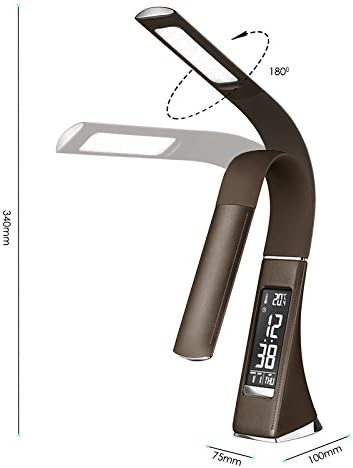
Diagram illustrating various technical specifications and features of the lamp, including power, voltage, LED quantity, and operating temperature.
Warranty uye Customer Support
Platinet products are designed and manufactured to the highest quality standards. This product is covered by a standard manufacturer's warranty against defects in materials and workmanship from the date of purchase. Please retain your proof of purchase for warranty claims.
For technical support, warranty inquiries, or service, please contact your retailer or visit the official Platinet website for contact information. Please have your product model number (PDLU2BR) and proof of purchase ready when contacting support.


