1. Nhanganyaya
Thank you for choosing the NTC V380 WiFi Smart Camera. This device is designed to provide reliable indoor security monitoring with advanced features such as remote access, two-way audio, and night vision. This manual will guide you through the setup, operation, and maintenance of your camera to ensure optimal performance.
2. Chigadzirwa Pamusoroview
The NTC V380 WiFi Smart Camera is a compact, indoor surveillance camera featuring pan, tilt, and zoom capabilities. It connects wirelessly to your home network, allowing for remote viewing and control via a smartphone or desktop application.
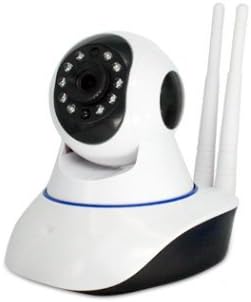
Mufananidzo 2.1: Mberi view of the NTC V380 WiFi Smart Camera, showing the lens, infrared LEDs, and microphone.
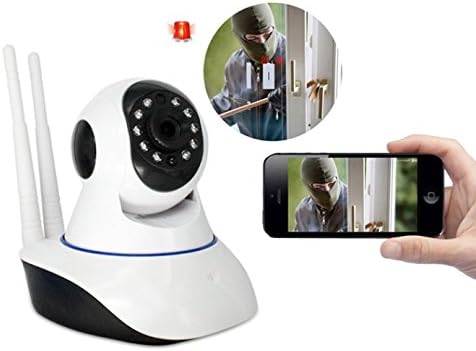
Figure 2.2: The NTC V380 camera demonstrating remote monitoring capabilities with a smartphone displaying the live video feed.
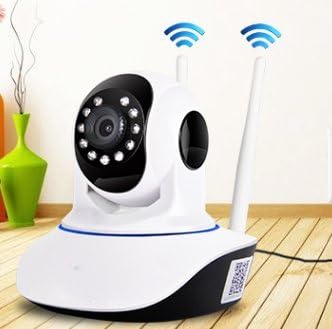
Figure 2.3: The NTC V380 camera positioned in an indoor environment, illustrating its wireless connectivity with WiFi signal indicators.
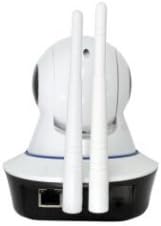
Mufananidzo 2.4: Kumashure view of the NTC V380 camera, highlighting the dual antennas for enhanced WiFi reception and the Ethernet port for wired connection.
3. Key Features
- Mbiri-Nzira Audio: Taurirana kuburikidza nekamera ine yakavakirwa-mukati maikorofoni uye mutauri.
- PTZ Kudzora: Pan (355° horizontal) and Tilt (120° vertical) functionality for comprehensive area coverage.
- High-Definition Vhidhiyo: Records video at 1080p resolution with a frame rate of up to 25 frames per second.
- Night Vision: Equipped with 10 infrared LEDs, providing clear visibility up to 10 meters in low-light conditions.
- Kuonekwa Kwekufamba: Receive alerts via email or FTP upload when motion is detected, with adjustable sensitivity.
- Wireless Kubatana: Supports Wi-Fi for flexible placement and easy integration into your network.
- Remote Monitoring: Access live video and control camera functions from your smartphone (iOS/Android) or desktop via the V380 application.
- Nzvimbo Yekuchengetera: Supports TF (microSD) card for local video recording.
4. Setup Guide
4.1 Package Zviri mukati
Ensure all items are present:
- NTC V380 WiFi Smart Camera
- Power Adapter
- Mounting Accessories (screws, wall plug)
- Mushandisi Chinyorwa (gwaro iri)
4.2 Kutanga Simba-Kubatidza
- Connect the power adapter to the camera's power input port.
- Plug the adapter into a power outlet. The camera will power on and initiate its self-test sequence.
- Wait for the camera to indicate readiness (e.g., a voice prompt or LED indicator change).
4.3 Kuisa App uye Kubatanidza Wi-Fi
- Download the V380 application from your smartphone's app store (available for iOS and Android).
- Bhalisa account nyowani kana kupinda kana watova nayo.
- Follow the in-app instructions to add your camera. This typically involves scanning a QR code on the camera or using an AP hotspot connection method.
- Select your 2.4GHz Wi-Fi network and enter the password when prompted. The camera does not support 5GHz Wi-Fi networks.
- Once connected, the camera will confirm its network status, and you will see it listed in your app.
4.4 Kuisa kamera
The camera supports wall mounting for optimal positioning.
- Choose a suitable indoor location with a clear view and within Wi-Fi range.
- Use the provided mounting bracket as a template to mark screw holes on the wall.
- Drill pilot holes and insert wall plugs if necessary.
- Batanidza chibatiso chekuisa pamadziro uchishandisa screws.
- Attach the camera to the mounting bracket, ensuring it is securely fastened.
5. Operating Instructions
5.1 Rarama View uye Kudzora kwePTZ
- Open the V380 app and select your camera from the device list to access the live video feed.
- Use the on-screen joystick or swipe gestures to pan (move horizontally) and tilt (move vertically) the camera lens.
- Pinch-to-zoom on the live feed to digitally zoom in or out.
5.2-Nzira mbiri Audio
- Ndichiri kurarama view, tinya chiratidzo chemaikorofoni chiri muapp kuti utaure uchishandisa spika yekamera.
- Tap the speaker icon to listen to audio from the camera's environment.
5.3 Kurekodha Mavhidhiyo uye Kutamba
- Insert a TF (microSD) card into the camera's card slot for continuous or event-based recording.
- In the app, navigate to the playback section to view yakanyorwa footage stored on the TF card.
- You can also manually record video or capture screenshots directly from the live view interface in the app.
5.4 Kuonekwa Kwekufamba uye Zviziviso
- Access the camera settings in the V380 app to configure motion detection.
- Adjust sensitivity levels to minimize false alarms.
- Enable push notifications, email alerts, or FTP uploads for motion detection events.
6. Kuchengeta
- Kuchenesa: Pukuta lenzi yekamera nemuviri wayo zvinyoro nyoro nejira rakaoma uye rakapfava. Dzivisa kushandisa makemikari akaomarara kana zvinhu zvinokwesha.
- Firmware Dzokorora: Periodically check the V380 app for available firmware updates to ensure your camera has the latest features and security enhancements. Follow the in-app instructions for updating.
- TF Kadhi Management: Regularly back up important recordings from your TF card. Format the TF card periodically within the app to maintain optimal recording performance.
7. Kugadzirisa matambudziko
Matambudziko Anowanikwa uye Mhinduro:
- Kamera Pasina Indaneti:
- Check if the camera is powered on.
- Verify your Wi-Fi network is active and the camera is within range.
- Tangazve kamera uye yako Wi-Fi router.
- Ita shuwa kuti kamera yakabatana kune 2.4GHz Wi-Fi network.
- Hunhu Hwakashata hweVhidhiyo:
- Ensure a strong Wi-Fi signal. Move the camera closer to the router if necessary.
- Chenesa lenzi yekamera.
- Tarisa kumhanya kweinternet yako.
- Motion Detection Haisi Kushanda:
- Tarisa kuti kuona mafambiro kwagoneswa muzvirongwa zveapp.
- Gadzirisa mazinga ekunzwa.
- Ensure notification permissions are granted for the V380 app on your smartphone.
- Haikwanise Kubatanidza kuApp:
- Ensure you have the correct V380 app.
- Tarisa zita rako rekushandisa uye password.
- If issues persist, try resetting the camera to factory defaults (refer to the camera's physical reset button, usually a small pinhole, and hold for 5-10 seconds while powered on) and re-add it to the app.
8. Zvinotsanangurwa
| Feature | Detail |
|---|---|
| Model Number | ICP-T3810-Q5 (T) V380 |
| Brand | NTC |
| Vhidhiyo Kurekodha Resolution | 1080p |
| Frame Rate | 25 mafuremu pasekondi |
| Kubatana Technology | Wireless (Wi-Fi) |
| Kubatana Protocol | Wi-Fi (2.4GHz chete) |
| Night Vision Distance | 10 Mamita |
| Special Features | Night Vision, Motion Sensor, PTZ Technology, Two-Way Audio |
| Inowirirana Devices | Smartphone, Desktop |
| Controller Type | Android (via V380 App) |
| Mounting Type | Gomo reMasvingo |
| Fomu Factor | Turret (Dome Type) |
| Inokurudzirwa Zvishandiso | Indoor Security |
| Kushandisa Kwemukati/Kunze | Indoor |
| Simba Source | Corded Electric (No batteries required) |
9. Warranty uye Tsigiro
For warranty information and technical support, please refer to the documentation provided at the time of purchase or contact your retailer. Keep your purchase receipt as proof of purchase for any warranty claims.


