Nhanganyaya
Ndatenda nekutengaasing the Trevi RR 501 BT Portable Bluetooth, USB, SD, MP3 Stereo Boombox. This manual provides essential information for the safe and efficient use of your new device. Please read these instructions carefully before operating the unit and retain them for future reference.
Safety Information
- Usaise mudziyo uyu kunaya kana kunyorova.
- Usavhare chero mazaru emhepo.
- Ita shuwa kuti tambo yemagetsi haina kudzvanywa kana kufambiswa.
- Shandisa zvinonamirwa/zvishandiso zvinotsanangurwa nemugadziri chete.
- Unplug the appliance during lightning storms or when unused for long periods.
- Tumira masevhisi ese kuvashandi vanokwanisa.
- Usavhure unit casing; hapana zvikamu zvinogona kushandiswa mukati.
Package Zviri mukati
Ndapota tarisai kuti zvinhu zvinotevera zviri mupakeji yenyu:
- Trevi RR 501 BT Boombox Unit
- AC Simba Cable
- Mushandisi Chinyorwa (gwaro iri)
Product Overview
Familiarize yourself with the main components of your Trevi RR 501 BT Boombox.
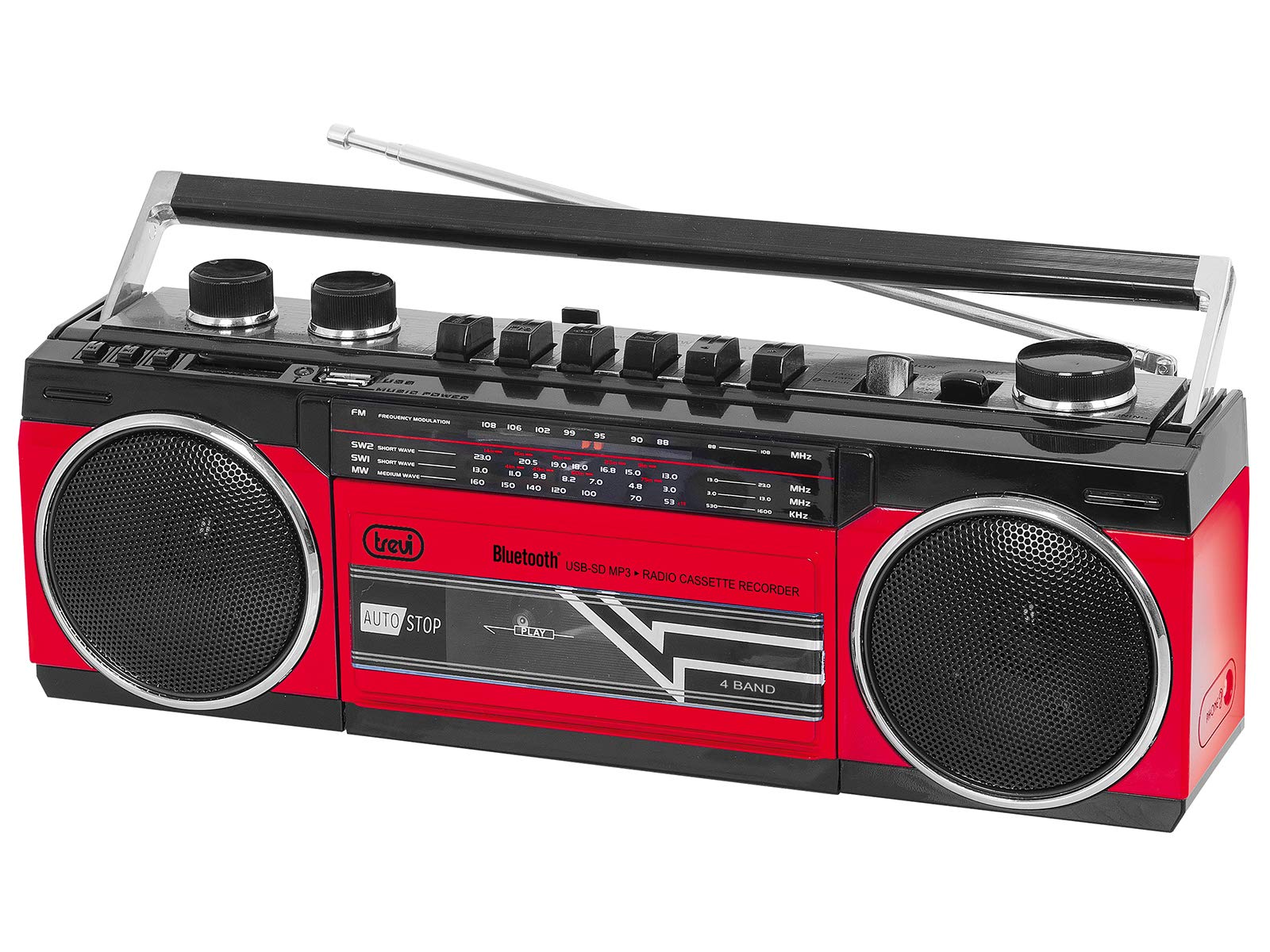
Mufananidzo 1: Mberi view of the Trevi RR 501 BT Boombox, showing the dual speakers, control panel, and cassette deck.

Mufananidzo 2: Angled view of the Trevi RR 501 BT Boombox, highlighting the side profile uye mubato.
Zvikamu Zvikuru:
- Vatauri: Maspika maviri e stereo akabatanidzwa.
- Control Panel: Buttons for playback, mode selection, and tuning.
- Vhoriyamu Knob: Inogadzirisa nhanho yekubuda kweaudio.
- Tuning Knob: For radio frequency selection.
- Maitiro Selector: Switches between Radio, Bluetooth, USB, SD, and Cassette modes.
- Cassette Deck: For playing and recording audio cassettes.
- USB Port: Kuti utarise USB flash drive.
- SD Card Slot: Kuti kadhi reSD ritambirwe.
- Antenna: Antena yeteresikopu yekugamuchira FM radio.
- Power Input: Yekubatanidza tambo yemagetsi yeAC.
- Battery Compartment: (Located on the bottom/rear) For optional battery operation.
Gadzirira
Power Connection:
- AC Simba: Insert the AC power cable into the AC input jack on the back of the unit, then plug the other end into a standard wall outlet.
- Simba reBhatiri (Sarudzo): Open the battery compartment cover (usually on the bottom or rear). Insert the required number of D-size batteries (not included), ensuring correct polarity (+/-). Close the compartment cover securely.
Note: When using AC power, batteries are automatically disconnected. Remove batteries if the unit will not be used for an extended period.
Operating Instruction
Kubatidza/Kudzima:
To turn the unit on, rotate the Vhoriyamu Knob clockwise until you hear a click. To turn off, rotate the Vhoriyamu Knob counter-clockwise until it clicks off.
Radio Operation (FM):
- Batidza chikwata.
- Seta iyo Mode Selector to "RADIO".
- Wedzera antenna yeteresikopu kuti igone kugamuchira zvakanaka.
- Rotate the Tuning Knob to select your desired FM station.
- Gadzirisa iyo Vhoriyamu Knob to your preferred listening level.
Bluetooth Kubatanidza:
- Batidza chikwata.
- Seta iyo Mode Selector to "BT" (Bluetooth). The unit will enter pairing mode, indicated by a flashing LED.
- Pamudziyo wako une Bluetooth (semuenzaniso, smartphone, tablet), vhura Bluetooth wobva watsvaga michina iripo.
- Select "Trevi RR 501 BT" from the list of devices.
- Once paired, the LED indicator will stop flashing and remain solid. You can now play audio from your device through the boombox.
Kutamba kwe USB/SD:
- Batidza chikwata.
- Isa USB flash drive mukati USB Port kana kadhi reSD mu SD Card Slot. Ensure the media contains MP3 audio files.
- Seta iyo Mode Selector to "USB/SD". The unit will automatically begin playing the first compatible audio file.
- Use the playback control buttons (e.g., Play/Pause, Next, Previous) on the unit to manage your audio.
Kutamba Makaseti:
- Batidza chikwata.
- Press the MIRA/EJECT button on the cassette deck to open the cassette compartment.
- Insert an audio cassette with the open edge facing upwards and the tape side facing you. Close the compartment door.
- Seta iyo Mode Selector to "TAPE".
- Press the ITAMBA bhatani kutanga kutamba.
- Shandisa iyo REWIND uye KUSIRIRA MBERI mabhatani ekufambisa tepi.
- Press MIRA/EJECT to stop playback and open the compartment.
Cassette Recording:
- Insert a blank cassette into the cassette deck.
- Select the desired audio source (Radio, Bluetooth, USB, SD) using the Mode Selector.
- Start playback of the source audio.
- Press the RECORD button (usually red) on the cassette deck. The ITAMBA button will also engage. Recording will begin.
- Kuti umise kurekodha, dzvanya iyo MIRA/EJECT bhatani.
Maintenance
- Kuchenesa: Shandisa jira rakapfava, rakaoma kuchenesa kunze kwechikwata. Usashandise abrasive cleaners kana solvents.
- Cassette Deck Care: Periodically clean the tape heads and pinch rollers with a cotton swab lightly dampyakasanganiswa ne isopropyl doro.
- Kuchengeta: When not in use for extended periods, store the unit in a cool, dry place, away from direct sunlight and extreme temperatures. Remove batteries if applicable.
Kugadzirisa matambudziko
| Dambudziko | Zvinogona Kukonzera | Solution |
|---|---|---|
| Hapana simba | Waya yemagetsi haina kubatana; Mabhatiri apera kana kuti akaiswa zvisiri izvo. | Tarisa kubatana kwemagetsi eAC; Tsiva mabhatiri kana kuti simbisa kuti polarity yacho yakarurama. |
| Kugamuchirwa kweredhiyo kusina kunaka | Antena haina kuwedzerwa; Chiratidzo chisina simba. | Wedzera antenna ye telescopic zvizere; Isazve chigadziro kuti chiratidze zviri nani. |
| Bluetooth haina kubatanidza | Unit not in BT mode; Device too far; Already paired with another device. | Ensure mode is set to BT; Move device closer; Disconnect from other devices. |
| USB/SD haisi kutamba | Incorrect mode; Incompatible file format; Corrupted media. | Set mode to USB/SD; Ensure files are MP3; Try different USB/SD media. |
| Cassette playback issues | Cassette inserted incorrectly; Tape heads dirty. | Re-insert cassette correctly; Clean tape heads and pinch rollers. |
Zvinotsanangurwa
| Brand | Trevi |
| Model Number | 0RR50102 |
| Kubatana Technology | Bluetooth, USB |
| Mutauri Rudzi | Stereo |
| Dimensions (L x W x H) | 50 x 50 x 28 masendimita |
| Simba Source | AC |
| Item Weight | 1.25 makirogiramu |
| Output Power | 6 Watts |
| Color | Tsvuku |
| Style | Retro |
Warranty uye Support
Kuti uwane ruzivo nezvewarandi uye rutsigiro rwehunyanzvi, ndapota tarisa kadhi rewarandi riri muchigadzirwa chako kana shanyira Trevi yepamutemo. website. Information regarding spare parts availability and software updates is not provided in the product specifications.
Ndapota chengetedza humbowo hwako hwekutenga kune chero vimbiso yewaranti.


