Nhanganyaya
Ndatenda nekutengaasing the OontZ Angle 3 Ultra Portable Bluetooth Speaker by Cambridge Soundworks. This manual provides essential information for setting up, operating, maintaining, and troubleshooting your speaker. Designed for superior sound quality and durability, the OontZ Angle 3 Ultra features a 14-watt output, rich bass, IPX7 waterproofing, and an impressive 30-meter Bluetooth range. Enjoy up to 20 hours of playtime on a single charge.

Image: The OontZ Angle 3 Ultra Portable Bluetooth Speaker, showcasing its sleek black, triangular design with control buttons on one end.
Gadzirira
1. Zvinhu zvinosanganisirwa
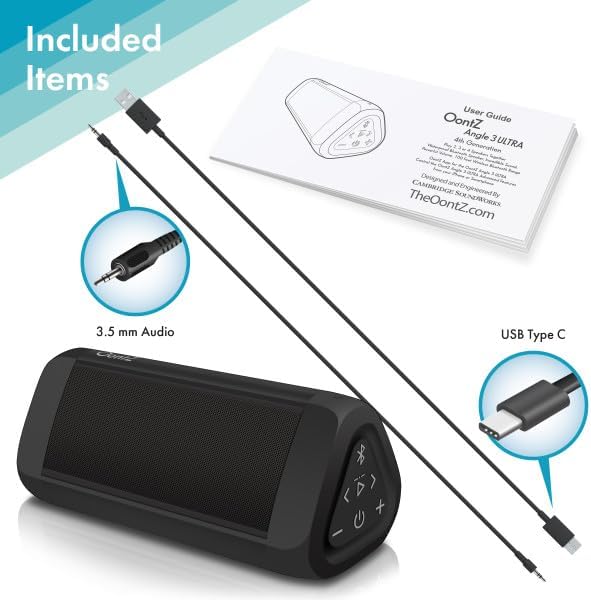
Image: The OontZ Angle 3 Ultra speaker along with its accessories: a Quick Start Guide, a 3.5mm audio cable, and a USB Type-C charging cable.
Usati watanga kushandisa, iva nechokwadi chekuti zvese zvirimo:
- OontZ Angle 3 Ultra Bluetooth Speaker
- Gwaro Rekutanga Nekukurumidza (Bhuku rekushandisa rinowanikwa online)
- 3.5mm Audio Cable
- USB Type-C Yekuchaja Cable
2. Kubhadharisa Mutauri
The speaker comes with a built-in rechargeable Lithium-ion battery. For optimal performance, fully charge the speaker before first use.
- Locate the charging port on the side of the speaker, protected by a rubber flap.
- Connect the supplied USB Type-C charging cable to the speaker's charging port.
- Connect the other end of the USB cable to a USB wall charger (not included) or a computer USB port.
- The charging indicator light will illuminate. A full charge takes approximately 20 hours for the first charge, and subsequent charges will be faster.

Mufananidzo: Kuvhara view of the speaker's side, showing the 3.5mm AUX input and the USB-C charging port, typically protected by a waterproof flap.
3. Bluetooth Kubatanidza
Pair your OontZ Angle 3 Ultra with your Bluetooth-enabled device (smartphone, tablet, laptop).
- Batidza mutauri nekudzvanya uye kubata bhatani reSimba (⏻) until the indicator light flashes blue.
- Pamudziyo wako, enda kuBluetooth settings uye iva nechokwadi chekuti Bluetooth yakabatidzwa.
- Look for "OontZ Angle 3 Ultra" in the list of available devices and select it.
- Once paired, the speaker will emit a confirmation tone, and the indicator light will turn solid blue.
4. Connecting via AUX Input
You can connect non-Bluetooth devices using the 3.5mm audio cable.
- Connect one end of the 3.5mm audio cable to the AUX IN port on the speaker.
- Connect the other end to the headphone jack or audio output of your device.
- Mutauri anozochinja otomatiki kuenda kuAUX mode.
5. Pairing Two Speakers for Stereo Sound (OontZ Dual Wireless Stereo)
Enhance your audio experience by wirelessly connecting two OontZ Angle 3 Ultra speakers for impressive stereo separation.

Image: Two OontZ Angle 3 Ultra speakers positioned to provide stereo sound, with two individuals enjoying music in an outdoor setting.
- Ensure both OontZ Angle 3 Ultra speakers are charged and powered on.
- Bvisa masipika ese ari maviri kubva kune chero zvishandiso zveBluetooth zvakabatanidzwa kare.
- On one speaker (this will be the Left Channel), press and hold the Bluetooth button (Ⓑ) for 3 seconds until you hear a tone.
- On the second speaker (this will be the Right Channel), press and hold the Bluetooth button (Ⓑ) for 3 seconds until you hear a tone.
- The speakers will automatically connect to each other. Once connected, you will hear a confirmation tone, and the indicator lights on both speakers will turn solid blue.
- Now, connect your audio device to the Left Channel speaker via Bluetooth as described in "Bluetooth Pairing" above.
- For video audio, connect your device or TV to the Left Channel speaker using the 3.5mm audio cable.
Operating Instruction
1. Controls Overview
| Bhatani / Chiratidziro | Function |
|---|---|
| ⏻ (Simba) | Dzvanya uye bata kune Simba On/Kudzima. |
| + (Volume Up) | Dhinda kuwedzera vhoriyamu. |
| - (Volume Down) | Dhinda kuti udzikise vhoriyamu. |
| ▷ (Tamba/Misa) | Dzvanya kuti Tamba/Misa mimhanzi. |
| < (Previous Track) | Dhinda kuenda kunzira yapfuura. |
| > (Next Track) | Dhinda kuenda kunzira inotevera. |
| Ⓑ (Makaralı) | Press to disconnect current Bluetooth device and enter pairing mode. Press and hold for 3 seconds to initiate OontZ Dual Wireless Stereo pairing. |
| Chiedza Chiratidzo | Flashes blue for pairing, solid blue for connected, red for charging. |
2. Hands-Free Calling
The OontZ Angle 3 Ultra has a built-in microphone for hands-free calls.
- When a call comes in, the music will pause. Press the ▷ bhatani rekupindura kufona.
- Kuti upedze kufona, tinya bhatani ▷ bhatani zvakare.
- Kuramba kufona, tinya wobata ▷ bhatani kwemasekonzi gumi.
- To activate Siri or Google Assistant, press and hold the ▷ button for 2 seconds when not on a call.
3. Waterproof Features (IPX7)
The OontZ Angle 3 Ultra is IPX7 certified, meaning it is fully waterproof and can be immersed in water up to 1 meter (3.3 feet) for up to 30 minutes.
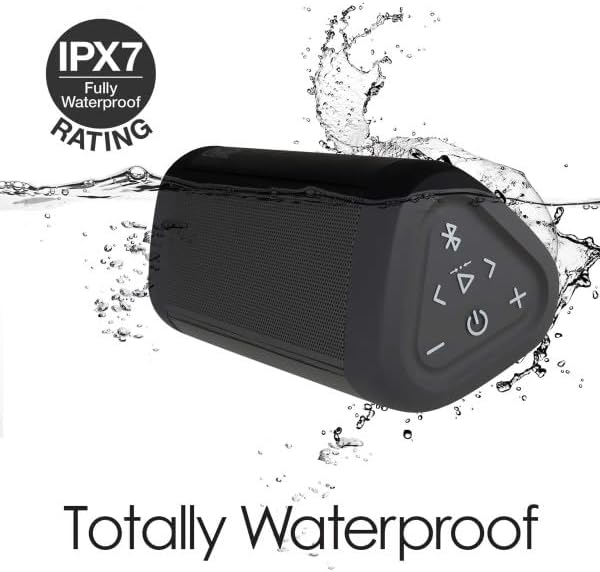
Image: The OontZ Angle 3 Ultra speaker shown partially submerged in water, illustrating its IPX7 waterproof capability.
- Ensure the rubber flap covering the charging and AUX ports is securely closed before exposing the speaker to water.
- Ideal for use by the pool, at the beach, or in the shower.
- Do not expose to salt water or chemicals. Rinse with fresh water after exposure to chlorinated water.
Maintenance
1. Kuchenesa
Kuti uchenese sipika yako, shandisa soft, damp jira. Usashandise abrasive cleaners kana solvents.
2. Kuchengeta
Chengetedza mukurukuri munzvimbo inotonhorera, yakaoma kure nechiedza chezuva uye tembiricha yakanyanyisa.
3. Battery Care
Kuwedzera hupenyu hwebhatiri:
- Dzivisa kuburitsa bhatiri zvakazara nguva zhinji.
- Chaja sipika nguva dzose, kunyangwe isiri kushandiswa, kuti bhatiri rirambe rakanaka.
- Do not expose the speaker to temperatures above 60°C (140°F).
Kugadzirisa matambudziko
| Dambudziko | Solution |
|---|---|
| Speaker will not turn on. | Ita shuwa kuti bhatiri rachajwa. Batanidza sipika kune sosi yemagetsi uchishandisa USB-C tambo. |
| Hapana ruzha kana vhoriyamu yakaderera. | Check the volume level on both the speaker and your connected device. Ensure the speaker is properly paired via Bluetooth or connected via AUX. |
| Haikwanise kubatanidza kuburikidza neBluetooth. | Ensure the speaker is in pairing mode (flashing blue light). Turn off and on Bluetooth on your device. Move the speaker closer to your device. Disconnect from other Bluetooth devices. |
| Sound distortion at high volume. | Reduce the volume on the speaker or your connected device. Ensure the audio source is not distorted. |
| OontZ Dual Wireless Stereo not connecting. | Ensure both speakers are disconnected from other Bluetooth devices. Follow the pairing steps carefully, ensuring both speakers are in pairing mode for stereo connection. |
Zvinotsanangurwa
Key technical specifications for the OontZ Angle 3 Ultra Portable Bluetooth Speaker:
- Model Number: SWOA3UBLK
- Zviyero (L x W x H): 16.26 x 7.11 x 7.11 masendimita (6.4 x 2.8 x 2.8 inches)
- Kurema 480 magiramu (1.06 lbs)
- Mutauriri Wekubuda Simba: 14 Watts
- Bluetooth Version: 4.2
- Wireless Range: Kusvika mamita gumi (mamita makumi matatu) pasina kudzivirirwa
- Hupenyu hwebhatiri: Up to 20 hours (at 2/3 volume)
- Waterproof Rating: IPX7 (Inogona kunyudzwa mumvura kusvika mita imwe kwemaminitsi makumi matatu)
- Kubatana: Bluetooth, 3.5mm AUX Input, USB-C Charging
- Zvinosanganisira: Speaker, 3.5mm Audio Cable, USB-C Charging Cable, Quick Start Guide

Image: Diagram showing the dimensions of the OontZ Angle 3 Ultra speaker: 6.5 inches in length, 3 inches in width, and 2.75 inches in height.
Warranty uye Support
For detailed warranty information and customer support, please visit the official OontZ website. The full localized manual is also available there.
Official Websaiti: www.theoontz.com
Cambridge Soundworks is committed to providing high-quality audio products and customer satisfaction.


