Nhanganyaya
Ndatenda nekutengaasing the VONYX SPX-PA9210 Portable PA System. This manual provides essential information for the safe and efficient operation of your device. Please read it thoroughly before use and retain it for future reference.
Mirayiridzo Yekuchengetedza
- Verenga mirairo yese zvakanaka usati washandisa mudziyo.
- Chengeta mudziyo uyu kure nemvura, hunyoro, uye tembiricha yakanyanya.
- Usavhura casing; endesa masevhisi ese kuvashandi vanokwanisa.
- Use only the specified power adapter for charging.
- Iva nechokwadi chekufefetera kwakakodzera kudzivirira kupisa.
- Dzivisa kuratidzwa kwenguva refu kune yakakwirira vhoriyamu kudzivirira kukuvara kwekunzwa.
Package Zviri mukati
Tarisa uone kuti zvinhu zvese zviripo mupakeji:
- VONYX SPX-PA9210 Portable PA System Unit
- 2 x UHF Wireless Microphones
- Power Adapter/Charging Cable
- Mushandisi Chinyorwa (gwaro iri)
Product Overview
The VONYX SPX-PA9210 is a portable PA system designed for various audio applications. It features integrated speakers, media playback options, and wireless microphones for versatile use.
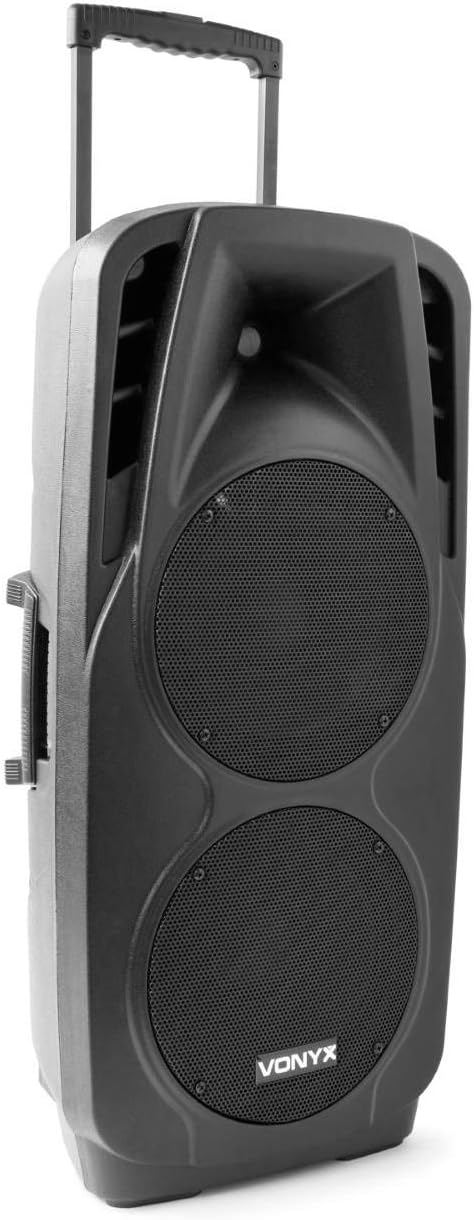
An image showing the VONYX SPX-PA9210 portable PA system. It features a black casing, two large speaker grilles on the front, and a retractable handle at the top for easy transport. A side handle is also visible.
Zvinokosha:
- Integrated 2x 10-inch speakers with titanium tweeter controller.
- Built-in media player with USB and SD/MMC card slots.
- Bluetooth connectivity for wireless audio streaming.
- High-performance 12V/7A rechargeable battery for 4-6 hours of autonomy.
- Two UHF wireless microphones with up to 50m range.
- Integrated trolley with telescopic handle and wheels for portability.
- LCD screen for media information display.
Gadzirira
1. Kutanga Kuchaja
Before first use, fully charge the internal 12V/7A battery. Connect the provided power adapter to the charging port on the PA system and then to a suitable power outlet. The charging indicator will show the charging status. A full charge typically provides 4-6 hours of operation.
2. Powering On / Off
- To power on the unit, locate the power switch (usually on the rear or control panel) and set it to the "ON" position.
- To power off, set the switch to the "OFF" position.
3. Kugadzika Maikorofoni
- Insert fresh batteries into the two UHF wireless microphones.
- Turn on the microphones. They should automatically connect to the PA system.
- Adjust the microphone volume on the PA system's control panel. The wireless range is up to 50 meters.
Operating Instruction
1. Media Playback (USB/SD/MMC)
- Insert a USB flash drive or an SD/MMC card into the corresponding slot on the control panel.
- The system will automatically detect the media and begin playback, or you may need to select the input source using the "Mode" button.
- Use the playback controls (Play/Pause, Next, Previous) on the control panel to manage your music.
- The LCD screen will display track information.
2. Bluetooth Kubatanidza
- Press the "Mode" button on the PA system until "Mode" button on the PA system until "Bluetooth" is selected.
- On your smartphone, tablet, or other Bluetooth-enabled device, enable Bluetooth and search for available devices.
- Select "VONYX SPX-PA9210" (or similar name) from the list to pair.
- Once paired, you can stream audio wirelessly from your device to the PA system.
3. Volume and Tone Controls
- Adjust the master volume knob to control the overall sound output.
- Separate volume controls are available for microphones and media playback.
- Use the bass and treble controls (if available) to adjust the tone of the audio.
Maintenance
1. Kuchenesa
Wipe the exterior of the unit with a soft, dry cloth. Do not use abrasive cleaners or solvents. Ensure no liquids enter the device.
2. Battery Care
- Kurebesa bhatiri, dzivisa kuburitsa bhatiri zvakazara nguva zhinji.
- Charge the unit regularly, even if not in use, to maintain battery health.
- Store the unit in a cool, dry place when not in use for extended periods.
Kugadzirisa matambudziko
- Hapana Simba: Ensure the unit is charged or connected to a power source, and the power switch is in the "ON" position.
- Hapana Inzwi: Check all volume controls (master, microphone, media player). Ensure the correct input source is selected. Verify microphone batteries.
- Bluetooth Haisi Kubatana: Ensure the PA system is in Bluetooth mode and discoverable. Turn off and on Bluetooth on your device and try pairing again. Move closer to the PA system.
- Inzwi Rakakanganiswa: Reduce the volume. Check audio cables if using wired inputs. Ensure microphones are not too close to the speakers (feedback).
Zvinotsanangurwa
| Brand | VONYX |
| Model Number | Sky-170.082 (SPX-PA9210) |
| Dimensions (L x W x H) | 27 x 38.5 x 81 cm |
| Kurema | 16.25 kg |
| Kubatana Technology | Bluetooth, USB |
| Yakakurudzirwa Kushandiswa Kwechigadzirwa | Smartphones kana Tablets |
| Special Features | Bluetooth, USB Port, Portable, LCD Screen |
| Simba Source | Wireless (Internal Battery) |
| Bhatiri | 12V/7A, 4-6 hours autonomy |
| Material | Acrylonitrile Butadiene Styrene (ABS) |
| Nhamba yeChannels | 5 |
| Vatauri | 2x 10-inch woofers, Titanium tweeter controller |
| Maikorofoni | 2x UHF Wireless Microphones (up to 50m range) |
Warranty uye Support
For warranty information and technical support, please refer to the documentation provided with your purchase or contact VONYX customer service directly.
Spare Parts Kuwanikwa: Ruzivo nezvekuwanikwa kwezvikamu zvechigadzirwa ichi haruna kuwanikwa parizvino.
Zvigadziriso zveSoftware: Information regarding guaranteed software updates for this product is currently unavailable.


