Nhanganyaya
This manual provides essential information for the safe and efficient operation of your Vonyx ST180 Portable Sound System. Please read these instructions carefully before use and retain them for future reference.
The Vonyx ST180 is a versatile, self-contained portable sound system featuring a 12-inch woofer, 450 Watts of power, Bluetooth connectivity, CD/MP3 player (USB/SD), and multiple microphone inputs. Its integrated battery, telescopic handle, and wheels make it suitable for various mobile applications.
Mirayiridzo Yekuchengetedza
- Kunobva Simba: Ita shuwa kuti magetsi anoenderana nevoltage specified on the unit. Use only the provided power cable.
- Mvura uye Unyoro: Do not expose the unit to rain or moisture to prevent electric shock or fire.
- Kufefetedza Ita shuwa kuti kune ventilation yakakwana. Usavhare kuvhurika kwemhepo.
- Kupisa: Chengeta mudziyo uyu kure nezvinhu zvinopisa zvakaita sema radiator, ma heat registers, mastove, kana zvimwe zvinhu zvinopisa.
- Kuchenesa: Disconnect from power before cleaning. Use a dry cloth only.
- Sevhisi: Usaedza kushandira iyo unit iwe pachako. Tumira masevhisi ese kuvashandi vanokwanisa.
- Battery Care: For optimal battery life, fully charge the unit before first use and recharge regularly. Avoid complete discharge.
Gadzirira
1. Kusunungura uye Kuongorora Kwekutanga
Carefully remove the sound system and all accessories from the packaging. Inspect the unit for any signs of damage during transit. Retain the packaging for future transport or storage.
2. Power Connection and Battery Charging
Connect the provided power cable to the AC inlet on the rear panel of the unit and then to a suitable wall outlet. The internal battery will begin charging automatically. The "CHARGE" indicator light will illuminate during charging.

Mufananidzo 1: The Vonyx ST180 Portable Sound System with its telescopic handle extended, ready for transport. This image shows the overall design and portability features.

Mufananidzo 2: Rear panel connections of the Vonyx ST180, including the AC power inlet, external battery terminals, and RCA Line Out ports.
A full charge is recommended before the first use to maximize battery life. The unit can operate while charging.
3. Kugadzika Maikorofoni
- Wireless Maikorofoni: Insert batteries into the two UHF wireless microphones. The system operates on 863.000 MHz and 865.000 MHz. Ensure the microphones are switched on. The "RF" indicator on the control panel will light up when a wireless microphone is connected.
- Wired Maikorofoni: Connect the wired microphone to the 6.35mm MIC input jack on the control panel.
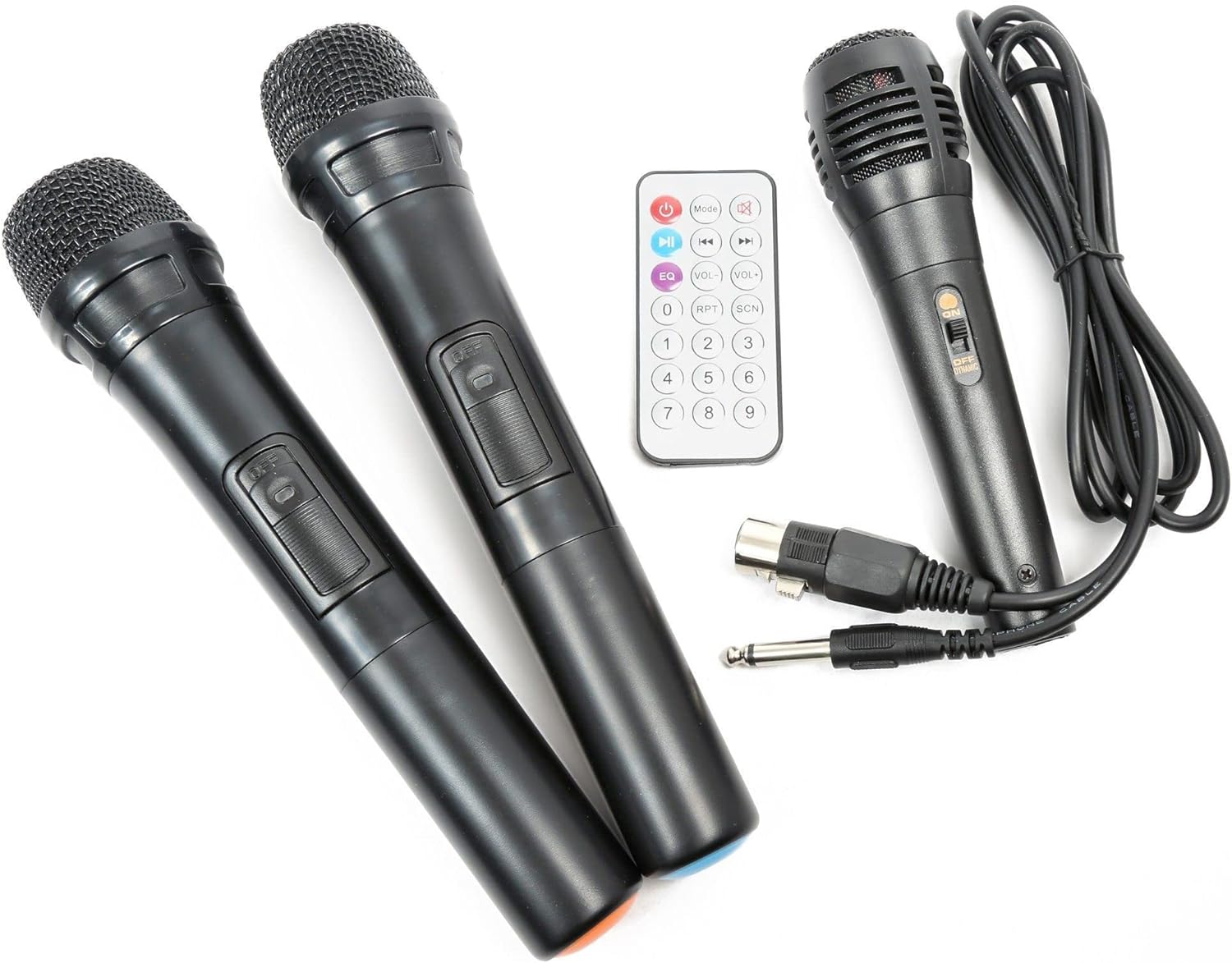
Mufananidzo 3: Included accessories: two UHF wireless microphones, one wired microphone, and the infrared remote control.
Operating Instruction
1. Powering On / Off
Locate the "POWER" switch on the control panel. Flip it to the "ON" position to power on the unit. Flip it to "OFF" to power down.

Mufananidzo 4: Overview of the Vonyx ST180 control panel, featuring master volume, EQ controls, microphone inputs, and the integrated media player.
2. Audio Source Selection
The ST180 supports multiple audio sources:
- Bluetooth:
- Press the "MODE" button on the media player or remote control until "BT" appears on the display.
- On your smartphone, tablet, or computer, enable Bluetooth and search for "VONYX".
- Select "VONYX" to pair. A confirmation tone will sound upon successful pairing.
- Iye zvino wava kukwanisa kuridza odhiyo pasina waya kubva pamudziyo wako.
- CD/MP3 Player (USB/SD):
- Insert a CD into the CD slot, a USB drive into the USB port, or an SD card into the SD card slot.
- The unit will automatically detect the media and begin playback, or you may need to press the "MODE" button to select the correct source (USB or SD).
- Use the playback controls (Play/Pause, Next, Previous, Folder, Repeat, Shuffle) on the unit or remote control.
- Line Input (3.5mm Jack): Connect an external audio device (e.g., laptop, MP3 player) using a 3.5mm audio cable to the "LINE INPUT" jack. Select "LINE" mode if available, or ensure no other media is playing.
- External Audio Input (RCA): Connect devices with RCA outputs to the "LINE IN" RCA ports on the control panel.
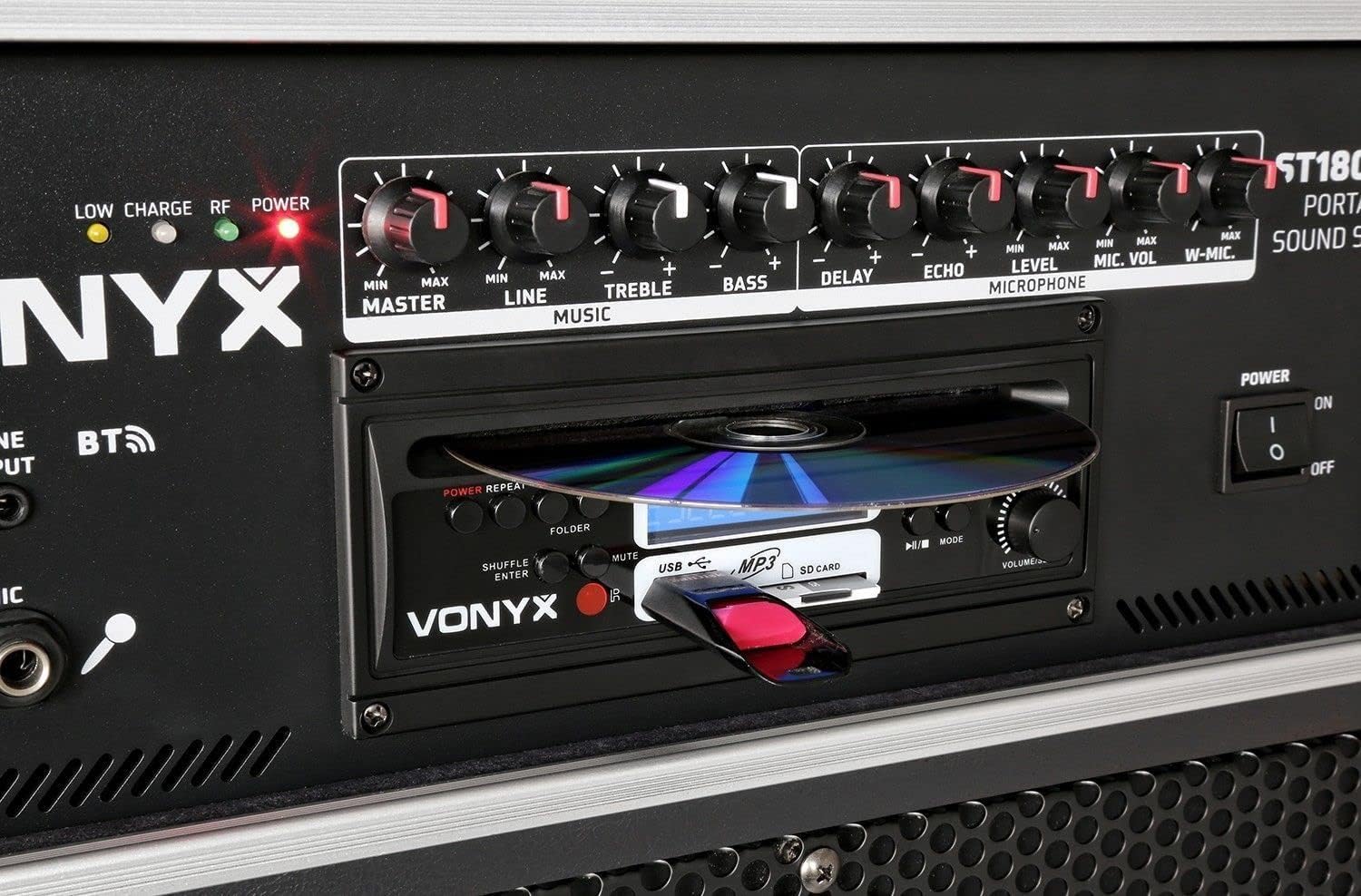
Mufananidzo 5: Detailed view of the integrated media player, showing the CD tray, USB port, and SD card slot. A USB drive is inserted.
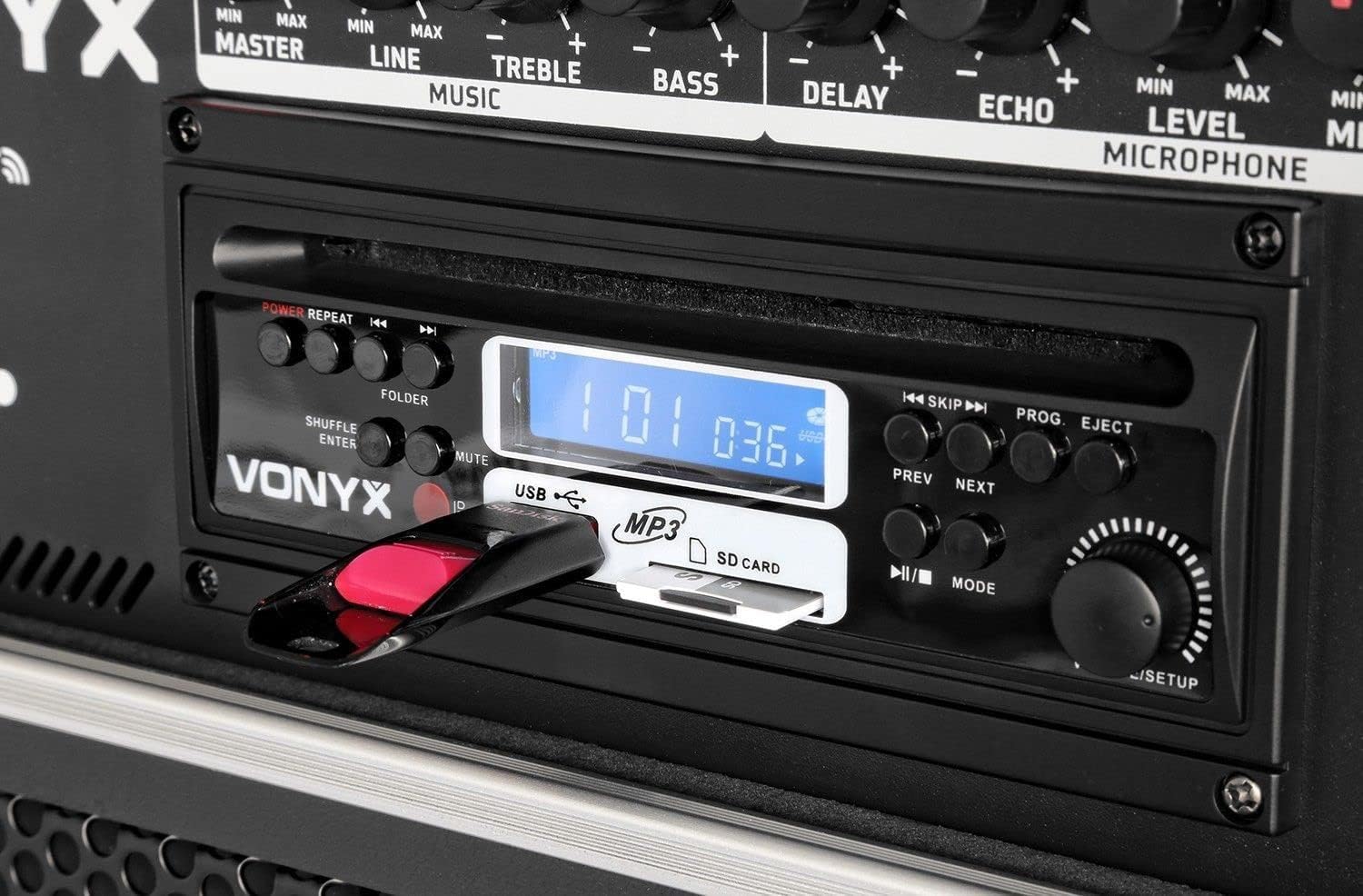
Mufananidzo 6: Close-up of the media player's control buttons and digital display, indicating playback status and selected source.
3. Maikorofoni Kushandiswa
Adjust the microphone volume using the "MIC VOL" knob for wired microphones and "W-MIC" knob for wireless microphones. Use the "LEVEL" knob to fine-tune the microphone input sensitivity. Apply "DELAY" and "ECHO" effects as desired.
4. Audio Kutonga
- TENZI: Controls the overall output volume of the system.
- ZVINOKOSHA: Adjusts the volume of the line input sources.
- TRUBLE: Adjusts the high-frequency response.
- BASS: Adjusts the low-frequency response.
5. Remote Control
The included infrared remote control allows for convenient operation of the media player functions (play, pause, track skip, mode selection) and volume adjustments from a distance.
Maintenance
- Kuchenesa: Shandisa jira rakapfava, rakaoma kuchenesa kunze kwechikwata. Usashandise abrasive cleaners kana solvents.
- Battery Storage: If storing the unit for an extended period, ensure the battery is partially charged (around 50%) and recharge it every few months to prevent deep discharge.
- Zvekufambisa: When moving the unit, utilize the telescopic handle and wheels. Exercise caution on uneven surfaces.
Kugadzirisa matambudziko
| Dambudziko | Zvinogona Kukonzera | Solution |
|---|---|---|
| Hapana simba | Power cable disconnected; unit switched off; battery depleted. | Check power cable connection; ensure power switch is ON; charge the battery. |
| Hapana inzwi rinobuda | Master volume too low; incorrect input selected; audio source not playing. | Increase MASTER volume; select correct input mode; ensure audio source is playing and its volume is up. |
| Maikorofoni haisi kushanda | Microphone switched off; batteries depleted (wireless); MIC/W-MIC volume too low; incorrect frequency (wireless). | Switch microphone ON; replace batteries; increase MIC/W-MIC volume; ensure wireless microphones are on correct frequencies (863.000 MHz / 865.000 MHz). |
| Bluetooth haina kubatanidza | Unit not in Bluetooth mode; device too far; previously paired with another device. | Select "BT" mode; ensure device is within range; disconnect from other Bluetooth devices and try pairing again. |
| CD/USB/SD not playing | Incorrect media format; media not inserted correctly; media player mode not selected. | Ensure media is in supported format (MP3); re-insert media; select correct mode (CD, USB, or SD). |
Zvinotsanangurwa
| Brand | VONYX |
| Model Number | 170.013 |
| Power Output | 450 Watts |
| Woofer Size | 12 inches |
| Nhamba yeChannels | 2 |
| Audio Inputs | USB, SD/MMC, Bluetooth, 6.3mm Jack (Microphone), 3.5mm Jack (External Audio), RCA Line In |
| Audio Output | RCA Stereo Line Out |
| Wireless Microphone Frequencies | 863.000 MHz, 865.000 MHz |
| Frequency Response | Kusvika ku20,000 Hz |
| Rechargeable Battery | 12V/4.5Ah (Integrated) |
| Kubatana Technology | Bluetooth, USB |
| Special Features | Bluetooth, USB Port, Portable, CD Player, SD Card Slot, Telescopic Handle, Wheels |
| Dimensions (L x W x H) | 32 x 43 x 76 cm |
| Item Weight | 32.7 makirogiramu |
| Material | Nylon |
| Simba Source | AC and Battery Combination |
| Mounting Type | Pole Gomo |
Warranty uye Support
For warranty information and technical support, please refer to the documentation provided with your purchase or visit the official Vonyx website. Chengetedza humbowo hwako hwekutenga kune chero vimbiso yewaranti.
Mugadziri: Vonyx
Contact Information: Please refer to the Vonyx official website or your retailer for the most up-to-date support contact details.


