1. Nhanganyaya
This manual provides instructions for the installation, operation, and maintenance of your VTech DS6151 DECT 6.0 2-Line Cordless Phone System. This system includes a main base unit and one DS6101 cordless handset. Please read this manual thoroughly before using your new telephone system.

Image 1.1: The VTech DS6151 DECT 6.0 2-Line Cordless Phone System, showing the main base unit and the cordless handset in its charging cradle.
2. Setup
2.1 Package Zviri mukati
Ita shuwa kuti package yako ine zvinotevera zvinhu:
- VTech DS6151 Base Unit
- DS6101 Cordless Handset
- Handset Charger
- Power Adapter yeBase Unit
- Power Adapter for Handset Charger
- Tambo yeNhare (2)
- Rechargeable Battery Pack for Handset
- Bhuku reMushandisi (gwaro iri)
2.2 Kuiswa kwebhatiri
The cordless handset requires one AA rechargeable battery. Follow these steps to install the battery:
- Locate the battery compartment cover on the back of the cordless handset.
- Svetesa chifukidziro pasi wochibvisa.
- Connect the battery pack connector securely into the jack inside the compartment, ensuring correct polarity.
- Isa bhatiri muchikamu.
- Slide the battery compartment cover back into place until it clicks.

Image 2.1: The VTech DS6101 cordless handset, showing its front display and keypad.
2.3 Base Unit Connection
Connect the base unit as follows:
- Plug one end of the power adapter into the power jack on the back of the base unit.
- Batanidza rimwe divi readapta yemagetsi muchinoburitsa magetsi chakajairika.
- Batanidza imwe magumo etambo yetambo muTEL LINE jack kuseri kwe base unit.
- Plug the other end of the telephone line cord into a telephone wall jack. If you have two phone lines, connect the second line cord to the LINE 2 jack and the second telephone wall jack.
2.4 Handset Charger Connection
Connect the handset charger as follows:
- Plug one end of the power adapter into the power jack on the back of the handset charger.
- Batanidza rimwe divi readapta yemagetsi muchinoburitsa magetsi chakajairika.

Image 2.2: The VTech DS6101 cordless handset placed in its charging cradle.
2.5 Kutanga Kuchaja
Place the cordless handset in the base unit or handset charger. The handset will begin charging. Allow the handset to charge for at least 16 hours before initial use. The CHARGE indicator on the handset will illuminate during charging.
3. Operating Instructions
3.1 Kuita uye kugamuchira mafoni
Kufona:
- From the handset, press KUTAURA / FLASH or MUTAURIRI. From the base, press MUTSARA 1 or MUTSARA 2.
- Dzvanya nhamba yefoni.
Kutambira Call:
- Kana foni ikarira, tinya KUTAURA / FLASH or MUTAURIRI on the handset. From the base, press the flashing MUTSARA 1 or MUTSARA 2 bhatani.
Kupedza Kufona:
- Press DZIMA on the handset or place the handset in the charger. From the base, press the active LINE bhatani.
3.2 2-Line Operation
The DS6151 system supports two separate telephone lines. You can make or receive calls on either line independently. When a line is in use, its corresponding button (MUTSARA 1 or MUTSARA 2) on the base will be lit. If a call comes in on an idle line, its button will flash.
3.3 Caller ID / Call Waiting
If you subscribe to Caller ID service, the caller's name and number will appear on the handset and base display. If you subscribe to Call Waiting Caller ID, the incoming call information will display during an active call.
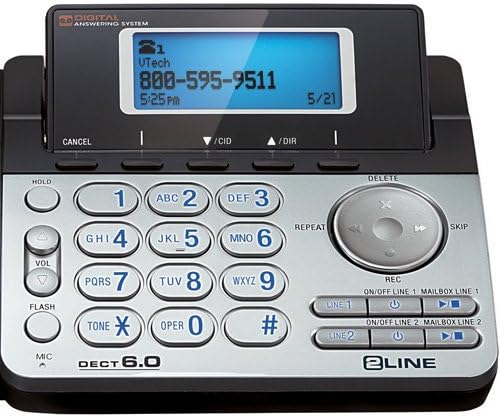
Image 3.1: Close-up of the VTech DS6151 base unit, highlighting the display and keypad for two-line operation.
3.4 Digital Mhinduro System
The base unit features a digital answering system with a 13-minute recording capacity and a dedicated mailbox for each line. You can access messages from the base unit or the cordless handset.
Kutamba maMessages:
- On the base, press TAMBA/MIRA.
- From the handset, press MENU/SELECT, scroll to 'Answering System', then 'Play Messages'.
Turning Answering System On/Off:
- On the base, use the ON / OFF ZVINOKOSHA 1 uye ON / OFF ZVINOKOSHA 2 mabhatani.
3.5 Bhuku rerunhare
The system can store up to 50 names and numbers in its phonebook directory. You can easily store frequently called numbers for quick dialing.
Adding a Phonebook Entry:
- Press MENU/SELECT pahandset.
- Scroll to 'Phonebook' and press MENU/SELECT.
- Select 'Add New Entry' and follow the on-screen prompts to enter the name and number.
3.6 Nhare mbozha
Both the base unit and the cordless handset feature a dual speakerphone function, allowing hands-free communication. Press the MUTAURIRI button on the handset or the speakerphone button on the base during a call to activate.
3.7 Dhonzazve
The system stores the last few numbers dialed. Press REDIAL on the handset to access the redial list.
3.8 Handset Locator / Paging
Kana ukarasa foni yako, tinya bhatani rekuti PEJI button on the base unit. All registered handsets will ring, helping you locate them.
4. Kuchengeta
4.1 Cleaning Your Telephone
Clean the telephone and handset with a soft, slightly damp cloth. Do not use cleaning agents or abrasive materials, as these can damage the finish. Avoid getting moisture into any openings.
4.2 Kuchengeta Battery
Kuti uve nechokwadi chekuita kwebhatiri rakakwana:
- Charge the handset for 16 hours before first use.
- Avoid overcharging by not leaving the handset on the charger for extended periods after it is fully charged.
- Replace the battery pack when the handset indicates low battery or when talk time significantly decreases. Use only the specified rechargeable battery pack.
5. Kugadzirisa matambudziko
If you experience issues with your VTech DS6151 system, try the following common troubleshooting steps:
- Hapana Dial Tone:
Ensure all power adapters and telephone line cords are securely plugged in. Check if your telephone service is active. Try plugging a different phone into the wall jack to confirm the line is working. - Handset Not Charging:
Verify the handset is correctly seated in the charger. Ensure the charger's power adapter is plugged into a working electrical outlet. Clean the charging contacts on both the handset and charger with a dry cloth. - Poor Call Quality / Static:
Move the handset closer to the base unit. Avoid placing the base unit near other electronic devices (e.g., microwaves, Wi-Fi routers) that may cause interference. Check for loose telephone line cord connections. - Handset Display is Blank:
Ensure the battery pack is correctly installed and fully charged. Place the handset on the charger for at least 30 minutes. - Sisitimu Yekupindura Isingarekodhwe:
Ensure the answering system for the respective line is turned ON. Check if the memory is full; delete old messages if necessary.
If problems persist, refer to the full troubleshooting section in the comprehensive user manual available on the VTech support website or contact VTech customer support.
6. Zvinotsanangurwa
The following are key specifications for the VTech DS6151 DECT 6.0 2-Line Cordless Phone System:
| Feature | Tsanangudzo |
|---|---|
| Vadivelu Comedy Technology | DECT 6.0 (1.9GHz) |
| Mitsetse Inotsigirwa | 2-Line Operation |
| Kuwedzera | Up to 12 Handsets |
| Kupindura System | 13 Minute Digital Answering System with dedicated mailbox per line |
| Display | Large Backlit LCD Display (Handset & Base) |
| Mutauririfoni | Dual Speakerphone (Base & Handset) |
| Keypad | Backlit Keypad |
| Caller ID Memory | 50 Station Name / Number |
| Phone Directory | 50 Station Name / Number |
| Mabhatiri | 1 AA rechargeable battery required per handset |
| Material | Plastiki |
| Item Weight | 4.13 pounds (yakazara system) |
| Package Dimensions | 12.09 x 9.84 x 6.73 inches |
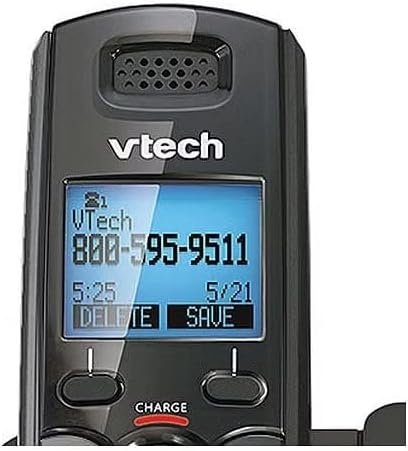
Image 6.1: Close-up of the VTech DS6101 cordless handset display, showing caller ID information.
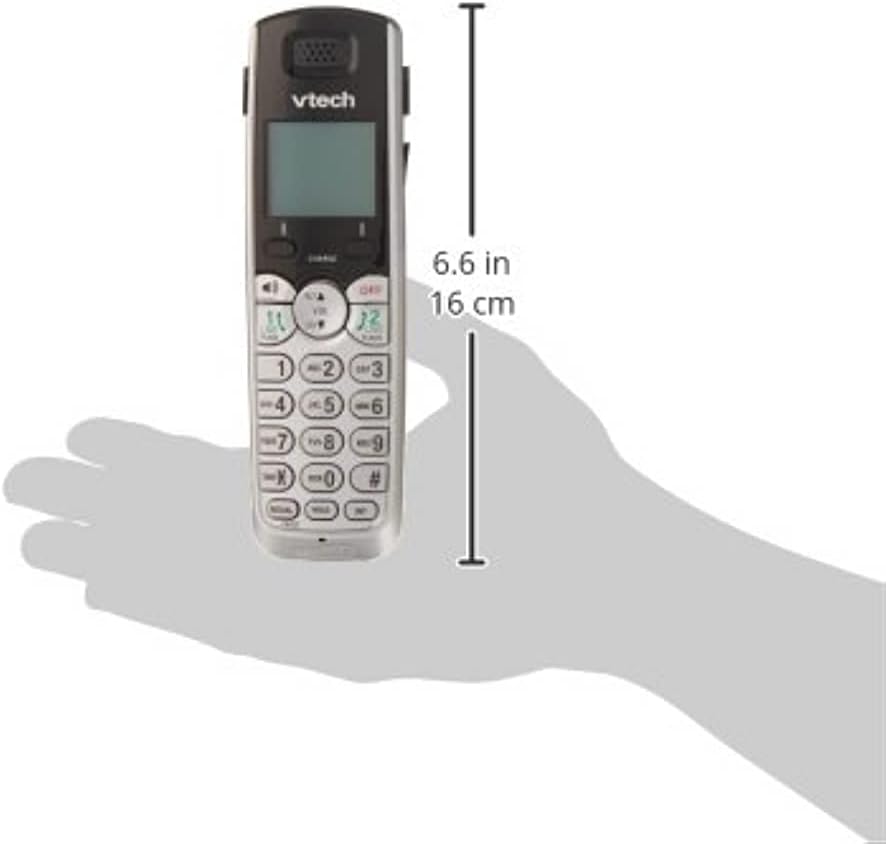
Image 6.2: The VTech DS6101 cordless handset with approximate dimensions indicated, showing its compact size.
7. Warranty uye Tsigiro
For warranty information, please refer to the warranty card included with your product or visit the official VTech website. VTech provides customer support for product assistance, troubleshooting, and service inquiries.
Kuti uwane rumwe rubatsiro, ndapota shanyira iyo Chitoro cheVTech paAmazon or the official VTech support website.


