Nhanganyaya
The REVO America RTCB30-1 Aero HD 1080p Indoor/Outdoor IR Bullet Camera is designed to provide high-definition video surveillance for both indoor and outdoor environments. Featuring a 2.1 Megapixel sensor, 1080p resolution, and 30 IR LEDs for night vision up to 100 feet, this camera offers reliable monitoring capabilities. Its IP66 weather-resistant rating ensures durability in various conditions, and the 3D rotary bracket simplifies installation and positioning.
Package Zviri mukati
- 1x REVO America Aero HD 1080p Indoor/Outdoor IR Bullet Camera (White)
- 1x 60' Premium Quality BNC Cable
Key Features
- Yakazara HD 1080p Vhidhiyo Resolution
- Indoor/Outdoor Usage with IP66 Weather Resistance
- 3.6mm Yakagadziriswa Lens
- 30 IR LEDs for up to 100' Night Vision
- Automatic IR Cut Filter Removal (ICR) for enhanced day/night performance
- 3D Rotary Bracket for easy mounting and positioning
- Wired Connectivity via BNC Cable
Setup uye Installation
1. Kuisa Kamera
The REVO Aero Bullet Camera is designed for wall mounting. The integrated 3D rotary bracket allows for flexible positioning to achieve the desired viewing angle. Ensure the mounting surface is stable and can support the camera's weight. The camera is rated IP66 weather resistant, making it suitable for outdoor installation.
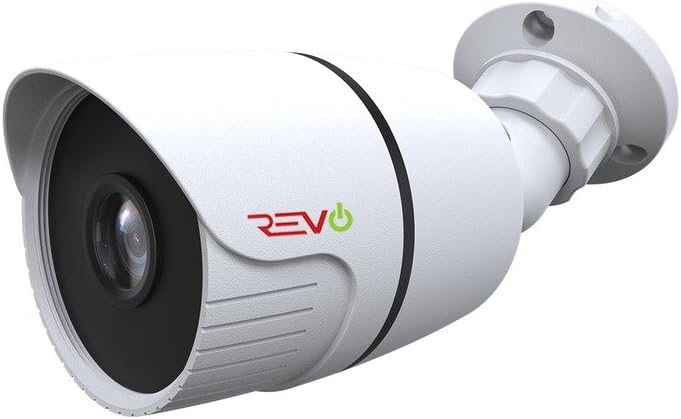
Mufananidzo 1: Mberi view of the REVO America RTCB30-1 Aero HD 1080p Bullet Camera, showing the lens and IR LEDs.
2. Kubatanidza Kamera
This camera uses a wired BNC connection for video transmission and a separate power connection. Connect the included 60' BNC cable to the camera's BNC port and to your compatible DVR/NVR system. Ensure all connections are secure to prevent signal loss. Power the camera using a compatible 12V DC power adapter (not included unless part of a kit).

Mufananidzo 2: Rutivi view of the REVO America RTCB30-1 Aero HD 1080p Bullet Camera, illustrating the mounting bracket and cable entry point.
For optimal video quality, it is recommended to use high-quality BNC cables. After installation, ensure no wires are exposed to maintain safety and reliability.
Operating Instruction
1. Powering On
Once the camera is securely mounted and connected to your DVR/NVR system and power source, it will automatically power on. The camera will begin transmitting video feed to your recording device.
2. Kutarisa Kure
To access live feed, review yapfuura footage, and manage settings remotely, utilize the REVO Aero Mobile App or Browser Login. These platforms allow you to receive instant notifications, adjust camera settings, set alarms, check motion events, and view multiple cameras simultaneously.
3. Night Vision
The camera is equipped with 30 IR LEDs, providing night vision capabilities up to 100 feet in low-light conditions. The automatic IR Cut Filter Removal (ICR) function ensures optimal image clarity by switching between day and night modes as ambient light changes.
Maintenance
Kugadziriswa nguva dzose kunobatsira kuona kuti kamera yako inoshanda zvakanaka uye inogara kwenguva refu.
- Kuchenesa: Nguva nenguva geza lenzi yekamera uye imba ine yakapfava, damp jira. Dzivisa mabrasive cleaners anogona kukwenya lens.
- Cable Inspection: Regularly check BNC and power cable connections for any signs of wear, damage, or corrosion, especially for outdoor installations.
- Firmware Dzokorora: Check the REVO America website for any available firmware updates for your DVR/NVR system, which may improve camera compatibility and performance.
Kugadzirisa matambudziko
If you encounter issues with your REVO America RTCB30-1 camera, refer to the following common troubleshooting steps:
- Hapana Chiratidzo cheVhidhiyo:
- Ensure the camera is properly powered.
- Verify that the BNC cable is securely connected at both the camera and DVR/NVR ends.
- Check the BNC cable for any damage or breaks.
- Confirm that your DVR/NVR system is compatible with 1080p HD analog cameras.
- Hunhu Hwakashata Wemufananidzo:
- Chenesa lenzi yekamera kubvisa tsvina kana madhaka.
- Ensure the camera's protective film (if any) has been removed.
- Check for strong light sources directly facing the camera, which can cause glare.
- Verify the BNC cable quality; a damaged or low-quality cable can degrade video.
- Kuona Kweusiku Kusingashande:
- Ensure there is sufficient power to the camera for the IR LEDs to activate.
- Check for obstructions in front of the camera that might block the IR light.
- Confirm that the camera is in a dark environment, as the IR LEDs only activate in low light.
Zvinotaurwa Nezvehunyanzvi
| Model Number | RTCB30-1 |
| Brand | REVO America |
| Vhidhiyo Capture Resolution | 1080p (2.1 Megapixels) |
| Lens | 3.6mm Yakagadziriswa Lens |
| Night Vision | Up to 100' (30 IR LEDs) |
| Indoor / Outdoor Kushandiswa | Ehe |
| International Protection Rating | IP66 (Kudzivirira Mamiriro ekunze) |
| Kubatana Technology | Wired (BNC) |
| Simba Source | Magetsi Ane Tambo (12V DC) |
| Mounting Type | Gomo reMasvingo |
| Color | Chena |
| Zviyero (L x W x H) | 9 x 9 x 9 inches |
| Item Weight | 16 ounces |
| UPC | 045924597953 |
Kutsigira uye Warranty
For technical assistance, product support, or warranty information, please refer to the official REVO America website or contact their customer service department. Warranty terms and conditions may vary and are typically provided with your purchase documentation or available on the manufacturer's website.
REVO America provides necessary materials such as videos and manuals to assist with self-installation and setup. For further assistance, please consult these resources or contact their support team directly.